
This guide walks through a fully automated, production-grade Salesforce CI/CD pipeline built entirely on GitLab’s native CI/CD — no paid DevOps tools, no Jenkins, no external orchestration. Every push through your Git workflow triggers the appropriate pipeline automatically.
The pipeline uses delta deployments (only changed files are deployed), smart Apex test detection (no more guessing which tests to run), and automatic environment promotion — once Integration passes, changes flow into UAT, then Staging, with a manual gate before Production.
Why Multiple Repos?
Each Salesforce environment gets its own dedicated GitLab repository. This approach gives you a clean separation of concerns: environment-specific CI/CD variables live in their own project, pipeline history is scoped to one environment, and access control is straightforward — developers can push to Int without touching Prod credentials.
Promotion between environments is handled by the pipeline itself — it clones the downstream repo, copies only the changed files, commits, and pushes. This triggers the downstream pipeline automatically, creating a true linear promotion chain.

Build CI/CD pipeline using Gitlab for Salesforce.
The Four Environments
Each environment has a specific role in the delivery chain. Here’s how to think about them:
| Environment | Salesforce Org Type | Purpose | Pipeline Trigger | Test Level |
|---|---|---|---|---|
| Integration (Int) | Developer Sandbox | First landing zone — validates every MR before merge | MR open/update + main branch push | NoTestRun / Specified |
| UAT | Partial Copy Sandbox | User acceptance testing with realistic data volumes | Triggered by Int pipeline (auto-promote) | RunLocalTests / Specified |
| Staging | Full Copy Sandbox | Production mirror — final validation before go-live | Triggered by UAT pipeline (auto-promote) | RunLocalTests |
| Production | Production Org | Live environment — requires manual gate | Manual trigger after Staging approval | RunLocalTests |
Production instance URL: Use
https://login.salesforce.comfor Production and Developer Edition orgs. For all sandbox environments (Int, UAT, Staging), usehttps://test.salesforce.com. This maps to theSF_INSTANCE_URLvariable in your pipeline.
Setting Up the External Client App
The pipeline authenticates to Salesforce using the JWT Bearer Token OAuth flow. This is fully headless — no browser, no interactive login — which is exactly what CI/CD needs. The authentication is configured through a Salesforce External Client App (the current Salesforce approach for OAuth-based integrations).
You need one External Client App per environment. Each app gets its own RSA key pair, and the corresponding private key is stored as a protected CI/CD variable in GitLab.
Learn about Salesforce OAuth 2.0 JWT Bearer flow.
Generate an RSA Key Pair
Run these commands locally to generate a 2048-bit RSA key pair. The private key goes to GitLab; the certificate goes to Salesforce.
# Generate private key
openssl genrsa -out server.key 2048

# Generate self-signed certificate (valid 10 years)
openssl req -new -x509 -days 3650 \
  -key server.key \
  -out server.crt \
  -subj "/CN=sfdc-cicd-int"

# Verify the key is readable
openssl pkey -in server.key -noout && echo "Key OK"
Create the External Client App in Salesforce
Navigate to Setup → External Client App Manager In the Quick Find box, search for External Client App Manager and click New External Client App.
Configure basic settings Give the app a name (e.g., CICD Int Pipeline), set a contact email, and select OAuth Settings as the app framework.
Enable OAuth and configure scopes Under OAuth Settings, enable OAuth. Add the following scopes: Manage user data via APIs (api), Perform requests at any time (refresh_token, offline_access).
Upload the digital certificate Check Use Digital Signatures and upload the server.crt file you generated above.
Disable Require Secret for Web Server Flow Since we’re using JWT (not web server flow), turn this off to avoid unnecessary prompts.
Save and copy the Consumer Id After saving, the app will show a Consumer Id (also referred to as client_id in OAuth terminology). Copy this — you’ll need it for your GitLab CI/CD variable SF_INT_CONSUMER_KEY.
Pre-authorize the integration user In the External Client App’s Manage page, set Permitted Users to Admin approved users are pre-authorized, then add your integration user’s profile or permission set to the approved list.
Dedicated integration user: Always use a dedicated Salesforce user (not a personal account) for CI/CD. Assign only the permissions needed for deployment. If the personal account is deactivated, the pipeline will keep running. Repeat for each environment. Create a separate External Client App in each Salesforce org (Int, UAT, Staging, Prod). Each gets its own RSA key pair. Never share private keys across environments.
Repository Structure
Each of the four GitLab repos follows the same structure. The key difference is the .gitlab-ci.yml — it’s tailored to the environment’s role (whether it promotes to the next repo, runs additional static analysis, requires a manual gate, etc.).
sfdc-cicd-int/              ← (or -uat, -staging, -prod)
├── .gitlab-ci.yml          ← Pipeline definition
├── sfdx-project.json       ← SFDX project config
├── force-app/
│   └── main/default/
│       ├── classes/        ← Apex classes & test classes
│       ├── lwc/            ← Lightning Web Components
│       ├── aura/           ← Aura components
│       ├── objects/        ← Custom objects & fields
│       └── ...             ← Other metadata types
└── manifest/
    └── package.xml         ← Optional: full-org manifest deploy
GitLab CI/CD Variables (per repo)
Navigate to your GitLab project → Settings → CI/CD → Variables and add these variables. Mark them as Protected and Masked where indicated.
| Variable | Type | Protected | Description |
|---|---|---|---|
SF_INT_JWT_PRIVATE_KEY | File | Yes | Full PEM content of server.key |
SF_INT_CONSUMER_KEY | Variable | Yes | Consumer Id from the External Client App |
SF_INT_USERNAME | Variable | Yes | Salesforce username of the integration user |
GITLAB_AUTOMATION_TOKEN | Variable | No | GitLab PAT with api scope (for cross-repo promotion) |
NEXT_ENV_PROJECT_ID | Variable | No | Numeric GitLab project ID of the next environment’s repo |
File vs Variable type for the private key: GitLab's File type writes the value to a temporary file and provides the path. This is what the pipeline expects. The value of SF_INT_JWT_PRIVATE_KEY should be the raw PEM content of server.key — including the BEGIN PRIVATE KEY header and footer. Pipeline Design
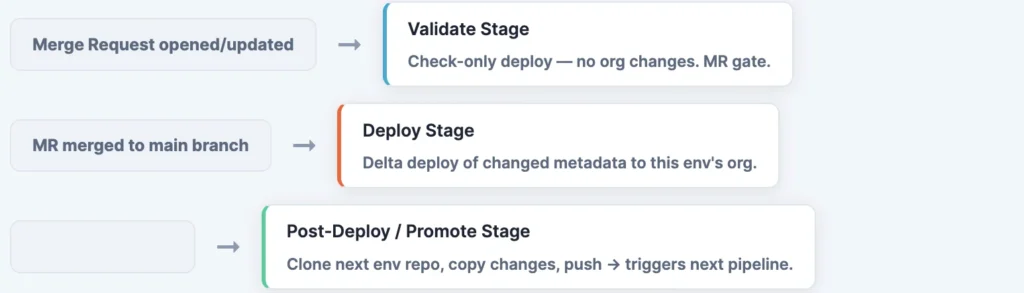
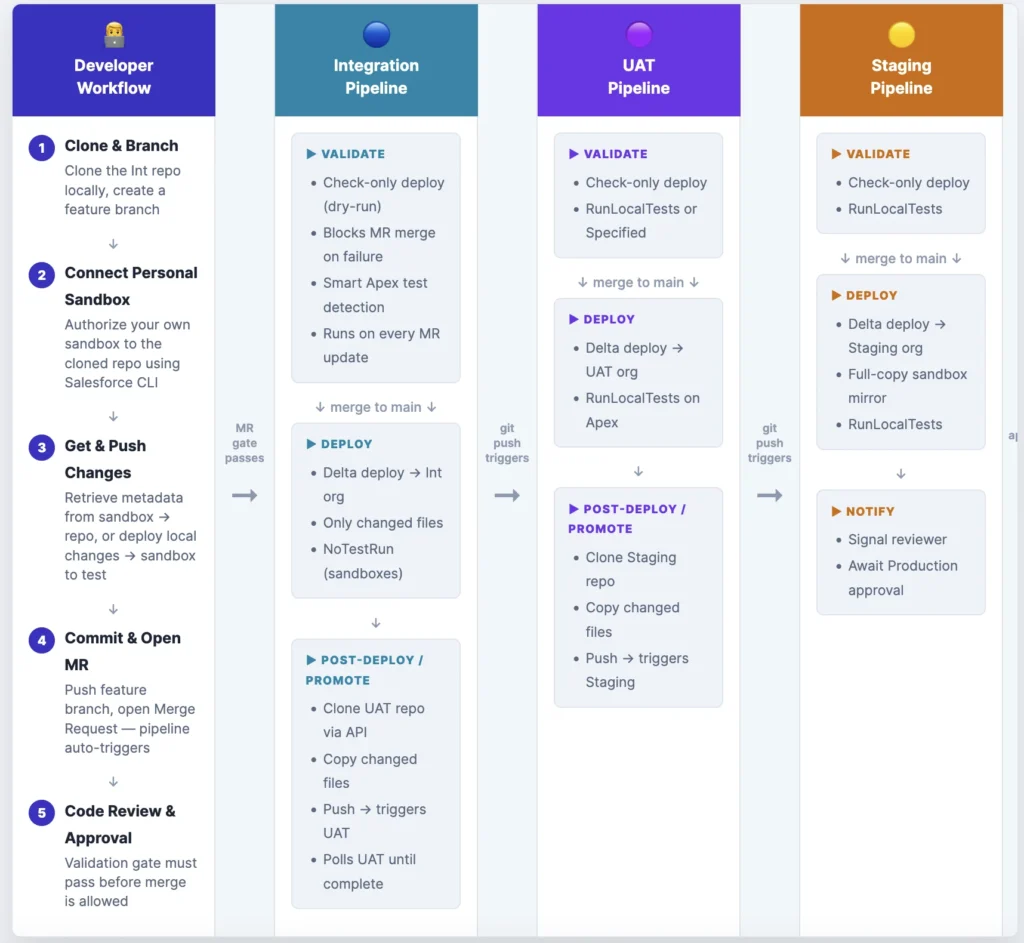
The pipeline uses GitLab’s workflow:rules to run only on two events: a Merge Request open/update (triggers the validate stage only), or a push to the default branch after merge (triggers deploy + promote).
Developer Sandbox Setup
Before a developer can contribute, they clone the Integration repo and connect their own personal developer sandbox to it using Salesforce CLI. This gives them a live org to develop and test against — completely isolated from the shared Integration environment. Changes travel in both directions: pull metadata from the sandbox into the local repo, or deploy local code changes up to the sandbox to verify they work.
# ── Step 1: Clone the Int repo and create a feature branch ───
git clone https://gitlab.com/your-group/sfdc-cicd-int.git
cd sfdc-cicd-int
git checkout -b feature/my-awesome-feature

# ── Step 2: Connect your personal developer sandbox ───────────
# Browser-based login (simplest for local dev)
sf org login web \
  --alias my-sandbox \
  --instance-url https://test.salesforce.com

# Or use JWT (if you have an External Client App set up for your sandbox)
sf org login jwt \
  --client-id  YOUR_CONSUMER_KEY \
  --jwt-key-file path/to/server.key \
  --username   your.user@sandbox.example \
  --instance-url https://test.salesforce.com \
  --alias my-sandbox

# ── Step 3a: Pull changes FROM your sandbox → local repo ──────
# Use this when you've made changes in the sandbox UI (Setup, builder, etc.)
# and want to capture them as source files in the repo
sf project retrieve start \
  --target-org  my-sandbox \
  --source-dir  force-app

# ── Step 3b: Push local changes TO your sandbox ───────────────
# Use this when you've edited source files locally and want to
# deploy and test them in your sandbox before committing
sf project deploy start \
  --target-org  my-sandbox \
  --source-dir  force-app \
  --test-level  NoTestRun

# ── Step 4: Commit and push your feature branch ───────────────
git add force-app/
git commit -m "feat: add my awesome feature"
git push origin feature/my-awesome-feature

# ── Step 5: Open a Merge Request in GitLab ────────────────────
# GitLab auto-triggers the validate pipeline — your MR is blocked
# until the check-only deploy passes against the Int org.
Retrieve vs Deploy — which direction? Think of it as: retrieve captures what is in the org and writes it to disk (org → repo). deploy sends what is on disk to the org (repo → org). In a Git-first workflow, deploy is the more common direction — you write code locally, deploy to test, then commit. Retrieve is used when you make a quick declarative change in the org UI and need to bring it into source control. JWT Authentication Block
Every job that talks to Salesforce uses a shared YAML anchor for authentication. The block validates the key format before attempting to authenticate — this catches misconfigured variables early with a clear error message rather than a cryptic SFDX failure.
# YAML anchor — referenced as <<: *sf-auth-int in each job
.sf-auth-int: &sf-auth-int
  before_script:
    - |
      # Validate the key file was injected as a GitLab File variable
      if [ ! -f "${SF_INT_JWT_PRIVATE_KEY}" ]; then
        echo "ERROR: SF_INT_JWT_PRIVATE_KEY must be a GitLab File variable."
        exit 1
      fi
      cp "${SF_INT_JWT_PRIVATE_KEY}" /tmp/server.key
      FIRST_LINE="$(sed -n '1p' /tmp/server.key)"
      if [ "${FIRST_LINE}" != "-----BEGIN PRIVATE KEY-----" ] && \
         [ "${FIRST_LINE}" != "-----BEGIN RSA PRIVATE KEY-----" ]; then
        echo "ERROR: Key file does not look like a PEM private key."
        echo "Got: ${FIRST_LINE}"
        exit 1
      fi
      if ! openssl pkey -in /tmp/server.key -noout >/dev/null 2>&1; then
        echo "ERROR: Key is invalid or unreadable by openssl."
        exit 1
      fi
    - chmod 600 /tmp/server.key
    - |
      sf org login jwt \
        --client-id    "${SF_INT_CONSUMER_KEY}" \
        --jwt-key-file /tmp/server.key \
        --username     "${SF_INT_USERNAME}" \
        --instance-url "${SF_INSTANCE_URL}" \
        --alias        int \
        --set-default
  after_script:
    - rm -f /tmp/server.key   # Always clean up — even on failure
Rename variables per environment. For UAT use
SF_UAT_JWT_PRIVATE_KEY/SF_UAT_CONSUMER_KEY/SF_UAT_USERNAME. For Staging and Production, follow the same pattern. Each org’s private key is completely independent.
Validate Stage (MR Gate)
The validate stage runs a check-only deploy — Salesforce validates the metadata without committing it to the org. This is the MR gate: if validation fails, the MR cannot be merged.
The smart test detection logic reads <runTest> annotations from changed Apex classes. If annotations are found, it uses RunSpecifiedTests. If non-test Apex was changed but no annotations exist, it fails the pipeline with a clear message rather than silently skipping tests.
validate-deploy-int:
  stage: validate
  <<: *sf-auth-int
  rules:
    # Only runs on MR events when Salesforce metadata changed
    - if: '$ENABLE_SF_DEPLOY == "true" && $CI_PIPELINE_SOURCE == "merge_request_event"'
      changes: [force-app/**/*, manifest/**/*, sfdx-project.json]
    - when: never
  script:
    - |
      # ── Compute diff base ──────────────────────────────────────────
      EMPTY_TREE="4b825dc642cb6eb9a060e54bf8d69288fbee4904"
      DIFF_TARGET="${CI_COMMIT_SHA}"

      if [ -n "${CI_MERGE_REQUEST_TARGET_BRANCH_NAME:-}" ]; then
        git fetch origin "${CI_MERGE_REQUEST_TARGET_BRANCH_NAME}" --depth=50 >/dev/null 2>&1 || true
        DIFF_BASE="${CI_MERGE_REQUEST_DIFF_BASE_SHA:-origin/${CI_MERGE_REQUEST_TARGET_BRANCH_NAME}}"
      else
        DIFF_BASE="${CI_COMMIT_BEFORE_SHA:-${EMPTY_TREE}}"
      fi
      [ -z "${DIFF_BASE}" ] || [ "${DIFF_BASE}" = "0000000000000000000000000000000000000000" ] \
        && DIFF_BASE="${EMPTY_TREE}"

      git diff --name-only --diff-filter=ACMR \
        "${DIFF_BASE}" "${DIFF_TARGET}" \
        -- force-app manifest sfdx-project.json > changed-files.txt || true
      grep -E '^force-app/' changed-files.txt > changed-force-app.txt || true

      # ── Smart test level detection ─────────────────────────────────
      TEST_LEVEL="NoTestRun"
      : > specified-tests.txt
      grep -E '^force-app/.*/classes/[^/]+\.cls$' changed-force-app.txt \
        > changed-apex-classes.txt || true

      while IFS= read -r cls; do
        [ -f "${cls}" ] || continue
        name="$(basename "${cls}" .cls)"
        case "${name}" in *Test|*Tests) continue ;; esac

        echo "${cls}" >> changed-non-test-apex.txt
        grep -oE '[[:space:]]*[A-Za-z0-9_]+[[:space:]]*' "${cls}" \
          | sed -E 's#[[:space:]]*([A-Za-z0-9_]+)[[:space:]]*#\1#' \
          >> specified-tests.txt || true
      done < changed-apex-classes.txt

      sort -u specified-tests.txt | sed '/^$/d' > specified-tests-unique.txt || true

      if [ -s specified-tests-unique.txt ]; then
        TEST_LEVEL="RunSpecifiedTests"
        echo "Using RunSpecifiedTests: $(tr '\n' ',' < specified-tests-unique.txt)"
      elif [ -s changed-non-test-apex.txt ]; then
        echo "ERROR: Non-test Apex changed but no  annotations found."
        echo "Add YourTestClass to your Apex class files."
        exit 1
      fi

      # ── Run check-only deploy ──────────────────────────────────────
      if grep -qx 'manifest/package.xml' changed-files.txt; then
        set -- sf project deploy start --dry-run \
          --manifest manifest/package.xml --target-org int \
          --test-level "${TEST_LEVEL}" --json
      elif [ -s changed-force-app.txt ]; then
        # Collapse LWC/Aura to their component directory (not individual files)
        awk '
          /^force-app\/main\/default\/(lwc|aura)\// {
            n=split($0,a,"/"); print a[1]"/"a[2]"/"a[3]"/"a[4]"/"a[5]"/"a[6]; next
          }
          { print }
        ' changed-force-app.txt | sort -u > changed-dirs.txt

        set -- sf project deploy start --dry-run \
          --target-org int --test-level "${TEST_LEVEL}" --json
        while IFS= read -r p; do
          [ -n "${p}" ] && set -- "$@" --source-dir "${p}"
        done < changed-dirs.txt
      else
        echo "No metadata changes — skipping validation."
        exit 0
      fi

      if [ "${TEST_LEVEL}" = "RunSpecifiedTests" ]; then
        while IFS= read -r t; do
          [ -n "${t}" ] && set -- "$@" --tests "${t}"
        done < specified-tests-unique.txt
      fi

      "$@" 2>&1 | tee deploy-validate-result.json

      STATUS=$(python3 -c "import json; print(json.load(open('deploy-validate-result.json')).get('status',1))")
      [ "${STATUS}" = "0" ] || { echo "Validation FAILED"; exit 1; }
      echo "Validation PASSED"
  artifacts:
    when: always
    paths: [deploy-validate-result.json]
    expire_in: 7 days
Deploy Stage
After an MR is merged to the default branch, the deploy job fires. It uses the same delta detection logic to find what changed between the previous commit and the current one, then deploys only those files. The result JSON is parsed with Python to give a clean pass/fail summary.
deploy-to-int:
  stage: deploy
  <<: *sf-auth-int
  rules:
    - if: '$ENABLE_SF_DEPLOY == "true" && $CI_COMMIT_BRANCH == $CI_DEFAULT_BRANCH && $CI_PIPELINE_SOURCE == "push"'
      changes: [force-app/**/*, manifest/**/*, sfdx-project.json]
    - when: never
  environment:
    name: int
  script:
    - |
      EMPTY_TREE="4b825dc642cb6eb9a060e54bf8d69288fbee4904"
      DIFF_BASE="${CI_COMMIT_BEFORE_SHA:-${EMPTY_TREE}}"
      [ -z "${DIFF_BASE}" ] || [ "${DIFF_BASE}" = "0000000000000000000000000000000000000000" ] \
        && DIFF_BASE="${EMPTY_TREE}"

      git diff --name-only --diff-filter=ACMR \
        "${DIFF_BASE}" "${CI_COMMIT_SHA}" \
        -- force-app manifest sfdx-project.json > changed-files.txt || true
      grep -E '^force-app/' changed-files.txt > changed-force-app.txt || true

      if grep -qx 'manifest/package.xml' changed-files.txt; then
        sf project deploy start \
          --manifest manifest/package.xml --target-org int \
          --test-level NoTestRun --json 2>&1 | tee deploy-result.json

      elif [ -s changed-force-app.txt ]; then
        awk '
          /^force-app\/main\/default\/(lwc|aura)\// {
            n=split($0,a,"/"); print a[1]"/"a[2]"/"a[3]"/"a[4]"/"a[5]"/"a[6]; next
          }
          { print }
        ' changed-force-app.txt | sort -u > changed-dirs.txt

        set -- sf project deploy start --target-org int --test-level NoTestRun --json
        while IFS= read -r p; do
          [ -n "${p}" ] && set -- "$@" --source-dir "${p}"
        done < changed-dirs.txt
        "$@" 2>&1 | tee deploy-result.json
      else
        echo "No metadata changes — skipping deploy."
        exit 0
      fi

    - |
      python3 - <<'PYEOF'
      import json, sys
      d = json.load(open("deploy-result.json"))
      r = d.get("result", {})
      ok = str(d.get("status", 1)) == "0" and r.get("success", False)
      print(f"Status   : {d.get('status')}")
      print(f"Tests OK : {r.get('numberTestsCompleted', 0)}")
      print(f"Tests ERR: {r.get('numberTestErrors', 0)}")
      sys.exit(0 if ok else 1)
      PYEOF
  artifacts:
    when: always
    paths: [deploy-result.json]
    expire_in: 30 days
Post-Deploy: Auto-Promote to Next Environment
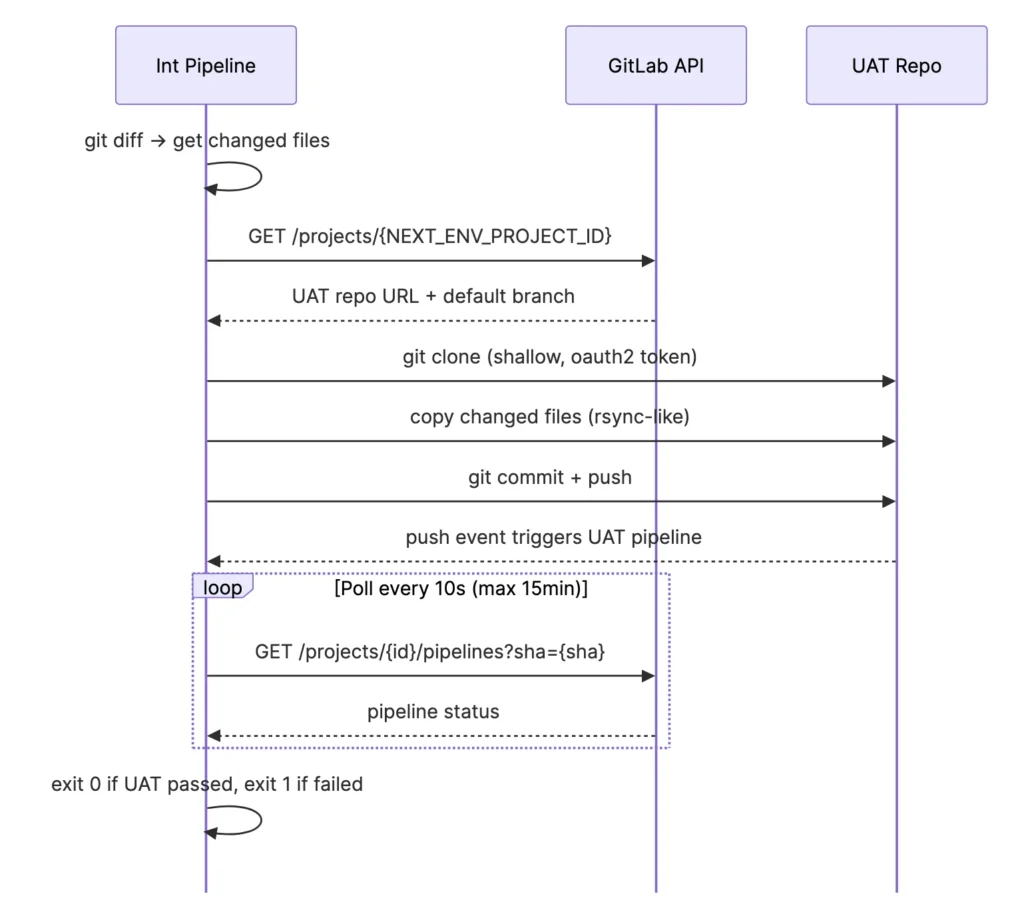
This is the glue of the whole system. After a successful deploy to Int, the promote job:
- Resolves the UAT repo’s HTTP URL via the GitLab API using
NEXT_ENV_PROJECT_ID - Clones the UAT repo
- Copies only the files that changed in this commit (upserts and deletes)
- Commits and pushes to UAT’s default branch
- Polls the newly-triggered UAT pipeline until it finishes
- Fails the Int pipeline if UAT fails — so broken changes can’t silently propagate
promote-to-uat:
  stage: post-deploy
  image: alpine:latest
  needs: [deploy-to-int]
  rules:
    - if: '$ENABLE_SF_DEPLOY == "true" && $CI_COMMIT_BRANCH == $CI_DEFAULT_BRANCH && $CI_PIPELINE_SOURCE == "push"'
      changes: [force-app/**/*, manifest/**/*, sfdx-project.json]
    - when: never
  script:
    - apk add --no-cache git curl jq >/dev/null
    - |
      # ── Resolve UAT repo URL from GitLab API ──────────────────────
      UAT_JSON="$(curl -sf --header "PRIVATE-TOKEN: ${GITLAB_AUTOMATION_TOKEN}" \
        "${CI_API_V4_URL}/projects/${NEXT_ENV_PROJECT_ID}")"
      UAT_URL="$(echo "${UAT_JSON}" | jq -r '.http_url_to_repo')"
      UAT_BRANCH="$(echo "${UAT_JSON}" | jq -r '.default_branch')"
      [ -z "${UAT_URL}" ] || [ "${UAT_URL}" = "null" ] && { echo "ERROR: Could not resolve UAT repo URL"; exit 1; }

      # ── Clone UAT repo ─────────────────────────────────────────────
      CLONE_URL="$(echo "${UAT_URL}" | sed "s#https://#https://oauth2:${GITLAB_AUTOMATION_TOKEN}@#")"
      git clone --depth 1 --branch "${UAT_BRANCH}" "${CLONE_URL}" uat-repo
      git -C uat-repo config user.email "ci-bot@pipeline.local"
      git -C uat-repo config user.name "GitLab CI Promote Bot"

      # ── Compute delta from this commit ─────────────────────────────
      EMPTY_TREE="4b825dc642cb6eb9a060e54bf8d69288fbee4904"
      DIFF_BASE="${CI_COMMIT_BEFORE_SHA:-${EMPTY_TREE}}"
      [ -z "${DIFF_BASE}" ] || [ "${DIFF_BASE}" = "0000000000000000000000000000000000000000" ] \
        && DIFF_BASE="${EMPTY_TREE}"

      git diff --name-only --diff-filter=ACMR \
        "${DIFF_BASE}" "${CI_COMMIT_SHA}" \
        -- force-app manifest sfdx-project.json > promote-upserts.txt || true
      git diff --name-only --diff-filter=D \
        "${DIFF_BASE}" "${CI_COMMIT_SHA}" \
        -- force-app manifest sfdx-project.json > promote-deletes.txt || true

      [ ! -s promote-upserts.txt ] && [ ! -s promote-deletes.txt ] \
        && { echo "Nothing to promote."; exit 0; }

      # ── Copy / remove files in UAT repo ───────────────────────────
      while IFS= read -r path; do
        [ -n "${path}" ] && [ -f "${path}" ] || continue
        mkdir -p "uat-repo/$(dirname "${path}")"
        cp "${path}" "uat-repo/${path}"
        git -C uat-repo add "${path}"
      done < promote-upserts.txt

      while IFS= read -r path; do
        [ -n "${path}" ] || continue
        rm -f "uat-repo/${path}" || true
        git -C uat-repo rm -f --ignore-unmatch "${path}" || true
      done < promote-deletes.txt

      git -C uat-repo diff --cached --quiet \
        && { echo "No changes staged — nothing to promote."; exit 0; }

      git -C uat-repo commit -m "chore: promote from Int ${CI_COMMIT_SHORT_SHA}"
      git -C uat-repo push origin "HEAD:${UAT_BRANCH}"
      PROMOTE_SHA="$(git -C uat-repo rev-parse HEAD)"
      echo "Promoted commit ${CI_COMMIT_SHORT_SHA} → UAT (${PROMOTE_SHA})"

      # ── Poll UAT pipeline ──────────────────────────────────────────
      UAT_PIPELINE_ID=""
      for _ in $(seq 1 24); do
        PIPELINES="$(curl -s --header "PRIVATE-TOKEN: ${GITLAB_AUTOMATION_TOKEN}" \
          "${CI_API_V4_URL}/projects/${NEXT_ENV_PROJECT_ID}/pipelines?sha=${PROMOTE_SHA}&per_page=1")"
        UAT_PIPELINE_ID="$(echo "${PIPELINES}" | jq -r '.[0].id // empty')"
        [ -n "${UAT_PIPELINE_ID}" ] && break
        sleep 5
      done

      [ -z "${UAT_PIPELINE_ID}" ] && { echo "WARNING: UAT pipeline not found. Promotion pushed OK."; exit 0; }
      echo "UAT pipeline ID: ${UAT_PIPELINE_ID}"

      STATUS="running"
      for _ in $(seq 1 90); do
        STATUS="$(curl -sf --header "PRIVATE-TOKEN: ${GITLAB_AUTOMATION_TOKEN}" \
          "${CI_API_V4_URL}/projects/${NEXT_ENV_PROJECT_ID}/pipelines/${UAT_PIPELINE_ID}" \
          | jq -r '.status')"
        echo "UAT pipeline status: ${STATUS}"
        case "${STATUS}" in success|failed|canceled|skipped|manual) break ;; esac
        sleep 10
      done

      [ "${STATUS}" = "success" ] && { echo "UAT pipeline PASSED"; exit 0; }
      echo "UAT pipeline finished with status: ${STATUS}"
      exit 1
Full Pipeline Header (workflow + stages + variables)
Every .gitlab-ci.yml starts with this boilerplate. Adjust the environment name and variable prefix for each repo.
image: salesforce/cli:latest-full

cache:
  key: ${CI_COMMIT_REF_SLUG}
  paths:
    - node_modules/

stages:
  - validate       # MR gate — check-only deploy
  - deploy         # Post-merge deploy to org
  - post-deploy    # Auto-promote to next environment

variables:
  SF_INSTANCE_URL: "https://test.salesforce.com"  # Use login.salesforce.com for Production
  ENABLE_SF_DEPLOY: "true"

# Only run on MR events or default branch pushes (skip all other refs)
workflow:
  rules:
    - if: '$CI_PIPELINE_SOURCE == "merge_request_event"'
    - if: '$CI_COMMIT_BRANCH == $CI_DEFAULT_BRANCH && $CI_PIPELINE_SOURCE == "push"'
Variables Reference
Here’s a complete reference of all CI/CD variables across environments. Each repo only needs the variables for its own environment plus the cross-repo promotion variables.
| Variable | Int | UAT | Staging | Prod | Notes |
|---|---|---|---|---|---|
SF_<ENV>_JWT_PRIVATE_KEY | ✓ | ✓ | ✓ | ✓ | File type. Full PEM content of server.key. |
SF_<ENV>_CONSUMER_KEY | ✓ | ✓ | ✓ | ✓ | Consumer Id from Salesforce External Client App. |
SF_<ENV>_USERNAME | ✓ | ✓ | ✓ | ✓ | Salesforce username of the integration user. |
SF_INSTANCE_URL | ✓ | ✓ | ✓ | ✓ | https://test.salesforce.com for sandboxes; https://login.salesforce.com for Prod. |
GITLAB_AUTOMATION_TOKEN | ✓ | ✓ | Staging only | — | GitLab PAT (api scope). Needed on repos that promote to a next env. |
NEXT_ENV_PROJECT_ID | ✓ | ✓ | — | — | Numeric GitLab project ID of the downstream repo. |
ENABLE_SF_DEPLOY | ✓ | ✓ | ✓ | ✓ | Feature flag. Set to "true" to enable. Useful for emergency disable. |
Tips & Gotchas
runTest Annotations are Required for Apex Changes
The validate stage enforces a firm rule: if you change a non-test Apex class, you must tag which test class to run using the <runTest> annotation. This makes test coverage explicit and avoids the ambiguity of “RunLocalTests” during validation.
// Add this annotation anywhere in the file — the pipeline reads it during CI
// <runTest>MyControllerTest</runTest>

public class MyController {
    // ...
}
LWC and Aura: Deploy the Component Folder, Not Individual Files
Salesforce CLI expects a full component directory when deploying LWC/Aura, not individual files. The pipeline’s awk snippet collapses any path under force-app/main/default/lwc/myComponent/ to just the component-level directory. This prevents “No source found” errors when, for example, only myComponent.js changed.
Shallow Clones and Diff Accuracy
GitLab’s default fetch depth is 1 (shallow clone). The validate stage fetches the MR target branch at depth 50 to ensure DIFF_BASE is resolvable. If a commit is outside the fetch window, the pipeline gracefully falls back to the empty-tree SHA, causing a full-set deploy rather than a delta — safe but not optimal.
The Empty-Tree SHA
4b825dc642cb6eb9a060e54bf8d69288fbee4904 is Git’s well-known empty tree object. It’s used as the diff base when CI_COMMIT_BEFORE_SHA is not available (e.g., a fresh branch’s first push). Diffing against it returns all files in the commit, effectively treating it as a “deploy everything” scenario.
External Client App: Pre-Authorization is Mandatory
JWT flow requires the user to be pre-authorized for the External Client App. If you see invalid_grant errors in the pipeline, the most likely cause is that the integration user’s profile or permission set is not in the app’s permitted users list.
Never commit
server.keyto Git. Add it to.gitignoreimmediately. If a private key is accidentally committed, rotate it: generate a new key pair, upload the newserver.crtto the External Client App, and update the GitLab variable. Treat a leaked key like a leaked password.
Production Needs a Manual Gate
The Staging-to-Production promotion should require a human approval step. In GitLab, add when: manual to the production deploy job. This ensures that someone consciously triggers the Production deploy rather than it happening automatically.
deploy-to-prod:
  stage: deploy
  <<: *sf-auth-prod
  when: manual          # ← Requires a human to click "Play" in the GitLab UI
  allow_failure: false  # ← Blocks the pipeline until triggered
  rules:
    - if: '$CI_COMMIT_BRANCH == $CI_DEFAULT_BRANCH && $CI_PIPELINE_SOURCE == "push"'
      changes: [force-app/**/*, manifest/**/*, sfdx-project.json]
    - when: never
Feature Flags for Safe Rollout
Each pipeline uses an ENABLE_SF_DEPLOY variable as a kill switch. Set it to "false" in GitLab’s variable settings to disable all Salesforce deployments instantly — useful during freeze windows or incident response, without changing any code.
Summary: What You’ve Built
Next steps: Add PMD Apex static analysis and ESLint for LWC as a static-analysis stage before Validate. Hook up Slack notifications in the post-deploy stage using SLACK_WEBHOOK_URL and a curl call. Consider adding deployment tags using the GitLab Releases API for auditability.
Complete Pipeline Files
Drop-in .gitlab-ci.yml files for each environment. Each file is self-contained — copy it into the corresponding repo, configure the GitLab CI/CD variables listed in Section 4, and you’re ready to run.
Before pasting: Replace every instance of the environment prefix (INT, UAT, STAGING, PROD) in the variable names with your actual GitLab variable names. The alias values (int, uat, etc.) can stay as-is — they are just local SFDX org aliases used within the job.
Integration (INT) – sfdc-ccid-int / .gitlab.ci.yml
Stages: validate → deploy → post-deploy. Runs validate on MR events; deploy + promote on default branch push. After a successful deploy it auto-promotes changed files to the UAT repo and polls the UAT pipeline to completion.
Check the code here.