
Understanding Salesforce Supplier Management Complexity
Supplier management might seem straightforward in Salesforce because the platform allows you to centralize data, automate processes, and give teams better visibility. In practice, however, it’s more complicated. While supplier records can exist in Salesforce, important operational data such as performance metrics, compliance documents, and evaluation results often live in separate tools. This fragmentation makes it hard to get a clear picture of supplier performance and slows down reporting and automation.
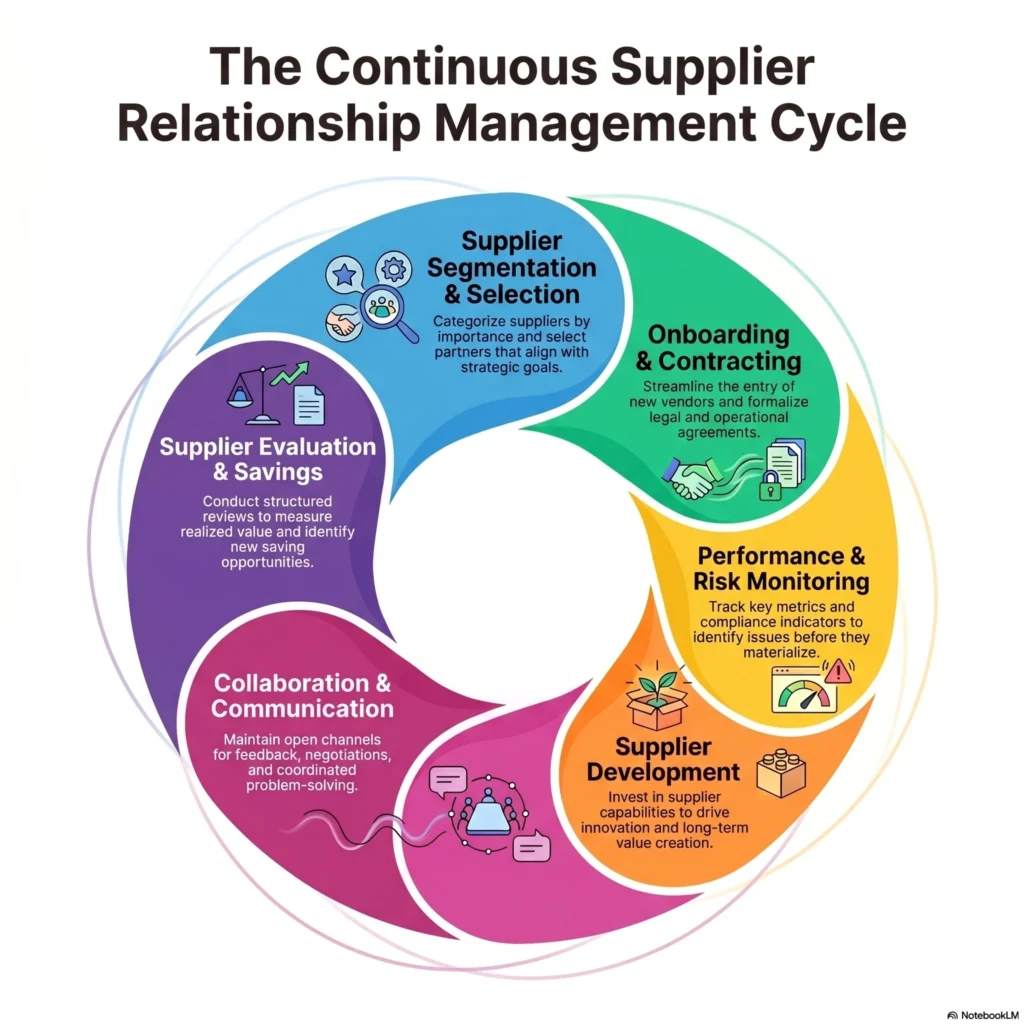
Supplier Relationship Management Process Based on The Kraljic Matrix and Art of Procurement
Industry research shows the scale of this problem. When organizations were asked about their top supply chain issues, 70% reported a lack of visibility into their supply chain, while 65% pointed to data problems such as missing or inconsistent information, and 50% identified organizational barriers that prevent effective collaboration across teams.
For example, a company managing 150 suppliers may have basic supplier accounts in Salesforce, but performance scorecards are kept in spreadsheets, certifications are stored in shared folders, and approvals happen over email. To identify underperforming suppliers or expired certifications, teams must manually gather and reconcile information from multiple sources.
Understanding Salesforce supplier relationship management challenges and how supplier data is scattered is the first step toward creating a centralized, automated system in Salesforce.
The next section looks at where supplier data typically lives and why these silos make reporting, automation, and supplier management more difficult.
Where Supplier Data Typically Lives
Salesforce was built for customer relationship management, not supplier relationship management. As a result, companies often keep supplier information in a mix of external systems and manual tools. Common storage locations include:
- Spreadsheets for performance tracking, scorecards, and KPIs are often maintained by procurement teams and updated manually. In fact, Excel spreadsheets are the primary operational tool for 46% of supply chain experts. They remain popular because they are flexible and easy to share, even though they can quickly become inconsistent.
- Shared drives or document repositories for compliance documents, certifications, and audits. These are used because many regulatory or safety documents originate outside Salesforce and need to be accessible to multiple teams.
- Email inboxes and threads for supplier communication, approvals, and informal updates. Teams often rely on email for negotiations and clarifications because it is immediate and widely used.
- Local files or personal notes on individuals’ computers are sometimes used to track additional supplier information. These temporary or improvised tools persist when teams lack a centralized system that supports workflow automation in supplier management.
This fragmented approach means that even when supplier accounts exist in Salesforce, critical operational data often lives elsewhere. Teams face challenges consolidating performance metrics and building supplier compliance management automation.
Challenges of Fragmented Supplier Data
When supplier information lives outside Salesforce, it creates several technical and operational challenges. Even if basic supplier records exist in Salesforce, key metrics like performance, compliance, and risk indicators remain disconnected. This fragmentation limits reporting, automation, and collaboration across teams.
Below are five common challenges that organizations face:
1. Incomplete reporting.
Dashboards in Salesforce may show supplier accounts, but cannot include performance or compliance metrics stored externally. Without integrated data, it’s difficult to generate accurate, real-time reports or identify trends on supplier performance.
2. Limited automation.
Flows,Agentforce and other Salesforce automation tools work best when programmed for supplier management excellence in mind. . For example, automatic alerts for expiring certifications or declining performance require manual tracking, reducing efficiency.
3. Data quality and standardization issues.
Information stored in multiple systems often suffers from inconsistencies: different naming conventions, outdated contact details, or mismatched metrics. Consolidating this data for reporting or automation requires significant manual effort and careful validation.
4. Communication and collaboration gaps.
Supplier-related communication typically occurs via email or personal notes, which are disconnected from Salesforce records. This leads to missing context, incomplete audit trails, and difficulty coordinating actions across departments.
5. Difficulty maintaining a single source of truth.
Different departments may define supplier metrics and evaluation criteria differently. Finance, procurement, and operations teams may track performance or risk using separate methods, resulting in conflicting data and unreliable decision-making.
Existing Ways to Manage Suppliers in Salesforce
When organizations decide to bring supplier data closer to Salesforce, they often start by using native platform capabilities. Instead of implementing a dedicated supplier management solution, teams attempt to model supplier information using standard objects, custom objects, or integrations.
Several approaches are commonly used:
| Common Approaches to Managing Suppliers in Salesforce | ||
|---|---|---|
| Approach | Implementation Method | Limitations |
| Accounts as Suppliers | Use the standard Account object with a dedicated record type, such as Supplier or Vendor | Basic data storage only. Does not provide structured performance tracking or evaluations |
| Custom Objects | Create objects like Supplier__c, Certification__c, Vendor_Scorecard__c to capture extended supplier data | Requires designing an entire data model, evaluation logic, and reporting. Workflows must be built from scratch |
| External Data Access | Connect Salesforce to external platforms to display supplier data within Salesforce | Data might be visible in Salesforce but not stored there. Operational metrics often remain external, limiting automation and native reporting |
| Periodic Data Uploads | Import supplier metrics and evaluation data using Data Loader or similar tools on a schedule | Data updates are not real‑time. Manual effort is required, and records can become outdated between imports |
Each of these approaches can bring some supplier information into Salesforce, but none provides a complete framework for tracking performance, monitoring compliance, or managing evaluations automatically. To fill the gaps, teams often have to build additional structures, such as:
- KPI tracking models
- Supplier evaluation workflows
- Risk indicators
- Compliance tracking
- Customized onboarding process
- Dashboards and reporting
For organizations managing hundreds of suppliers, designing and maintaining this setup from scratch can be time-consuming and requires careful planning of data models and relationships.
When a Dedicated Supplier Management Tool Becomes Useful
After exploring native approaches, it’s clear that building a complete supplier management framework in Salesforce requires significant effort. As supplier networks grow, managing multiple objects, defining evaluation criteria, tracking certifications, and keeping reporting consistent across departments becomes increasingly complex.
At this stage, many organizations start evaluating supplier management automation software, or dedicated solutions available on AppExchange, which provide pre-built objects, scorecards, and reporting structures specifically designed for supplier evaluation and compliance tracking.
For this guide, we looked at several Salesforce-native solutions and chose LUPR SRM to illustrate how an organization can centralize supplier data and monitor performance directly within Salesforce.
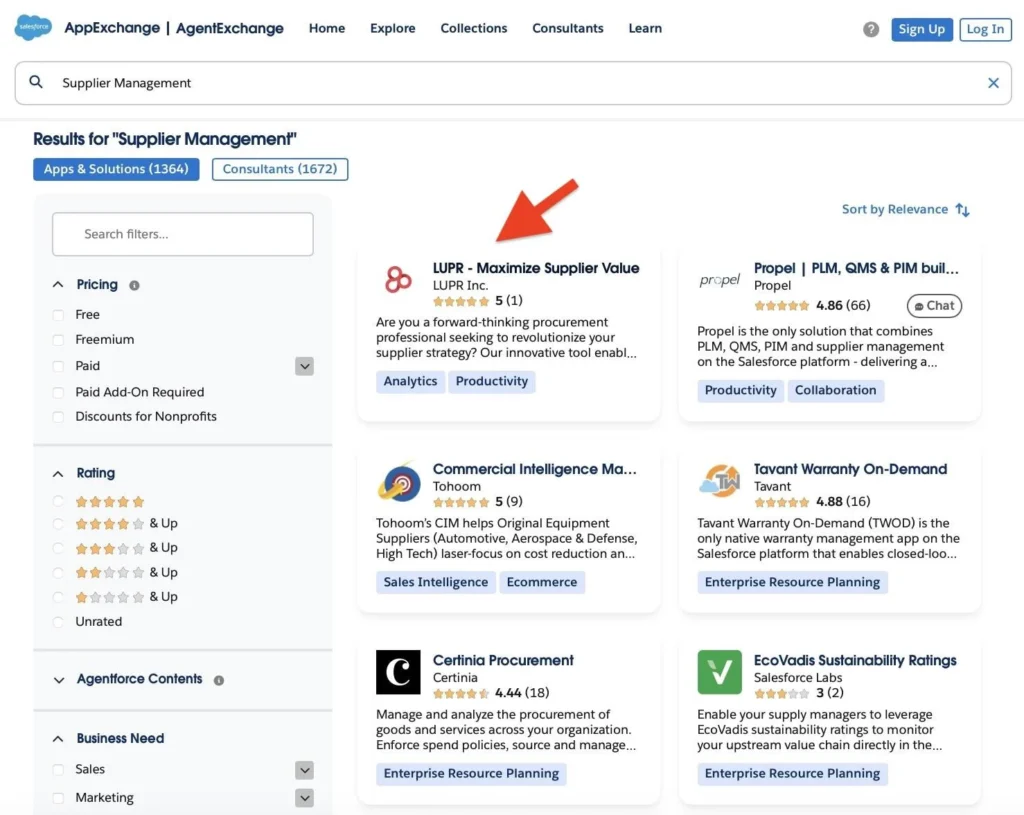
Supplier Management on AppExchange
LUPR is a Salesforce-native application for supplier relationship management. It treats suppliers as strategic partners, allowing teams to track performance, risk, and value continuously. By keeping all supplier data in one place, procurement teams can increase cost savings by around 30% per category in the first year. Automation and AI help manage workflows, alert teams to risks, and identify savings, so staff can focus on important decisions instead of manual tasks.
Step-by-Step: Automate Supplier Management in Salesforce
In the following walkthrough, we will configure and automate supplier management in Salesforce, covering installation, data setup, scorecards, certifications, and dashboards. Each step shows exactly how to organize processes and make supplier information actionable inside the platform.
Step 1: Install the Package
Start by installing the package from the AppExchange listing.
Select “Get It Now” if you are installing the package in your production org, or choose “Try It” if you want to test and configure the application in a sandbox environment first. This ensures you can safely set up and review the system without affecting live data.
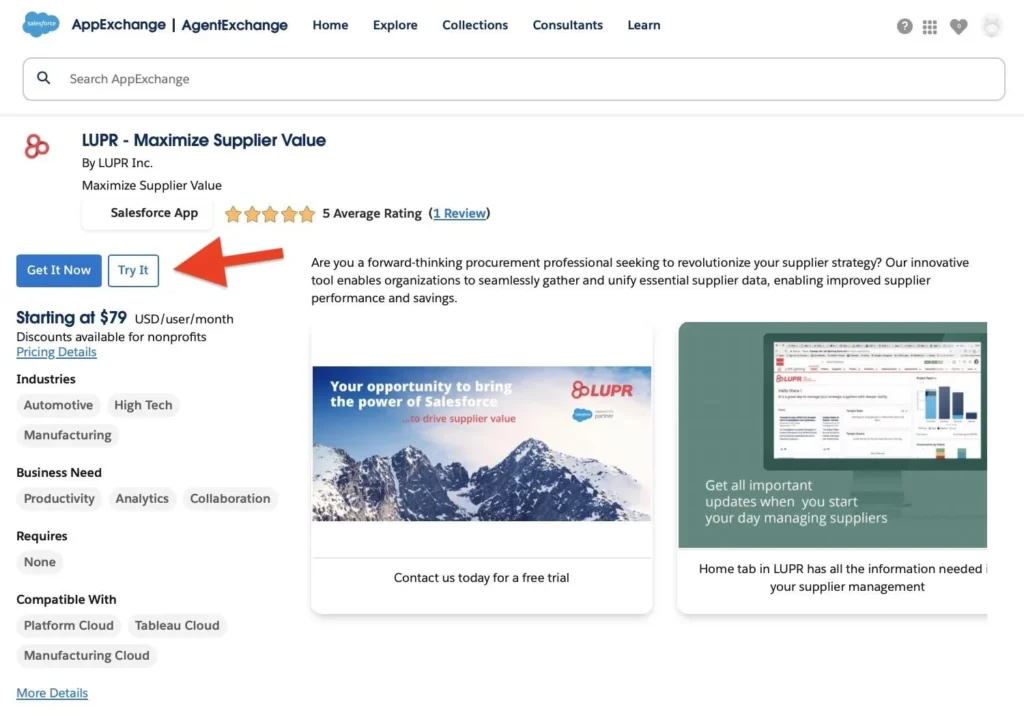
Get the application
For testing and configuration, sandbox installation is recommended.
During installation, you can select:
- Install for Admins Only
- Install for All Users
- Install for Specific Profiles
For initial configuration, installing for administrators allows time to configure data structures and permission sets.
Step 2: Configure the Application
After installing the app, set up supplier records, performance metrics, and dashboards to match your business processes. You can do this internally or get guidance from the LUPR team.
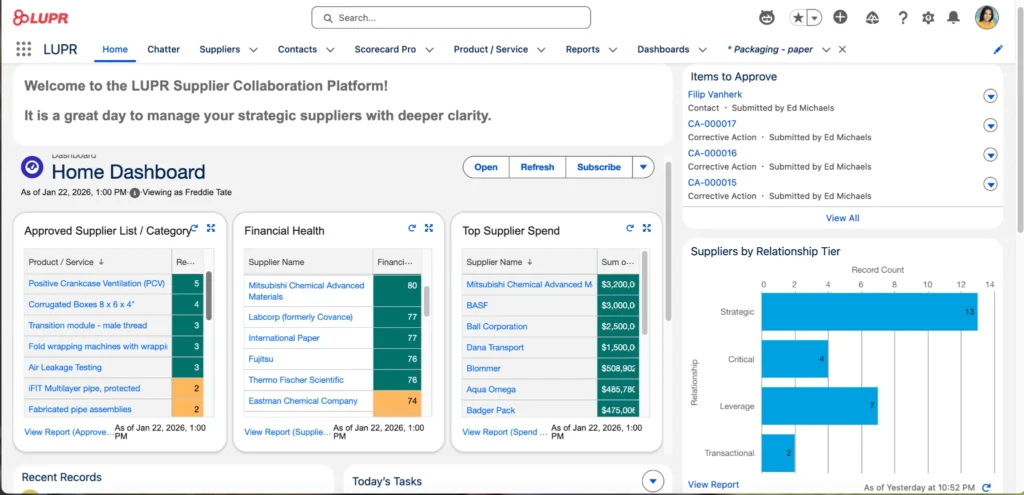
LUPR in Salesforce
The application can also connect with existing external systems, bringing historical or external supplier data into Salesforce without disrupting workflows. LUPR can provide professional services to help clean and export data from files or create a permanent integration with any system in use.
Step 3: Organize Supplier Data
The Suppliers tab is where all supplier information is centralized. You can maintain supplier profiles, track relationships, monitor performance indicators, and access related files and communications, all in one place.
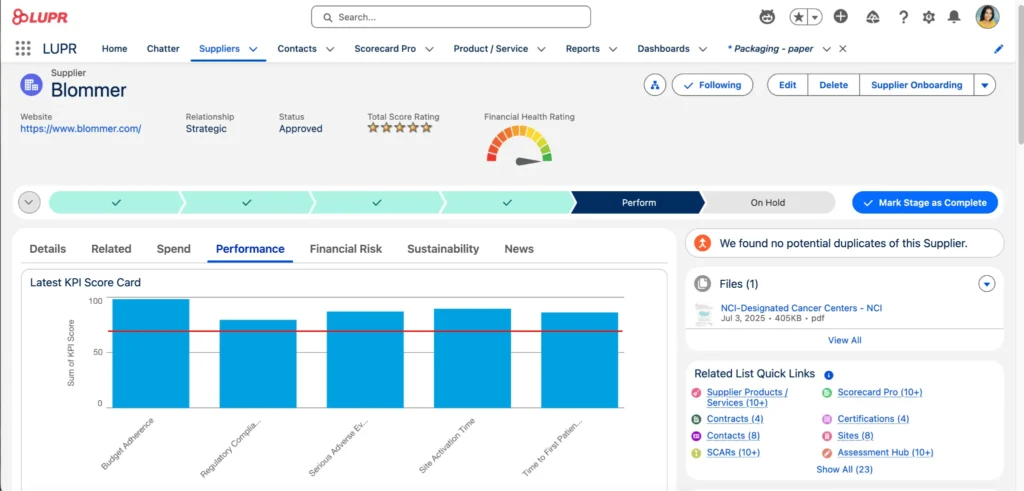
Suppliers in Salesforce
Step 4: Define Supplier Scorecards
In the Supplier Scorecards tab, you can create structured evaluations for each supplier. Teams can define KPIs and track them consistently across suppliers and categories. This allows tracking of performance metrics, identifying high performers or suppliers needing attention, and keeping historical evaluation records.
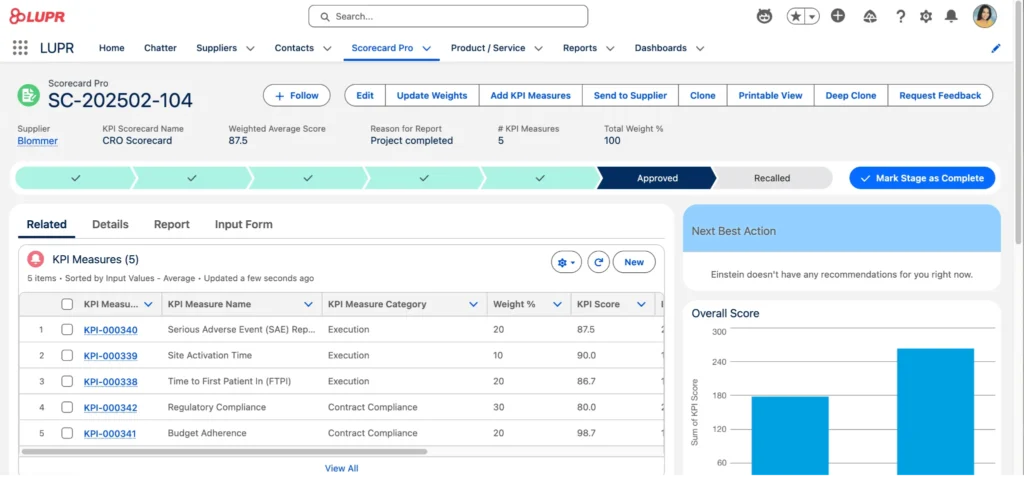
Scorecard in Salesforce
Step 5: Track Certifications and Compliance
Compliance management is one of the most difficult areas in supplier management. LUPR provides structured ways to track certifications, compliance documents, and risk indicators. Certification records allow teams to monitor issue dates, expiration, and renewal status. Automation can notify teams before certifications expire, helping move from reactive risk management to proactive monitoring.
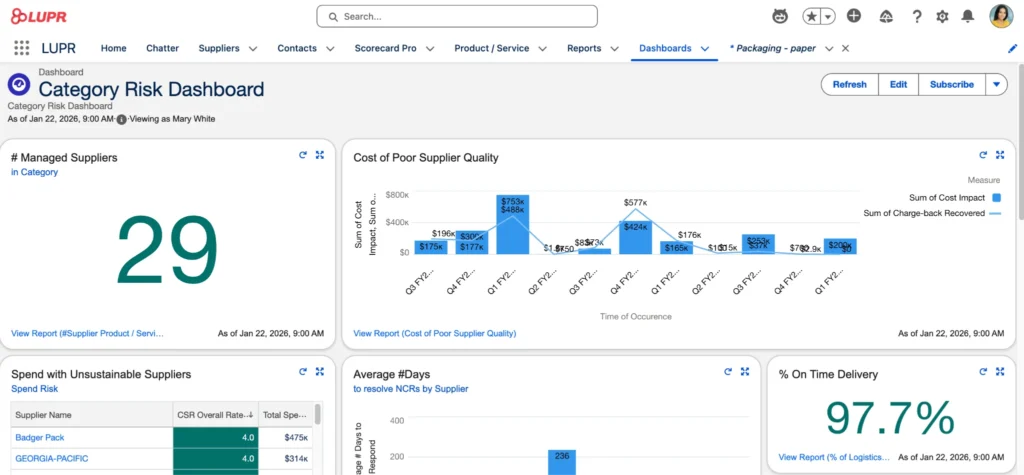
Category Risk Dashboard
Step 6: Organize Suppliers by Category
You can organize suppliers into Categories to reflect their role or importance. Categories are managed in Salesforce list views and support multiple attributes, making it easy to track and analyze suppliers.
Grouping suppliers helps teams focus on what matters most. Critical suppliers can be monitored more closely, while less strategic suppliers can use simpler tracking. With the power of AI, a clear Approved Supplier List is generated to ensure alternative suppliers when needed. This ensures a smart, consistent approach based on data.
Benefits of Supplier Management Automation
Once you automate master supplier data management using a dedicated tool, several capabilities become available that go beyond basic record-keeping. These features allow admins and teams to leverage automation, AI, reporting, and structured evaluation for more efficient supplier management.
1. Real-time performance insights.
With structured supplier scorecards and KPI tracking, dashboards can reflect performance immediately. Teams can identify trends such as declining delivery reliability, recurring quality issues, or compliance gaps without manually consolidating data from multiple sources. Real-time visibility enables faster, data-driven decisions.
2. Automated workflows and alerts for better compliance process.
Structured supplier data supports automation inside Salesforce. Admins can configure flows or notifications to:
- Alert procurement teams when certifications are nearing expiration
- Trigger follow-ups if a supplier falls below a defined performance threshold
- Automatically update risk indicators based on evaluation results
This automation reduces manual tracking and ensures important events are addressed promptly.
3. Standardized reporting.
By defining consistent KPIs and evaluation rules across the organization, reporting becomes reliable and comparable. Admins can generate dashboards that show:
- Supplier performance rankings across categories (ASL)
- Compliance status and certification coverage
- Historical trends and evaluation completion rate
Standardized reporting helps maintain a single source of truth, aligning all teams on supplier performance and risk.
4. Focus on Category
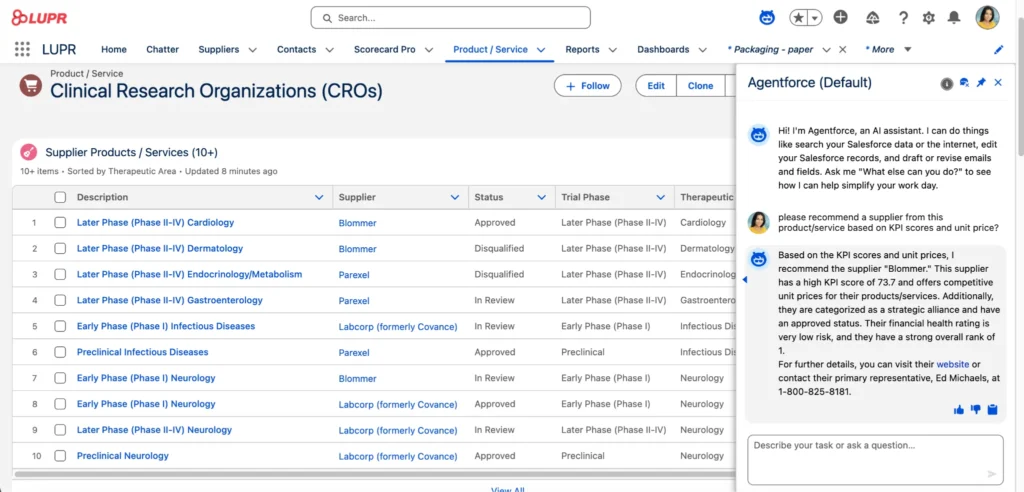
Category Co-Pilot
LUPR includes a Category Co‑Pilot feature that helps teams organize and manage supplier groups more strategically. The Co‑Pilot guides structured assessments to determine category relationship tiers and support strategic decision‑making. It uses AI‑assisted tools to analyze supplier group attributes, automate parts of the category planning process, and highlight the suppliers that are most critical to your goals. This gives procurement teams actionable insights and a consistent way to define strategies for different supplier segments.
5. Collaboration through Supplier Community
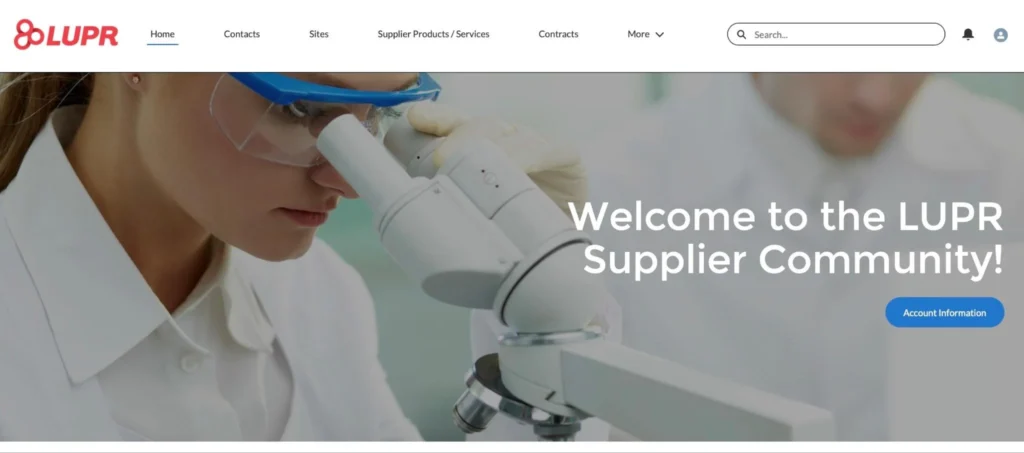
Supplier Community
LUPR’s Supplier Community enables internal teams and suppliers to collaborate directly inside Salesforce. Instead of relying on email threads or shared drives, communications, updates, and document sharing happen in a centralized, trackable workspace. This improves traceability, reduces delays, and keeps all supplier interactions connected to the relevant records.
Real-World Impact: Leaving Spreadsheets Behind and adopt an AI solution
The shift to Reverse CRM drives immediate, measurable results. Organizations can eliminate reliance on manual spreadsheets, establishing the new system as the authoritative source for tracking procurement savings. Similarly, global brands use this architecture to drive continuous improvement, build transparent supplier histories, and track critical Capital equipment and other projects across multiple sites.
Final Thoughts
Supplier management shouldn’t be an afterthought in your Salesforce architecture. By abandoning disconnected spreadsheets and embracing an automated, Salesforce-native Reverse CRM strategy, your organization can finally gain the visibility, risk mitigation, and cost reductions required to navigate today’s disrupted supply chains.