

The reactivity of our Salesforce UI will make sure that the user interface is up to date with any changes to the data. A coding layer in Lightning Web Components (LWC) manages reactivity by monitoring changes to fields and properties and rerendering templates as and when they are needed or required. At its core are membranes or proxies that watch values, shallow vs deep mutation rules and a few simple conventions that make components predictable and fast. This blog will walk us through the fundamentals (proxies, mutation patterns, when explicit tracking is required), highlights common mistakes and finishes with a tiny, real example that can be dropped into an org and photographed for screenshots. The aim is practical: by the end, reasoning about reactive updates in LWC should feel straightforward and repeatable.
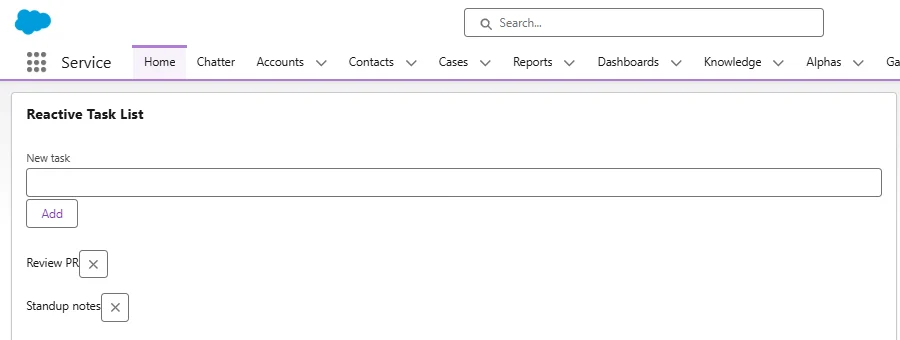
Implemented example post going through this blog will look like as below:
Core concepts: Proxies, membranes and shallow tracking
LWC implements reactivity using a membrane like mechanism: objects passed into the component are wrapped so that reads and writes can be observed. This lets the framework know when template expressions must be re-evaluated. Primitive fields (strings, numbers, booleans) are reactive by identity assigning a new primitive triggers updates. For objects and arrays, LWC performs shallow tracking by default: assigning a new object or array reference is detected, but mutating an existing complex object in place may not be detected unless that field is explicitly marked for deeper tracking. For these deeper mutations, the @track decorator is available and instructs LWC to observe internal property changes recursively for plain objects and arrays.
A few clarifications that are helpful in practice:
- Fields declared in an LWC class are reactive by default since Spring ’20; @track is only needed for scenarios where deep, internal mutation should be observed. Data provided through @wire arrives as an immutable stream; objects from wire are treated as read only and must be copied before mutating. This design encourages predictable state transitions.
Mutation patterns: safe, unsafe and recommended
Reactive systems in LWC prefer immutable style updates. That means replacing references instead of mutating in place.
Common patterns:Restore the array or object
When we will need to add or remove from an array, we can always try to create a new array and assign it back:
 // unsafe -- may not trigger re-render
this.items.push(newItem);

// safe -- create new array, then assign
this.items = [...this.items, newItem];
Shallow copy objects before mutating (safe)
When changing a nested property, shallow copy first:
 // safe approach
const copy = { ...this.config };
copy.theme = 'dark';
this.config = copy;
Use @track only when necessary (deep observation)If an object must be mutated in place frequently and the cost of creating new references is high, @track causes the framework to observe internal changes for plain objects/arrays:
 import { track } from 'lwc';
@track state = { counts: { a: 1, b: 2 } };
state.counts.a = 2; // detected because of @track- But note that @track does not observe class instances, Date, Map or Set.
When working with @wire
Treat wire results as immutable. To edit data in the component, make a shallow copy first:
// wire provides data.readOnlyObject
const editable = JSON.parse(JSON.stringify(data)); // or {...data} for shallow
editable.someField = 'changed';
this.localCopy = editable;- This prevents unplanned alteration of the wire provided object and will make sure that reactivity works as expected.
Common issues and how to prevent them
A few happen repeatedly risks seen in real projects:
- Mutating wire data in place. Because wire provides read-only values, direct mutation often leads to unpredictable behavior. Always copy before mutating.
- Relying on @track as a crutch. Overusing deep tracking can mask design problems; prefer explicit reference replacement for clarity and predictable change history.
- Using class instances for reactive fields. Instances (custom classes, Date, Map, Set) are not observed; prefer plain objects or arrays for state that needs to be reactive.
- Confusing identity vs. internal mutation. Changing someObject.name does not change someObject’s identity. If the framework is only checking identity, the template might not update either reassign the parent field or use @track where appropriate.
Error patterns to watch for in templates: unexpected stale UI after array push/pop, or failure to reflect nested property updates. The fix is almost always to either (a) reassign a new reference, or (b) mark the field with @track when in-place deep mutation is unavoidable.
Real example : Simple reactive task list for daily use
This example demonstrates common mutation patterns and how reactivity reacts. It is intentionally tiny so screenshots can be taken of the component in the App Builder preview or in a scratch org.
Files to create:
<template>
  <lightning-card title="Reactive Task List">
    <div class="slds-p-around_medium">
      <lightning-input label="New task" value={newTask} onchange={onInput}></lightning-input>
      <lightning-button label="Add" onclick={addTask} class="slds-m-top_small"></lightning-button>

      <template if:true={tasks}>
        <ul class="slds-list_vertical slds-m-top_medium">
          <template for:each={tasks} for:item="t">
            <li key={t.id} class="slds-p-vertical_x-small">
              <span>{t.name}</span>
              <lightning-button-icon icon-name="utility:close"
                                     alternative-text="Remove"
                                     onclick={removeTask} data-id={t.id}></lightning-button-icon>
            </li>
          </template>
        </ul>
      </template>
    </div>
  </lightning-card>
</template>
taskList.js
import { LightningElement } from 'lwc';

export default class TaskList extends LightningElement {
  newTask = '';
  tasks = [
    { id: '1', name: 'Review PR' },
    { id: '2', name: 'Standup notes' }
  ];

  onInput(event) {
    this.newTask = event.target.value;
  }

  addTask() {
    if (!this.newTask) return;
    const newItem = { id: String(Date.now()), name: this.newTask };

    // recommended immutable update:
    this.tasks = [...this.tasks, newItem];

    this.newTask = '';
  }

  removeTask(event) {
    const id = event.currentTarget.dataset.id;
    // create new array without the removed item
    this.tasks = this.tasks.filter(t => t.id !== id);
  }
}
Why this example helps
- Uses only reference replacement (this.tasks = […]) so reactivity is predictable.
- Avoids @track to show that modern LWC usually requires only reassignments for reactive updates.
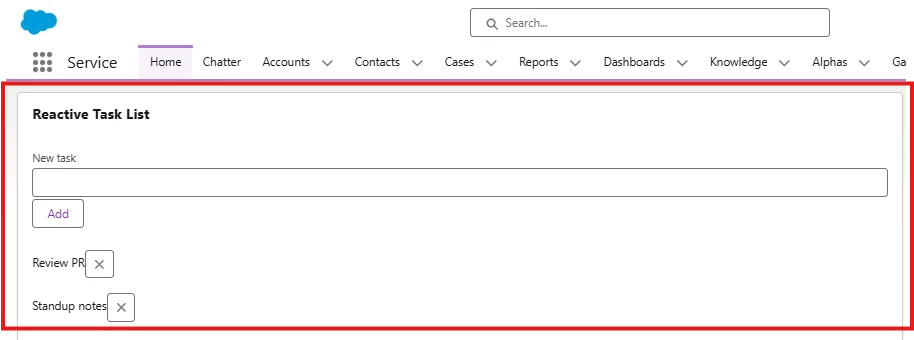
Below are few screens for better understanding
- Component rendered on a Lightning App page (showing initial list).
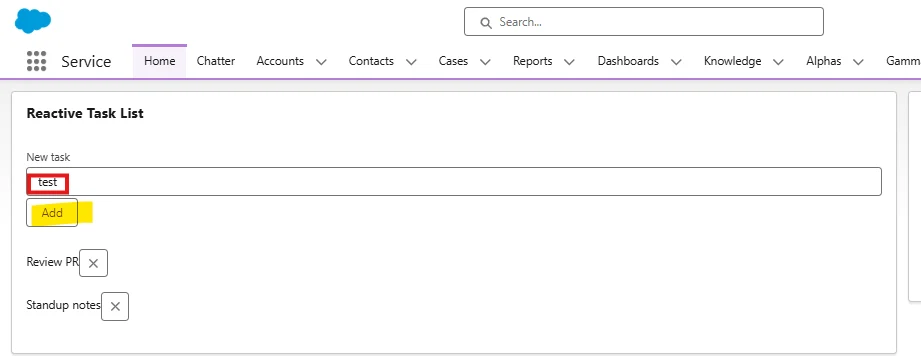
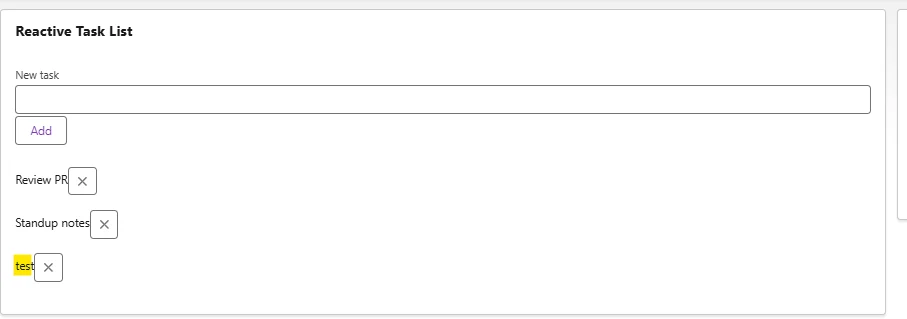
- After adding a task (showing input filled and new item displayed).
Before clicking on Add:
Once clicked on Add button:
- After removing a task (showing the filtered list).
Real-world scenarios where reactive architecture matters
- Dynamic dashboards and filters. When filters or selections mutate large arrays of records, using immutable updates prevents stale lists and makes it easier to implement undo/redo or optimistic updates.
- Collaborative editing UI. For interfaces where multiple users may update the same view, treating incoming state as immutable snapshots reduces race conditions.
- Complex form wizards. Deeply nested form models require care; either use shallow copies when moving between steps or use @track intentionally for specific nested models.
- Large lists with real-time changes. When new data arrives from a server push or streaming source, treating each update as a new value keeps reconciliation simple and performant.
Conclusion
Reactive architecture in LWC is intentionally simple when the right conventions are followed: prefer immutable-style updates (replace references), reserve @track for special deep-mutation cases and always copy @wire data before modifying. Understanding that the framework uses a membrane or proxy under the hood helps make predictable reassigning references is the most straightforward way to ensure the template reflects the current state. With the tiny task list example, the recommended patterns are ready to test in an org and document via screenshots. Practicing these patterns across small components will make larger apps much easier to maintain and reason about.