
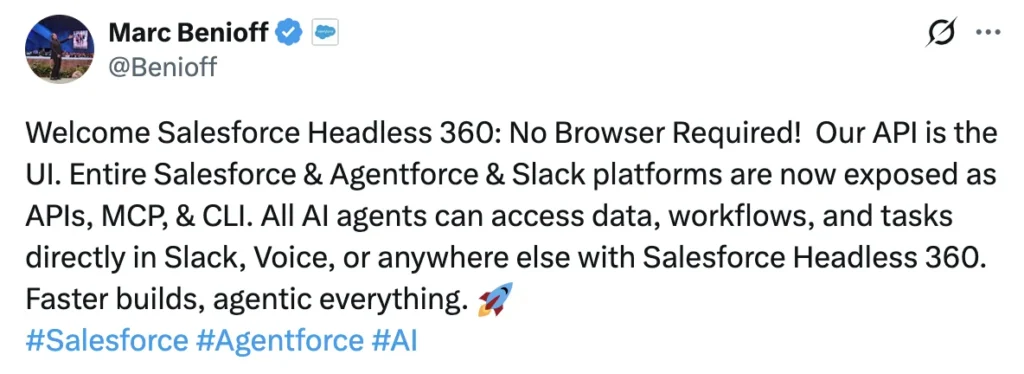
Welcome Salesforce Headless 360: No Browser Required! Our API is the UI. Entire Salesforce & Agentforce & Slack platforms are now exposed as APIs, MCP, & CLI. All AI agents can access data, workflows, and tasks directly in Slack, Voice, or anywhere else with Salesforce Headless 360. Faster builds, agentic everything – Benioff, April 15, 2026
That phrase — “Our API is the UI” — is doing a lot of work. It’s not marketing shorthand. It’s an architectural statement. And if you’ve been building on Salesforce for more than a few years, you probably felt it land.
Parker Harris, co-founder, put it even more starkly from the TDX stage.
Why should you ever log into Salesforce again– Parker Harris, co-founder
When AI agents can handle data access, workflow execution, and metadata deployment entirely through APIs — what exactly is the UI for? For most enterprise workloads, the answer is increasingly: not much
What is Salesforce Headless 360?
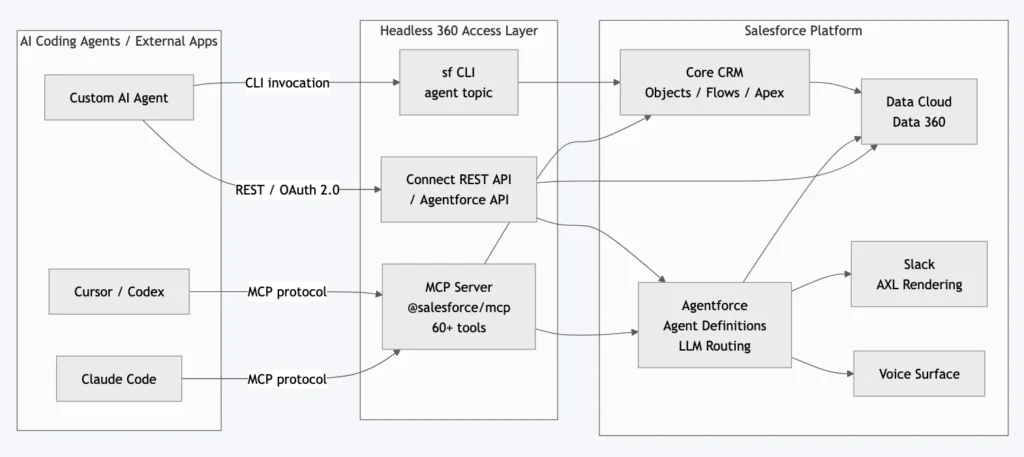
Let’s be precise about what Headless 360 is, because the announcement is broad enough to sound vague until you look at the specifics. At its core, it means Salesforce has committed to exposing every platform capability through three programmable surfaces: REST/Agentforce APIs, MCP tools, and sf CLI commands.
Honest take: This is partly a reframing of APIs that already existed, but the MCP layer is genuinely net-new as a packaged, documented, turnkey surface for AI agents. Having 60+ tools organized into named toolsets that a coding agent can call without writing custom integration code — that didn’t exist twelve months ago.
The Four Surfaces: What Each One Unlocks
1. APIs: The Foundation You Already Know
Salesforce has had REST and SOAP APIs since 2006. What Headless 360 adds is intent: every endpoint is now explicitly documented as an agent-accessible surface, with guidance on token-scoped access and Named Credentials. The Agentforce REST API lets external systems invoke agent sessions, pass context, and receive structured responses — without a logged-in user involved.
Daily API limits still apply. Enterprise Edition orgs start at 100,000 REST API calls per 24-hour rolling window, pooled across REST, SOAP, Bulk, and Connect REST. If your agentic workflows are calling Salesforce every few seconds, that ceiling arrives faster than you’d expect.
2. MCP: The Biggest Actual Shift
Model Context Protocol is an open standard that lets AI assistants connect to external tools without custom integration code. Salesforce’s MCP server (@salesforce/mcp) ships with the Salesforce DX toolchain and exposes 60+ tools across these categories.
| Toolset | What it does |
|---|---|
metadata | Deploy/retrieve metadata between DX projects and orgs |
data | Execute SOQL queries against live orgs |
testing | Run Apex tests and agent evaluation tests |
lwc | Create LWC components, generate Jest tests, accessibility guidance |
code-analysis | Static analysis via Salesforce Code Analyzer |
devops | CI/CD pipeline access through DevOps Center MCP |
aura | Migration blueprints, LWC transition guidance |
Install and configure via NPX:
npx -y @salesforce/mcp --orgs myDevOrg --toolsets metadata,data,testingYour AI coding agent picks up those tools automatically once the MCP server is configured. From that point, the agent can query your org, deploy a class, run tests, and inspect results — without leaving the coding environment
Watch out: Enabling all 60+ tools at once will overwhelm your LLM’s context window. The
--toolsetsflag exists precisely to scope what the agent sees. Start narrow, add toolsets as your use case demands. The--allow-non-ga-toolsflag unlocks pre-release functionality — development environments only.
3. CLI: sf Agent Commands Are Now Real
The sf agent The topic in the Salesforce CLI is the scriptable, CI/CD-friendly face of Headless 360. Here are the commands that are actually available:
# Generate an agent spec (YAML) from a plain-language description
sf agent generate agent-spec \
  --type customer-facing \
  --role "Handle tier-1 support escalations" \
  --company-description "B2B SaaS, Enterprise edition org" \
  --max-topics 5 \
  --tone professional \
  --output-file specs/agentSpec.yaml \
  --target-org myDevOrg

# Deploy metadata (including agent definitions) to org
sf project deploy start --source-dir force-app --target-org myDevOrg

# Run agent evaluation tests
sf agent test run --target-org myDevOrg

# Call Connect API endpoints directly
sf api request rest /services/data/v63.0/limits --target-org myDevOrg
The agent generate agent-spec command is worth pausing on. You describe the agent’s role in plain language; the CLI generates a YAML specification including subagent definitions. Pass --spec specs/agentSpec.yaml to refine a previous output iteratively, rather than starting from scratch each time
4. Slack and Voice: The Agentic Front Door
Slack has grown 300% in Agentforce agent deployment since January 2026. Under Headless 360, Slack isn’t just where humans use agents — it’s where agents surface structured outputs without any Salesforce UI involvement.
The Agentforce Experience Layer (AXL) separates what an agent does from how it renders. An agent can return a decision tile, a rebooking workflow, or a renewal summary — and that component renders natively inside Slack, Teams, ChatGPT, Claude, Gemini, or any MCP-compatible client. Build the agent logic once; AXL handles surface-specific rendering.
How Headless 360 Fits With Agentforce, Data Cloud, and Slack
Headless 360 is the programmable access layer over three existing Salesforce investments:
Agentforce 360 provides the reasoning engine — LLM routing, Agent Script definitions, the evaluation framework (Testing Center, Custom Scoring Evals), and observability (Session Tracing, A/B Testing). With Headless 360, all of that is reachable via API or MCP tool, not just the Agentforce UI.
Data Cloud (Data 360) is the data mesh underneath. Customer escalation status, renewal dates, SLA timers, relationship maps — all exposed as APIs, MCP tools, and CLI commands. An external agent doesn’t need to scrape a Salesforce screen to know that a customer’s renewal is 14 days out and they’ve had two open tickets this month.
Slack is the primary human-facing surface for agentic output. When an agent completes a task, the result surfaces in Slack — with rich interactive components via AXL if appropriate. It’s the “front door to the Agentic Enterprise” in Salesforce’s framing.
Architecture: How It All Connects
Salesforce Headless 360 architecture — AI agents reach the full platform through MCP tools, the sf CLI, or REST APIs. Agentforce routes, reasons, and surfaces results to Slack or Voice without a browser in the loop
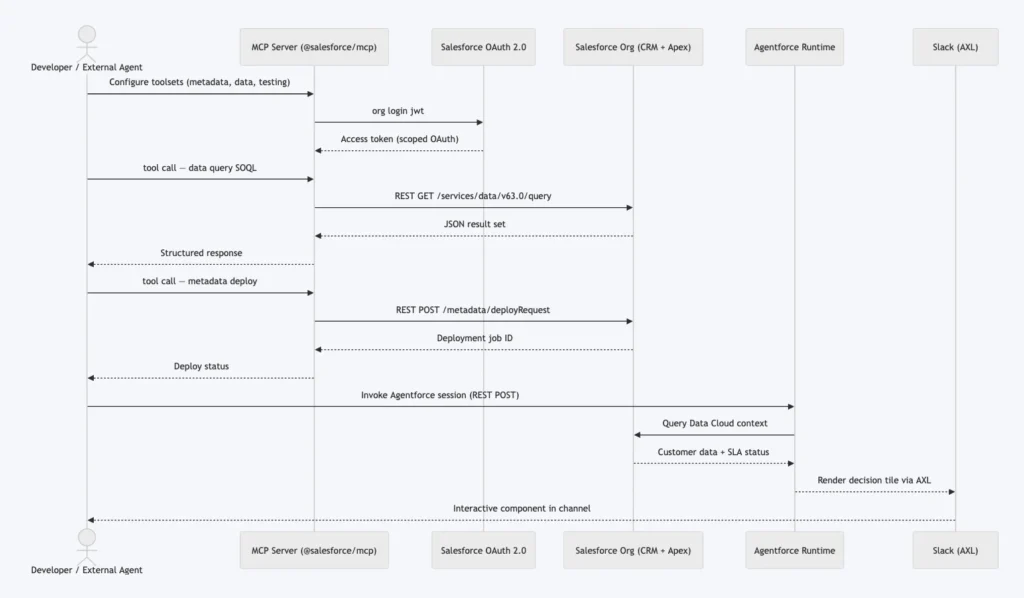
Sequence diagram — from MCP authentication through SOQL query and metadata deployment, to Agentforce session invocation and Slack rendering, all without a browser.
Developer Walkthrough: A Concrete “Hello, Agent” Example
Here’s a minimal end-to-end flow: an AI coding agent generates an agent spec, deploys it, and runs an evaluation test — all from the terminal, no browser.
Step 1: Authorize the Org (Once)
# Web-based OAuth — development environments
sf org login web --alias myDevOrg --instance-url https://login.salesforce.com

# JWT-based — CI/CD, truly headless, no browser
sf org login jwt \
  --client-id <CONNECTED_APP_CONSUMER_KEY> \
  --jwt-key-file server.key \
  --username deployer@mycompany.com \
  --alias myCIOrg
JWT auth is how you run this headlessly in a pipeline. You’ll need a Connected App configured with the JWT OAuth flow and a certificate uploaded to Salesforce. The certificate upload step is the most common failure point in headless CI setups — don’t skip it.
Step 2: Generate an Agent Spec
sf agent generate agent-spec \
  --type customer-facing \
  --role "Handle tier-1 billing support questions and escalate unresolved cases" \
  --company-description "B2B SaaS, Enterprise edition, 500-seat customer base" \
  --max-topics 4 \
  --tone professional \
  --output-file specs/billingAgentSpec.yaml \
  --target-org myDevOrg
This outputs specs/billingAgentSpec.yaml with the agent definition and up to four subagent topics. Run it again with --spec specs/billingAgentSpec.yaml to iterate and refine.
Step 3: Deploy to the Dev Org
sf project deploy start \
  --source-dir force-app \
  --target-org myDevOrg \
  --wait 10
Standard metadata deployment. Your AgentDefinition files live in force-app/main/default/botDefinitions/ — version-controlled, diffable, code-reviewable. That’s the whole point.
Step 4: Run Evaluation Tests
# Run agent evaluation tests
sf agent test run --target-org myDevOrg

# Query test results via Connect API
sf api request rest \
  "/services/data/v63.0/connect/ai/agent-evals" \
  --target-org myDevOrg
The Testing Center checks your agent against its defined test cases — logic gaps, policy violations, response quality. Once @salesforce/mcp is configured in your coding agent, it can do all of the above autonomously. You describe the goal: “Create a billing support agent, deploy it to myDevOrg, and run the evaluations.” The agent does the rest. That’s “agentic everything.”
The Honest Take: What This Changes
For Developers
This is genuinely transformative for developer experience. The days of switching between Setup, the Developer Console, VS Code, and three browser tabs to make one change are numbered. Having a coding agent that can query the org, write the code, deploy it, and validate it — all within one conversation thread — is a meaningful productivity shift.
The tradeoff: you’re trusting an AI to write and deploy code to your org. Agents are “probabilistic, not deterministic,” as The Register quoted from TDX. They reason their way to unexpected outcomes. Build solid evaluation test suites before you let an agent anywhere near a staging environment, let alone production.
For Admins
You won’t need to log in as often. That’s actually good news — fewer context switches, less clicking through nested Setup menus. But it shifts your work toward configuration governance: making sure OAuth scopes are tightly scoped, reviewing Session Traces when something goes wrong, and understanding what an agent actually did when a user reports unexpected behavior.
Loose field-level security and sharing rules don’t get worse with Headless 360, but the consequences become more visible faster. An agent hitting the API 500 times a minute doesn’t notice that a field probably shouldn’t be readable.
For Architects
The interesting question Headless 360 raises: where does your integration layer live now? When any MCP-compatible AI agent can reach your org directly, the API gateway conversation becomes more important, not less. Named credentials, connected app scopes, IP allowlisting, and per-agent rate limits at the gateway level — these matter more now.
The governor limits conversation also changes shape. MCP tool invocations consume daily API quota just like any other API call. Agentic workflows that run hundreds of SOQL queries and deploy metadata in a loop can drain your 24-hour pool in ways that traditional batch jobs didn’t.
Getting Started with Salesforce Headless 360: Hands-On Walkthrough
Governor Limits & Security Considerations
API Limits
| Resource | Enterprise Edition Default | Notes |
|---|---|---|
| Daily API calls (rolling 24h) | 100,000 | Pooled: REST, SOAP, Bulk, Connect |
| Connect REST rate limit | Per-app, per-user, per-hour | Returns 503 when exceeded |
| SOQL queries per transaction | 100 | Applies to synchronous Apex in agent tools |
| DML statements per transaction | 150 | Governor limits don’t bend for agents |
| Heap size (sync / async) | 6 MB / 12 MB | Apex called by agent tools is subject to this |
| CPU time (sync / async) | 10s / 60s |
OAuth and Authentication
Use JWT OAuth flow for headless agent authentication — no browser redirect, supports certificate-based auth. Scope your Connected App to only the OAuth scopes your agent actually needs:
api— access to REST/SOAP APIsrefresh_token— keep sessions aliveweb— not needed for headless; omit it
Avoid over-scoping. An agent with full scope can do anything a System Administrator can do. Use Named Credentials to manage org credentials for agent-to-org connections — they keep auth details out of your code and out of your agent’s context.
Einstein Trust Layer
The Einstein Trust Layer applies to every Agentforce session invocation, browser or not. It enforces data masking of PII fields before they reach external LLMs, zero-data-retention agreements with LLM providers, dynamic grounding against your org’s actual data with permission checks, and field-level security compliance — agents respect FLS and sharing rules. The Trust Layer is not configurable to “off.” That’s the right call.
FAQ
Salesforce Headless 360 is a platform initiative announced at TDX 2026 that exposes every capability in the Salesforce platform — CRM, Agentforce, Data Cloud, Slack — as APIs, Model Context Protocol (MCP) tools, and sf CLI commands. AI agents can access data, trigger workflows, and deploy code without a user opening a browser.
The core package — including @salesforce/mcp and sf agent commands — is available as of April 2026, with some toolsets still in Beta or Developer Preview. The --allow-non-ga-tools flag unlocks pre-release tools. Capabilities continue rolling out through 2026. Check the Salesforce CLI Release Notes for current GA status.
The Salesforce DX MCP server (@salesforce/mcp) lets AI coding agents — Claude Code, Cursor, Codex, Windsurf — connect directly to Salesforce orgs. It exposes 60+ tools in toolsets covering metadata, data, testing, LWC development, code analysis, DevOps, and more. Install with npx -y @salesforce/mcp.
Yes. Every API call from an MCP tool or sf CLI command counts against your daily API limit (100,000 for Enterprise Edition by default). Agentic workflows that run many queries or deployments in sequence can drain your quota faster than traditional integrations. Monitor via Setup and set API usage alerts.
The Einstein Trust Layer enforces data masking, dynamic grounding, field-level security, and zero-data-retention agreements with LLM providers for every Agentforce session — regardless of whether it was triggered from a browser or an API call. Agents running as a given Salesforce user respect that user’s sharing rules and FLS settings.
Yes. Any MCP-compatible AI agent can connect to the Salesforce MCP server. The Connect REST API and Agentforce REST API are standard HTTP/OAuth surfaces accessible from any programming language or AI framework. The sf CLI is Node.js-based and usable from any CI/CD environment.
References
- Salesforce Official — Introducing Salesforce Headless 360. No Browser Required.
- VentureBeat — Salesforce launches Headless 360 to turn its entire platform into infrastructure for AI agents
- GitHub — salesforcecli/mcp: MCP Server for interacting with Salesforce instances
- Salesforce Developers — Introducing MCP Support Across Salesforce