
When an Order Is Ready, but the Invoice Process Is Not
An Order is ready for billing, the customer has accepted the commercial terms, and all product lines are already in Salesforce. The next step looks simple: generate the invoice.
But finance still needs to know which legal entity should issue it, which VAT rules apply, whether the customer needs a PDF or e-invoice, who must approve it, and how payment will be tracked.
Most of this information already exists in Salesforce. The Account stores customer details, while the Quote or Order contains products, prices, and terms. Moving invoicing elsewhere means transferring that context and bringing payment updates back later.
Salesforce’s 2026 State of Sales report found that only 34% of sales teams use one platform. Teams use eight tools on average, and 42% say they have too many to manage. Another disconnected finance system can make the customer record harder to follow.
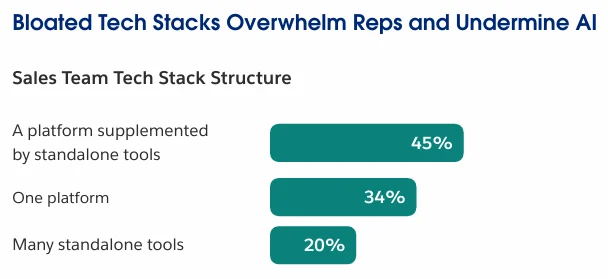
Image source: Salesforce
With Salesforce invoice management, source data, finance documents, accounting rules, and payment follow-up stay closer to the same customer record.
What a Complete Salesforce Invoicing and Accounting Process Should Cover
A complete process needs more than an Invoice record. It should connect three areas:
- The financial document lifecycle: Source data, Quotes, Orders, Invoices, Credit Notes, corrections, and generated documents.
- The accounting configuration: Legal entities, tax rules, numbering, currencies, account assignments, and user access.
- The follow-up process: Sending, open balances, partial payments, reminders, bank matching, and accounting export.
To show how these areas work in Salesforce, I will use Finblick by Cloudwharf as a working example. Finblick is a native finance solution listed on AppExchange (now AgenExchange). It covers quotes, orders, invoices, credit notes, e-invoices, tax and legal-entity settings, banking, payment tracking, and DATEV export. We will start with the source data used for each document.
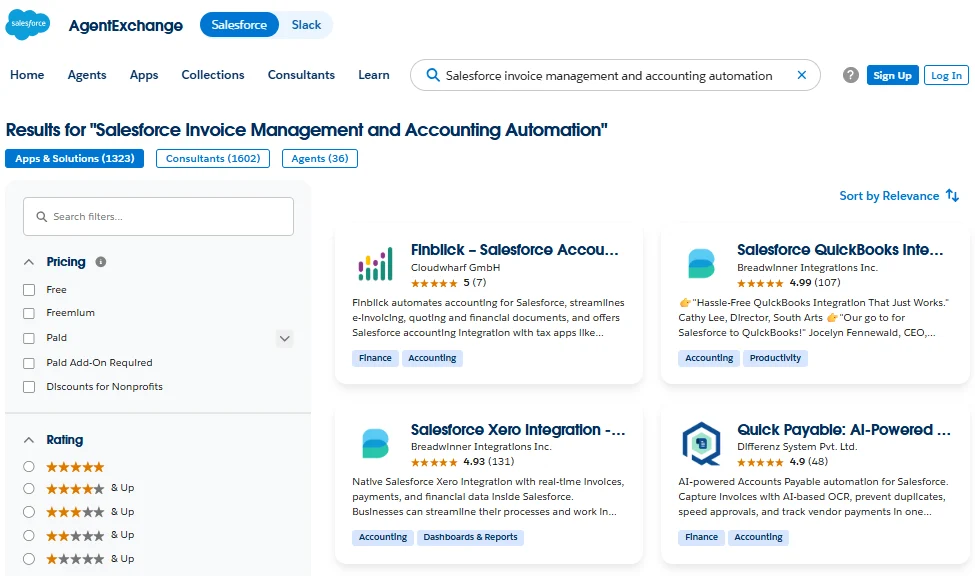
Salesforce invoice management and accounting automation solutions in AppExchange
Connect the Financial Document Lifecycle from Source Data to Customer Output
The financial document lifecycle begins with the transaction data and ends with the document sent to the customer.
Start with the Data Behind the Transaction
Before creating an Invoice, the team needs a clear source for:
- Customer and billing details
- Products, quantities, prices, discounts, and currency
- Payment terms, tax treatment, language, and legal entity
- Customer references and supporting files
These values may come from several Salesforce records. Users should be able to identify their source and spot missing information before document generation. Required fields, validation rules, approval checks, or app controls can prevent an incomplete document from being created.
In Finblick, Quotes and Orders use Salesforce data such as Account details, products, prices, addresses, and tax information. Teams searching for Salesforce automate contract invoice workflows should note that Finblick creates Invoices from Orders, so any Contract-to-Order step must be configured separately.
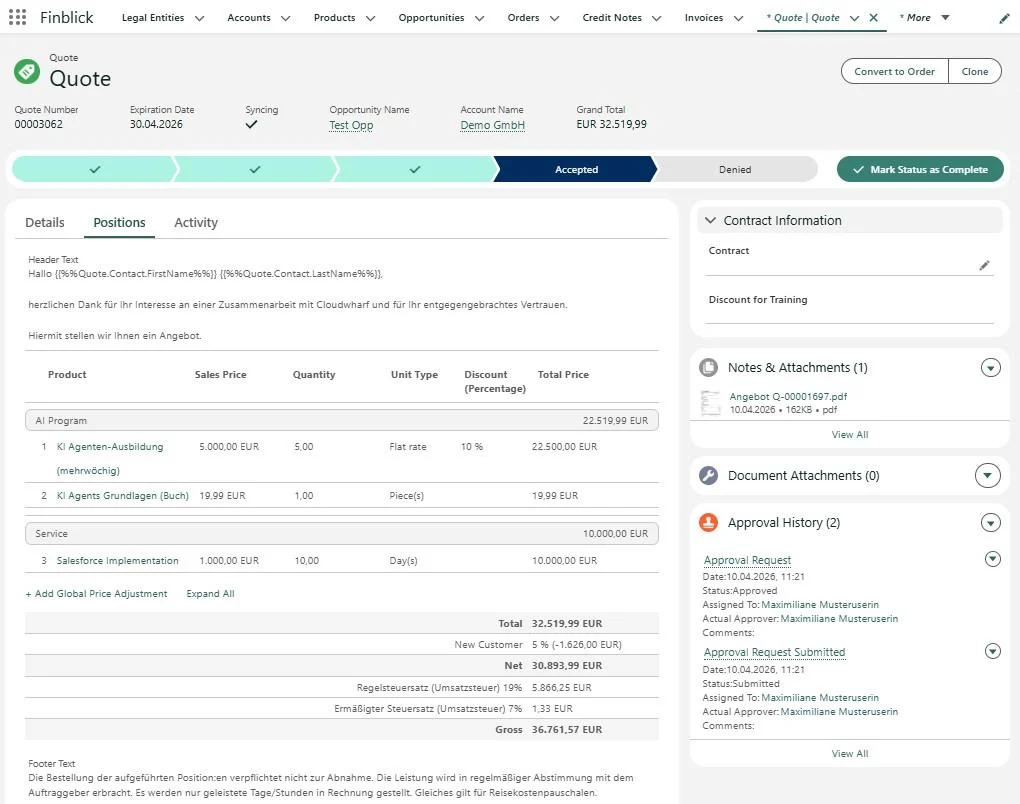
Quote management in Finblick with line items, tax calculation, and approval tracking
Keep the Salesforce Invoice Tracking Connected
A Quote records what was offered, an Order confirms what should be delivered and billed, and an Invoice records the amount due. Credit Notes and cancellation invoices should remain connected to the original Invoice.
The process may also need partial, down payment, final, and cancellation invoices, line-level corrections, supporting files, and duplicate controls. For Salesforce billing automation invoice generation, creating the file is only one step. The Invoice should retain its source, current status, previous documents, and later corrections.
Finblick by Cloudwharf supports Quotes, Orders, Invoices, and Credit Notes. It also supports partial, down payment, final, and cancellation invoices, as well as Credit Notes and corrections at the invoice line level.
Prepare the Document the Customer Will Receive
The final document may vary by legal entity, customer language, and required format. A Salesforce invoice personalization solution should control company details, branding, translated text, payment terms, supporting files, and PDF or e-invoice output.
A Salesforce invoice personalization system should reuse Salesforce data and stored settings instead of asking users to enter the same information for every document. It should also keep document changes under admin control so that branding, legal details, and text remain consistent.
In Finblick, Legal Entity records store company information used in financial documents. Templates control logos, layout, text, and legal details. Template text can be stored in Salesforce Custom Labels and translated through Translation Workbench.
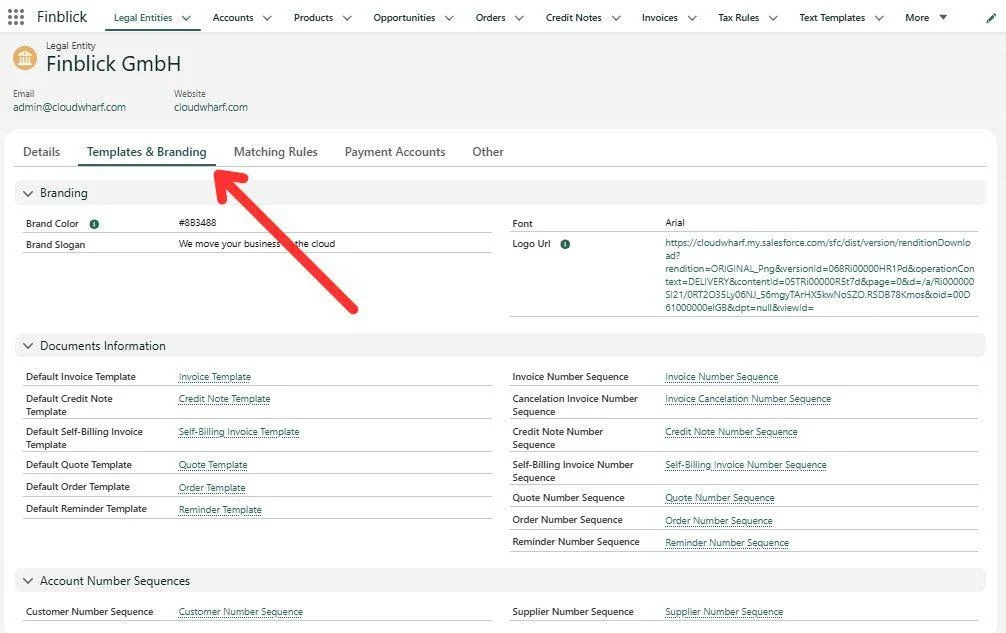
Finblick Legal Entity record with Templates and Branding settings
The app also supports ordered attachments and output in PDF, XRechnung, and ZUGFeRD.
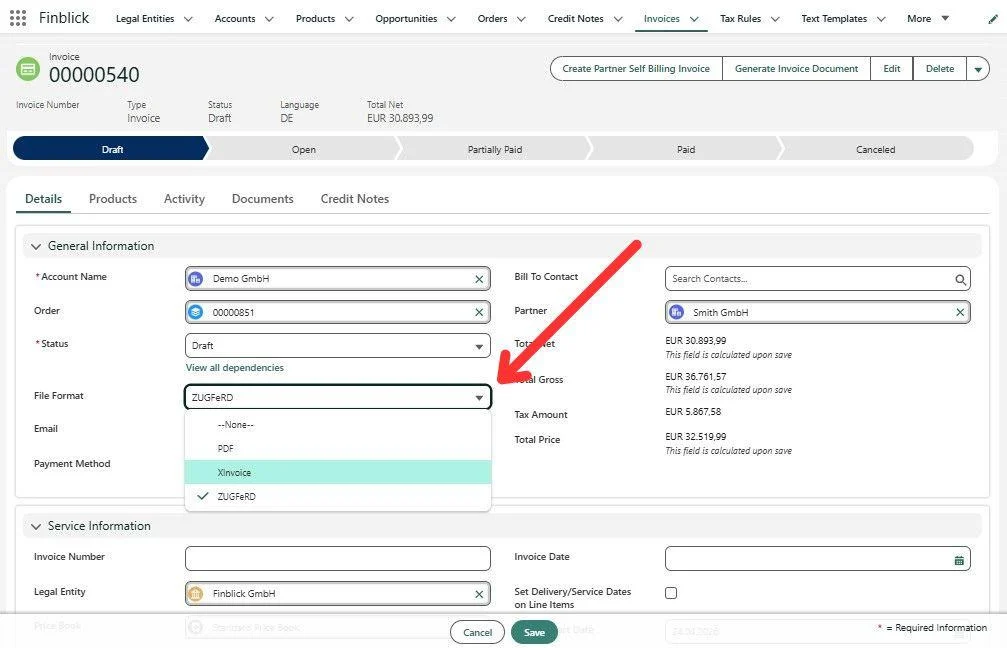
Selecting the invoice file format in Finblick
Insight: The European Commission estimates that the move to e-invoicing and digital VAT reporting could reduce administrative and compliance costs for EU traders by more than €4.1 billion per year over the next decade.
The next area is the accounting configuration that determines the legal entity, document number, tax treatment, and account assignment.
Configure the Rules Behind Salesforce Accounting Automation
Once the document flow is clear, the rules should be stored in configuration rather than selected manually for every transaction.
Define which company issues the document
The legal entity determines the company name, VAT number, bank details, numbering, and accounting data shown on the document. If several companies share one Salesforce org, each finance record needs the correct Legal Entity and number sequence.
In Finblick, the Legal Entity record stores the company information used for financial documents. When multiple legal entities are enabled, each financial record is assigned to one legal entity. Finblick also requires separate number-sequence formats for each entity to avoid duplicate document numbers.
Apply tax and accounting rules consistently
Tax, booking accounts, and cost centers should come from stored rules rather than user memory. These Salesforce accounting automation features allow admins or finance key users to change future handling without correcting each document manually.
Finblick uses Tax Rules to define the tax applied to document lines. It also supports account determination and cost-center allocation for accounting data sent to DATEV.
Control document numbers and currencies
Document numbers should be unique and centrally controlled for each document type or legal entity. Currency should also remain consistent as a Quote becomes an Order and then an Invoice.
Finblick stores number sequences for the different financial documents and allows admins to adjust their formats. The app also supports multiple currencies.
Give users the access they need
Accounting data should not be open to every Salesforce user. The access model should follow these responsibilities. For example Finblick provides three main licence types:
- Read-only users view records.
- Sales users work with Quotes.
- Finance users work with Quotes, Orders, Invoices, and Credit Notes.
Additional permission sets control Finblick administration, DATEV export, and banking records.
Prepare the accounting export
Before enabling DATEV export, test a small set of Invoices and Credit Notes with the accounting team. Check the accounts, document numbers, dates, taxes, and amounts.
Finblick’s DATEV export requires specific values on the Legal Entity, Account, and matching-rule records. Users also need the DATEV licence and permission set before they can create an export.
Once these rules are configured, the process can continue from document creation to payment follow-up.
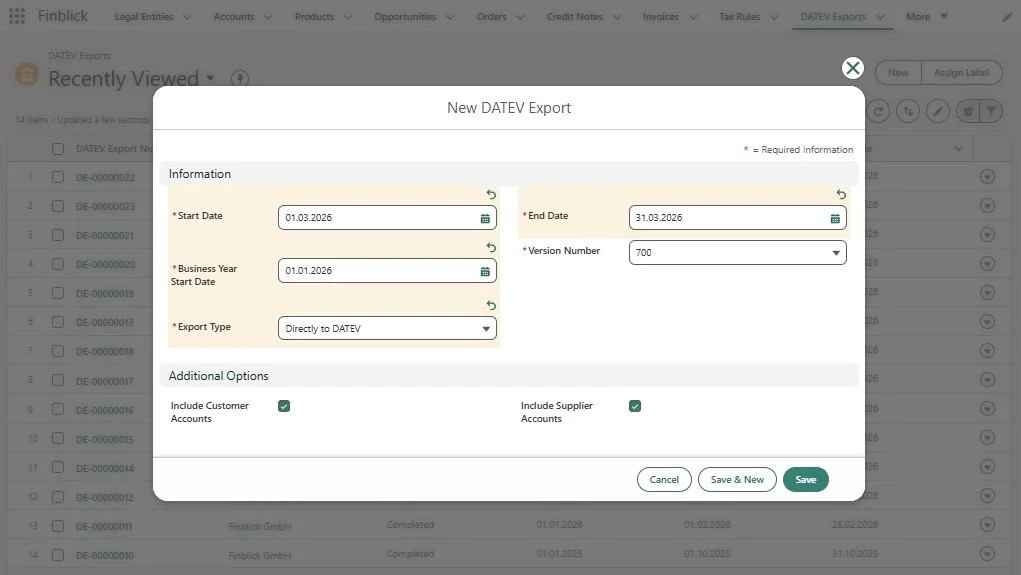
Export from Salesforce to DATEV via Finblick
Extend Salesforce Invoice Management from Sending to Payment
Sending the Invoice is not the end of the process. Users still need to see whether the balance is open, partially paid, paid, or overdue. These statuses should come from confirmed payment data.
Match payments with the right invoice
For bank transfers, the invoice number, customer number, amount, and bank account can support automatic matching.
With Finblick’s banking integration, transactions from connected bank accounts are retrieved and made available in Salesforce. They can be matched with Invoices and Credit Notes automatically, using reference information and amounts, or manually when no clear match is found. A confirmed match updates the related document to Paid or Partially Paid.
Use current payment data for reminders
A reminder should use the latest open balance. Otherwise, finance may contact a customer who has already paid or request the wrong amount after a partial payment.
The EU Payment Observatory found that 52% of European companies faced problems from late payments in 2024. The average B2B payment period was 60.3 days, and companies spent 9.85 hours per week chasing late payments.
The system should therefore identify invoices that are still open or partially paid after the due date. Finance can then review the remaining balance and send the correct reminder.
Finblick uses current payment information as the basis for its reminder process. Open and partially paid invoices can be identified for reminders and further action.
Collect payments by SEPA Direct Debit
With SEPA Direct Debit, a company can collect payment after the customer has provided a valid mandate. The Invoice, mandate, amount, and payment result should remain connected.
Finblick can initiate a SEPA Direct Debit for an open invoice when a valid customer mandate is available. The collection is started from Salesforce, while the invoice, mandate, and payment information remain part of the same process.
Keep payment and accounting information connected
Payment matching and accounting export serve different purposes, but both should remain connected to the Invoice. Sales can check payment status, while finance can review balances, reminders, and export data.
Finblick supports DATEV export for Invoices and Credit Notes, including the related customer, supplier, account, and tax information. Together with banking and payment matching, this connects invoicing and accounting in Salesforce from the document sent to the customer through payment and accounting transfer.
How Finblick Supports the Three Connected Areas
We have looked at the process from three angles: the financial document lifecycle, accounting configuration, and follow-up after the invoice is sent. The table below shows how a dedicated accounting app for Salesforce can support each area.
| How Finblick Supports the Complete Finance Process in Salesforce | ||
| Process area | What Finblick provides | How it fits into the Salesforce setup |
| Financial document lifecycle | Quotes, Orders, Invoices, Credit Notes, partial invoices, down payment invoices, final invoices, cancellation documents, templates, attachments, PDF, XRechnung, and ZUGFeRD | Uses Salesforce customer, product, pricing, and address data. Admins configure required fields, approval rules, and the Quote and Order pages used by sales and finance. |
| Accounting configuration | Legal Entities, Tax Rules, number sequences, multiple currencies, cost centers, account determination, permission sets, and DATEV data | Company details, tax rules, account assignments, user access, number formats, and DATEV settings are configured for the company’s finance process. |
| Follow-up process | Bank transactions, automatic and manual payment matching, Paid and Partially Paid statuses, reminders, SEPA Direct Debit, and DATEV export | Banking and DATEV access are enabled as needed. Finance users review payment matches, maintain SEPA mandate data, manage reminders, and validate exports. |
The table also gives teams a practical way to evaluate a finance solution. Instead of checking features one by one, they can ask whether the app preserves the document trail, applies the required accounting rules, and keeps payment information connected to the invoice.
In Summary: Give Sales and Finance One Transaction History
Let us return to the Order example from the beginning of the article. The customer has accepted the terms, the products and prices are already recorded, and the Order is ready for billing. Finance should not need to enter the same information again or check several systems before creating the invoice.
The invoice should use the agreed commercial data and the correct legal entity, tax rule, number sequence, language, and document format. After it is sent, the same process should show whether the amount is open, partially paid, paid, or overdue. Any Credit Note, cancellation, reminder, bank transaction, or accounting export should remain connected to that transaction.
Finblick provides one example of how Salesforce invoicing and accounting can work this way. The wider lesson applies to any implementation: the document, accounting, and payment stages should be designed as one process rather than as separate tasks.
The goal is not only to generate an invoice faster. It is to give sales and finance the same view of the transaction, from the accepted Order through payment and accounting transfer.