
If you’ve been hand-wiring Salesforce agent skills into Claude Code — downloading MCP servers one at a time, authenticating each, praying nothing drifts out of version — you’ve been solving a problem Salesforce already solved for you. The fix is the Salesforce Development Plugin, and it bundles roughly 38 core platform skills, four MCP servers, a specialized agent, about twenty slash commands, and a stack of lifecycle hooks into a single installable unit that auto-updates from a marketplace.
Here’s what you’ll come away with: what’s actually inside the plugin, how the pieces talk to each other, the install steps that work in November 2026 (not the April blog post), and the sharp edges that bit Philippe Ozil on stage so they don’t bite you.
Written for Salesforce Developers and Architects running Claude Code against real orgs, with asides for Admins who are code-adjacent.
Background: The 500-Skill Scale Problem
Salesforce started shipping agent skills in February 2026. A handful of markdown files. Fine. By November 2026, the count is around 500 across the ecosystem — and that’s not the ceiling, that’s the pace.
Three problems show up once you pass maybe forty skills in a single Claude Code session:
- Context bloat. Skills are lazy-loaded (only the name and description sit in the agent’s memory until something actually fires one), but even those headers pile up. Multiply by MCP server tool definitions, and the context window starts groaning before you’ve written a prompt.
- Auth multiplication. Every MCP server you connect has its own authentication. Headless 360, Metadata Experts, Metadata Grounding — three separate OAuth dances if you hand-install them.
- Skills don’t version. They just change. There’s no
skill@1.2.3. You’d have to track freshness yourself against the GitHub repo, which — as the speaker put it — nobody’s actually doing.
Plugins answer all three. One install bundles the dependencies, the marketplace handles versioning, and authentication is shared at the plugin level instead of per-server. (The downside, which we’ll come back to: plugin packaging is vendor-specific right now. Anthropic’s model, OpenAI’s Codex model, and whatever shows up next for GitHub Copilot are not interchangeable.)
Deep Dive: What’s Inside the Salesforce Development Plugin
The core plugin is deliberately lightweight. It covers Apex, Lightning Web Components, Flows, FlexiPages — the things every Salesforce developer touches. It doesn’t include Data 360, DevOps Center, mobile, Code Analyzer, or AgentScript. Those live in sub-plugins (about 20 of them sit alongside the core), and the core plugin can detect your intent and suggest the right one to install.
Five component types ride inside the plugin:
1. Skills (~38 core platform workflows)
Think Apex trigger scaffolding, LWC generation, Flow interrogation, SOQL writing, metadata deploy prep. Each one is a folder with a SKILL.md header — name + description — plus any support files it needs. Claude only pulls the full file into context when it decides the skill is relevant.
If you’re used to installing skills by hand into ~/.claude/skills/, this is the same shape, just pre-bundled and version-pinned.
2. MCP servers (four, pre-configured)
This is where the plugin earns its keep — these four normally take an afternoon to wire up individually.
| Server | Where it runs | Status (as of Nov 2026) | What it does |
|---|---|---|---|
| Headless 360 MCP | Hosted by Salesforce | Beta → GA transition; being renamed Salesforce MCP | 6–7 flexible tools that query and mutate both metadata and data: create fields, activate/deactivate flows, work with custom metadata types, read records. The main development server. |
| Metadata Experts MCP | Hosted | Beta, scheduled to deprecate | Metadata-only querying. Overlaps with Headless 360 and will quietly disappear. Don’t invest in it. |
| Metadata Grounding MCP | Hosted | Beta, read-only | Uses API Catalog and Data 360 to do semantic search / retrieval augmented generation over your org’s customization. Essential if you want Claude to reason about relationships between custom objects, fields, and flows. |
| Apex Language Server | Local | GA | Validates Apex syntax before the agent attempts a deploy. Same LSP you already have if you use the Salesforce Extensions for VS Code — the plugin just gives Claude direct access to it without running the whole IDE around it. |
The whole stack inherits authentication from your Salesforce DX project and the sf CLI. You don’t paste tokens, you don’t configure OAuth per server, you don’t juggle org aliases. If sf org list knows about your org, the plugin knows about your org.
(And yes, the Metadata Grounding server falls back to Headless 360 if you don’t have Data 360 provisioned. You lose the RAG-style semantic search but the basics still work.)
3. Specialized agent: salesforce-dev
This one’s important, and it’s the thing that keeps Claude from doing something horrible to your production org. The agent instructions are always loaded in memory — they’re not a lazy skill, they’re the posture Claude adopts the moment the plugin activates.
The core rules:
- Capability-resolution hierarchy: Skills first → MCP servers next →
sfCLI after that → direct Salesforce APIs only as a last resort. - No destructive changes to production orgs. Hard-coded guardrail.
- Required Apex code coverage enforced on deploy attempts.
- Delegation to sub-agents for specialized work (review, org analysis).
You can layer your own CLAUDE.md rules on top of this to tighten restrictions further — that’s exactly how you add team-specific guardrails.
4. Commands (~20 slash commands)
Commands are a Claude Code vendor-specific feature. OpenAI Codex doesn’t have an equivalent yet. They’re predictable scripted actions — not prompts you have to compose.
The ones you’ll use constantly:
/salesforce-development:setup— runs environment checks (sf CLI version, Git, Node.js, Python) and tells you exactly what’s missing./salesforce-development:status— shows current org, API version, project name, recommended sub-plugins based on local metadata./salesforce-development:login,/salesforce-development:logout— org authentication without typing the fullsf org login web --alias ...incantation.- Deploy, retrieve, and project-scan shortcuts.
Type / in a Claude Code session with the plugin installed and you’ll see all of them prefixed with the plugin name.
5. Hooks (lifecycle events)
Hooks are the quiet workhorse — deterministic code that fires around prompts and tool calls. The ones that ship with the plugin:
- Startup hook: detects that you’re inside an SFDX project, figures out your default org, decides whether it’s sandbox or production, and warns you accordingly.
- Pre-prompt / pre-deploy hook: intercepts deployment intents, checks the target isn’t a production org, blocks if it is.
- Post-prompt / post-deploy hook: parses the output of a deploy, extracts errors into human-readable form, feeds telemetry back to Salesforce.
Here’s the thing about hooks — they’re not AI. They’re regular code paths. Which means they’re deterministic, which means you can actually trust them. That’s why “don’t deploy to production” lives in a hook, not in a natural-language instruction.
Architecture: How the Pieces Connect
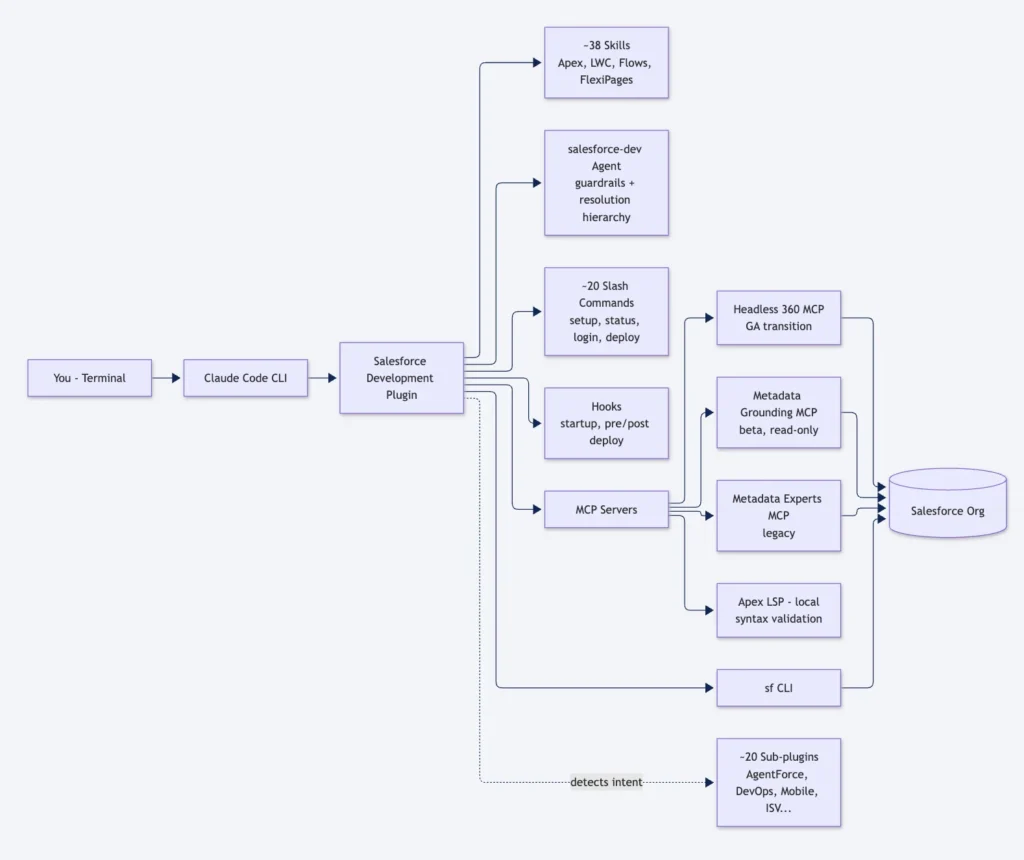
Getting Started: The Actual Install
Three places to touch, in order:
1. In your Salesforce org. Go to Setup → Integration → Salesforce MCP Servers (the label has already shifted in current orgs — Philippe’s slide said “API Catalog MCP Servers,” which was the older name). Toggle on the Headless 360 MCP server and the Metadata Experts MCP server. One click each.
2. In Claude Code. Open a terminal (not the Claude Code extension inside VS Code — more on that in a minute), run claude in your SFDX project, then:
/plugin marketplace add forcedotcom/sf-skills
/plugin install salesforce-development@salesforce
The first command registers Salesforce’s marketplace. The second installs the core plugin at user scope. If you want it project-scoped so everyone on the repo gets it, pick that option when the install panel prompts you.
3. Validate the install.
/salesforce-development:setupThe command runs environment checks and tells you what’s missing (sf CLI, Git, Node, Python). Fix whatever it flags. Then:
/salesforce-development:statusYou should see your current org alias, API version, and a list of recommended sub-plugins based on what the plugin found in your local metadata.
That’s the whole install. Two toggles, two commands, one validation.
Best Practices & Gotchas
The plugin is new, which means things break in ways release notes haven’t caught up with. The ones worth knowing:
- Don’t install every sub-plugin at once. The whole point of plugins is context economy. Install
salesforce-developmentas your base; addagentforce-adlc,devops-center, ormobileonly when you’re focused on that area. Toggle plugins on and off from the/pluginInstalled tab to keep your active skill set tight. - Don’t use Claude Code inside VS Code for the plugin UI. The Salesforce extension pre-installed in VS Code runs Claude Code, and the skills + MCP servers still work — but the plugin’s text UI (install summaries, recommendations, the welcome page) doesn’t render correctly. Use a plain terminal. If you want VS Code’s file tree open alongside, fine — just launch Claude in VS Code’s integrated terminal, not the extension panel.
- Don’t try this in Claude Desktop. Plugins are a Claude Code feature. The desktop app doesn’t support them. If you’ve been using Claude Desktop for Salesforce work, you’ll need to switch surfaces.
- You don’t need Claude Code Pro. The free tier handles the plugin fine. The speaker was asked this directly.
- Watch the plugin-recommendation sensitivity setting. It has three levels: off, low, high. If Claude isn’t proposing sub-plugins when it should, check this. The demo hit this exact issue on stage.
- Metadata Grounding requires Data 360. No Data 360, no semantic search over custom metadata. The plugin falls back to Headless 360 gracefully, but if you’re relying on RAG-style org understanding, you need the Data 360 license.
- The Codex plugin exists — don’t rush to it. The same team is building a Codex-compatible version at
codex-plugins/insideforcedotcom/sf-skills. It’s much younger, more restricted, and some Codex features don’t map cleanly (commands and hooks work differently). If you’re on Codex, try it, but expect gaps. - Plugins are open source. The whole Salesforce Development Plugin — agent instructions, hooks, commands, the lot — lives under
plugins/builder/salesforce-development/in forcedotcom/sf-skills. Read thesalesforce-devagent file inagents/if you want to see the guardrails verbatim. Apache 2.0 license. - Forward-looking caveat (the speaker’s own). Some of this — the Headless 360 rename to Salesforce MCP, the Heroku plugin, the “Claudeforce” business-user plugins for Sales/Service/Marketing clouds — is on the roadmap, not GA. Don’t make licensing decisions on the roadmap.
What’s Next on the Roadmap
Three things to watch, pulled from the end of Philippe’s session:
- Heroku Claude Code plugin — the Heroku team is building a standalone plugin, reportedly targeted for end of 2026. Separate install from
salesforce-development. - Codex plugin parity — as Codex matures its plugin support (commands, hooks, agent delegation), the Salesforce team expects to close the gap.
- “Claudeforce” plugins for business users — Sales Cloud, Service Cloud, Marketing Cloud plugins pre-wired with the relevant MCP servers and skills. Aimed at end users, not developers. And connected to a bigger shift: skills becoming manageable centrally inside Agentforce Studio in your Salesforce org, with governance that developer-local skills don’t have.
Summary
- One plugin install replaces hand-managing ~38 skills and 4 MCP servers for core platform development.
- Marketplace-driven auto-updates solve the versioning problem plain skills never had.
- Shared authentication through the
sfCLI eliminates per-server OAuth setup — the single biggest time saver. - Hard-coded guardrails — no destructive production changes, Apex coverage checks — live in deterministic hooks and the always-loaded
salesforce-devagent, not in soft prompt instructions. - Vendor-specific for now — Claude Code is the mature target; Codex is nascent; GitHub Copilot support isn’t here yet.
- Sub-plugin discovery is the trick that keeps context small — load only what the task needs, propose the rest on demand.