
A year ago, a skill library was a novelty. Now it is the default. Teams publish folders of SKILL.md files for Claude, Cursor, and every other coding agent that will read them. Salesforce teams have been early and loud about it: one skill to write Apex, another to run tests, another to deploy, another to grant field access, another to scan the diff. The library grows every week. The agent does not get better at the same rate.
The miss is not the missing skill. The miss is the prompt. A person types “add a formula field and make sure the existing permission set can see it,” and the agent either loads nothing and improvises, or loads one nearby skill and follows only half the job. Ninety good playbooks in a folder do not help if the turn loads zero of them, or loads the field skill and never the permission-set skill the prompt also asked for.
| A skill library answers “what do we know how to do?” The skill router answers “which of those does this prompt need, and which should stay on disk?” |
That second question is the whole product. The router reads the prompt, compares it with skill names and descriptions, and returns the skills to load. A prompt about one job returns one skill. A prompt that asks for two jobs returns both. If the match is weak, it returns an empty list. Empty is a successful answer. A router that always picks something will eventually follow the wrong playbook with complete confidence.
The skills checked into this repo are samples. They are here so the route can be shown and the numbers can be checked. They are not a library to adopt. Point the router at skills you have already written. Or point it at the skills folder in github.com/forcedotcom/sf-skills, the Salesforce skills library, which already has SKILL.md files for Apex, Flow, fields, permission sets, and the jobs around them. The router does not care who wrote the file. It loads the skills the prompt asked for, and it leaves the rest on disk.
The measurement later in this post uses those samples, 19 short files, because that is the folder in the repo. Swap the folder and the same router runs on yours.
Samples, so the route is visible
The names below are the kind of Salesforce jobs a prompt has to tell apart. The files in this repo are short stand-ins, a few lines each, so this post can show the route without pasting a real playbook. The other samples in the measurement are general: unit tests, a pull-request review, an explanation, docs, a SQL query, a release, and an HTTP note. Use forcedotcom/sf-skills when you want the real versions of jobs like these, and leave these samples behind. Each sample still has the routing signal: a description, and a keywords line.
| Skill | The job it owns |
| platform-soql-query | Write or check a SOQL or SOSL query. |
| platform-apex-generate | Write or refactor an Apex class or trigger. |
| platform-apex-test-generate | Generate an Apex test, including a bulk case. |
| platform-apex-test-run | Run tests and read the coverage. |
| platform-apex-logs-debug | Read a debug log or a governor-limit failure. |
| platform-metadata-retrieve | Pull metadata from an org into the project. |
| platform-metadata-deploy | Deploy metadata with the Salesforce CLI. |
| platform-custom-field-generate | Create a custom field, including a formula. |
| platform-permission-set-generate | Grant object and field access in a permission set. |
| platform-validation-rule-generate | Author a validation rule. |
| automation-flow-generate | Build a screen, record-triggered, or autolaunched flow. |
| dx-code-analyzer-run | Scan Apex or LWC for security and performance issues. |
Twelve skills is already enough to collide. “Test” appears in two of them. “Field” appears in two. “Deploy” is a neighbor of “retrieve.” A keyword scan that stops at the first hit will send a coverage question to the skill that generates tests, and a retrieve question to the skill that deploys. The person did not ask for a bigger library. They asked for the prompt to land on the right row.
Watch a few prompts move through the router. These lines are in eval/prompts.jsonl.
- “Write a SOQL query for accounts created this week”. That is one job. The query skill loads. The deploy skill and the Apex skill stay on disk.
- “Run the Apex tests and tell me the code coverage”. Coverage belongs to the skill that runs tests, not the one that writes a new test. One skill loads: platform-apex-test-run.
- “Add a formula field for renewal date and grant field-level security on the sales permission set”. That is two jobs. The field skill and the permission-set skill both load. A prompt that only asks for the formula field loads only the field skill. The permission-set skill does not come along unless the prompt asked for access.
- “What is a good lasagna recipe”. Nothing in the library is about dinner. The router returns nothing, and the agent does not invent an Apex procedure.
That is the help. The library can hold dozens or hundreds of skills. The prompt pays for the skills it asked for, and no others. Context stays small, the guardrails in those skills actually run, and a prompt that is not yours does not get a random playbook stapled to it.
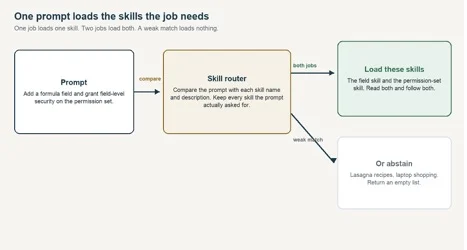
Figure 1. A prompt that names two jobs loads both skills. A weak match loads nothing.
How the router helps
Without a router, a host matches the prompt against every skill description it was given, or it matches against none and relies on the model’s memory. Both degrade as the library grows. Descriptions start to share words. The context window fills with procedures the turn will not use. The model picks a plausible skill and follows it carefully, which is worse than picking none, because the mistake is now enforced.
The router sits in front of that, as a tool the agent can call or as a one-line hint before the turn starts. It does five jobs.
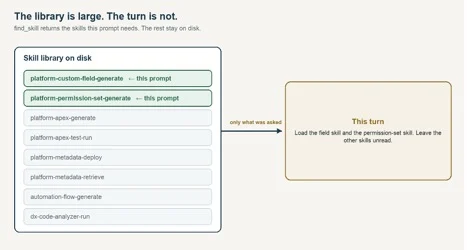
Figure 2. The catalog can be large. The turn receives only the skills this prompt needs.
- It names the skills to load before any code, metadata, or query is written. The agent reads each of those SKILL.md files and follows them.
- It keeps the rest of the library on disk. find_skill returns the skills for this prompt, not the catalog. list_skills and read_skill exist so the agent can open exactly what was named.
- It prefers the word that only one skill uses. “Coverage” belongs to the test run. “SOQL” belongs to the query. “Formula field” belongs to field creation. A word that appears on many skills, such as “test,” counts for less.
- It stays quiet when the match is weak. The result is an empty list. The agent may answer directly. It should not pretend a skill applied.
- It returns one skill or several, depending on the prompt. A field change that also asks for access loads both skills. A field change that does not mention access loads only the field skill.
The same index is available three ways, because hosts differ. ROUTER.md is the human table. An MCP server exposes find_skill, list_skills, read_skill, search_topics, and read_topic over stdin, with no packages to install. An optional hook prints the skills to load only when it is sure, and prints nothing otherwise.
Extending the library does not mean extending the router
This is the part teams underestimate. Adding the next skill should be a file, not a project. The ranker does not get a new branch. You do not retrain a model. You do not edit a priority list of phrases and hope you inserted the rule in the right place. The samples stay in the repo for the eval. Your catalog is a different folder.
Two ways to fill that folder. Write your own SKILL.md files. Or clone the Salesforce skills library and point the router at its skills directory. Those files already have a name and a description, which is what the score reads. They do not use the keywords line this router uses when one prompt should load two skills. Add that line on the skills you want loaded together. Without it, a prompt still loads the single best match.
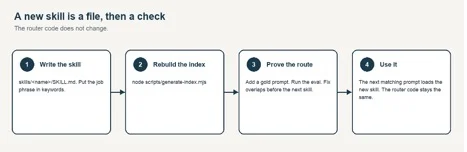
Figure 3. Extending the library is a file and an eval run. The router code stays put.
- Create skills/<name>/SKILL.md. The description is what the score reads. The keywords line holds the job phrases, separated by commas, in the words a person would type: formula field, field-level security. A prompt that contains one of those phrases loads this skill. The body is the procedure, and it is loaded only after the skill is chosen.
- If a real prompt needs two skills, do not hard-wire them together. Write the prompt so it uses both job phrases, and add that prompt to the gold set. The router loads both because the prompt asked for both.
- Add a gold prompt that must return this skill, and a negative if the new words could fire on an unrelated prompt. If the skill is often used beside another, add one prompt that must return both, and one prompt that must return only this skill.
- Regenerate the index and run the eval. If the right skills stop coming back, or an unrelated prompt starts getting a skill, the new description is overlapping a neighbor. Fix that before the next skill.
To use the Salesforce skills library instead of the samples, run this from the skill-router folder. The clone lands next to the router, and the second command rewrites the local index. The sample files stay in skills/.
git clone https://github.com/forcedotcom/sf-skills.git
node scripts/generate-index.mjs –skills-dir sf-skills/skills –out-dir .
Set SKILL_ROUTER_SKILLS_DIR to sf-skills/skills when you start the server. If you cloned it somewhere else, pass that path in both places. Nothing from that repo is copied into this one. A folder of skills you wrote is the same command, with your path.
The router code stays put. The index is generated. A new Salesforce skill — a naming-convention check, a permission-set diff, a flow-fault reviewer — shows up in find_skill on the next prompt, because its description is now in the catalog. Removing a skill is the same operation in reverse: delete the folder, regenerate, confirm the gold prompts that used to hit it now abstain or land on the replacement.
Efficiency here is operational, not clever. The expensive work is writing a sharp description and one prompt that proves it. The cheap work is everything the router does after that. I have added skills to a live catalog this way in minutes. The sessions that went wrong were the ones where I tuned a description by reading it, skipped the gold prompt, and discovered a week later that it had stolen a neighbor’s traffic.
The failure mode
A skill, in the sense this router cares about, is a markdown file. The frontmatter carries a name and a description. The body carries the procedure: what to read, what to refuse, what “done” means. Hosts such as Claude Code and Cursor already match a prompt against those descriptions. That match is enough while the catalog is small.
Past a few dozen skills, two failures show up in real sessions.
- Overlapping descriptions steal each other’s prompts. Deploy, promote, release, and pipeline all sound like the same task to a loose keyword scan, and they are different jobs with different checks.
- The agent answers from memory when a playbook exists. The output is fluent, and it skips the guardrails the skill was written to enforce.
Putting every skill into the prompt does not fix this. The descriptions crowd each other, and the bodies blow the context window before the agent has done any work. What you want is a cheap step in front: return the skills this prompt needs, or return nothing.
What gets indexed
A generator walks skills/ and reads each SKILL.md. It keeps the routing signal and throws away the procedure: directory name, frontmatter name, description, and the keywords line. Multi-word job phrases come from that keywords line. Single words are also taken from the description, and they affect the score only. It writes two artifacts from the same pass.
- router/skills-index.json is the catalog the server scores against.
- ROUTER.md is the same catalog for a person.
The body of the skill is not in the index. That choice came from a measurement later in this post. The procedure is loaded later, on purpose, by a separate tool, after the route has already been decided.
If a skill ships a folder of curated notes rather than a single procedure, the generator also rebuilds a topic index for that folder. Routing still picks the skill. A second, simpler search picks the note.
The tools
find_skill is the call that matters. The list it returns is the set to load. Read every skill in it. The other four tools exist so the agent can open those files, instead of guessing a path.
| Tool | Returns |
| find_skill | Every skill this prompt needs. One skill, or several. An empty list when nothing fits. Read all of them. |
| list_skills | The catalog, with an optional substring filter. |
| read_skill | The full SKILL.md, so the agent follows the procedure after the route. |
| search_topics | Keyword hits inside a skill’s curated notes. |
| read_topic | One note, by domain and topic id. |
How a prompt is matched
The router does not read every skill from top to bottom before it chooses. It reads two things: the skill’s name, and the one-line description at the top of SKILL.md. That sentence is the routing signal. The rest of the file is the procedure, and it is loaded only after the skill has been chosen.
The match itself is ordinary. Which description shares the distinctive words in the prompt? “SOQL” appears on the query skill and almost nowhere else, so a SOQL question goes there. “Test” appears on the skill that writes tests and the skill that runs them, so it is a weaker clue, and “coverage” is what separates them. Words such as “the” and “for” are ignored. They show up everywhere and do not tell you which skill the person wants.
A skill joins the set when the prompt contains that skill’s job phrase. The job phrase is a multi-word entry on the keywords line, such as “formula field” or “field-level security.” One phrase, one skill. Two phrases from two skills, both skills. Words that appear only in the description do not add a second skill. If the prompt uses none of the phrases, but one skill is still clearly the best match, that one skill loads. If the best match is weak, the router returns an empty list. A question about dinner does not get an Apex skill. That cutoff is a number in the code, currently recorded in eval/results.json. You only change it by rerunning the eval after the catalog grows. You do not need the math to write a skill. You need a keywords line that uses the words a person would actually type.
The method has a name, BM25. It is the same idea a library catalog uses: a rare word is a better clue than a common one. The formula is in lib/score.mjs for anyone who wants it. The rest of this post does not depend on it.
One prompt can need more than one skill
A router that always returns one skill is the wrong shape. Create a field, and the permission-set skill should not come along unless the person asked for access. The prompt decides the set.
A hand-written phrase list is still in the repo, in router/intents.json, so we can measure the older idea. The first matching phrase wins, and the second job is dropped. On this set that list puts a right skill first 80% of the time (60 of 75) and does not answer any of the 10 unrelated prompts. It misses whenever the person does not use the exact phrase. It also misses the second skill on every prompt that needs two. The router that ships does not use that list.
5 prompts in the gold set ask for two skills: a formula field plus field access, an Apex class plus its test class, a retrieve plus a deploy, a review plus a unit test, and a release checklist plus docs. The shipped router returned both skills, and no extra skill, on 5 of those 5. A prompt that names only one of those jobs returns only that skill.
What we measured
The test set is eval/prompts.jsonl in this repo: 75 prompts that should load one or more skills, plus 10 prompts that should get no skill at all. 12 of the real prompts say the job in different words than the skill description. 5 prompts ask for two skills. node eval/compare.mjs runs every approach on those same lines and writes eval/results.json. The table below is that file, in plain terms. “Right skill first” means the strongest skill returned was one the prompt needed. “Only the skills asked for” means the list was exactly that set, with nothing extra and nothing missing. “Unrelated prompts answered” means a dinner plan or a flight search still got a Salesforce skill. The same table is in eval/results.md.
| How we picked | Right skill first | Only the skills asked for | Unrelated prompts answered |
| Phrase list. First match wins. | 80% (60 of 75) | 73.3% (55 of 75) | 0/10 |
| Count the words in common. | 84% (63 of 75) | 9.3% (7 of 75) | 0/10 |
| Name and one-line description. This is what ships. | 84% (63 of 75) | 84% (63 of 75) | 0/10 |
| Name, description, and the whole skill file. | 84% (63 of 75) | 84% (63 of 75) | 3/10 |
The shipped approach, matching the name and the one-line description, puts a needed skill first 84% of the time (63 of 75) and answers 0/10 unrelated prompts. On those same 75 prompts, the skills it returned were exactly the skills the prompt needed 84% of the time (63 of 75). Simply counting words in common ties the first-skill number on this small catalog, and then keeps returning neighboring skills the prompt did not ask for. The two also split when we search the body of the skill file.
Searching the whole SKILL.md answers 3/10 unrelated prompts. Skill files share ordinary teaching language. Several of the samples open with “Use this skill”. That shared language is enough to answer a prompt that should have been left alone. The one-line description already has the words that matter. The rest of the file is for after the choice.
This repo does not include a search that treats two differently worded sentences as the same idea, so this post does not quote one. The four rows above are the comparison you can rerun from the files in the repo.
| The body of a skill is context for doing the task. It is noise for choosing the task. Index the description. Load the body only after the skill has been chosen. |
The percentage is not the whole story
That 84% does not mean the router understands the work. All 63 prompts that used the skills’ own words loaded exactly the skills they asked for, including the prompts that asked for two. Of the 12 prompts that said the same job in different words, 4 returned nothing and 8 returned a different skill. “The suite is red in the org. What failed?” loaded the deploy skill. The list is in eval/results.md. “Show me customers we added in the last seven days” never says SOQL, so the SOQL skill does not load.
The fix is in the description. If people say “customers we added” and the skill only says “SOQL,” the router will miss, and it should, until their words are in the frontmatter. A description edit that helps one phrasing often steals another skill’s prompts. You will not see the theft by rereading the description. You see it when a gold prompt that used to pass starts landing on the neighbor.
That is why the test prompts are in the repo. Every skill you add comes with at least one prompt that must return it and, if the new words are broad, one prompt that must come back empty. When two skills belong in the same turn, the gold set has a prompt that must return both. node eval/run-eval.mjs asks the running server the same questions. The bar in this repo is: the skills returned are exactly the skills the prompt needed at least 80 percent of the time, and none of the unrelated prompts get a skill. The last run clears that bar. If you change a description, rerun the comparison and rebuild this post from eval/results.json. If the post and the file disagree, the file wins.
Silence is part of the design
Calling a tool is a choice. A hook is not. The hook sees every prompt, including dinner plans and laptop shopping, and it has to stay quiet on those. It uses the same match as the server, and it only speaks when one of the matched words is distinctive. A prompt that only shares ordinary words produces no hint.
The hook is fail-open. If the index is missing or the process throws, it prints nothing and exits 0. A hint must never block the session. It appends a small jsonl log of fires and abstains. After a week of use, read the fires for mis-routes and the highest-scoring abstains for real tasks it stayed silent on. Both become new rows in the gold set. That loop, more than the formula, is what keeps the router from rotting as the catalog grows.
Notes, one level down
Some skills are not procedures. They are a folder of short notes: a status-code table, a pagination note, an idempotency note. The router picks that skill the same way it picks any other skill in the set. A simpler keyword search then picks the note. The sample repo includes one such skill, a short HTTP API guide, so you can see the shape without anyone’s internal notes attached.
Run it
The reference implementation is github.com/Lakshmikanth-Paruchuru/skill-router. It ships sample skills so the eval can be rerun, plus the MCP server, the hook, and eval/prompts.jsonl. Point SKILL_ROUTER_SKILLS_DIR at your own skills, or at skills/ from forcedotcom/sf-skills, and the same server loads those instead. Wire it into any MCP client:
Replace the path with the real checkout. A relative path works only when the client starts in that directory.
{
“mcpServers”: {
“skill-router”: {
“command”: “node”,
“args”: [“/absolute/path/to/skill-router/mcp/server.mjs”],
“env”: {
“SKILL_ROUTER_ROOT”: “/absolute/path/to/skill-router”
}
}
}
}
Rebuild the index after you add or edit a skill, then run the gate:
node scripts/generate-index.mjs
node eval/compare.mjs
node eval/run-eval.mjs –gate 80
Those three commands are the entire extension loop: regenerate the index, write the results, then prove the new skill did not steal a neighbor. Set SKILL_ROUTER_ROOT if the checkout is not the working directory, and SKILL_ROUTER_SKILLS_DIR if the skills live somewhere else, such as a user-level skills folder. Set SKILL_ROUTER_FLOOR when you retune.
What I would leave out
I would leave a vector search out until it is one of the rows in the comparison and it beats the shipped matcher on this same prompt file, including the unrelated prompts. This repo does not have that row.
I would leave the first-match phrase list out of the choice. On the same prompts it is right 80% of the time, and it can return only one skill, so a prompt that asks for two jobs loses the second.
I would leave the body of the skill out of the match. Searching the whole file felt like giving the router more context. On this prompt set it created more ties and more answers to prompts that were not ours.
The boring version is the one that works
Skill libraries are everywhere now. The useful next step is small. An index you can regenerate. A match that sends the prompt to the skills it needs, one or more. A test file, checked in, that fails when a new skill steals a neighbor or when a two-job prompt comes back with only one. The agent loads those skills and does the work they describe. The rest of the library stays on disk. When the prompt is not one of yours, the router gets out of the way.