
Most Salesforce teams I talk to are already “using AI”. Someone has Copilot open in VS Code. Someone else pastes a Flow error into Claude. The Apex gets written a bit faster, and that’s about it. The project itself looks exactly the same as it did three years ago. Same discovery workshops, same hand-offs, same UAT crunch in the last two weeks. That’s not AI-native delivery. That’s the old process with faster typing.
In this post, we’ll look at what AI-native delivery actually means for a Salesforce implementation, how it changes each phase of the project, and the 10 practices that keep it fast without letting quality slip. We’ll also cover the four traps I see teams fall into most often.
What is AI-native delivery?
AI-native delivery means designing the whole delivery lifecycle around AI from day one, instead of adding AI tools to a traditional process. The difference isn’t the tool. It’s who does what.
| AI-assisted | AI-native | |
|---|---|---|
| What changes | Same process, faster typing | The work itself is reorganized |
| Who produces the work | A consultant, with Copilot or Claude helping | Agents draft, build, test and document |
| What people do | Write the code, a bit quicker | Set intent and guardrails, review output, own the outcome |
| Team shape | Same team, phases and hand-offs | Small pods built around review and orchestration |
In an AI-native team, your job shifts from producing artifacts to defining them, reviewing them and owning them. If that sounds like a small change, try running a sprint that way. It changes how you write stories, how you staff the project and even how you price it.
What is an Intent in Ai Native delivery
An Intent (or Intent Statement) is an outcome-first requirement. It describes what the business wants to achieve and why, but not how to build it. The footnote treats it as one of three interchangeable forms, along with epics and high-level user stories, depending on what the team agrees. It matters more in AI-native delivery because an agent, not just a developer, is turning the requirement into a working build.
A good intent usually covers:
- The outcome: what should be true for the user or business when it’s done.
- The why: the problem or value behind it, so trade-offs can be judged.
- Who it’s for: the users or roles affected.
- Constraints and guardrails: data, security, compliance, systems it must work with, things it must not do.
- Success criteria: how the customer will know it worked. These are what QA, UAT and the Adopt phase check against
A quick example:
Service agents should resolve warranty-claim cases without leaving the case record, so average handling time drops. The flow must use existing entitlement data, respect current approval limits, and be measurable through case-closure time and first-contact resolution.
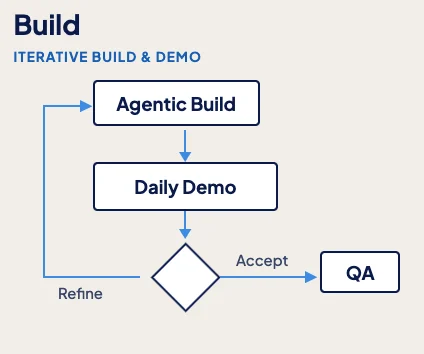
Daily demo vs. daily standup: A standup is a status report (“what I did, what I’ll do”). A daily demo shows real, running software and asks “is this right?” (Intent → Build → Operate).
Daily Demo is a practice in AI-native delivery. Every day, the engineering team shows the product owner or PM working software they built since the day before. It replaces detailed upfront specs and the end-of-sprint review with a short daily feedback loop
How AI-native delivery changes each phase of a Salesforce project
AI-native delivery doesn’t just speed up the build. It changes every phase, from the first discovery call to how you write the SOW.
| Phase | What AI does | What people do |
|---|---|---|
| Discovery | Turns call transcripts, org scans (metadata, tech debt, data quality) and existing docs into current-state drafts in days, not weeks | Validate the findings, ask the questions the data can’t answer |
| Design | Drafts user stories, acceptance criteria, data models and solution options | Architects weigh trade-offs instead of writing documents |
| Build | Generates Apex, LWC, Flows, metadata and SQL against your team’s standards | Developers review, integrate and handle the hard edge cases |
| Test | Generates test classes, UAT scripts and test data from the acceptance criteria; regression runs continuously | Decide what “good” looks like and sign off |
| Deploy and hypercare | Drafts release notes, runbooks and training material; triages issues after go-live | Own the release and the client relationship |
| Commercials | Makes delivery faster, which time-and-materials doesn’t reward | Move toward fixed-fee or outcome |
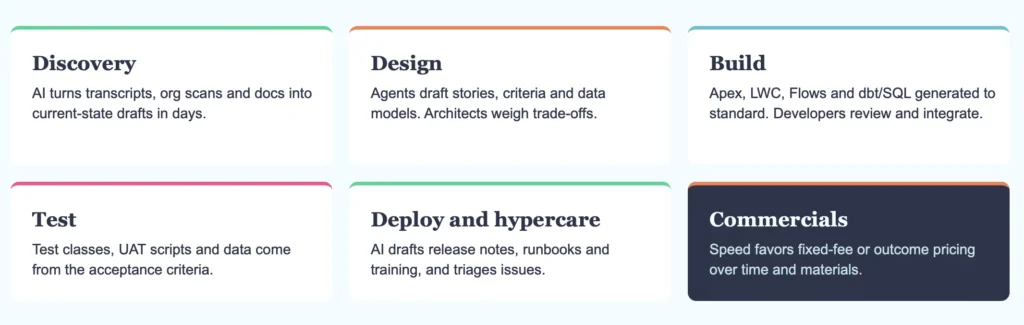
Two phases deserve a closer look.
Discovery comes first, and it’s mostly about data. The most common reason Agentforce pilots stall isn’t the agent. It’s an outdated knowledge base, missing integrations (no API access to orders or pricing) or undefined routing and escalation paths. So make an org scan and a data-readiness check your first deliverable, before you scope any agent work.
Testing now has two layers. Apex unit tests still matter. But if you’re building agents, you also need agent evaluations: Salesforce’s Testing Center can grade multi-turn conversations, run batch prompt tests and use custom scorers. Plan for both from sprint one.
10 best practices for AI-native Salesforce delivery
These fall into three groups: the foundations that make agent output good, the guardrails that keep it safe, and the people and process changes that make it stick.
Foundations: good input makes good output
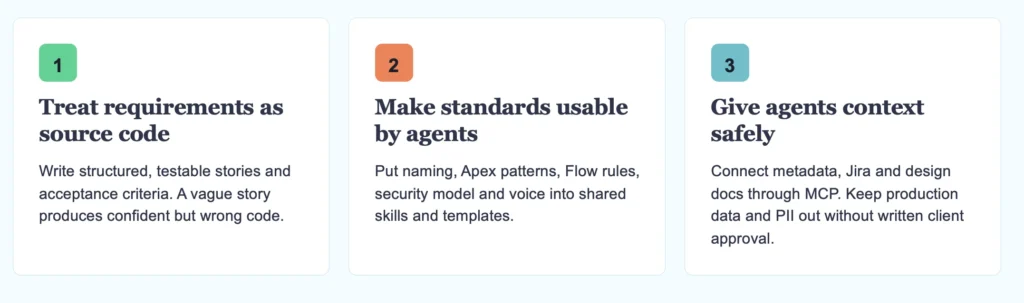
1. Treat requirements as source code. Agent output is only as good as its input. A vague story produces confident but wrong code. Write stories precise enough for an agent to build from: field API names, the sharing model and the existing automation on that object.
2. Capture your standards so agents can use them. Naming conventions, Apex patterns, Flow rules, your security model and even brand voice belong in reusable skills and templates, not in people’s heads. If standards only live in your senior dev’s memory, every agent run reinvents them. Salesforce now treats skills as a native concept, so this is easier than it used to be.
3. Give agents context, safely. Connect org metadata, Jira and design docs through MCP. Use the DX MCP Server with allowlisted sandboxes only, and per-user OAuth when an agent needs data. Keep production data and client PII out unless the client has approved it in writing.
Guardrails: speed without losing control
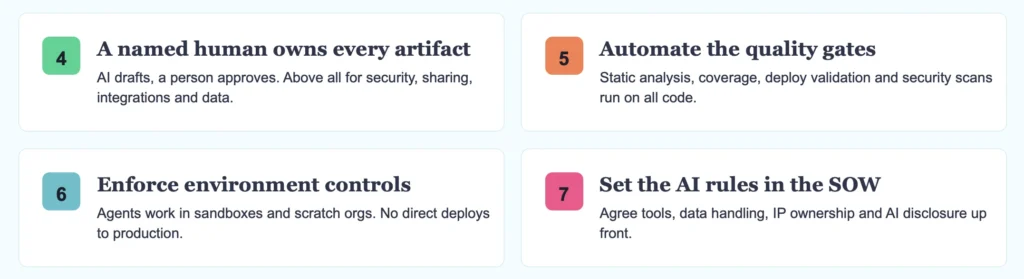
4. A named human owns every artifact. AI drafts, a person approves. This matters most for security, sharing rules, integrations and anything that touches data.
5. Automate the quality gates. Run PMD, Salesforce Code Analyzer and ApexGuru in CI. Check test coverage, validate deployments, run security scans and block deploys when tests fail. Apply the same gates whether a person or an agent wrote the code.
6. Enforce environment controls. Agents work in sandboxes and scratch orgs. They never deploy straight to production. Set up CLI guardrails that block risky commands against production orgs.
7. Put the AI rules in the SOW. Agree up front which tools you’ll use, how data is handled, who owns the IP and how you’ll disclose AI use. That conversation is much easier before kickoff than after a client’s security team finds out.
People and process: new roles, shorter loops
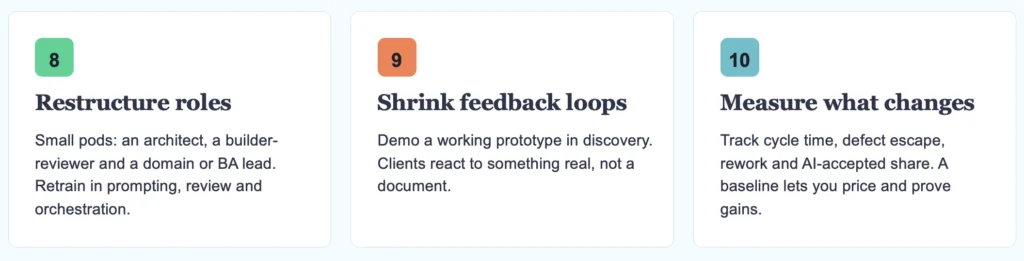
8. Restructure roles. Swap the big pyramid of junior developers for small pods: an architect, a builder-reviewer and a domain or BA lead. Then retrain people in prompting, review and orchestration. Reviewing AI output well is a skill, and it doesn’t come for free.
9. Shrink the feedback loop. If a working prototype now takes hours, demo one during discovery. Clients react far better to something real than to a 40-page requirements document.
10. Measure what changes. Track cycle time per story, defect escape rate, rework percentage and the share of AI-generated work that actually gets accepted. Without a baseline, efficiency claims are just anecdotes, and you can’t price or prove the gains.
4 common pitfalls to avoid
Gartner expects more than 40% of agentic AI projects to be cancelled by the end of 2027, because of rising costs, unclear value or weak risk controls (Outlook Business). Here’s where I see delivery teams go wrong most often:
- The bottleneck just moves. The build gets faster, but discovery and UAT are as slow as ever. You’ve saved two weeks of dev time and the go-live date hasn’t moved.
- Rubber-stamp reviews. AI-generated Apex and Flows can reference fields that don’t exist, call outdated APIs or clash with existing automation, and still pass the first checks. When reviewers wave that through, quality drops quietly.
- Every team for itself. Each team writes its own prompts instead of building a shared skills library. You end up with five versions of “our Apex trigger pattern”.
- Pricing away the gain. You deliver 40% faster and then bill 40% less. If your commercial model doesn’t change with your delivery model, the speed only helps the client.
Why this matters now for Salesforce teams
A year ago this was mostly theory. In 2026, Salesforce itself rebuilt the platform for coding agents:
- Headless 360 (TDX, April 2026) exposes the platform through APIs, MCP tools and the CLI. It added more than 60 new MCP tools and 30 preconfigured coding skills, and works with agents such as Claude Code, Cursor, Codex and Windsurf. We covered the full keynote in our TDX 2026 recap.
- The Salesforce DX MCP Server lets an agent manage orgs, deploy and retrieve metadata, run Code Analyzer and work with DevOps Center. It reuses your encrypted CLI auth and only reaches orgs you explicitly allowlist (Salesforce Developers).
- Agentforce Vibes 2.0 is Salesforce’s own coding agent, with multi-model support including Claude Sonnet and GPT-5.
- The partner program now rewards outcomes. In March 2026 the consulting track was rebuilt around “verifiable AI outcomes”, so partners get paid for agents that go live and work, not for hours.
Salesforce says Headless 360 can cut build cycles by up to 40%. Treat that as a vendor claim until you’ve measured it on your own projects. But the direction is clear: deploying, running tests, static analysis and LWC scaffolding are now things an agent can do directly. What sets a good team apart moves to specs, standards and review.
FAQ
AI-assisted keeps the same process and uses AI to work faster. AI-native redesigns the process so agents do most of the drafting, building and testing, while people set intent, review and own the result.
No. You can use Claude Code, Cursor or Agentforce Vibes with the Salesforce DX MCP Server. Agentforce matters when the thing you’re delivering is an agent.
Only to sandboxes and scratch orgs you’ve explicitly allowlisted, with quality gates in CI and a named person approving every change. Never directly to production.
It changes the job more than it removes it. Developers spend less time typing code and more time reviewing, integrating and solving the edge cases agents get wrong.
Wrapping up
AI-native delivery isn’t about which tool your team uses. It’s about rebuilding the project so agents do the producing and people do the defining, reviewing and owning.
If you want to try it, don’t transform everything at once. Here’s a good first week:
- Pick one small project or one phase as your pilot.
- Write down your current baseline: cycle time per story, defect escape rate and rework.
- Turn your top three coding standards into reusable skills or templates.
- Set up the DX MCP Server against an allowlisted sandbox.
- Agree the AI rules with the client before you start.
Where would you pilot AI-native delivery first? Tell us in the comments.