
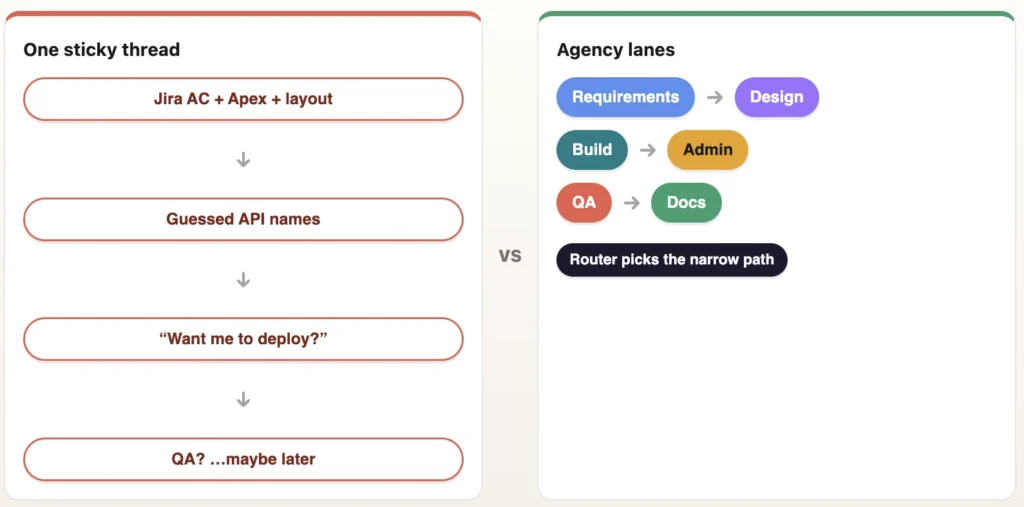
A mid-size story lands: new field, layout tweak, Apex validation and a pile of notes nobody wrote down yet. You open Cursor and paste the Jira link into one long thread. The model is helpful. Too helpful. It invents an API name that already lives in the org. It rewrites acceptance criteria mid-Apex. It offers a deploy command before anyone said “yes.” By lunch you have a long chat, three half-right diffs, and a sticky note that says “fix Jira later.”
What we mean by PDS (for readers outside our team)
PDS = Post-Deploy Steps (sometimes called promotion / post-deployment steps). On Salesforce programs, not everything ships as metadata in git. After (or alongside) a metadata promote, humans often still need data loads, permission checks, CPQ/QCP tweaks, or runbook actions. We track those as Jira subtasks under the story so DevOps doesn’t guess.
- Dev Task — metadata that does go in git / the deploy package (Apex, LWC, fields, layouts, perm sets…)
- PDS (Data) — per-org data scripts / seed data (never copy production record IDs)
- PDS (Permissions & Layout) — FLS checks, tab visibility, assignment notes
- PDS (QCP) — CPQ / Quote Calculator Plugin manual steps when relevant
- PDS (Manual) — everything else: pricing decisions, open questions, runbook leftovers
Agency-Swarm’s jira-subtask-workflow skill helps keep Dev Task vs PDS buckets honest so higher environments aren’t “works in my sandbox” folklore.
Look, the failure mode isn’t that AI is dumb. It’s that one chat has no lanes:
- Context collapse — requirements, design, Apex, FLS, and QA all share one scrollback.
- Org amnesia — the model guesses metadata instead of retrieving it.
- Unsafe momentum — deploy becomes the next autocomplete, not a human gate.
Honest aside: when you should not use this
Here’s the thing: multi-agent setups have overhead. If your task fits in one specialist’s head, routing a fleet is theater.
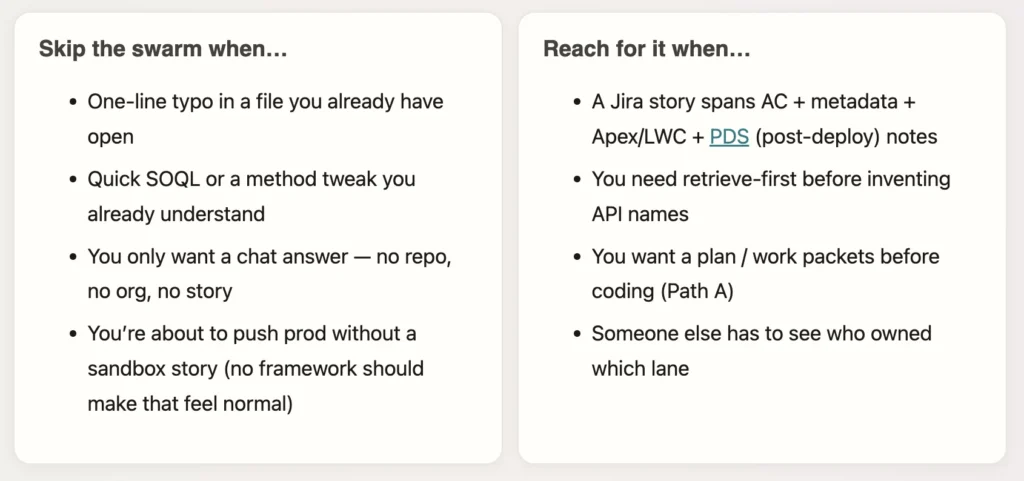
Rule of thumb: If you’d ask a tech lead to break it down and assign it, use the agency. If you’d ask a teammate “what does this line do?”, stay in one chat.
Plan and artifacts can live outside the scroll; humans still own the deploy gate. LangGraph plans — it does not deploy.
What we built
Agency-Swarm is a Salesforce-shaped agency template for Cursor: plain-English routing, specialist skills, an optional orchestrator for multi-step work, and a local dashboard. You still approve deploys. You still own architecture. The swarm stops one thread from pretending it has all of that judgment at once.
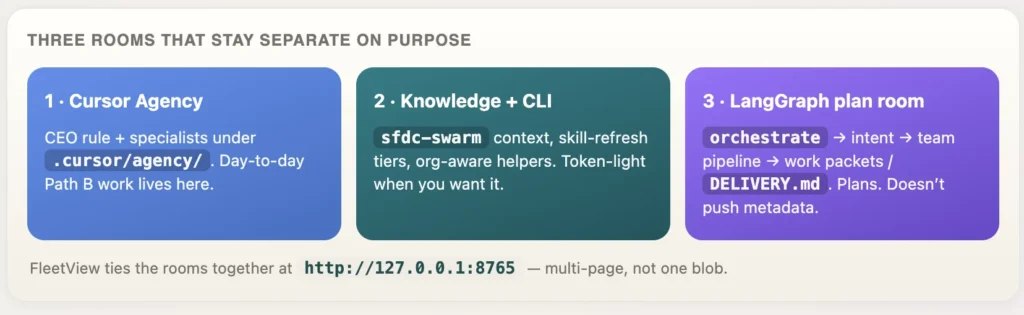
Help: A Cursor skill is a playbook the agent loads for a task type so Apex advice does not morph into a reckless deploy.
Help: LangGraph is the graph runtime behind sfdc-swarm orchestrate. It plans and opens work packets. It does not run sf project deploy for you. It may retrieve metadata into the local DX project when a research/sync step needs org truth.
Help: Clone wiring lives under templates/ (templates/cursor, templates/project) — that’s what gets copied into a consumer DX repo, not a mystery folder dump.
How it works — the flows
These are full-width vertical steps so nothing gets cut off on the side. Read top → bottom.
Flow 1 · End to end From your ask to human-owned deploy + PDS (post-deploy steps)
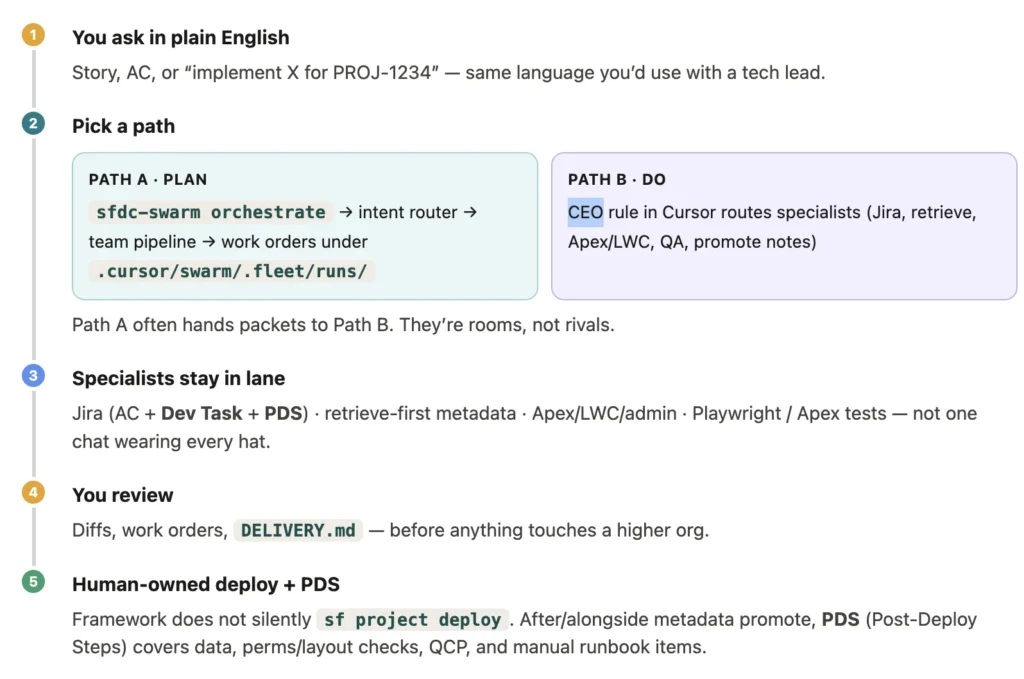
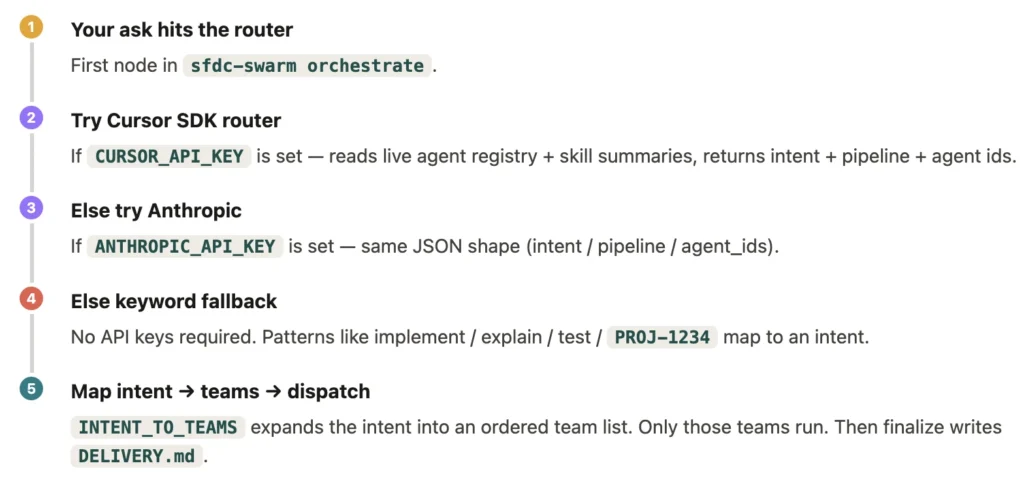
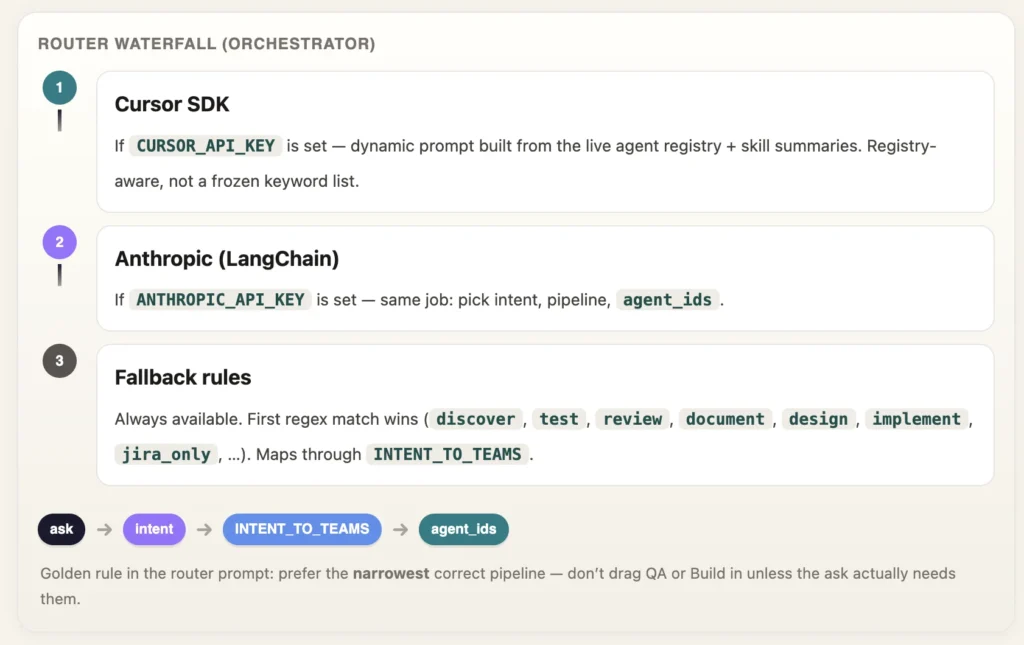
Flow 2 · How agents get chosen: Orchestrator waterfall — narrowest pipeline, not “run everyone”
Safety defaults that matter on CRM teams: specialists prefer retrieve-first via sfdc-metadata-sync before inventing API names. Deploys stay human-owned — the orchestrator prompts for review rather than pushing metadata. Projects can tighten that with a Cursor rule (e.g. “no deploy without explicit approval in the same message”); that stricter gate is a project choice, not the shipped framework default. Run sfdc-swarm context so the target org comes from DX config, not memory.
Skill freshness is tiered so you don’t burn tokens refreshing everything daily:
sfdc-swarm skill-refresh --tier manifest   # light
sfdc-swarm skill-refresh --tier weekly     # common cadence
sfdc-swarm skill-refresh --tier daily
sfdc-swarm skill-refresh --tier all_light  # everything except LLM
sfdc-swarm skill-refresh --tier open_deep  # stale LLM (needs key)
vs generic multi-agent kits
Plenty of kits can spawn agents. Salesforce teams need something narrower — DX-aware, sandbox-aware, and allergic to silent deploys.
| Topic | Generic kit | Agency-Swarm |
|---|---|---|
| Domain | Abstract “workers” | Jira / retrieve / Apex-LWC / admin / Playwright / promotion |
| Org truth | Hope the prompt remembers | Retrieve-first + sfdc-swarm context |
| Deploy | Often just another tool call | Human-owned; LangGraph does not deploy |
| Visibility | Chat scroll | FleetView pages on :8765 |
| Routing | “Call all the agents” | Intent → narrow INTENT_TO_TEAMS pipeline |
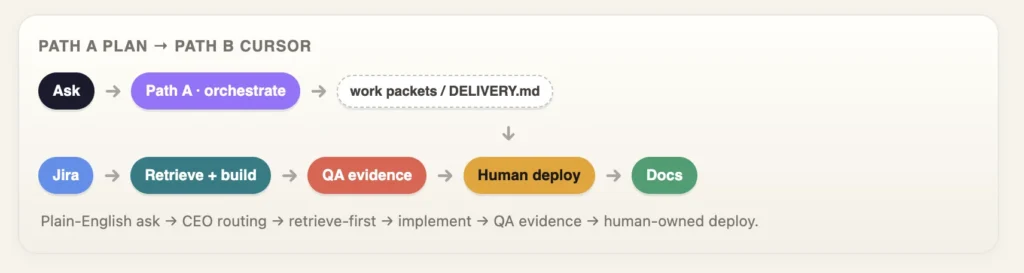
How a story moves (Path A / Path B)
Path A — plan the work (CLI / FleetView orchestrator). You type something like:
sfdc-swarm orchestrate "PROJ-1234: add validation + layout + PDS (post-deploy) notes"
You get an intent, an ordered team pipeline, agent ids, and reviewable packets under the fleet run — not a surprise deploy.
Path B — do the work (Cursor agency). You (or the CEO rule) load specialists against those packets — the seams you already expect:
- AC / subtasks with
jira-subtask-workflow - Retrieve with
sfdc-metadata-syncbefore inventing names - Build with
advanced-salesforce-developer - Evidence with
playwright-e2e-validation/ Apex tests - Promote notes with
sfdc-promotion-workflow— you still own any deploy to the org
How agents get chosen
Routing is a waterfall. We try the smartest option that’s actually configured, then fall back — no mystery black box.
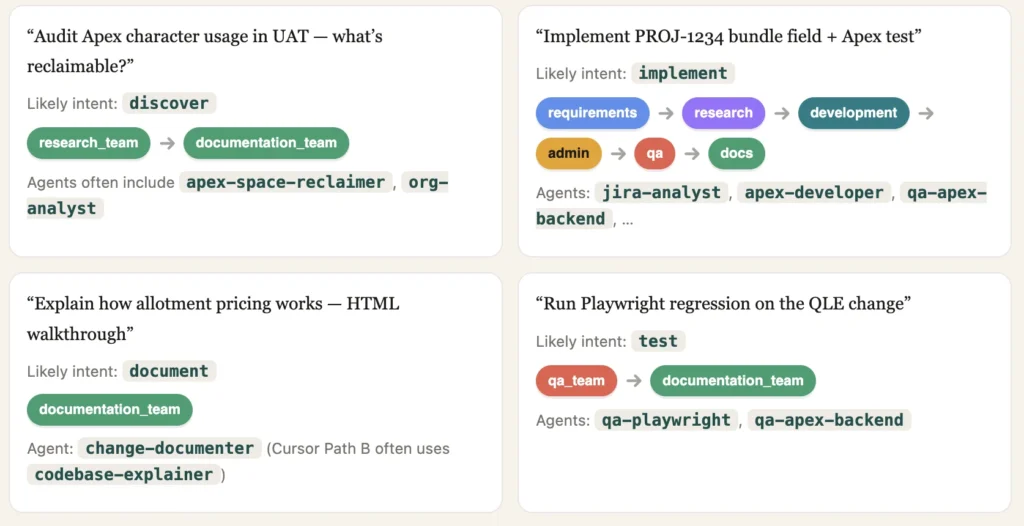
Concrete routing examples
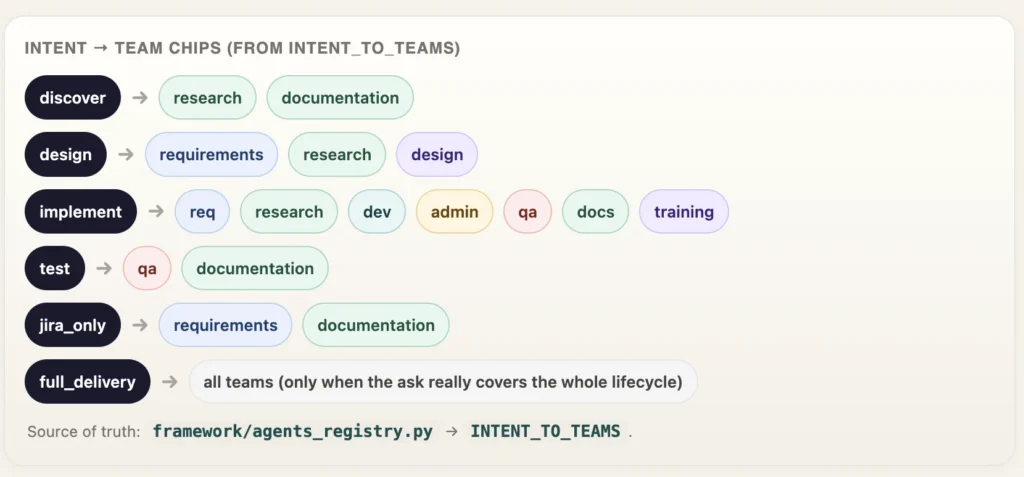
Show me the intent table
| Intent | Pipeline (team nodes) | When |
|---|---|---|
discover | research_team → documentation_team | Analyze / audit / scan what exists — no build |
review | review_team | PR / diff / “ready to deploy?” gate |
design | requirements → research → design | Architecture, blueprints, “how should we build” |
implement | req → research → development → admin → qa → docs → training | Explicit build / create / write Apex-LWC |
jira_only | requirements → documentation | Read story / extract AC — no build |
test | qa_team → documentation_team | Tests / Playwright / regression |
document | documentation_team | Explain / walk through / teach |
full_delivery | all teams incl. review + training | Ask explicitly covers the whole lifecycle |
kb_refresh | training_team | Refresh KB / update skills |
Sample agent_ids in the registry: jira-analyst, technical-architect, apex-developer, ui-developer, salesforce-admin, promotion-engineer, pr-reviewer, qa-playwright, qa-apex-backend, change-documenter, skill-trainer, org-analyst, apex-space-reclaimer, reverse-engineer.
What changes on your team
- Work orders and
DELIVERY.mdgive you something reviewable before anyone asks for deploy approval. - Specialists stop “helpfully” rewriting AC while writing Apex — different lanes, different skills.
- FleetView makes stale skills and active runs visible instead of tribal knowledge in Slack.
- New folks clone from
templates/, wire the project, runsfdc-swarm context— less “ask the person who set up Cursor last quarter.”
We didn’t remove judgment. We just stopped pretending one scrollback was a delivery process.
Try it yourself
If this resonated, don’t stop at the diagrams — clone it and wire it to a real DX project. Prerequisites, install steps, and project wiring all live on GitHub.
Start here → https://github.com/Lakshmikanth-Paruchuru/sfdc-multi-agent-swarm
- Prerequisites — Cursor, Salesforce CLI (
sf), Python, Node, Git, and an SFDX project (full table in the README). - Install globally —
pip install -r framework/requirements.txt, then./install.shand./scripts/install-skills.sh. - Wire your project —
scripts/install-to-project.sh --global-skills .(agency folders, skills,AGENTS.md). - Run —
sfdc-swarm context,serve(FleetView),orchestrate,skill-refresh.
git clone https://github.com/Lakshmikanth-Paruchuru/Agency-Swarm.git
cd Agency-Swarm
# Full prerequisites + steps: README on GitHub (#prerequisites, #quick-start)
# After install + wiring into an SFDX project:
sfdc-swarm context
sfdc-swarm serve          # → http://127.0.0.1:8765/
sfdc-swarm orchestrate "your story ask"
sfdc-swarm skill-refresh --tier weekly
Draft note: This HTML is still local-only for review. The GitHub repo above is already public with prerequisites and install instructions.
Quick defs
| Term | Meaning here |
|---|---|
| CEO / agency rule | Cursor rule that routes plain-English asks to specialists (agency-swarm-cursor). |
| LangGraph | Runtime behind sfdc-swarm orchestrate: plan → dispatch → finalize. Writes artifacts; does not deploy to the org. |
| Intent routing | First orchestrator step: ask → intent → team pipeline → agent ids. Priority: Cursor SDK → Anthropic → keyword fallback. Maps via INTENT_TO_TEAMS; prefers the narrowest pipeline. |
| Path A | Plan via CLI / FleetView orchestrator. |
| Path B | Do the work in Cursor with the agency + skills. |
| FleetView | Local multi-page dashboard on port 8765. |
| skill-refresh tiers | manifest / weekly / daily / all_light / open_deep — token-aware KB refresh. |
| templates/ | Clone sources for Cursor agency + project wiring. |
| Human-owned deploy | Framework does not silently sf project deploy; humans approve/run deploys (tighten with a project rule if you want). |
| PDS | Post-Deploy Steps — Jira subtasks for work that isn’t pure metadata in git (data, perms/layout checks, QCP, manual runbook). Paired with a Dev Task for deployable metadata. See What we mean by PDS. |
| Dev Task | Jira subtask tracking metadata that ships via git / package deploy. |