

If you’ve worked with Apex for any length of time, you’ve probably run into this error at least once:
Apex heap size too large
It tends to show up at the worst possible moment — in the middle of a batch job, during a data migration, or right when your data volume grows past what you originally planned for. The transaction simply stops. No partial results, no graceful recovery, just a failed process that someone now has to investigate and fix.
With the Winter ’27 release, Salesforce is addressing this directly by increasing the Apex heap limits across the board. It’s not a flashy feature, but for anyone who writes or maintains Apex code, it’s one of the more practically useful changes in this release.
This blog breaks down exactly what’s changing, why it matters, and how to prepare for it — including a real-world scenario so you can see the impact in practice.
Quick note: This feature is currently in preview. It isn’t generally available yet, and Salesforce hasn’t confirmed a fixed GA date. Keep that in mind if you’re planning production rollouts around it.
What is Apex heap size?
Before we get into the numbers, it helps to understand what “heap size” actually means. When your Apex code runs, it needs memory to store things temporarily — variables, lists, maps, and any records or data you’re working with. This memory space is called the heap. Salesforce puts a limit on how much heap any single transaction can use. Once your code tries to use more memory than that limit allows, Salesforce stops the transaction immediately, even if your code logic is completely correct.
In short: it’s not about how well you’ve written your code. It’s about how much data you’re holding in memory at any given moment during that transaction.
What are the new Apex heap limits?
Two numbers matter here:
- Synchronous transactions (triggers, button clicks, anything that runs in real time) go from 6 MB to 10 MB
- Asynchronous transactions (batch Apex, queueable jobs, future methods) go from 12 MB to 25 MB
That second jump is the one worth paying attention to. More than double the old limit. If you’ve ever had to shrink a batch scope down to almost nothing just so it wouldn’t blow up, that pain point is basically gone now.
Why it’s a bigger deal than it looks
A few extra megabytes doesn’t sound like much when you read it in a release note. In practice, though, it changes a few things:
Fewer failures on data-heavy jobs. Building a large map keyed by record ID, with nested lists of child records hanging off each one? You’ve got a lot more slack now before Salesforce shuts you down.
Integrations breathe easier too. If you’re pulling a big JSON payload from an external system — a product catalog sync, a bulk export, whatever it is — there’s more room to hold onto that data while you process it.
Batch Apex benefits the most, honestly. Doubling the async limit means a lot of batch jobs that were deliberately kept small just to survive can go back to running larger scopes. Fewer batches, faster completion.
And there’s a quieter win too — less defensive code. A lot of us end up writing extra logic purely to manage memory. Clearing collections mid-loop. Splitting work into awkward smaller chunks. Adding exits just to avoid a heap error nobody wanted to deal with. Some of that becomes unnecessary once there’s more headroom to work with.
Who this applies to
It’s not limited to one edition or interface. This covers both Lightning Experience and Salesforce Classic, across any edition that supports custom or managed Apex. Enterprise, Unlimited, whatever you’re on — if Apex runs in your org, this reaches you.
When it lands
You don’t flip a switch for this one. The new limits roll out automatically as part of the Winter ’27 release schedule, which Salesforce pushes out in phases instance by instance.
If you want your exact date, go to Trust Status, search your instance, and check the maintenance tab. That’ll tell you when your org actually gets bumped up.
Checking your current limit
Want to see what your org is working with right now? There’s a method for that:
Limits.getLimitHeapSize();
Call it, and you’ll get back the max heap size available for the current transaction. Useful if you’re debugging or just want to build some monitoring into your code.
One thing to watch out for
Here’s a situation that trips people up. Say your production org is still on Summer ’26, but your sandbox or scratch org already jumped to Winter ’27. You build something new, test it, everything passes. You deploy to production — and it fails.
Why? Because you tested under the new, more generous limits, but production was still running the old, stricter ones. Your code passed a test it never should’ve passed.
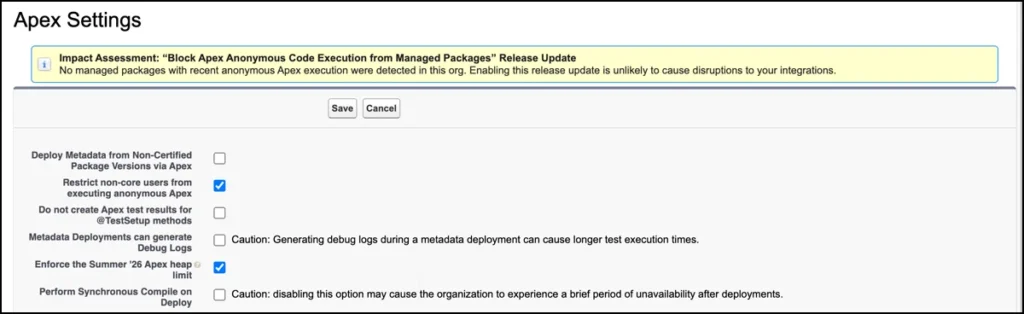
Salesforce actually built a fix for this. Inside any sandbox, Developer Edition, or scratch org, go to Setup, search Apex Settings, and you’ll find a checkbox labeled “Enforce the Summer ’26 Apex heap limit.” Turn that on and your nonproduction org behaves like it’s still under the old caps — 6 MB and 12 MB. That way you can properly test whether your code will actually hold up in a production org that hasn’t upgraded yet.
Just don’t get too attached to that setting. It’s temporary. Once every production org is on Winter ’27, the higher limits apply everywhere automatically, checkbox or not.
Real-time scenario: how this plays out in an actual org
Let’s walk through a realistic example.
Imagine you support a retail company that runs a nightly batch job to sync order data from an external e-commerce platform into Salesforce. Every night, this job:
- Pulls in thousands of order records through an API callout
- Builds a map of Order IDs linked to their line items
- Cross-references customer and product data already in Salesforce
- Writes updates back to the relevant records
On a normal day, this batch job runs without any issues. But during a big sale — say, a holiday weekend — order volume spikes to three or four times the usual amount. Suddenly, the same batch job that ran fine every other night starts throwing “Apex heap size too large” errors partway through. The team ends up manually reducing the batch scope size just to get through the backlog, and the sync takes far longer than usual, right when the business needs it most.
This is exactly the kind of situation the increased heap limits are meant to fix. With the asynchronous limit going from 12 MB to 25 MB, that same batch job now has significantly more room to hold order data, build its maps, and process everything in memory — even during a traffic spike. The team wouldn’t need to manually shrink the batch size during high-volume periods, and the sync would be far less likely to fail exactly when reliability matters most.
That’s the real value here. It’s not just a number going up in a release note — it’s fewer emergency fixes, fewer 2 AM alerts, and more confidence that your automation will hold up when data volume unexpectedly grows.
Bottom line
This isn’t an update you have to act on immediately, but it’s worth understanding. Bigger Apex heap limits mean fewer broken transactions, more headroom for data-heavy jobs and integrations, and less time spent working around memory limits that probably shouldn’t have been a problem to begin with.
If you’re responsible for Apex in your org, check your instance’s upgrade date on Trust Status when you get a chance. Take a look at any batch jobs you had to scale down just to avoid heap errors, and see if it’s time to loosen them back up. It’s a small change on paper, but it tends to save real hours once it’s actually live.