
You already know Headless 360. Here is the simple timeline for HXL itself. The Salesforce Headless Experience Layer (HXL) beta launched at the end of July 2026, with organization access rolling out in early August 2026. Full General Availability is planned for Dreamforce later this year. Learn it in the HXL Playground. For a short official click-through, see Tour HXL Playground.
What it does — and why Salesforce techies should care
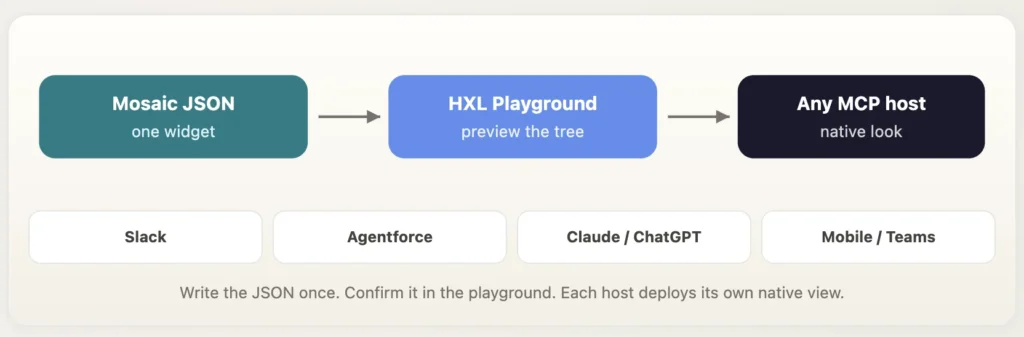
HXL is the UI service inside Headless 360. You describe an interface once as Mosaic JSON — cards, badges, callouts, buttons, semantic variants like primary and warning. Slack, Agentforce, ChatGPT, Claude, Teams, or any MCP host paints that same tree with its own look. You do not rebuild Block Kit, then an LWC, then a chat markdown card for the same next action.
What that means on a real team
| Role | Why HXL is useful |
|---|---|
| Admin | You already decide what a user should see. HXL is that same judgment for agents: which fields, which warning, which button — without a new page layout per channel. |
| Developer | One widget instead of three front ends. Bindings like {!$case.subject} and meta.if stay in metadata. The host owns pixels. You own the contract. |
| Architect | Presentation can travel. Sharing, FLS, and audit stay in Salesforce. Claude is another surface, not a sidecar copy of the org. |
| Agentforce builder | A case escalation or renewal alert can be a card the agent shows, not a paragraph the model invents each turn. |
Use it when the moment is more than text — SLA at risk, approve this, take the next step. If a sentence is enough, skip HXL. If the same next action has to look native in Lightning and Slack and a chat host, this is the layer that stops you writing it three times.
In the playground that is three moves: browse components, flip host previews on a widget, expand the code and copy the Mosaic. That is how we started Case Next Action
How we learned it: Case Next Action
We started in the playground with a case a queue would recognize. Payment failed on a renewal. SLA has two and a half hours left. The agent — human or otherwise — needs the number, the customer, the burn, and the next move. The playground already had cousins of this (case summary, SLA status). We wanted the one you act on.
So we built Case Next Action: a mosaic with a card, priority and SLA badges, a warning callout that only exists when the case is at risk, a recommended next step, and one primary button. Sample data is fictional — Northwind Traders, case 00001234, owner Alex Rivera. The sample lives here:
See the README for full implementation details and code: github.com/Lakshmikanth-Paruchuru/hxl-agentic-experience-layer
{
  "definition": "tile/callout",
  "meta": { "if": "{!$case.slaAtRisk}" },
  "attributes": { "variant": "warning", "title": "SLA at risk" }
}
When slaAtRisk is false, that block is not in the tree. Each host decides what “absent” means. That single line taught us more about HXL than the product headline did.
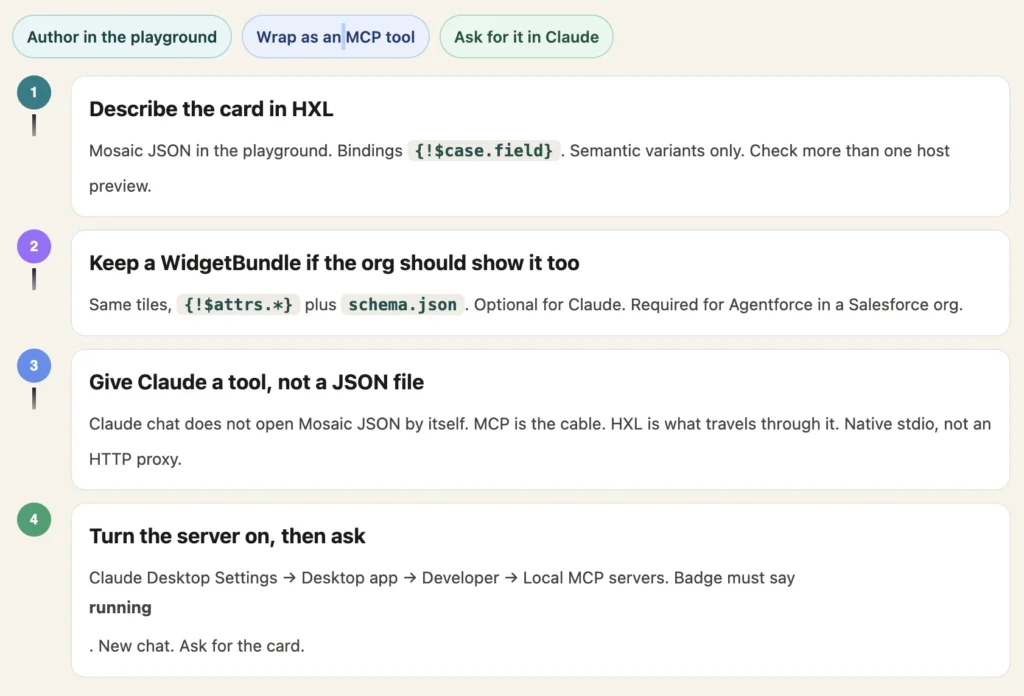
Then we did what the launch implied but did not finish for you: we wrapped the same idea as an MCP app so Claude Desktop could call get_case_next_action and mount the card in chat. Mosaic, WidgetBundle, server, and Settings → Developer → running are all in that repo. This is the path we actually walked.
The sample, running
After the server is running, a new Claude Desktop chat gets one line:
Show me the Case Next Action card
Allow the tool if Claude asks. You want the white card — not a paragraph that says “here is the card” with a spinner underneath. Click Take next action and the widget talks back into the thread. In this sample the buttons send a chat message. They do not update Salesforce. The lesson stops at “the host can render and click.”
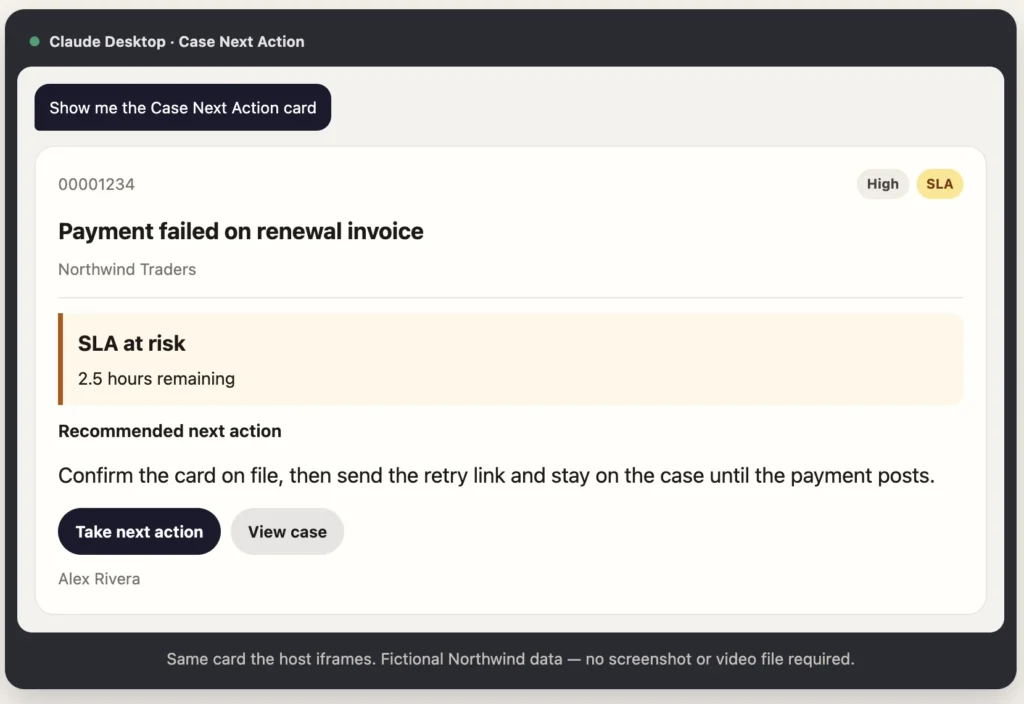
First run we got a spinner. Claude wrote a confident summary. The iframe stayed blank. The HTML had not finished the MCP Apps handshake, and we had put an HTTP proxy in front of a server that wanted stdio. The README lists the fix. If a turn already broke, quit with ⌘Q and start a new chat. The host caches the widget aggressively.
What stays in Salesforce
Headless means the presentation can travel. It does not mean the case record should leave the platform. In a real org the same mosaic would bind through Salesforce — sharing, field-level security, audit — and Claude would be another surface.
If you want to repeat the sample, the story ends here. The clicks and file names are in the README.
Clone hxl-agentic-experience-layer, follow the README, ask for the card. That is how we learned HXL: one component, one host, no second UI kit.