

In Salesforce, data is king, but as any experienced admin or developer knows, data storage should be carefully managed. When we have to deal with large data chunks then the 20 MB heap limit will be restrictive. This is where the most powerful, but underutilized, technique of file compression in Apex comes into play. It wont just save space but also efficiently transmits data, and handles large volumes of data within the governor limits.
Compression is done by encoding information with fewer bits compared to original representation. For Apex lossless compression of text,XML, JSON or CSV data can be done in such a way that the exact original data can be rebuild without loss of any data. Salesforce doesn’t provide an inbuilt ZIP utility in Apex, but it gives us the foundational tools to perform robust compression and decompression: the Blob class and its methods for Base64 encoding and decoding, and crucially, the Compression class.
The System.Compression class, introduced in later API versions, is the cornerstone of native Apex compression. It uses the DEFLATE compression algorithm, a widely used method combining LZ77 and Huffman coding. Understanding its two key methods is essential. The compress(Blob uncompressedBlob) method takes your raw data as a Blob and returns a new, compressed Blob. Conversely, the decompress(Blob compressedBlob) method performs the inverse operation. Its vital to remember that these methods work on binary data (Blobs), so any text or structured data must be converted to a Blob using Blob.valueOf(String) before compression, and reconstructed back to a String from the decompressed Blob using toString().
Why is it needed? Consider a common scenario where you have a large CSV string generated from a report, perhaps 15 MB in size. Trying to process this directly can blow through heap limits. By compressing it, you might reduce its size by 70-80%, bringing it down to 3-4 MB. This compressed Blob can be safely attached to a record, sent via a callout (within the larger 50 MB limit for Blobs), or stored temporarily. Another common use case is in integration. While sending a massive payload of records as JSON to an external system, compressing it reduces bandwidth, speeds up transmission, and can help avoid HTTP request size limits.
Let’s build a complete, functional example. Imagine we need to archive the details of all Closed Won Opportunities from the last quarter into a compressed text file and attach it to a designated record.
First, we generate our data string. We’ll query the opportunities and format the data. To avoid governor limits on queries and string manipulation, we must be careful, potentially processing in batches.
public class OpportunityArchiveCompressor {

    public static Id createZippedOpportunityArchive() {

        // --- 1. Build the CSV text ---
        String header = 'Opportunity Name,Close Date,Amount,Account Name\n';
        String csvData = header;

        for (Opportunity opp : [
            SELECT Name, CloseDate, Amount, Account.Name
            FROM Opportunity
            WHERE StageName = 'Closed Won'
              AND CloseDate = LAST_QUARTER
     LIMIT 10000
        ]) {
            csvData += opp.Name + ',' +
                       String.valueOf(opp.CloseDate) + ',' +
                       String.valueOf(opp.Amount) + ',' +
                       opp.Account.Name + '\n';
        }

        // Convert the CSV string to a Blob
        Blob csvBlob = Blob.valueOf(csvData);

        // --- 2. Create a ZIP archive with Compression.ZipWriter ---
        Compression.ZipWriter writer = new Compression.ZipWriter();

        // Add the CSV file into the ZIP archive
        writer.addEntry('ClosedWonOpportunities.csv', csvBlob);

        // Finalize and get the ZIP Blob
        Blob zipBlob = writer.getArchive();

        // --- 3. Save the ZIP as a Salesforce File (ContentVersion) ---
        ContentVersion zipFile = new ContentVersion();
        zipFile.Title = 'Q3-Closed-Won-Opps-Archive';
        zipFile.PathOnClient = 'Q3-Closed-Won-Opps-Archive.zip';
        zipFile.VersionData = zipBlob;

        // You must scope this to a valid record -- here using an example Account ID
        zipFile.FirstPublishLocationId = '001xx000003DmZZAA0';

        insert zipFile;

        System.debug('Created ZIP ContentVersion with ID: ' + zipFile.Id);
        return zipFile.Id;
    }
}
Id fileId = OpportunityArchiveCompressor.createZippedOpportunityArchive();
System.debug('Created File ID: ' + fileId);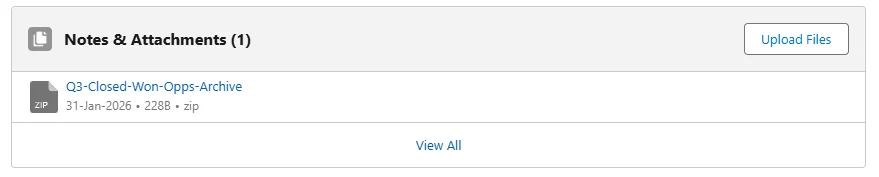

In this code, we see the straightforward flow. The significant reduction from the original Blob size to the compressed Blob size is the key outcome. We store the compressed Blob directly in VersionData. The .gz extension is a convention hinting at DEFLATE compression, though Salesforce does not automatically decompress it; our code must handle that.
The symmetrical decompress method unlocks our original data. Its crucial to handle potential exceptions here, such as StringException if the Blob contains non-UTF-8 data (though toString() expects UTF-8), or errors if the Blob wasnt correctly compressed in the first place.
However, developers must navigate several important variations. The Compression class has its own limits. The compress method can accept an input Blob up to 12 MB for synchronous Apex. This is separate from, and more restrictive than, the general heap limit. So the size of the input blob has to be less than 12 MB so always make sure the size of the file to be compressed before compressing it. And make sure error handling was done as it was mandatory. Try to use code inside try – catch blocks.
What about working with the compressed data externally? A Blob compressed by Apexs Compression.compress() is in the raw DEFLATE format (RFC 1951). Common utilities like gzip use the DEFLATE algorithm but wrap it in a header and trailer (RFC 1952). To decompress an Apex-compressed Blob in an external system like Python, Java, or C, you may need to use a “raw” or “deflate” inflater, not a standard GZipInputStream. Conversely, to compress data externally for decompression in Apex, you must ensure its in raw DEFLATE format.
For scenarios which require more compatibility with .zip or .gzip formats , it has to be implemented using advanced apex code for handling headers and footers or install package from Appexchange which works with that functionality. The traditional compression class can be used for salesforce internal use and also in a scenario where we control decompression along with compression endpoint.
Thanks for Reading and Happy coding 🙂