Skip to content
No results
Menu
No results
  • Home
  • All Blogs
    • Career
    • Admin
    • Developer
    • DevOps
    • CTA
  • Interview
  • Certifications
  • Free Training
  • About Us
Events
Apex Hours
  • Home
  • All Blogs
    • Career
    • Admin
    • Developer
    • DevOps
    • CTA
  • Interview
  • Certifications
  • Free Training
  • About Us
Courses
Events
Apex Hours
Courses

Login Flows in Salesforce

  • Apex HoursWritten ByApex Hours
  • February 8, 2021
  • Salesforce Admin / Salesforce Flow
  • August 22, 2023
  • 1
  • 2 mins
Home Salesforce Admin Login Flows in Salesforce

Login flows in Salesforce is one of the greatest Arsenal that could be used to collect information from users during Login process. You could also use Login flows to show “Terms & Conditions” page or “Privacy policy” Page and make users Accept during Login. Login flows will come for your rescue during deployments and Release to stop users from logging into System.

One of the powerful use cases for flow is during the login / authentication process where you can insert custom business processes before the user gets access to the application.

Table of contents
  1. Login Flow Examples
  2. Set Up a Login Flow
    1. Login Flows in Salesforce Video

Login Flow Examples

You can use a login flow to customize the login experience. Common uses cases include collecting and updating user data at login, configuring multi-factor authentication and etc.

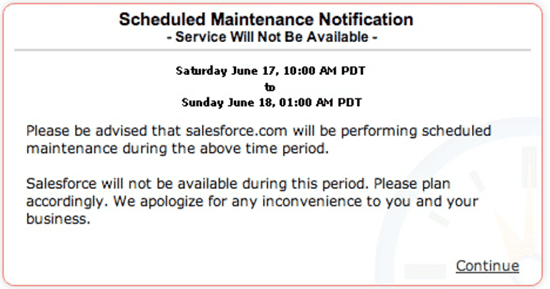
Have you ever wondered how Salesforce was showing Maintenance message?
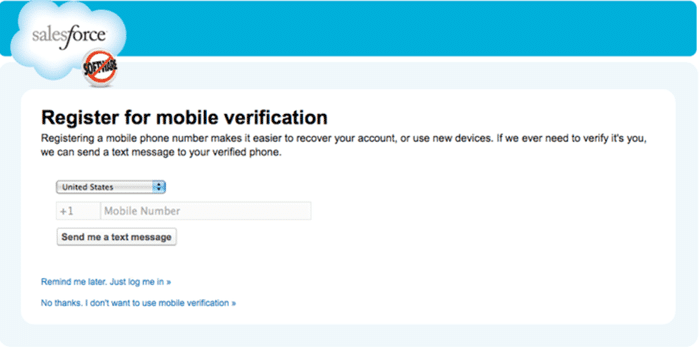
Did you see Salesforce asking to provide Phone number for Mobile verification?
There are lots of other good example:-

  • You can use login flows to interact with external third-party authentication providers by using an API. like
    YubiKey.
  • You can also implement a third-party SMS or voice delivery service, like Twilio or TeleSign, to implement an SMS-based multi-factor authentication and identity verification flow.

Set Up a Login Flow

Let’s see how we can use Login Flow in Salesforce.

  1. You can create the login flow from Flow builder or Visual force page.
  2. After creating the a flow, designate the flow as a login flow and associate it with specific profiles in your org. You can create multiple login flows and associate each one with a different user profile.

Don’t associate a login flow with your administrator profile until you are sure that the login flow works properly. Otherwise, if it fails, you can’t log in to your org.

Login Flows in Salesforce Video

Please check below recording for step by step process to create login flow in Salesforce.

Please Subscribe to the channel to get notification for upcoming recording.

If you are new in Salesforce. Please check our free Salesforce Admin and Salesforce Developer training.

Tags
# Flows# Login Flows# Mobile verification
Share your love
Share on Facebook Share on X (Twitter) Share on Pinterest Share on LinkedIn
Apex Hours
Apex Hours

Salesforce Apex Hours is a program of the community, for the community, and led by the community. It is a space where Salesforce experts across the globe share their expertise in various arenas with an intent to help the Ohana thrive! Join us and learn about the apex hours team.

Articles: 357

Related Posts

How AI Is Changing the Way Salesforce Admins Build Flows

How AI Is Changing the Way Salesforce Admins Build Flows

How Revenue Cloud Helps Subscription

How Revenue Cloud Helps Subscription-Based Businesses

Customizing the Utility Bar for Admins in Salesforce

Customizing the Utility Bar for Admins in Salesforce

Kanban Board in LWC

Developing a Drag and Drop Kanban Board in LWC

Troubleshooting a Broken Flow in Salesforce

Troubleshooting a Broken Flow in Salesforce with Simple Example

Salesforce Installed Packages

Salesforce Installed Packages: A Guide to Implement Salesforce Packages

One comment

  1. mani

    mani

    February 12, 2021 / 6:23 pm Reply

    Loved this one & i came across this Just at a right time when i have requirement around the same. Thanks a bunch

Leave a ReplyCancel Reply

Your email address will not be published. Required fields are marked *

Accelq

Important Links

Home
About us
Contact us
Privacy Policy

Recent Posts

  • LWC Security in Salesforce

  • Salesforce Data Breaches- What Really Went Wrong (And How to Protect Your Org)

  • From Admin to Architect —A Realistic Career Roadmap

  • LWC + Apex Best Practices for Large Data Operations

  • getQueryLocator vs. Iterator in Apex

Subscribe to the blog via email

Enter your email address to subscribe to this blog and receive notifications of new post by email.

Join 4,526 other subscribers

Copyright 2018-2026. All Rights Reserved By Apex Hours.