

Lightning Web Components (LWC) is a new Salesforce development method using open web standards like standard JavaScript and HTML which means developers who have never worked with Salesforce can now jump right in and existing developers can now use standard techniques and tools never before available. In this post, we will learn about Lightning Web Components (LWC) Best Practice.
Let’s learn Lightning Web Components (LWC) Best Practices like when to use apex class and when not to use apex class. When we should use which event in LWC?
1. LWC component Bundle naming convention
Check this post to learn about what is camelCase, PascalCase and kebab-case.
- Html file: Use camel case to name your component and use kebab-case to reference a component in the markup
- JavaScript File: Java Script Class name should be in PascalCase
- Bundle Component: use camelCase.
2. Calling Apex From LWC
There are two ways to call Apex class in the Lightning web component.
- Imperatively
- Wire
- Wire a property
- Wire a function
Wire Vs Imperatively:
As per Lightning component best practices, use @wire over imperative method invocation. @wire fits nicely in the overall Lightning Web Component reactive architecture. Salesforce is building some performance enhancement features that are only available with @wire. However, there are a few use cases that require you to use imperative Apex.
Wire Property Vs. Wire Function:
Prefer wiring to a property. This best practice applies to @wire generally (not just to wiring Apex methods).
3. Lightning Data Service (LDS)
As per LWC, the best practice is to use Lightning Data Service functions to create, Record, and delete a record over invoking Apex methods. Yes, there are some use cases where you need multiple records, then we can use Apex methods.
Lightning Data Service is built on top of User Interface API. UI API is a public Salesforce API that Salesforce uses to build Lightning Experience. As its name suggests, UI API is designed to make it easy to build Salesforce UI. UI API gives you data and metadata in a single response
Give preference to user interface form type in below order.
- lightning-record-form: It is the fastest/most productive way to build a form.
- lightning-record-view-form: If you need more control over the layout, want to handle events on individual input fields, or need to execute pre-submission
- @wire(getRecord): If you need even more control over the UI or if you need to access data without a UI.
4. Event in LWC
There are typically three approaches for communication between the components using events.
- Communication using Method in LWC ( Parent to Child )
- Custom Event Communication in Lightning Web Component (Child to Parent )
- Publish Subscriber model in Lightning Web Component Or Lightning Message Service ( Two components which don’t have a direct relation )
Here is some recommendation for the DOM Event.
- No uppercase letters
- No Spaces
- use underscores to separate words
- Don’t prefix your event name with the string “on”.
Learn more about Events in lightning web components here. Avoid using Lightning Message Service or Pubsub when not needed.
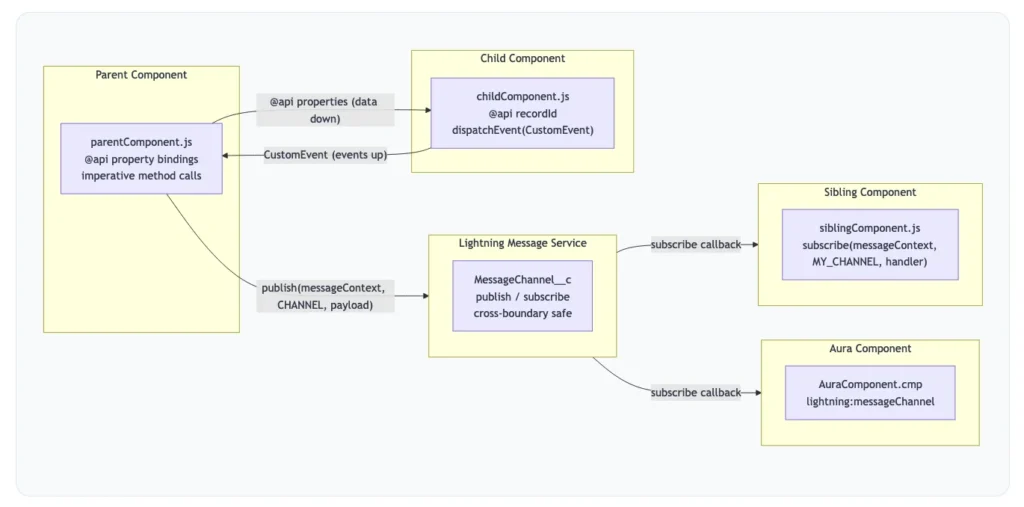
Communication Decision Summary
| Scenario | Correct Pattern | Avoid |
|---|---|---|
| Parent → Child | @api properties + imperative method calls | Shared mutable state |
| Child → Parent | CustomEvent with event.detail | Reaching into parent via querySelector |
| Siblings / Unrelated | Lightning Message Service (LMS) | Old pubsub.js library |
| LWC ↔ Aura | Lightning Message Service (LMS) | Aura events from LWC |
5. Streaming API, Platform Event, Change Data Capture
The lightning/empApi module provides access to methods for subscribing to a streaming channel and listening to event messages. All streaming channels are supported, including channels for platform events, PushTopic events, generic events, and Change Data Capture events. This component requires API version 44.0 or later. The lightning/empApi module uses a shared CometD connection. Example Code.
6. How to debug LWC
Use Chrome’s pretty JS setting to see unminified JavaScript and Debug Proxy Values for Data. Here is example.
- Enable Debug mode
- It gives unminified Javascript
- Console warnings
- Pretty data structure
- Caution – it reduces the performance of Salesforce; make sure it’s disabled in production.
Learn about Debug Lightning Web Components.
7. Use Storable Action/ Cache Data
Use Storable Action; It will reduce calls to the Server. Syntax
@AuraEnabled(cacheable=true)Caution: A storable action might result in no call to the server. Never mark as storable an action that updates or deletes data.
For storable actions in the cache, the framework returns the cached response immediately and also refreshes the data if it’s stale. Therefore, Storable actions might have their callbacks invoked more than once: first with cached data, then with updated data from the server.
8. Build reusable Lightning Web Components
Modularity is key to creating a scalable application by reusing components. We rarely write code that is abstract enough to be reusable everywhere. You should write components not to be reused out of the box but to be abstract and composable sufficient to serve that purpose in various implementations.
Component Composition
Components are the building blocks of a page. We should consider the following point before dividing the components in LWC.
- Level 1: Based on its functionality
- Level 2: Based on its reusability: Passing attributes becomes a pain when you need to pass lots of inputs to the component. Consider passing objects as parameters instead of having multiple attributes.
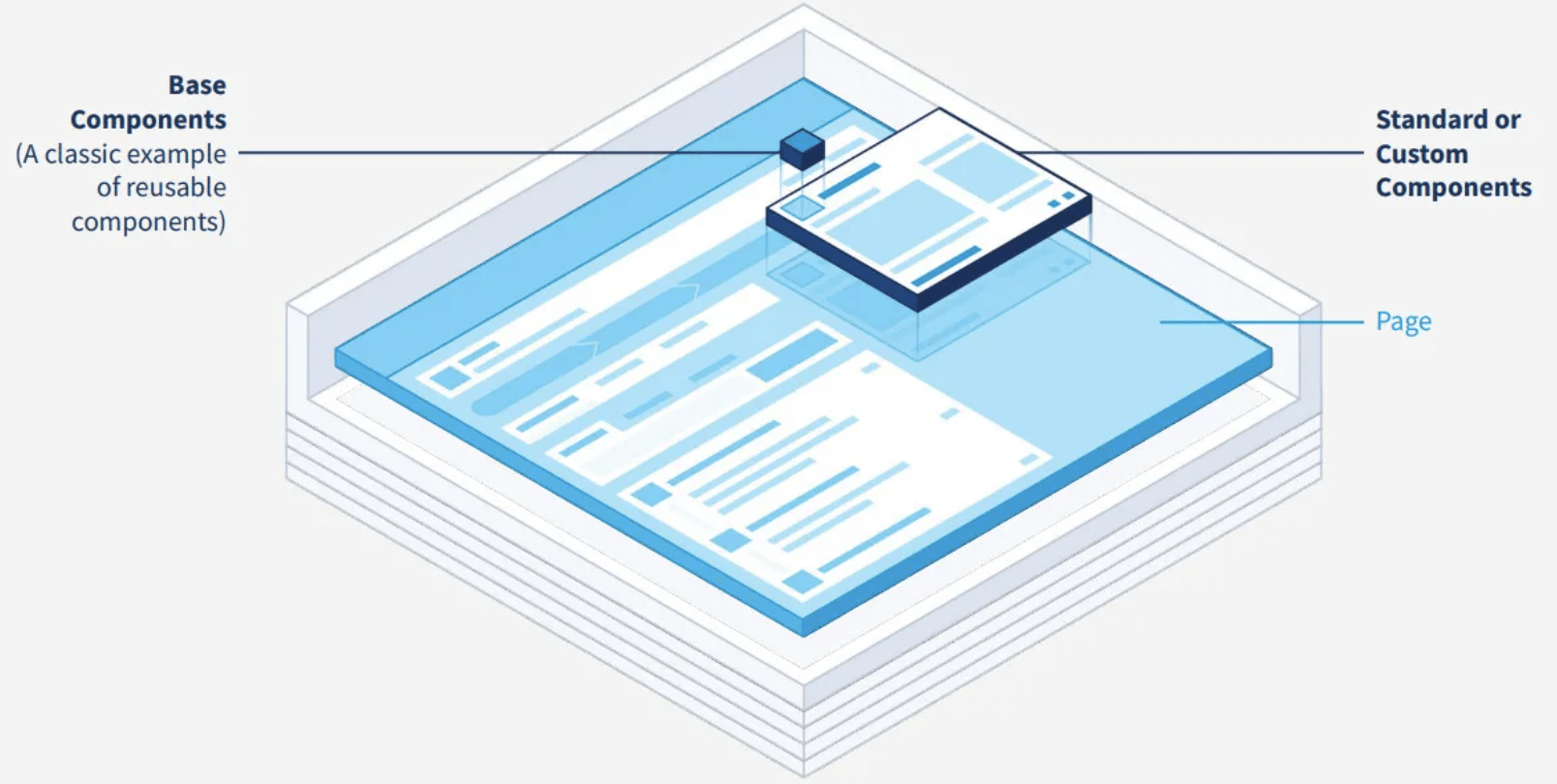
Learn more about Design Patterns and Best Practices to build reusable Lightning Web Components.
9. Styling Reusable Components
LWC encapsulates and isolates a component’s stylesheet. Does it mean it is hard to style a child component from a parent?
- Spend some time at design time to think about possible variants of your component.
- Use CSS Custom Properties for custom styles
- Use Styling Hooks to override the styling of Base Components.
- Favor Styling Hooks and CSS Custom Properties over component attributes.
Check out how to Share CSS styles among Lightning Web Components.
10. LWC Best Practices
Here are some other LWC best practices that we can follow while building LWC components.
- Use UI API Wire Adapters and Lightning Base Components
- Allows the admin to configure your components without modifying code by configuring lists views record layouts.
- If required, don’t hesitate to restrict your component’s visibility to certain objects.
- Think whether the component needs to be tied to an object or can it be object-agnostic
- Don’t use static references
- If needed, create object-agnostic classes
- Extract utility methods outside your LWC components
- LWC components should only deal with UI-related logic.
- Favor public properties over public methods.
- Properties can be set directly in the template, while a method requires the consumer to render the component first, retrieve it back from the DOM, and invoke the method
11. Tips & Trick for Lightning Web Components
Check out our post to learn 20 Tips for Lightning Web Components (LWC) in Salesforce.
12. Performance Optimization: Lazy loading in LWC
Lazy loading helps you to load the data only when it is required. Infinite scrolling (enable-infinite-loading) enables you to load a subset of data and then load more data when users scroll to the end of the table.
Learn more about Lazy loading in Lightning Web Component.
Lazy Loading and Conditional Rendering
Don’t load everything upfront. Use lwc:if to conditionally include components in the DOM — not CSS display: none. The difference matters: lwc:if completely removes the element, preventing wire calls, lifecycle hooks, and rendering cycles on content the user hasn’t requested yet.
13. Decorators: @api, @track, and @wire — Used Correctly
13.1 @api — Public Properties and Methods
@api exposes a property or method as part of the component’s public interface. Public properties are reactive — the template re-renders when they change. Keep the public surface minimal. If a component has 12 @api properties, it’s tightly coupled to its parent’s internal state.
// childComponent.js
import { LightningElement, api } from 'lwc';

export default class ChildComponent extends LightningElement {
    @api recordId;        // parent sets this

    @api
    refreshData() {       // parent can call this method imperatively
        // imperative refresh logic
    }
}
13.2 @track — Only When You Actually Need It
Here’s the one that still trips people up: since Spring ’20, all fields in an LWC class are reactive by default. You don’t need @track for primitive values or for top-level property reassignment.
// WRONG — unnecessary @track on primitives (Spring '20 made this unnecessary)
import { LightningElement, track } from 'lwc';

export default class MyComponent extends LightningElement {
    @track isLoading = false;      // unnecessary
    @track accountName = '';       // unnecessary
    @track count = 0;              // unnecessary
}

// CORRECT — @track only for nested object/array mutation
import { LightningElement, track } from 'lwc';

export default class MyComponent extends LightningElement {
    isLoading = false;             // reactive by default — no @track needed

    @track filters = {             // @track needed: we'll mutate nested props
        status: 'Active',
        type: 'Customer'
    };

    updateStatus(newStatus) {
        this.filters.status = newStatus;  // @track detects this nested mutation
    }
}
13.3 @wire — Reactive Data Binding Done Right
@wire connects your component to a data source reactively. The $ prefix on a parameter name makes it reactive — without it, the value is evaluated once at initialization and the wire never re-fires when the property changes.
import { LightningElement, api, wire } from 'lwc';
import { getRecord, getFieldValue } from 'lightning/uiRecordApi';
import ACCOUNT_NAME_FIELD from '@salesforce/schema/Account.Name';
import ACCOUNT_INDUSTRY_FIELD from '@salesforce/schema/Account.Industry';

const FIELDS = [ACCOUNT_NAME_FIELD, ACCOUNT_INDUSTRY_FIELD];

export default class AccountDetail extends LightningElement {
    @api recordId;  // when this changes...

    @wire(getRecord, { recordId: '$recordId', fields: FIELDS })  // ...wire re-fires
    account;

    get accountName() {
        return getFieldValue(this.account.data, ACCOUNT_NAME_FIELD);
    }
14. Data Management: LDS First, Then Apex, Then GraphQL
Lightning Data Service (LDS)
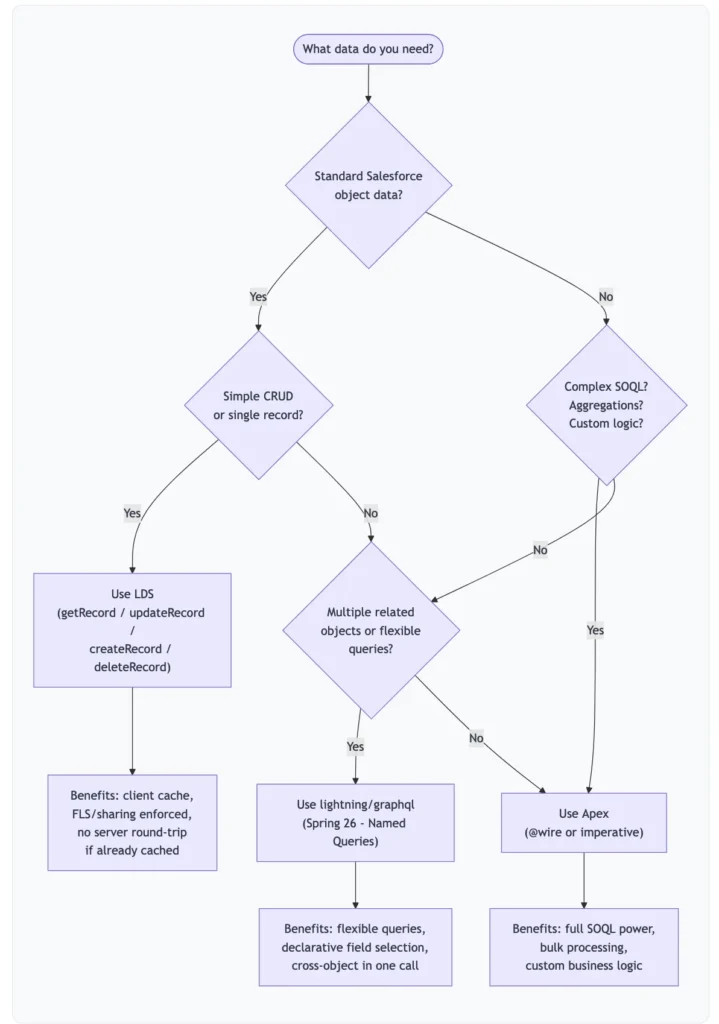
LDS is the default choice for standard CRUD on Salesforce objects. The key benefit often undersold: if LDS already has the record data in cache from another component on the page, your component gets it instantly without a server round-trip. LDS also automatically enforces FLS, OLS, and sharing rules — you don’t write a single line of security enforcement code.
When Apex Is the Right Call
LDS isn’t designed for aggregate queries, complex multi-object SOQL with subqueries, bulk data processing, or custom business logic that belongs server-side. Wire Apex when data depends on reactive inputs; call it imperatively when responding to user actions.
The New lightning/graphql Module Spring ’26 GA
Spring ’26 brings the lightning/graphql module to general availability, replacing the older lightning/uiGraphQLApi. Named Queries let you define GraphQL queries in metadata and reference them declaratively in LWC. For components that need flexible cross-object data in a single call, this will become a meaningful option.
Lightning Web Components (LWC) Best Practice Session
Hear from the man who helps make it happen: Salesforce Principal Developer Evangelist René Winkelmeyer. Building rich, efficient, and resilient Lightning Web Components is no black magic. This webinar will cover best practices around:
Agenda:-
- Using public and private properties for effective component composition.
- When should we use @api or @track variable
- Event communication for child-to-parent as well as for sibling components (pubsub).
- Parent to Child Communication
- Child to Parent Communication
- pubsub
- When, and when not, to use Apex with Lightning Web Components
- Aura interoperability
Lightning Web Components (LWC) Best Practice Video

Please subscribe our YouTube and click on the bell icon to get a notification for video upload.
Lightning web component Training
New to LWC? Check our FREE LWC Training.

12 The Anti-Pattern Reference: What NOT To Do
| # | Anti-Pattern | Why It’s a Problem | Correct Approach |
|---|---|---|---|
| 1 | Hardcoding user-facing strings | Breaks i18n, hard to update at scale | Use Custom Labels |
| 2 | @track on primitives | Unnecessary re-renders; shows misunderstanding of reactivity model | Drop @track — all fields are reactive by default since Spring ’20 |
| 3 | Ignoring base components | Reinvents accessibility, validation, SLDS styling | Check Lightning Base Components first |
| 4 | Loading all data upfront | Blocks initial render, wastes callouts | Lazy load with lwc:if |
| 5 | Heavy logic in getters | Runs on every render cycle | Cache computed values in fields |
| 6 | No disconnectedCallback() cleanup | Memory leaks, lingering LMS subscriptions | Always mirror connectedCallback() setup |
| 7 | Styling internal base component markup | Breaks silently on Salesforce releases | Use SLDS hooks or global SLDS classes |
| 8 | jQuery / Bootstrap in LWC | Unnecessary weight, CSP violations | Use LWC’s native capabilities + SLDS |
| 9 | No error handling | Users see blank screens or raw exceptions | Handle wire errors + try/catch on imperative calls |
| 10 | if:true / if:false directives | Deprecated | Use lwc:if / lwc:elseif / lwc:else |
| 11 | No Jest tests | Regressions catch you in production | Write tests for every component |
| 12 | God components | Untestable, unmaintainable, unreusable | Single responsibility; compose from children |
| 13 | Old pubsub pattern | Unsupported; doesn’t cross LWC/Aura boundary | Use Lightning Message Service |
| 14 | Direct DOM manipulation | Fights shadow DOM; fragile and unreliable | Use data binding and lifecycle hooks |
Summary
I hope this post will help you to learn Design Patterns and Best Practices to build reusable Lightning Web Components. Lightning web components’ best practices will help you become a good Salesforce Developer.






Hi there! Such a great article, thank you!
Glad you like our Lightning web components best practices post.
Hi there! Such a nice post, thank you!
Great post on Lightning Web Components (LWC) best practices! I particularly appreciate the tips on naming conventions and the use of @wire for better performance. The advice on using Lightning Data Service over Apex for CRUD operations is also valuable. These best practices will surely help streamline LWC development!