

Want to learn about useful Top Salesforce Chrome Extensions in 2026? Join us and learn about some of the Most Popular Salesforce Chrome Extensions. These Chrome extensions for Salesforce can help you improve the user experience and boost your productivity.
What is Salesforce Chrome Extensions?
Salesforce Chrome extensions are Google Chrome extensions. They are easy to use and allow you to add new features or functionality to create a better user experience in Salesforce.
Top Salesforce Chrome Extensions
Here is a list of some of the top Google Chrome extensions we compiled for Salesforce. There are lots of other excellent Salesforce extensions available in the market. But in this session, we will discuss the 12 top Google Chrome extensions. Some popular Salesforce Chrome extensions that you might find helpful are:
1. Salesforce Inspector Chrome extension
Salesforce Inspector is one of the best Salesforce extensions. An extension to add a metadata layout on top of the standard Salesforce UI to improve the productivity and joy of Salesforce configuration, development, and integration work.
How to install Salesforce Inspector
Download Salesforce Inspector from here.
Feature of Salesforce Inspector
- Show All Data: See all field values and API names, especially those not on the page layout.
- User Data: You can search and see user records
- Data Export: You can query the record and export the data from Salesforce.
- Data Import: It also allows you to import data in Salesforce
- Org limit: It also has a very good UI that shows the overall org limit.
Learn more about Salesforce inspector chrome extension and demo.

This extension allows you to inspect and debug your Salesforce data, metadata, and Apex code.
2. Salesforce Inspector reloaded
Salesforce Inspector reloaded is a Chrome and Firefox extension to add a metadata layout on top of the standard Salesforce UI to improve the productivity and joy of Salesforce configuration, development, and integration work.
Feature of Salesforce Inspector reloaded
Learn about Salesforce Inspector Reloaded: New Version Highlights.
3. ORGanizer for Salesforce
The ORGanizer Chrome Extension lets you forget about your Salesforce.com username and passwords and helps you to recognize Salesforce.com tabs on your browser. It also have lots of other features. Please check our recording for that.

How to install Salesforce Organizer
Download Salesforce Organizer from here.
Feature of Salesforce Organizer Chrome Extensions
With Salesforce ORGanizer, you can:
- Store your frequently used accounts (basic encryption for password, details on the guide): username/password/login URL / landing page.
- Log in to an account on a new tab, window, and window on incognito mode or get the full login URL for other browsers
- Change an ORG tab and title to instantly recognize which tab belongs to which ORG
- Use the built-in Quick Link tool to quickly access your most used standard Salesforce links
- Create your personal ORG’s quick link library to handle special links
- Use the Quick Links tool to make a global search or open a custom relative link (e.g. from a copied Salesforce ID) or login to another ORG
- Use the Quick Console right inside your Salesforce tab to have quick access to describe manager, queries, execute anonymous and other handy tools
4. Salesforce Lightning Inspector
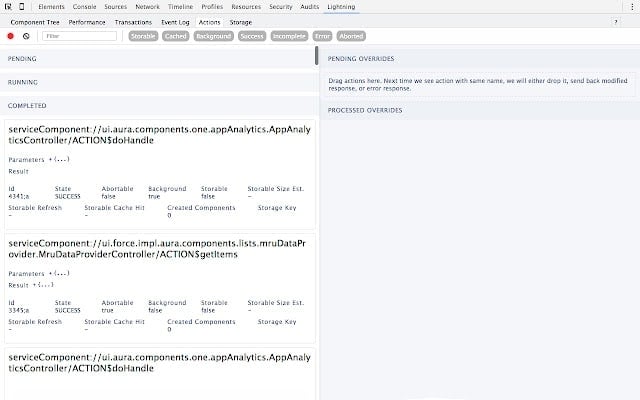
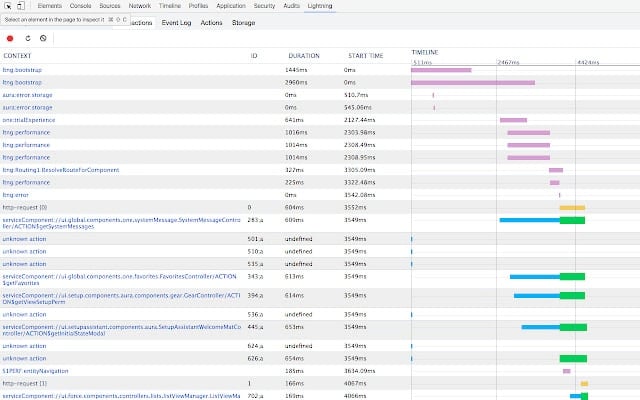
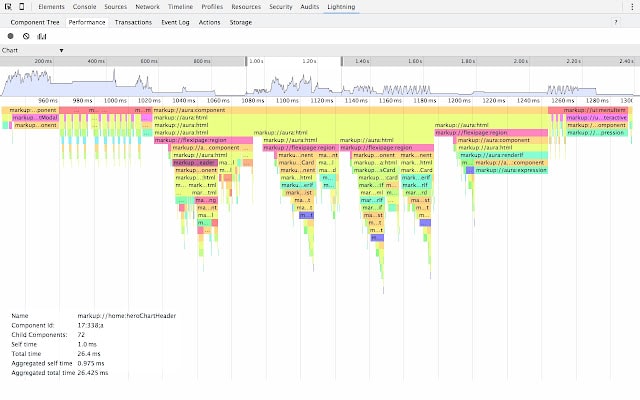
The Salesforce Lightning Inspector is a Google Chrome DevTools extension that enables you to navigate the component tree, inspect component attributes, and profile component performance. The extension also helps you to understand the sequence of event firing and handling.
Feature of Salesforce Lightning Inspector
- Navigate the component tree in your app, inspect components and their associated DOM elements.
- Identify performance bottlenecks by looking at a graph of component creation time.
- Debug server interactions faster by monitoring and modifying responses.
- Test the fault tolerance of your app by simulating error conditions or dropped action responses.
- Track the sequence of event firing and handling for one or more actions
Download from here.
5. Advanced Code Searcher
This extension helps you to search code in Salesforce with different search options. It enables you to quickly search through your instances of Apex classes, triggers, Visualforce pages, and components. It also provides Code Coverage Extract and ApexPMD reports. This extension allows you to lint the lightning code via the Lightning Linter tab.
We are now on Lightning!!!!
How to install Advanced Code Searcher Chrome Extensions
Download Advanced Code Searcher from here.
Feature of Advanced Code Searcher
Using this extension you can search your code components in your Salesforce instance:
- apex Classes
- Apex Triggers
- visualforce Pages
- Visualforce Components
- Lighting Component
6. Force.com Login
Helps you manage Salesforce login credentials and lets you login with 1 click. This extension helps you manage your Salesforce login credentials and lets you quickly login.
If you are a Salesforce admin or developer who needs to manage multiple orgs and login credentials, you must be tired of entering usernames and passwords every time they move from one account to the other.
How to install Force.com Login Chrome Extensions
Download Force.com Login from here
Feature of Force.com Login
This extension helps you
- Manage your Salesforce.com login information (username, password, security token, and description).
- Quickly log in to Salesforce.com with a new tab, new window, and incognito window.
- Sync your login information across your devices – automatically takes backup of account information to your Google Drive
7. Salesforce API Name
Small extension to toggle between API field names and labels on salesforce detail pages. Display Field & Object API Names on Detail Pages (LEX & Classic). This repo is a Chrome extension to show field and object API names on the record detail page.
How to install Salesforce API Name Chrome Extensions
Download Salesforce API Name from here.
8. Salesforce Coloured Favicons
Salesforce Coloured favicons: Overrides the standard Salesforce favicon with one colored based on the org. Also, displays a separate icon for sandbox instances.
Supports both Classic and Lightning Experiences and includes separate icons for production, sandbox, and scratch orgs.
How to install Salesforce Coloured Favicons Chrome Extensions
Download Salesforce Coloured favicons from here.
Feature of Coloured Favicons
To use the extension, navigate to a Salesforce org, and the extension will automatically select a random color for it, and then update the favicon with that color. Now every time you visit that org, the colored favicon will be displayed instead of the default Salesforce favicon. At this point, you can also visit the options page to change the color for any org you’ve visited.
9. Salesforce DevTools
Powerful Salesforce developer tools, including Query Editor, Fields definition, ERDs, Page Layout, and others.
How to install Salesforce DevTools Chrome Extensions
Download Salesforce DevTools from here. This extension provides you with a set of developer tools that can help you debug and troubleshoot your Apex code and Visualforce pages
Feature of DevTools
Salesforce DevTools is a powerful Salesforce developer Chrome extension for doing the following things:
- Quickly generate Apex code / SOQL, exporting query results to an Excel file.
- Quickly access to new record page, list page and object setting page of any object.
- Quickly search object fields and check its usage.
- Display fields API name on the Salesforce object detail page.
- Exporting Objects Definition to Excel file.
- Exporting Objects Fields Definition to Excel file.
- Exporting Objects Page Layout Definition to Excel file.
- Exporting Objects List View Definition to Excel file.
- Salesforce data modal (ERDs) generator.
- All Check / Select on profile edit page and field permissions edit page.
- Mass edit, mass delete, mass clone custom fields (Only Classic).
10. Apex Debugger
Apex Debugger: Debug Salesforce apex code with ease and improved debug logs for Salesforce.
11. Salesforce Navigator
Salesforce Navigator: This extension helps you get to any Salesforce page quickly. Just type in what you need to do.
12. Enhance the Salesforce Dashboard
Enhance Salesforce Dashboard Auto Refresh and up to 7 Columns Salesforce Dashboard.
13. Lightning Studio
With Lightning Studio, you can Build Salesforce LWC development easily and fastest.
Download it from here.
14. Salesforce Flow Visualiser
It provides an easy-to-use representation of Salesforce Flow files. As well as a graphical view of the flow itself it also outputs. This is VS Code extension to create a visual representation of Salesforce Flow.
Learn more.
Top Salesforce Chrome Extensions Video
FAQ’s
1 From the Relationship Insights component and select Settings.
2-Under Browser Extensions, select and install the extension for the browser. The Einstein Relationship Insights browser extension is available only for Chrome.
Every Salesforce extension have different instructions for use. it is better to go to the Google Store to see the instructions to use.
Yes. Salesforce supports different Salesforce Extensions.
Salesforce Chrome extensions are used to add new features or improve the program functionality to make it more reliable for users.
Summary
Try all the above Google Chrome extensions for Salesforce and share your feedback. Let us know if you like some other Salesforce Chrome extensions that helped you in your day-to-day work to increase your productivity.







Is it authenticated plugin? can we trust on these if we are using in customer Sandbox/Prod ?