

Every Salesforce release brings a long list of updates, and honestly, most of them don’t change your day-to-day work all that much. But every so often, a release lands with a handful of features that actually make development smoother, faster, or less frustrating. Winter ’27 is one of those releases.
We went through the release notes and picked out the five updates that matter most if you’re the one writing Apex, building Lightning components, or working with the REST API on a regular basis. Some of these are small quality-of-life improvements. One of them might genuinely change how you build Salesforce apps going forward.
1. Bigger Apex Heap Limits
Let’s start with the one every Apex developer will appreciate: increased heap limits.
If you’ve ever hit the “Apex heap size too large” error, you know how disruptive it is. It usually shows up mid-transaction, often during a batch job or data-heavy operation, and stops everything cold. Winter ’27 raises the ceiling considerably:
- Synchronous transactions (triggers, button clicks): 6 MB → 10 MB
- Asynchronous transactions (batch Apex, queueable jobs, future methods): 12 MB → 25 MB
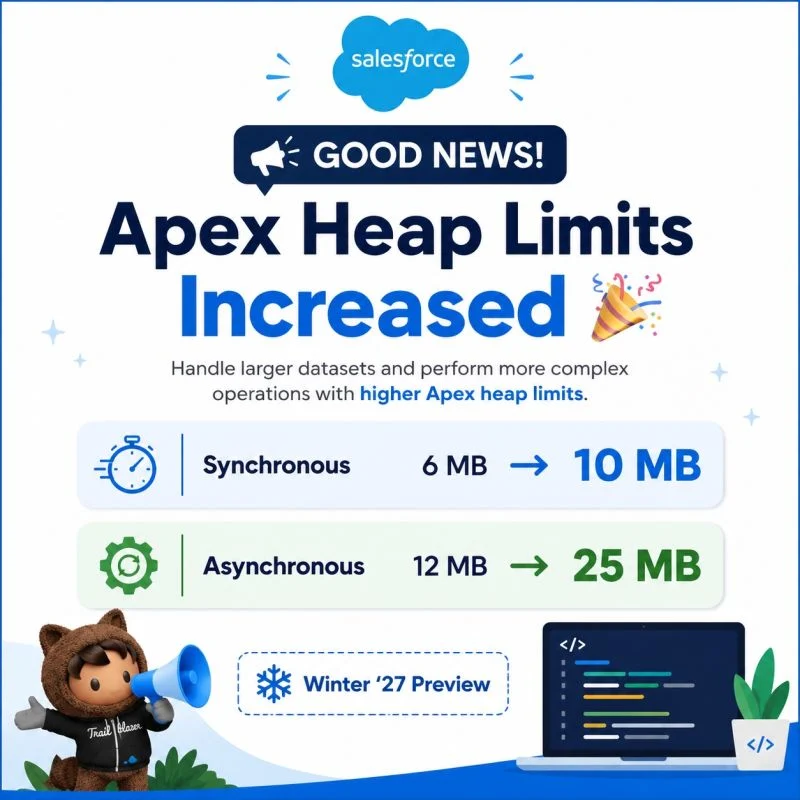
That async jump is more than double the previous limit. If you’ve had to shrink batch job scopes or write extra logic just to manage memory carefully, this gives you a lot more room to work with.
Real-world impact: Picture a nightly batch job syncing order data from an external system. During a normal day it runs fine, but during a big sale, order volume spikes and the job starts failing on heap errors. With the higher async limit, that same job can now handle the spike without needing emergency intervention.
Status: This change rolls out automatically as part of the Winter ’27 schedule — no beta flag, applies broadly across Lightning Experience and Salesforce Classic in any edition running custom or managed Apex.
2. Compare Values Between Fields in SOQL — with FORMULA() (Beta)
This one is aimed squarely at anyone tired of writing formula fields just to compare two values in a query. Winter ’27 introduces the FORMULA() function, which lets you perform arithmetic calculations directly inside a SOQL WHERE clause. Instead of creating a dedicated formula field on the object or handling the comparison in Apex after the query runs, you can now do the comparison right inside the query itself.
Real-world impact: Say you need to find all Opportunities where the discount amount is greater than a certain percentage of the total deal value. Previously, you’d either build a formula field to precompute that ratio, or pull all the records back and filter them in Apex — extra metadata, extra processing, extra complexity. With FORMULA(), you write that comparison directly into your query and get exactly the records you need, nothing more.
Status: This is currently in beta, and it’s important to know the limitations. It’s available only in sandbox, Developer Edition, and scratch orgs running API version 68.0 or later. It is not available in production orgs yet, and it’s governed by Salesforce’s Beta Services Terms. Great for testing and getting ahead of the curve, but not something to build production logic around just yet.
3. Complex Template Expressions in Lightning Web Components (Generally Available)
If you’ve built Lightning Web Components, you know the templating system has always leaned on a “virtual DOM” that renders efficiently — but it was historically limited to fairly basic property bindings in the HTML template file.
That limitation is gone. Winter ’27 makes complex template expressions generally available, letting you use a much broader subset of JavaScript expressions directly inside your component’s HTML template — not just simple properties.
Real-world impact: Say your component needs to display a formatted string that combines a few different values, or conditionally render something based on a small calculation. Before, you’d typically compute that value in your JavaScript file and expose it as a getter, just to keep the template clean. Now you can often write that logic directly in the template itself, which means less boilerplate in your component’s JavaScript and a template that more clearly reflects what’s actually being displayed.
Status: This feature is now Generally Available — not beta. To use it, set your component’s apiVersion to 66.0 or later. It applies across Lightning Experience, Experience Builder sites, and all versions of the mobile app, in all editions.
4. The Claude Code Plugin for Salesforce Development
This is arguably the most interesting addition on this list, especially if you’re the kind of developer who’s been experimenting with AI-assisted coding tools.
Salesforce now has an official development plugin for Claude Code that lets you build Salesforce apps using natural language prompts. The plugin detects your Salesforce DX project environment automatically and gives Claude Salesforce-specific skills and org context through hosted MCP (Model Context Protocol) servers. In practice, that means Claude isn’t just generating generic code — it understands your actual project structure and can act on it directly.
Real-world impact: Instead of manually scaffolding a new Apex class, writing boilerplate, and then writing a test class separately, you could type something like “Create an Apex service class to handle Account territory assignments” or “Write a test class for AccountTerritoryService and run it,” and the plugin handles the implementation within your actual DX project. It works whether you’re an experienced developer with an existing project or someone starting completely from scratch — new developers can simply prompt “Let’s build something in Salesforce” and get guided through project setup.
To get started, install the prerequisite software, then run:
/plugin install salesforce-development@claude-plugins-official
/reload-plugins
Followed by:
/salesforce-development:welcome
This works across the Claude Code CLI, Desktop app, VS Code, and JetBrains IDEs — so it fits into whatever environment you’re already using.
Status: Available now from the Claude Plugin Marketplace. Full technical documentation and the list of supported skills are available on the associated GitHub repository, where you can also file issues or feature requests.
5. Simplified REST API Version Management
This last one is small, but it solves a genuinely annoying maintenance problem.
Normally, when you call the Salesforce REST API, you have to specify a version number in the URI — something like v62.0. Every time Salesforce releases a new API version, you either update that number manually across your integrations or get stuck on an older version indefinitely. Winter ’27 fixes this with a simple addition: you can now use latest instead of a version number.
https://<MyDomainName>.my.salesforce.com/services/data/latest/sobjects/Account
Real-world impact: If you maintain integrations that call the REST API and don’t want to manually track and update version numbers every release, using latest means your requests automatically route to the most recent REST API version your org supports. Less maintenance overhead, one less thing to remember during upgrade cycles.
Status: This applies to Lightning Experience and Salesforce Classic in API-enabled Group, Professional, Enterprise, Performance, Unlimited, Developer, and Database.com editions.
Wrapping Up
Winter ’27 isn’t a release built around one massive headline feature — it’s a handful of practical improvements that add up. Bigger heap limits mean fewer failed transactions. FORMULA() in SOQL cuts down on unnecessary formula fields. Complex template expressions clean up your LWC code. The Claude Code plugin changes how you can actually build within a Salesforce project. And the latest REST API keyword removes a small but recurring maintenance headache.
If you’re planning your Winter ’27 upgrade, it’s worth checking your instance’s rollout date on Trust Status, and testing the beta features like FORMULA() in a sandbox before you get too attached to using them anywhere near production.