
Adam Olshansky session at ApexHours on May 23, “10 Tips to Make Your Next Project Well-Architected,” playbook. You’ll get:
- The three pillars of the Salesforce Well-Architected framework, in practitioner language
- Ten tips that map to those pillars, plus the two soft-skill tips most architects skip
- Three live architecture exercises Adam ran with the audience — and the answers

Background: Why Salesforce Built “Well-Architected”
If you’ve ever sat in a design review and said, “this is the right way to do it because Salesforce says so,” you understand why the Well-Architected framework exists. It’s prescriptive guidance published at architect.salesforce.com, and it answers two questions at once: how should I build this?, and how do I defend the choice when someone challenges it later?
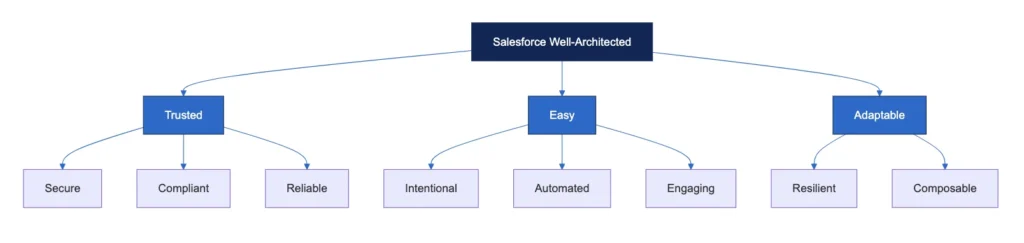
The framework is organized around three pillars. Each pillar has sub-pillars that map almost one-to-one with Adam’s ten tips:
| Pillar | Sub-pillars | What it means in practice |
|---|---|---|
| Trusted | Secure, Compliant, Reliable | Access is controlled, the law is respected, the thing actually stays up |
| Easy | Intentional, Automated, Engaging | Every feature has a purpose, the boring stuff is automated, users don’t hate it |
| Adaptable | Resilient, Composable | It survives change, and you can swap pieces without breaking everything else |
Adam noted Salesforce is updating the framework before Dreamforce 2026, but as of this writing, those three pillars and eight sub-pillars are the structure to know.
Pillar 1 — Trusted
Tip 1: Security First
Salesforce’s number-one corporate value is trust. The way you translate that into design choices is by treating security as a system, not a checkbox. Adam’s reminder: think at every layer.
- Org and session security — IP restrictions, session timeouts, MFA, login-IP ranges.
- Data access — org-wide defaults, sharing rules, permission set groups (please retire profile-only security if you haven’t already), and roles where they still make sense.
- Licenses — who needs a Salesforce Platform license vs. a full CRM license vs. an Experience Cloud license vs. nothing at all (Headless 360 is changing this calculus).
- Code — APEX classes declared
with sharingvs.without sharingvs.inherited sharing. Named credentials for outbound callouts. Connected apps for inbound API access. Don’t run system-mode code on user-initiated paths unless you’ve thought hard about why.
The trick is to ask “who is using this, and what do they need to see?” before you draw a single object diagram. The security model is the shape of the design — not a wrapper you put on top later.
Tip 2: Know Your Limits (Compliance)
Salesforce calls this compliant. Translation: where does your data live, and where do your users live? You may need both answers before you write your first SOQL query.
- Data residency — Hyperforce gives you a choice of region. GDPR fines aren’t a hypothetical anymore. Meta, Amazon, TikTok, and WhatsApp have all paid nine-figure penalties under the regulation.
- Retention — for how long should this data exist? Is there an archive path?
- AI guardrails — what is your agent allowed to do? Refund decisions? Customer communications? There are public stories of AI agents granting refunds larger than the original purchase price. That’s an architecture failure, not a model failure.
- Localization — date formats break first. If today is May 2nd, an American writes
5/2, a European reads it as February 5th. Mexico, Adam learned mid-session, also uses day-month-year. Use<lightning-formatted-date>and the user’s locale, not a string.
Tip 3: Be Reliable
Reliable = available, performant, scalable. Three questions to keep returning to:
- Does this need to be real-time? A “wheel of doom” while a synchronous Apex job runs is reliability theater. Move to near-real-time where you can.
- Can you cache it? Platform Cache (org cache + session cache) eats this problem for breakfast when your reference data doesn’t change every minute.
- Are you set up for large data volumes? Bulkify everything (Apex, flows, integrations). Watch for account data skew — more than 10,000 child records pointing at one parent account triggers locking and sharing recalculations that will quietly tank performance.
A reliability point Adam stressed that doesn’t get enough air: standards and consistency. If a button click works one way in app A and another way in app B, users have to remember context. That’s a reliability problem dressed up as a UX problem.
Pillar 2 — Easy
Tip 4: Be Intentional
The meme Adam showed: a clean, single-purpose Apple-style app on the left, an 80-field Salesforce form on the right. Users do not want to fill out 80 fields. Nobody has ever wanted to fill out 80 fields.
Intentional design means every feature earns its place:
- Plan ahead. What’s the roadmap? What’s the release cadence (Adam’s team deploys every Monday)? When will users actually see this?
- Build vs. buy vs. AppExchange vs. off-platform. Each has trade-offs. With Headless 360, “off-platform with Salesforce as system of record” is now a credible answer too.
- Team style guides. Naming conventions, pseudo-namespaces on custom objects (
AH_Delivery__cso you canLIKE 'AH_%'your way to your own stuff), trigger frameworks, common base classes for inheritance. - Documentation — the favorite topic of nobody. Future-you in six months will not remember why you wrote that one weird Apex method.
Tip 5: Automation Is Your Friend
The competitor isn’t another CRM. The competitor is a Google Sheet. Your job is to make Salesforce a better answer than the spreadsheet — and the way you do that is by automating what the spreadsheet can’t.
- Pick the right tool: Flow for declarative work, Apex for complex logic, Queueable/Batch for asynchronous, Agentforce or a custom LLM integration for genuinely AI-shaped problems.
- Friendly error messages. Validation rules. Never let a user hit a stack trace.
- Treat KPIs as a precondition for taking on the project. Adam’s rule: if the business can’t tell you what success looks like, that’s a sign to push back, not a sign to start building.
Tip 6: Make It Engaging
“Users don’t care about Salesforce. They care about getting their job done as quickly and efficiently as possible.” — Adam Olshansky
Concrete techniques to make a Salesforce app feel less like a Salesforce app:
- Restrict the UI. Dynamic Forms, Lightning App pages with audience targeting, hide fields the user can’t change. Pre-fill anything that’s deterministic.
- Use Screen Flows for long forms. Five fields per step beats thirty fields on one screen. Add a progress indicator — Adam said nothing annoys him more than not knowing how far he is through a form.
- Audience-target apps and tabs so users only see what’s relevant to their role.
- In-App Guidance for first-run flows and feature rollouts.
Pillar 3 — Adaptable
Tip 7: Build to Last (Resilient)
The visual Adam used: a tiny patch slapped on a broken pipe, then forgotten. Don’t ship that.
Resilient architecture covers application lifecycle management (ALM), incident response, and continuity planning. The practical checklist:
- DevOps process. Source-driven development, version control, a real release pipeline. Change sets are not a strategy.
- Tests. Salesforce requires 75% code coverage to deploy to production. Adam’s harder rule: aim for 90% — not because the number matters, but because if you’ve tested every user journey end-to-end, you’ll naturally land there. Code you can’t reach through a user journey is code you probably don’t need. Test the things that don’t require coverage too: flows, Lightning Web Components, AI agents.
- Logging.
System.debugis not a logging strategy. Use a custom logger object or a tool like Nebula Logger — Adam’s team does, and the audience seconded it during the talk. - Alerting and mitigation. When something fails, do you know? Can the user recover? Is there a “create a bug” button to keep them moving?
- Backup and restore. Yes, still a thing — even with Salesforce Backup as a managed service, you need a documented restore plan.
Tip 8: Break It Down (Composable)
Composable design means you can change one part of the org without the whole org collapsing. Think LEGO, not concrete.
Virtual / abstract Apex classes. A clean base class with use-case-specific subclasses is one of the highest-ROI patterns on the platform.
Separation of concerns. Modules organized around business domains. The team that owns Sales shouldn’t be redeploying when the team that owns Support ships.
Reusable utility methods. Don’t reinvent date math, address parsing, or REST callout wrappers in every class.
Interoperability. Salesforce-to-MuleSoft-to-third-party should have well-defined contracts at every hop.
Metadata vs. data. Adam’s heuristic: prefer metadata until users need to change it themselves more often than you can deploy. The moment that happens, promote it to a custom object so they can self-serve.
The Two Tips That Aren’t on the Framework — But Should Be
Tip 9: Soft Skills
The framework won’t tell you this, but the audience kept nodding along. People hate change. Doesn’t matter how much better your new tool is. If you walk in with a finished build and tell people they’re using it Monday, you’ve already lost.
What to do instead:
- Build with users, not for them. Mocks, demos, feedback loops, co-design sessions.
- Show them what’s in it for them. “Your day is going to get easier” is more persuasive than “Salesforce told us to.”
- Make a few users into champions. Their endorsement does more for adoption than any rollout email you’ll ever write.
- Borrow what Adam calls “Salesforce administration by walking around.” Go talk to users. In person if you can.
Tip 10: Don’t Repeat Mistakes
This is where Adam tells the validation-rule-in-production story from the introduction. Twenty minutes before a holiday weekend, opportunity logic backwards, angry sales reps in customers’ houses. The fix took 30 minutes. The lesson took longer.
The mature version of “don’t repeat mistakes”:
- Blameless post-mortems. Borrowed from Google’s culture — when something breaks, you document the failure of the process, not the failure of the person. Look for the system condition that let the mistake through.
- Learn from each other. Don’t make your own mistake twice. Don’t make somebody else’s mistake even once.
Bonus: Diagrams and Mockups
Everybody likes pictures. Rapid prototypes ship faster than RFCs.
- Lucidchart has a Salesforce integration with platform-accurate icons.
- Figma for higher-fidelity mockups.
- Avonni Components on AppExchange for Lightning Web Component mockups in minutes.
- A screenshot + a few labels in Keynote also works. Adam often repurposes existing screens from the same org so the mockup looks native — and once a user agrees, they aren’t surprised at rollout.
Best Practices & Gotchas — The Architect’s Field Card
Distilled, in the order you’ll actually use them in a design review.
- Security model before data model. Decide who sees what before you decide what things to store.
- Profiles are not your security model. Permission Set Groups + role hierarchy + OWDs + sharing rules.
- Cache anything that doesn’t change in real time. Platform Cache will save more hours than you expect.
- Bulkify, always. Assume any trigger or flow runs on 200 records, because eventually it will.
- Watch the 10,000-record line. Account data skew, ownership skew, lookup skew — same root cause, same fix (spread the parents).
- Standard objects > custom objects whenever you can make them fit. Order, Case, Asset, Opportunity already do a lot of work.
- Aim for 90% test coverage by testing user journeys. The number is a side effect, not a target.
- Logger ≠
System.debug. Pick a real logger (Nebula or your own custom object), retain logs, alert on errors. - Restrict the UI. Dynamic Forms, audience targeting, hide non-editable fields. Less is more.
- Build with users. Mocks early, feedback often, no big-reveal launches.
- No production-only changes. Adam’s solar-panel story is the cautionary tale. Sandboxes exist for a reason.
Summary
- The Salesforce Well-Architected framework is three pillars — Trusted, Easy, Adaptable — and eight sub-pillars. Adam’s ten tips map almost one-to-one with those sub-pillars, with two bonus tips (soft skills + learning from mistakes) that the framework doesn’t quite cover but every architect needs.
- “Trusted” is security, compliance, and reliability. Don’t bolt them on at the end.
- “Easy” is intentional design, automation, and an engaging UX. Restrict the UI. Use Screen Flows for long forms.
- “Adaptable” is resilient ALM + composable architecture. Test user journeys end-to-end. Build LEGO blocks, not monoliths.
- Roadmap decisions are trade-offs about business value, effort, and maintenance cost — not technology choices.
- And the architect’s mantra Adam closed on: there’s no one right way. It always depends.
References
Session credit: Adam Olshansky, Salesforce Technical Architect at Google and Salesforce MVP Hall of Fame member. Delivered live at ApexHours on May 23, 2026.