
In this session, we are talking about External Services in Salesforce. What if you could now start doing API Integrations without any code? Salesforce provides a wide range of external services that can be integrated with the platform to extend its functionality. These services can connect Salesforce with other systems like ERP, marketing automation, and e-commerce. Let’s see how.
What are External Services?
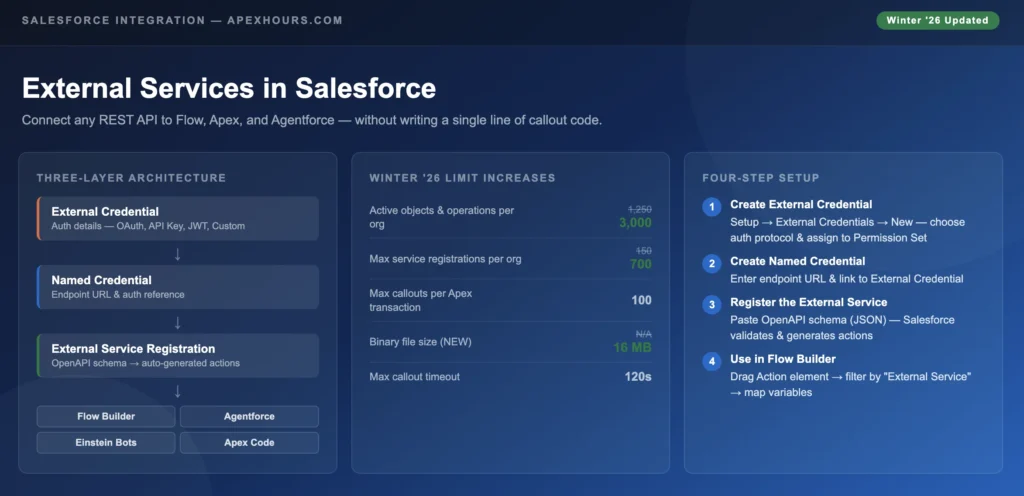
External Services is a declarative integration feature built into every Salesforce org. The premise is straightforward: you give Salesforce an OpenAPI schema describing your external REST API, and Salesforce auto-generates invocable actions — drag-and-drop building blocks you can use directly in Flow Builder, Agentforce, Orchestrator, and Einstein Bots. No custom Apex required.
What it isn’t is a full enterprise integration platform. You won’t route complex messages, transform data across formats, or orchestrate multi-system event chains here. That’s what MuleSoft is for. External Services lives in the sweet spot: simple, direct REST API calls that you want to trigger from Flows or AI agents without spinning up a middleware layer.
The supported invocation surfaces are:
- Flow Builder — Record-Triggered, Screen, Schedule, Auto-launched
- Orchestrator — for multi-step process flows
- Einstein Bots and OmniStudio
- Agentforce Agent Actions — the big 2025-2026 story (more on this below)
- Apex — via invocable wrapper, for when you need programmatic control
What Problem Are We Solving
- Nowadays, there is an API Integration in every Org.
- Development effort that goes into every implementation.
- Repetitive Code.
- It is not admin-friendly, even with the advent of processes.
How Do External Services Work?
- Setup a Named Credential for Authentication
- Write a Schema (Swagger or Integrant) for your API
- Import the Schema (JSON)
- Select the Named Credential
- Voila – You have Actions created for all the Verbs!
External Services Demo
Please Subscribe to the channel to get notification for upcoming recording.
If you are new in Salesforce. Please check our free Salesforce Admin and Salesforce Developer training.
Getting Started: The Four-Step Setup
Here’s the actual setup process, in order. Each step builds on the previous one — don’t try to skip ahead.
Step 1: Create an External Credential
Navigate to Setup > External Credentials > New. Choose your authentication protocol — OAuth 2.0, API Key, JWT, Custom, or Named Principal depending on what your external API requires. Fill in the authentication parameters for that protocol. Then go to the Permission Set you want to grant access to and add this External Credential to it. This permission-set-based model means you can have different credentials for different teams or process users without any code changes.
Step 2: Create a Named Credential
Setup > Named Credentials > New. Enter the external endpoint’s base URL. Link it to the External Credential you just created. Configure which HTTP methods are allowed. This is also where you’d set any certificate configurations for mTLS if your API requires it.
Step 3: Register the External Service
Setup > External Services > New > From API Specification. Select the Named Credential. Paste your OpenAPI schema in JSON format — or upload the file. Salesforce will validate the schema structure, attempt to reach the endpoint, and if everything checks out, generate an invocable action for each API operation defined in the spec.
Step 4: Use It in Flow Builder
Create a new Flow or open an existing one. Add an Action element. In the action type filter, select External Service — you’ll see all registered external service actions available. Pick the operation you want, then map your Flow variables to the input parameters and capture the output variables into Flow variables you can use downstream.
Choosing the Right Integration Approach
| Feature | External Services | Apex HTTP Callouts | MuleSoft | Platform Events |
|---|---|---|---|---|
| Code Required | No | Yes | Low-code | Varies |
| Setup Complexity | Low | Medium–High | High | Medium |
| OpenAPI Support | Native | Manual | Native | N/A |
| Flow Integration | Native | Via Invocable | Via Connector | Via Triggers |
| Agentforce Ready | Yes | Yes | Yes | No |
| Real-time | Yes | Yes | Yes | Near real-time |
| Best For | Simple REST APIs | Complex logic, bulk | Enterprise iPaaS | Event-driven async |
| Learning Curve | Low (admin-friendly) | High (developer) | Medium | Medium |
The honest answer: for most orgs, External Services handles 60–70% of integration touchpoints. The remaining scenarios — bulk data sync, complex transformation logic, multi-hop routing — still belong in Apex or MuleSoft.
Summary
Overall, these external services can help you to streamline your business processes and improve the overall efficiency of your organization.