Skip to content
No results
Menu
No results
  • Home
  • All Blogs
    • Career
    • Admin
    • Developer
    • DevOps
    • CTA
  • Interview
  • Certifications
  • Free Training
  • About Us
Events
Apex Hours
  • Home
  • All Blogs
    • Career
    • Admin
    • Developer
    • DevOps
    • CTA
  • Interview
  • Certifications
  • Free Training
  • About Us
Courses
Events
Apex Hours
Courses
Paypal integration with salesforce

PayPal integration with Salesforce | Paypal API

  • Amit ChaudharyWritten ByAmit Chaudhary
  • March 26, 2025
  • Integration
  • 1

Join us to learn about PayPal integration with Salesforce. In this session we will show how you can easily connect the PayPal Payflow Pro payment gateway to Salesforce, in order to charge credit cards directly from Salesforce, either via embedded buttons.

Table of contents
  1. Agenda:
  2. Purpose Of Integration
  3. What is API
  4. What is WebService
  5. 5 Pillars of Integration
    1. Create a PayPal Account
    2. Create a Sandbox Account
    3. Create an Application in PayPal
    4. Get Access Token

Agenda:

  1. Purpose of Integration
  2. What is API?
  3. What is WebService?
  4. Live Demo
    1. Create Paypal Account
    2. Create Sandbox in paypal
    3. Paypal Connected App
    4. Paypal API
      1. Create Payment using Paypal Method
      2. Create Payment using Credit Card Method
      3. Create Order using api
      4. Create Invoice
      5. Send Invoice
      6. Create Product
      7. Create Product Subscription
  5. Object Structure of the Objects involved in Demo
  6. Walkthrough of how to setup the Integration and test API using Postman tool.
  7. Q & A

Purpose Of Integration

  1. Purpose of integration is to integrate the PayPal payment gateway with Salesforce.
  2. Integration is useful to make the payment from e-com community or sites.

What is API

  1. An API in an Application Programming Interface
  2. It provides the information for how to communicate with software components
  3. Operations (What to Call) GET, POST, PUT, PATCH, DELETE
  4. Inputs (What to send with a Call)
  5. Outputs(What you get back from a Call)
  6. Request-Response format with object structure
  7. By using API you can change what is happening behind the scene without modifying how people call it

What is WebService

A web service is a method of communication that allows two software systems to exchange data over the internet.

  1. REST
  2. SOAP

5 Pillars of Integration

  1. Read 3rd Party System API
  2. Identify the oAuth of the API
  3. Test Authentication using any API Testing Tool like POSTMAN, Advanced REST Client
  4. Test API Callouts for different endpoints using API Testing Tools
  5. Start writing code

Create a PayPal Account

Create a Personal or Business PayPal account
1. To create business PayPal account visit https://paypal.com
2. To create Personal/Individual Account visit https://www.paypal.com/in/signup/account

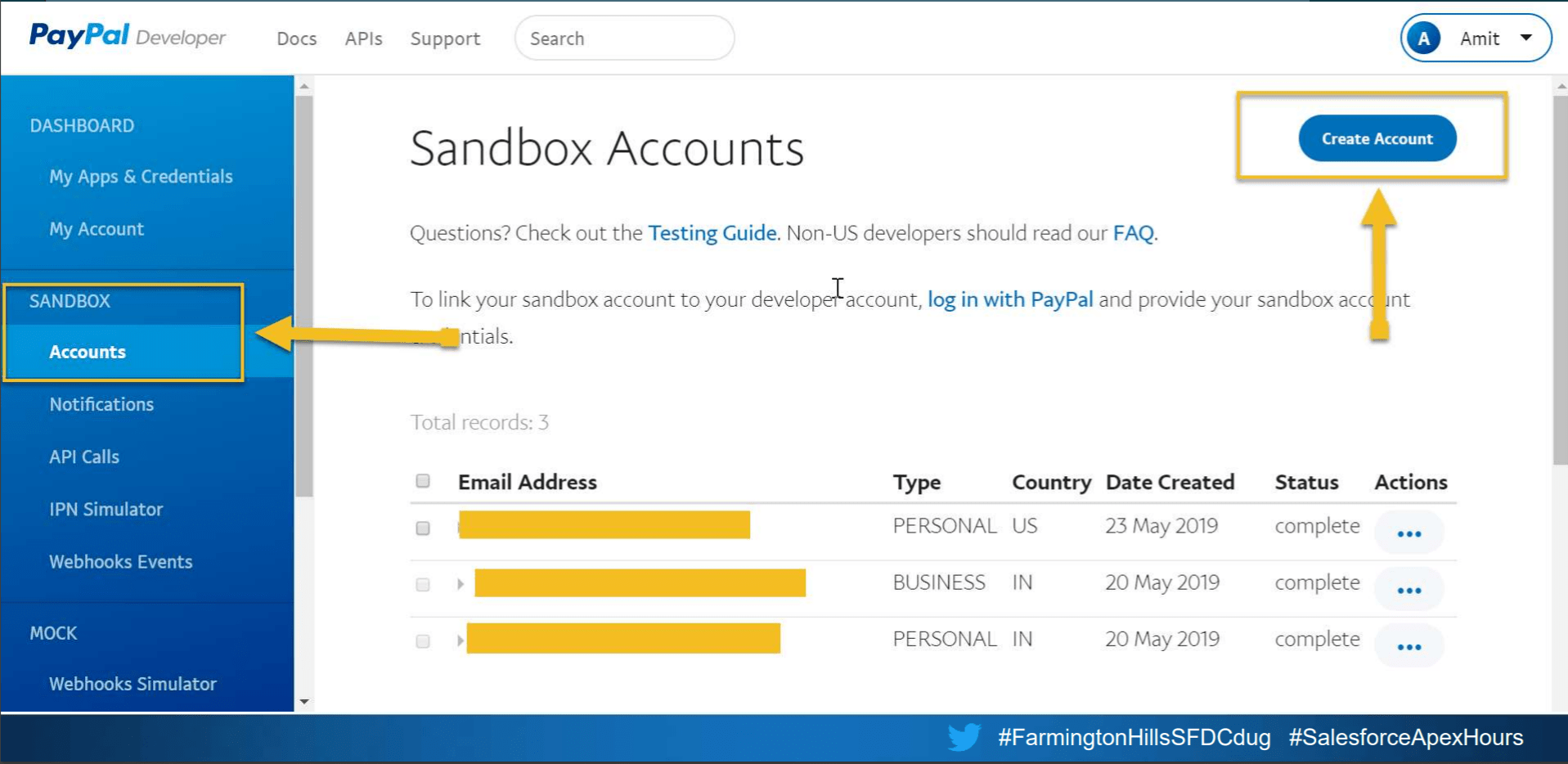
Create a Sandbox Account
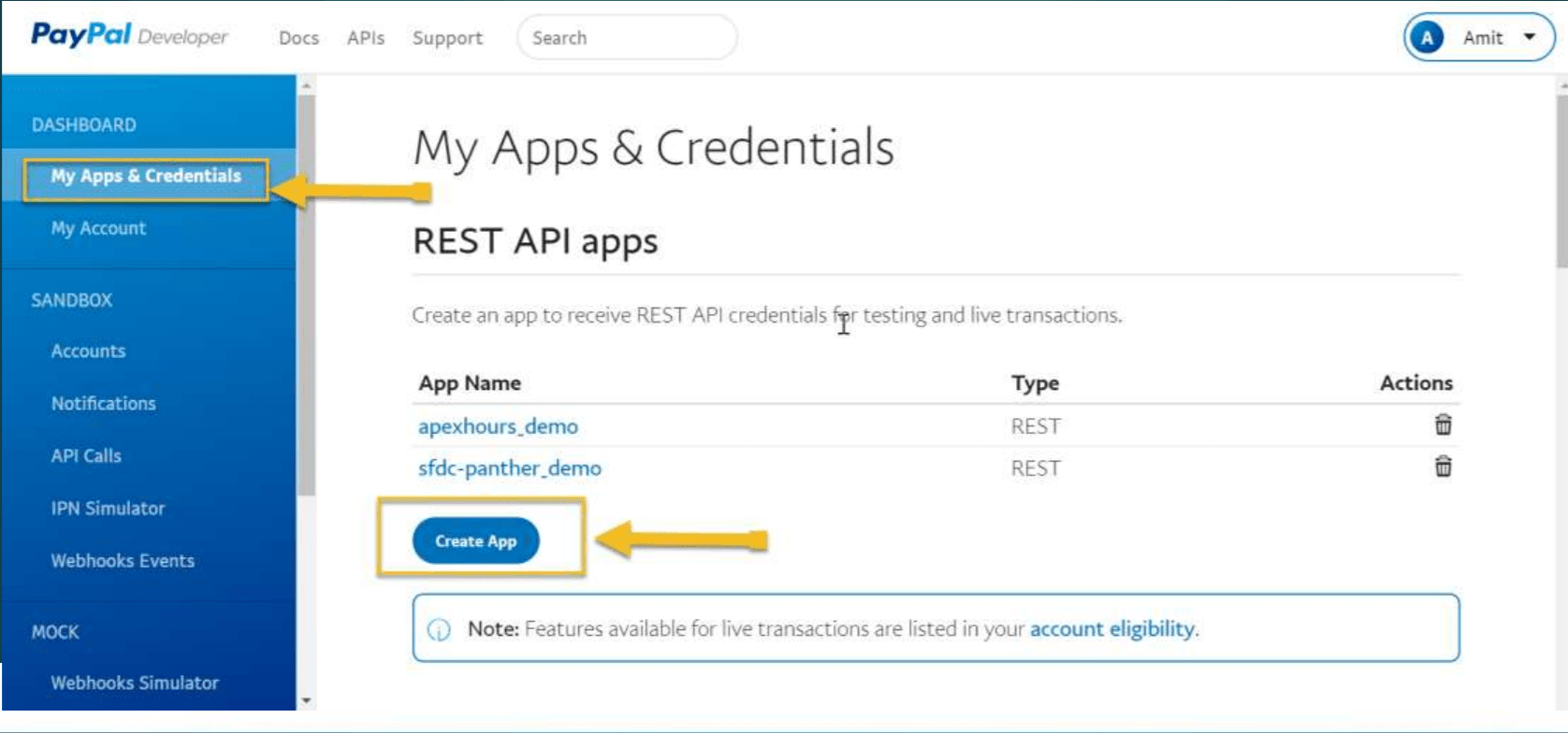
Create an Application in PayPal

Visit https://developer.paypal.com/developer/applications
Get Access Token

Method :- POST

  • URL :- https://api.sandbox.paypal.com/v1/oauth2/token
  • Content Type :- application/x-www-form-urlencoded
  • Body => grant_type=client_credentials
  • Header
    • Grant_type : client_credentials
    • Authorization : Basic Base64Encoded String of Clien_Key:Client_Secret

Here is recording of session.
Paypal integration with salesforce | Paypal API | Paypal invoice


Speaker         : Amit Singh
Date               : Saturday, 13 July 2019 10:00 AM EST ( 7:30 PM IST)


Here is the Link to Request Body that we used in our demo
https://docs.google.com/document/d/1JI1KuBE9vmfB5Ts6-msOdWINI7y_TkX0fFZpOHhCxi4/edit?usp=sharing

Please subscribe our YouTube channel to get notification for video upload. Check our “Session in 2019” page for all upcoming and old sessions of 2019.

Sharing is Caring so Share with your friends

Tags
# pay via paypal# Paypal Account# Paypal API# PayPal integration with Salesforce# WebService
Share your love
Share on Facebook Share on X (Twitter) Share on Pinterest Share on LinkedIn
Amit Chaudhary
Amit Chaudhary

Amit Chaudhary is a Salesforce Application & System Architect who has been working on the Salesforce Platform since 2010. He has been Salesforce MVP since 2017 and has 23 Salesforce Certificates.

Articles: 153

Related Posts

Monitor Your Salesforce API Usage Like a Pro

Monitor Your Salesforce API Usage Like a Pro

Make Google Events From Salesforce

Make Google Events From Salesforce

Testing Web Services Callouts in Salesforce

Testing Web Services Callouts in Salesforce

Apex Metadata API for Dynamic Salesforce Customizations

Apex Metadata API for Dynamic Salesforce Customizations

Understanding Named Credentials in Salesforce

Understanding Named Credentials in Salesforce

Integrating Stripe Payment Gateway with Salesforce LWC

Integrating Stripe Payment Gateway with Salesforce LWC

One comment

  1. Chris Chitemerere

    Chris Chitemerere

    August 21, 2021 / 10:56 am Reply

    Can you kindly assist with setting up the Salesforce Objects side?

    Thanking you in advance

Leave a ReplyCancel Reply

Your email address will not be published. Required fields are marked *

Accelq

Important Links

Home
About us
Contact us
Privacy Policy

Recent Posts

  • Salesforce Data Breaches- What Really Went Wrong (And How to Protect Your Org)

  • From Admin to Architect —A Realistic Career Roadmap

  • LWC + Apex Best Practices for Large Data Operations

  • getQueryLocator vs. Iterator in Apex

  • Salesforce Revenue Cloud Key Objects We Should Know

Subscribe to the blog via email

Enter your email address to subscribe to this blog and receive notifications of new post by email.

Join 4,531 other subscribers

Copyright 2018-2026. All Rights Reserved By Apex Hours.