Skip to content
No results
Menu
No results
  • Home
  • All Blogs
    • Career
    • Admin
    • Developer
    • DevOps
    • CTA
  • Interview
  • Certifications
  • Free Training
  • About Us
Events
Apex Hours
  • Home
  • All Blogs
    • Career
    • Admin
    • Developer
    • DevOps
    • CTA
  • Interview
  • Certifications
  • Free Training
  • About Us
Courses
Events
Apex Hours
Courses
Login Flow
Login Flow

Three Arsenal for every Admin to become a Super admin

  • Apex HoursWritten ByApex Hours
  • Published OnJune 2, 2020
  • Updated OnNovember 13, 2023
Home Salesforce Admin Three Arsenal for every Admin to become a Super admin
  • Salesforce Admin
  • 2 mins

In this session, we will try to understand three essential aspects of becoming a super admin. 1 Login Flows – stop users from logging in when there is system maintenance or deployments. 2 power of 1 in formulas and 3 Using custom settings in Process Builders to avoid hard codings. Join us to learn about Three Arsenal for every Admin to become a Super Admin.

Three Arsenal for every Admin to become a Super admin
Table of contents
  1. 1. Login Flows
  2. 2. Custom Metadata Relationships
  3. 3. CaseSafeId and Power of 1
    1. Summary

1. Login Flows

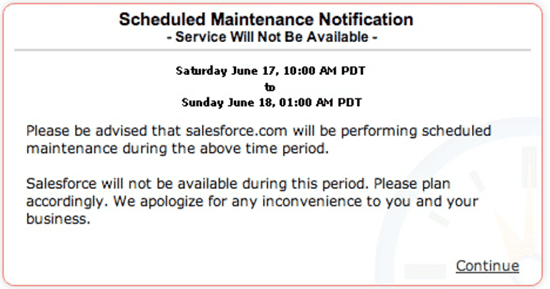
Login flows are one of the greatest Arsenal that could be used to collect user information during the Login process. You could also use Login flows to show the “Terms & Conditions” page or the “Privacy policy” Page and make users Accept during Login. Login flows will come to your rescue during deployments and Releases to stop users from logging into the System.

Have you ever wondered how Salesforce was showing a Maintenance message?
Login Flows

2. Custom Metadata Relationships

As we know, Salesforce wants us to use Custom Metadata Types instead of List Custom Settings. Custom Metadata settings can be used in
a. Formulae fields
b. Validation rules
c. Process builder /Workflows
d. Flows
e. Apex

One of the less known feature is Custom Metadata Relationships. We could use Custom Metadata Relationships to connect custom metadata setting with
a. Standard Object/ Custom object
b. Custom field
c. Custom Metadata settings.

Custom Metadata Relationships

3. CaseSafeId and Power of 1

Did you spend more time comparing data from External Systems with Salesforce Report data? Are you using Google search to convert your 15-digit id to an 18-digit ID or use an Excel function to convert to an 18-digit ID from 15 15-digit ID?

While performing data analysis, you need an 18-digit id (Case Insensitive) to Provide appropriate stats. CaseSafeId function in Salesforce comes to your rescue. Create a Formula field on the Standard/Custom object with the casesafeId function.

Power of 1 is the most excellent formula that has ever been written. If you want to get the high-level stats of unique counts, such as Owner and unique records owned by the user from a desired object in the report, then the power of 1 comes to your rescue.

Summary

Please Subscribe to the channel to get notification for upcoming recording.

If you are new in Salesforce. Please check our free Salesforce Admin and Salesforce Developer training.

Tags
# CaseSafeId# Custom Metadata Relationships# Login Flow# power of 1
Share your love
Share on Facebook Share on X (Twitter) Share on Pinterest Share on LinkedIn
Apex Hours
Apex Hours

Salesforce Apex Hours is a program of the community, for the community, and led by the community. It is a space where Salesforce experts across the globe share their expertise in various arenas with an intent to help the Ohana thrive! Join us and learn about the apex hours team.

Articles: 324

Related Posts

How AI Is Changing the Way Salesforce Admins Build Flows

How AI Is Changing the Way Salesforce Admins Build Flows

How Revenue Cloud Helps Subscription

How Revenue Cloud Helps Subscription-Based Businesses

Customizing the Utility Bar for Admins in Salesforce

Customizing the Utility Bar for Admins in Salesforce

Kanban Board in LWC

Developing a Drag and Drop Kanban Board in LWC

Troubleshooting a Broken Flow in Salesforce

Troubleshooting a Broken Flow in Salesforce with Simple Example

Salesforce Installed Packages

Salesforce Installed Packages: A Guide to Implement Salesforce Packages

Leave a ReplyCancel Reply

Your email address will not be published. Required fields are marked *

Accelq

Important Links

Home
About us
Contact us
Privacy Policy

Recent Posts

  • Salesforce Data Breach Prevention: The Complete Security Hardening Guide for Admins and Developers

  • Nebula Logger Salesforce: The Complete Setup, Usage & Best Practices Guide

  • LWC Security in Salesforce

  • Salesforce Data Breaches- What Really Went Wrong (And How to Protect Your Org)

  • From Admin to Architect —A Realistic Career Roadmap

Subscribe to the blog via email

Enter your email address to subscribe to this blog and receive notifications of new post by email.

Join 4,519 other subscribers

Copyright 2018-2026. All Rights Reserved By Apex Hours.