

Apex triggers are a powerful tool in Salesforce development. Used correctly, they enable you to automate processes, enforce business logic, and maintain data integrity. However, mismanaged triggers can lead to performance issues, data inconsistencies, and maintenance headaches. Here are some best practices to ensure your Apex triggers are robust, efficient, and maintainable.
Here are the key best practices for writing Apex triggers in Salesforce:
1. Core Design Principles
Use one trigger per object to avoid unpredictable execution order and conflicts. Multiple triggers on the same object can fire in any sequence, making debugging difficult. Check different Apex Trigger frameworks.
Keep trigger logic minimal by delegating business logic to handler classes. The trigger itself should just route to appropriate handler methods based on the trigger context (before insert, after update, etc.). Here are few best practices.
- One trigger per object- Avoid multiple triggers on the same object
- Logic Less Trigger – The trigger itself should only route to handler methods. All business logic lives in dedicated Apex handler classes.
- Context-specific handler methods- Create separate handler methods for each context: beforeInsert, afterUpdate, etc. for clean separation of concerns.
- Follow Apex Best practices – Adhere to naming conventions, proper documentation, and follow established Apex trigger frameworks.
Why This Matters:
- Predictable execution order ensures consistent behavior
- Easier debugging and troubleshooting
- Centralized logic management
- Improved code organization and readability
- Reusable code across different contexts
2. Bulkification
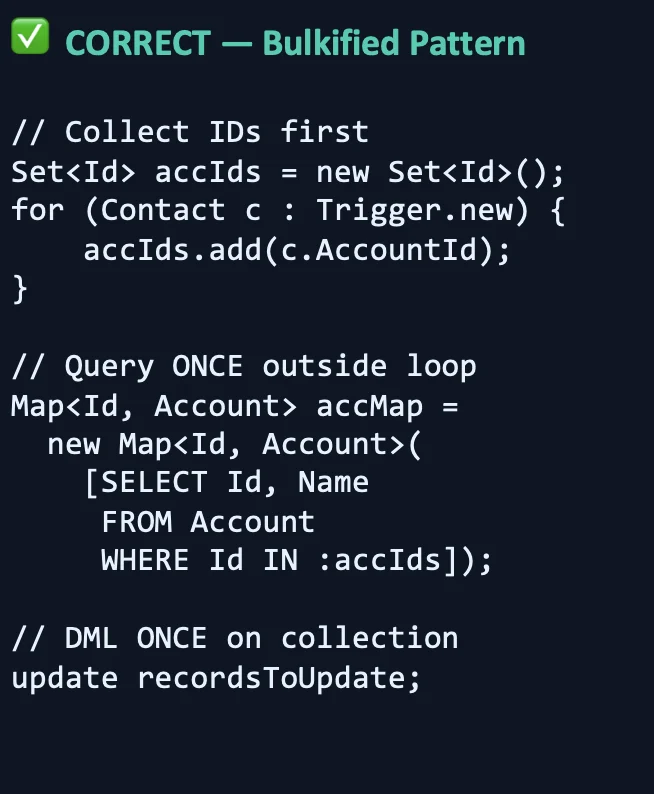
Always write triggers to handle bulk operations, not just single records. Salesforce processes records in batches of up to 200, so avoid SOQL queries and DML statements inside loops. Instead, collect IDs or data in collections, query once outside the loop, and perform DML operations on collections.
Critical Bulkification Rules
- Process collections, not individual records – design all methods to handle List<SObject>
- Never perform SOQL queries inside loops – collect IDs first, then query once outside the loop
- Never perform DML operations inside loops – collect records in a list, then perform DML once
- Use Maps for efficient lookups – convert query results to Maps for O(1) access
3. Governor Limits
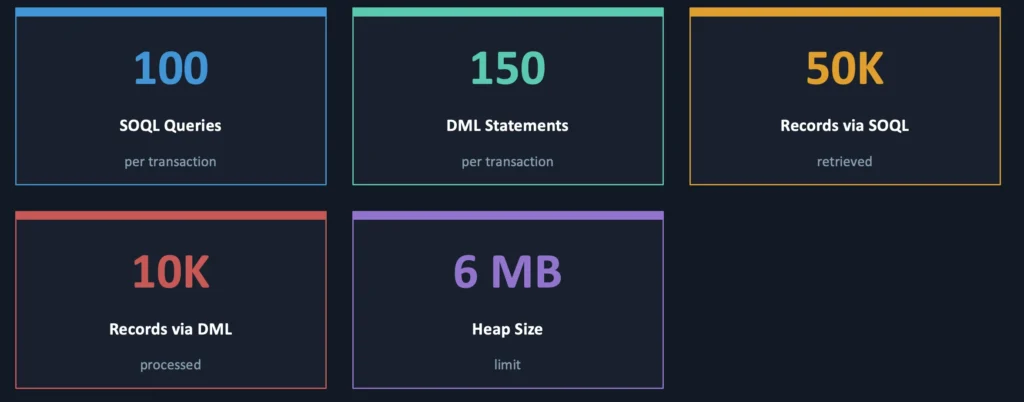
Be mindful of Salesforce governor limits. Stay under limits like 100 SOQL queries and 150 DML statements per transaction. Use efficient queries with proper filtering and avoid unnecessary recursive triggers by implementing static variables to track execution.
Key Governor Limits:
- 100 SOQL queries per transaction
- 150 DML statements per transaction
- 50,000 records retrieved by SOQL queries
- 10,000 records processed by DML statements
- 6 MB heap size limit
Check out Governor Limits in Salesforce & Best Practices.
4. Context Variables
Leverage trigger context variables appropriately:
- Use
Trigger.newandTrigger.oldto access record versions. - Check
Trigger.isBefore,Trigger.isAfter,Trigger.isInsert, etc. to control logic flow. - Use
Trigger.newMapandTrigger.oldMapfor efficient lookups in after triggers.
Key Trigger Context Variables:
| Variable | Description |
| Trigger.new | List of new versions of records (insert, update, undelete) |
| Trigger.old | List of old versions of records (update, delete) |
| Trigger.newMap | Map of IDs to new versions (after insert, after update, after undelete) |
| Trigger.oldMap | Map of IDs to old versions (after update, after delete) |
| Trigger.isBefore | Returns true if executing in before context |
| Trigger.isAfter | Returns true if executing in after context |
5. Error Handling
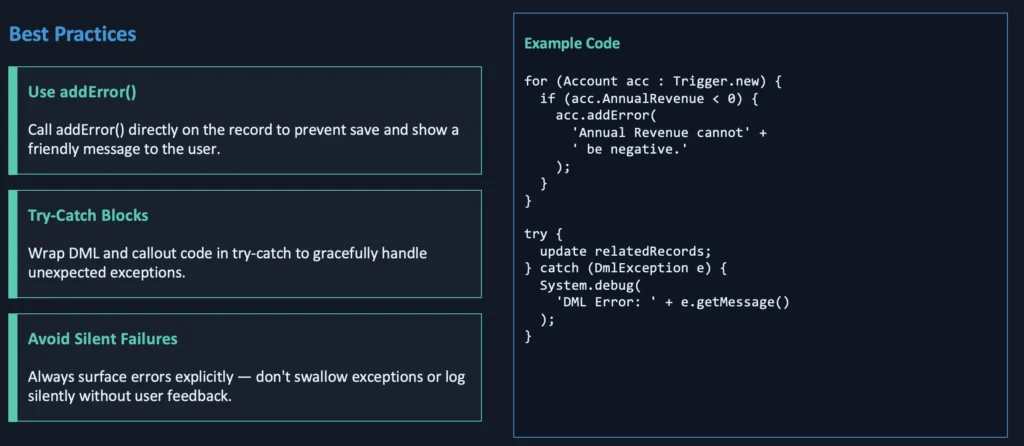
Implement proper error handling with try-catch blocks and use addError() method on records to provide user-friendly validation messages rather than letting exceptions bubble up.
6. Recursion control
Many Developers face recursive trigger issues. For example in the ‘after update’ trigger, the Developer is performing an update operation, and this lead to the recursive call.
There are different ways to solve the recursion in the trigger.
- Use Static Boolean Variable
- Use Static Set to Store Record Id.
- Use Static Map
- Use Old Map
Learn more.
7. Testing
Write comprehensive test classes with at least 75% code coverage, but aim for 100%. Test bulk scenarios with 200+ records, test all trigger contexts, and include both positive and negative test cases.
8. Before vs. After — Choose the Right Context
One of the most common mistakes is putting logic in the wrong trigger context. It affects correctness, not just style.
- Use before insert / before update when you’re setting or normalizing field values on the triggering record itself, or validating and calling addError() to prevent the save.
- Use after insert / after update when you’re creating related records (which require DML that needs the parent Id), initiating callouts via @future, or firing platform events.
Conclusion
Following these Apex trigger best practices leads to scalable, maintainable, and robust Salesforce applications. Keeping code organized, efficient, and well-tested ensures that your automation works reliably as your org evolves.
Happy coding, and may your triggers always fire successfully!