 Written ByNikh T
Salesforce developers have always had a tricky problem to solve. How do you process very large SOQL result sets without blowing past governor limits or building heavy Batch Apex jobs? Salesforce’s answer to this is Apex cursors and Apex pagination cursors. They let you work with large volumes of data in smaller, controlled pieces while staying inside a single-transaction boundary.
Let’s break this down clearly, without fluff.
An Apex cursor is a pointer to a SOQL query result, not the result itself.
Instead of pulling thousands or millions of records into memory at once, a cursor lets you fetch only a small slice of records at a time. You decide:
This makes Apex cursors ideal for high-volume, high-resource processing where normal SOQL queries or collections would hit limits.
Apex cursors are:
Batch Apex works, but it has trade-offs:
Apex cursors give you more control. You can decide how many records to process per transaction and when to continue, without being locked into batch execution rules.
For package developers and advanced orgs, this is a big deal.
Here’s the flow at a high level:
Important detail: You are responsible for tracking the offset position. The cursor doesn’t remember it for you.
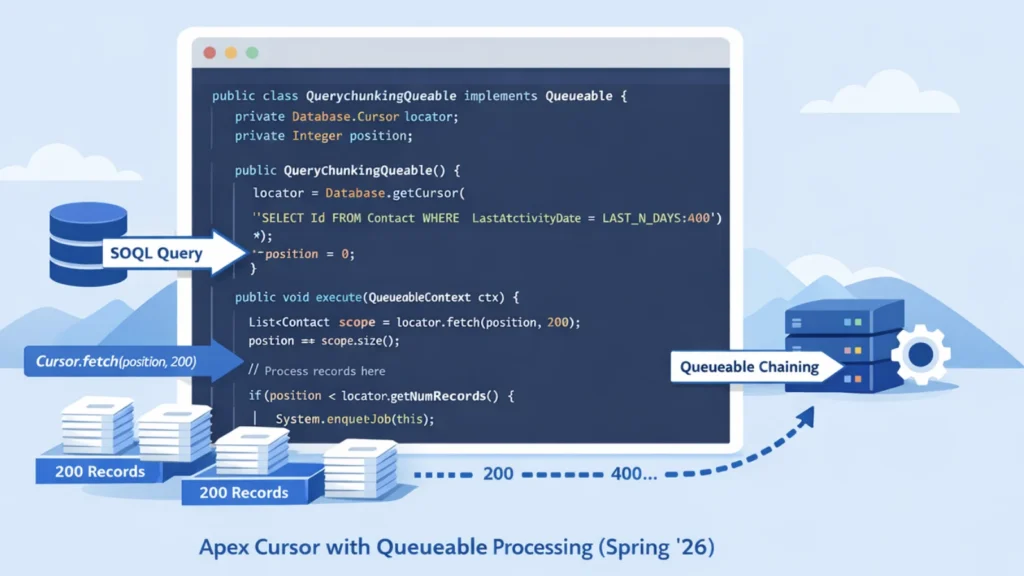
What’s happening here:
Even though cursors are powerful, they are not limit-free.
Apex cursors introduce two new system exceptions:
This retry behavior makes cursors safer for long-running processes.
Pagination cursors solve a different problem. They are designed for UI-based pagination, such as:
Instead of processing massive data jobs, pagination cursors focus on consistent page sizes and user experience.
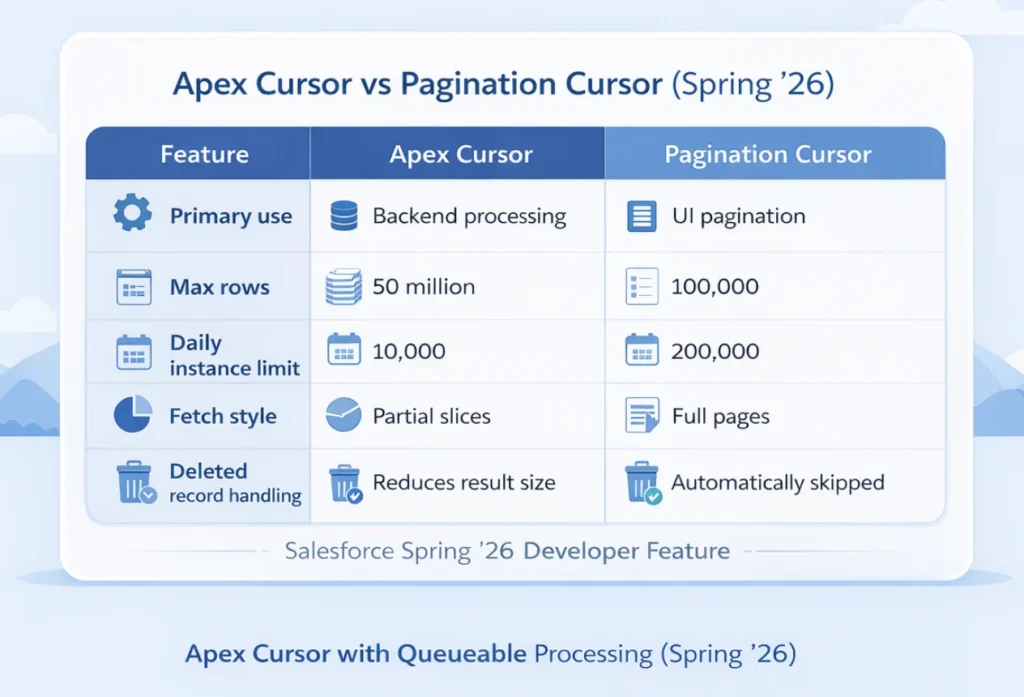
This is where pagination cursors really shine.
If records are deleted after the cursor is created:
This ensures users always see a consistent number of records per page.
To fetch a page:
From that object, you can:
The maximum page size is 2000 rows.
Salesforce exposes detailed cursor limits through the Limits and OrgLimits classes.
You can track:
This makes it easier to build safe, observable large-data logic.
Use Apex cursors when:
Use pagination cursors when:
Apex cursors give Salesforce developers a powerful middle ground.
You get:
Pagination cursors complement this by solving UI pagination correctly, especially in dynamic datasets where records can change between page loads.
Used properly, cursors let you scale your Apex logic without fighting governor limits—and that’s a win every advanced Salesforce org needs.
Can Apex cursors replace Batch Apex completely?
Not entirely. Batch Apex still makes sense for scheduled, chunked processing. Apex cursors are better when you want more control and flexibility using Queueable jobs.
Do Apex cursors store data in memory?
No. They store a pointer to the query result and fetch only the records you request.
What happens if a cursor fetch fails mid-processing?
If the error is transient, Salesforce throws System.TransientCursorException, and the transaction can be retried safely.
Are pagination cursors safe for large data exports?
No. They are optimized for UI pagination, not massive exports or background processing.
Do cursor fetch calls affect SOQL limits?
Yes. Both fetch calls and fetched rows count toward SOQL limits, so careful sizing still matters.