
Salesforce Open CTI Retirement and Why It Matters
Salesforce has officially put Open CTI in maintenance mode, with a planned retirement date of February 28, 2028. As the Salesforce Open CTI sunset approaches, companies with complex call center setups should begin preparing for the Open CTI retirement now. An effective Open CTI migration from the integration may require significant architectural redesign and resources.
No new features or enhancements will be added as Salesforce Open CTI retirement progresses, meaning existing implementations risk falling behind modern tech, such as advanced telephony and AI capabilities.
This shift toward AI-driven solutions is happening rapidly. According to Salesforce, AI is expected to handle up to 50% of customer service cases by 2027, making artificial intelligence integration a priority for customer service.
To understand why the OpenCTI end is significant, it helps to refresh knowledge of what it actually is and why it worked effectively for so long.
What Open CTI Is
Open CTI is a browser-based integration technology that connects Salesforce with external telephony systems such as Avaya or Cisco. It allows call center agents to handle calls, log interactions, and access customer data directly within Salesforce, without needing desktop software or plugins.
For years, the framework solved several major challenges in Salesforce call center integration:
- Fully browser-based architecture: No local installation was required, making it platform-independent (Windows, macOS, Linux) and compatible across browsers.
- Customizable integration: Developers could use JavaScript APIs to implement custom behavior according to their business needs, such as automations or personalized screen pops.
- Decoupled telephony: Organizations could integrate with a wide range of telephony providers, without being locked into a single vendor.
- Fast implementation for standard use cases: Common features like customer screen pops, click-to-call, and call logging could be implemented quickly, reducing deployment time for Salesforce call center software.
It was a practical, flexible solution for traditional customer service needs.
Why Open CTI Is No Longer Enough
While the solution handled traditional workflows, its architecture is now limited for modern contact center needs, especially as Salesforce Open CTI ends and AI solutions emerge.
The main limitation is its reliance on external telephony systems. Call audio, recordings, IVR, routing, and controls all reside outside Salesforce, while the CRM only receives metadata. This separation reduces control and visibility and makes troubleshooting harder. As a result, Salesforce depends on provider events to take action rather than making real-time decisions internally.
In addition, each voice provider uses its own API, so integration, updates, or switching vendors can be complex and costly. Softphone interfaces can vary by provider, so the user experience can feel different and inconsistent for agents.
Setup and maintenance are another hurdle. There’s no standardized approach, and many features require custom JavaScript development. Even small changes often depend on developer support, creating a need for ongoing maintenance.
Overall, this fragmented architecture makes it harder to manage operations and limits the ability to adopt Salesforce AI contact center features. That’s a growing issue, as 93% of service professionals say AI saves time, and representatives using AI spend 20% less time on routine cases. Open CTI simply wasn’t designed to support this level of real-time intelligence.
Salesforce Voice and Salesforce Agentforce Contact Center: The Next Generation
As the Open CTI retirement progresses and more Salesforce Contact Center news highlights this shift, organizations are looking for ways to replace Open CTI Salesforce implementations with more modern solutions. Salesforce is addressing this need with a telephony solution built directly into the platform: Salesforce Voice.
Key Features of Salesforce Voice
The tool introduces several important improvements, making it a strong replacement Open CTI Salesforce approach:
- Fully managed and supported by Salesforce: Call center capabilities are built directly into the platform, reducing reliance on external CTI adapters and third-party vendors.
- Configuration over customization: Many core features can be enabled through configuration rather than custom development.
- Native UI: Agents can handle calls within Salesforce using built-in softphone features such as click-to-dial, call controls, and automatic call logging.
- Automatic call recording and transcription: Calls are recorded and transcribed in real time, with data stored in the CRM.
- Native call data: Voice interactions are captured as native data, allowing for comprehensive reporting and analytics.
| Salesforce Open CTI Retirement: Comparing Open CTI and Salesforce Voice | ||
|---|---|---|
| Feature | Salesforce Voice (Service Cloud Voice) | Open CTI |
| Type | Native Salesforce telephony solution | API/framework to integrate third-party telephony systems |
| Setup | Quick, mostly configuration-based | Requires development and custom adapter integration |
| Telephony Integration | Voice calls handled natively in Salesforce, automatically logged | Requires custom integration with your telephony provider |
| Call Recording & Analytics | Built-in call recording, transcription, and AI insights | Dependent on the third-party system |
| User Interface | Integrated into Salesforce UI | Must be built using Salesforce Lightning + Open CTI API |
| Maintenance | Managed by Salesforce | Maintained by your organization or vendor; updates require developer effort |
| Supported Providers | Salesforce-certified telephony partners | Any telephony system compatible with Open CTI |
Salesforce Voice provides the communication capabilities, but Agentforce Contact Center is what makes customer service truly intelligent.
The Role of Agentforce Contact Center
Agentforce is built to manage interactions across multiple channels, including voice, chat, email, and messaging. It uses AI to help route cases and interactions based on context and business logic. Because it is native to Salesforce and unifies voice, digital channels, CRM data, and AI agents in a single system, all customer interactions are stored in one place as part of a single context, allowing agents to easily access interaction history and resolve issues more efficiently.
AI in Agentforce actively supports agents during interactions. Routine tasks, such as case creation, routing, follow-ups, customer notifications, and updates, can be automated. Agents can access recommended answers and knowledge base content to save time on research. Real-time AI suggestions, next-best actions, and automated processes help agents resolve issues faster and more accurately. When AI cannot fully resolve a case, the interaction is passed to a human agent with the full transcript and customer history.
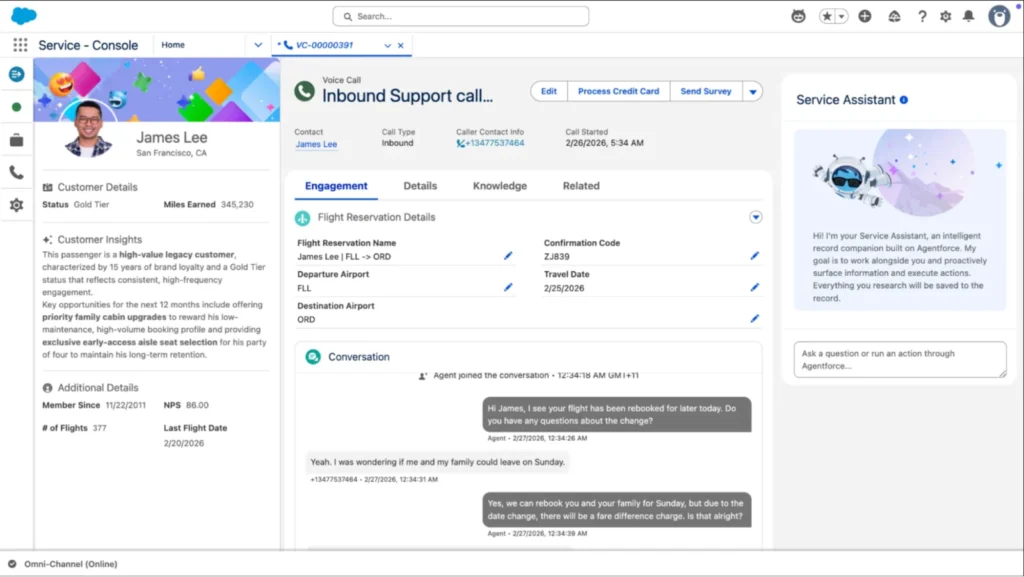
Salesforce Service Console, image from Salesforce.
In addition, reporting and omnichannel dashboards provide real-time visibility into agent performance, queues, customer satisfaction, and handling times.
This approach reflects broader call center AI news trends, where AI is no longer limited to post-call analysis but actively participates in interactions. The results are already clear: Salesforce reports that Agentforce has handled over 2 million conversations on Salesforce Help.
With Salesforce Agentforce Contact Center, organizations move closer to an AI powered contact center Salesforce model, where routing decisions happen inside the platform, and AI continuously supports agents in real time.
A More Unified Approach to Voice – With Some Trade-Offs
Unlike Open CTI, Salesforce Voice and Agentforce Contact Center together create a more native call center experience: calls and data stay within Salesforce, routing and logic run in real time, and reliance on vendor-specific integrations is reduced. Features like transcription, sentiment analysis, and intelligent recommendations are built into the platform.
However, this may not meet the needs of every enterprise. Many still rely on existing telephony systems like Cisco, Avaya, or Microsoft Teams, with established carrier contracts, regional infrastructure, and compliance requirements. As a managed solution, Salesforce Voice works best within its own ecosystem, which can limit flexibility for businesses that need to:
- keep existing telephony setup,
- support multi-region or hybrid deployments,
- extend voice participation beyond the contact center,
- maintain full control over routing and voice data.
Enterprise Voice Control Layer: How to Replace Open CTI Salesforce Integration
To address these limitations, organizations can implement an enterprise voice control layer, a middle layer between the CRM and existing telephony platforms. Often called enterprise voice for Salesforce, this approach keeps the voice infrastructure decoupled from the CRM but still fully integrated with it.
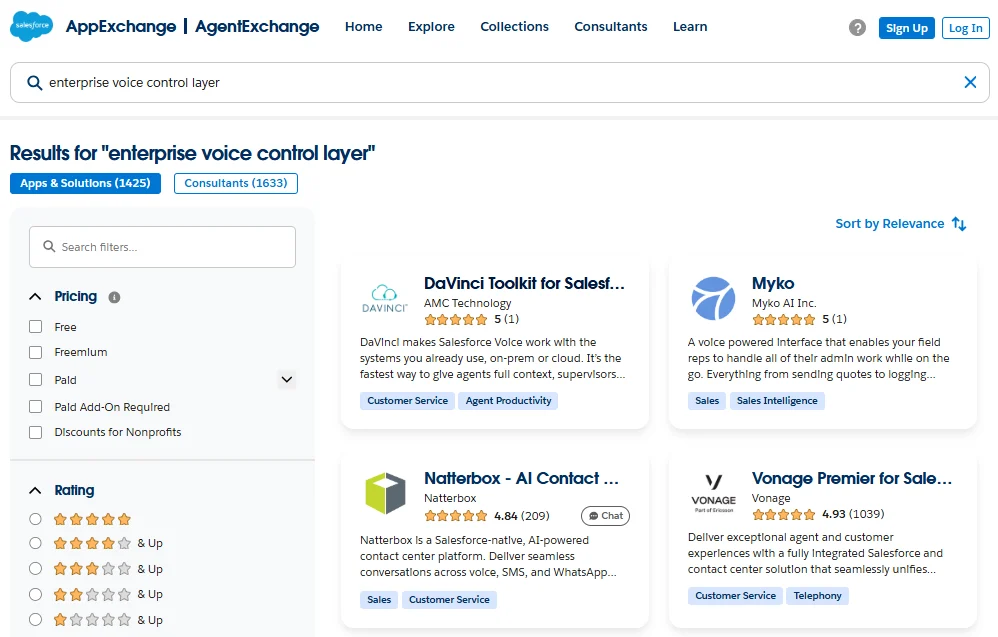
Enterprise voice control layer solutions on AppExchange
For example, when exploring AppExchange, you can find solutions such as the DaVinci Toolkit for Salesforce Voice, combined with DaVinci for Agentforce, that follow this model. Rather than replacing Salesforce Voice or existing telephony systems, they connect them. Salesforce stays the system of intelligence, voice platforms handle calls, and AI works across channels.
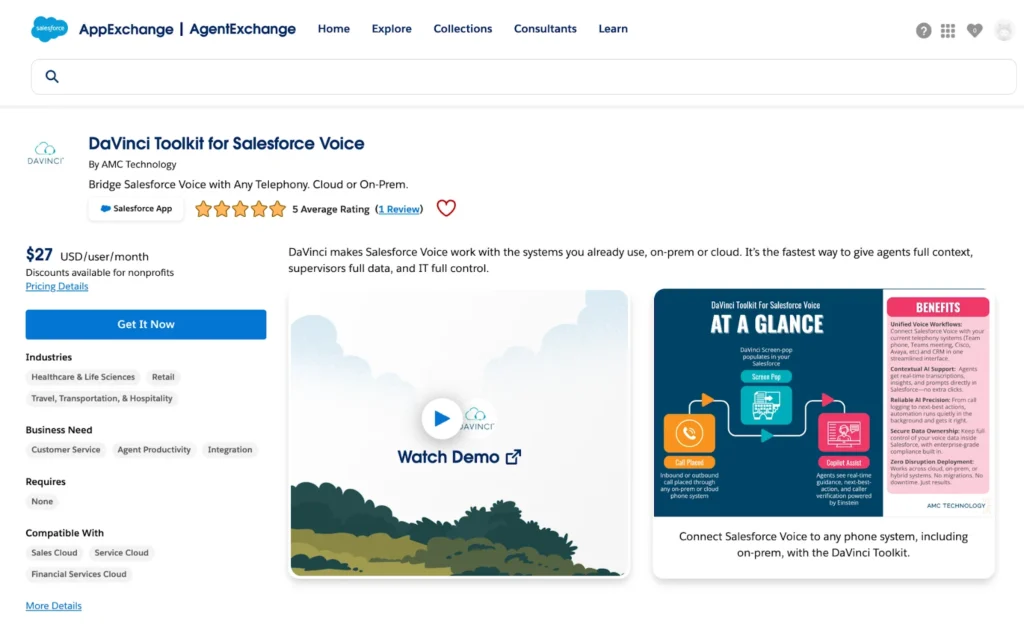
DaVinci Toolkit for Salesforce Voice on AppExchange
Key Capabilities of an Enterprise Voice Layer
1. Unified voice workflows across systems: Connects Salesforce Voice with existing platforms such as Cisco, Avaya, or Microsoft Teams. Agents handle calls in Salesforce while keeping full context and using existing telephony systems.
2. Preserve existing telephony investments (BYOT): Organizations can keep their current carriers, contracts, and regional setups without migrating to a new provider.
3. Flexible deployment across environments: Supports cloud, on-premise, and hybrid architectures, making it a good fit for enterprises with complex infrastructure or mixed deployments, for example, using on-premise telephony in one region and cloud systems in another.
4. Centralized data and improved visibility: Calls, transcripts, and insights are stored in Salesforce, reducing fragmentation. Supervisors can track performance and review interactions in dashboards without switching tools.
5. Real-time AI support within Salesforce: During live calls, Salesforce can show transcriptions, sentiment analysis, and recommended actions. AI agents can also handle tasks like fetching data, triggering processes, or doing repetitive work, saving time for service reps.
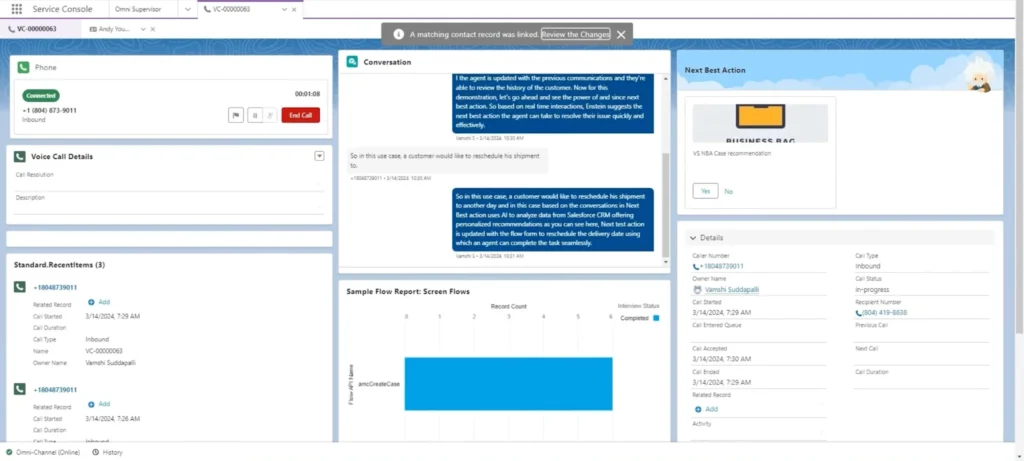
Voice call record page with transcription and next-best-action recommendation
6. Automated authentication and smarter interactions: Identity checks run in the background during calls, showing results instantly to agents. With real-time AI help, this makes customer interactions more secure and personalized, especially important as 76% of customers now expect personalized service.
7. Custom workflow integration across systems: Workflows can be run across Salesforce and external systems using custom integrations, allowing flexible customer service without being limited to a single platform.
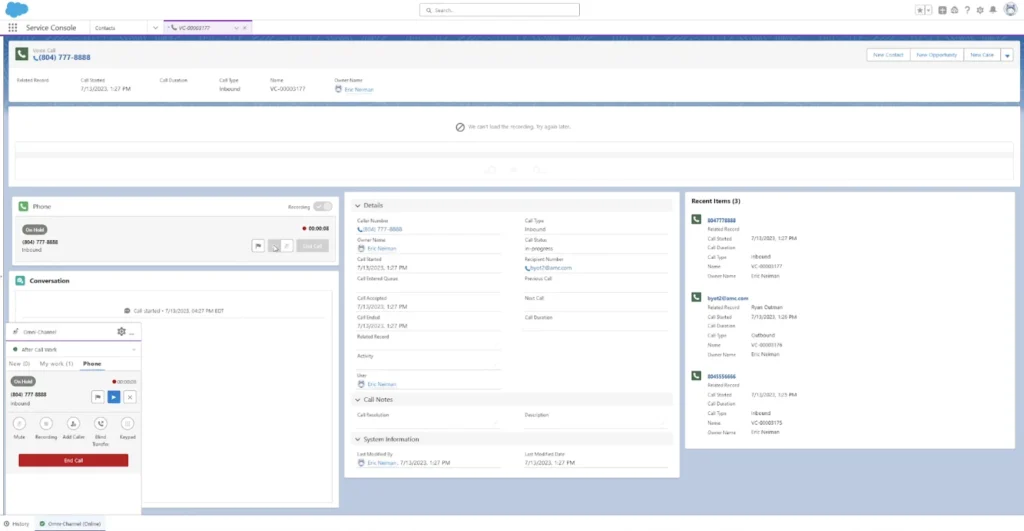
Voice call record page, with the Omni‑Channel panel
Why This Layer Matters
As organizations move toward more advanced voice and AI capabilities, the challenge is not just adding new features, but integrating them into existing systems without disruption. An enterprise voice layer:
- enables AI-driven processes in Salesforce,
- preserves telephony investments,
- reduces the need for large-scale migrations,
- provides more control over voice data and routing.
This approach lets companies modernize their AI contact centre Salesforce architecture at their own pace, rather than replacing their entire voice ecosystem at once.
How to Prepare for Migration from Open CTI to Salesforce Voice
To prepare for Salesforce Agentforce Contact Center and evolving Salesforce voice AI capabilities, companies should focus on a few key steps:
- Assess your current setup: Review your Open CTI environment, telephony systems, integrations, workflows, and compliance requirements to gain an understanding of what needs to be preserved or modernized.
- Define your goals: Identify key outcomes like intelligent routing, real-time transcription, automation, and improved customer experience.
- Design your future architecture: Move from point-to-point integrations to a layered architecture. Plan a model where Salesforce handles intelligence, telephony handles voice delivery, and an orchestration layer connects them.
- Build a foundation: Instead of rebuilding everything, introduce a central integration/orchestration layer, such as DaVinci, and gradually connect existing systems.
- Add AI capabilities: Enable real-time transcription, sentiment analysis, automated tasks, and AI recommendations using Agentforce.
- Start with a hybrid model: Run Open CTI and new solutions in parallel, testing with selected teams or use cases to ensure smooth adoption.
- Iterate and scale gradually: Optimize based on results, then expand AI and new workflows across the organization.
Final Thoughts: Open CTI End Is an Opportunity
The Salesforce Open CTI end of life isn’t a setback, it’s a chance to modernize your entire Salesforce call center.
Rather than expecting new tools to solve everything automatically, organizations should approach this change as a structured migration toward a modern, intelligent architecture.
With solutions such as DaVinci by AMC Technology alongside Salesforce Agentforce, organizations can keep existing telephony, enable AI automations, and move toward an intelligent, omnichannel contact center.
Service leaders rank AI adoption as the #2 priority to improve customer experience. With the right planning, Salesforce can become a smart control center for every customer interaction.