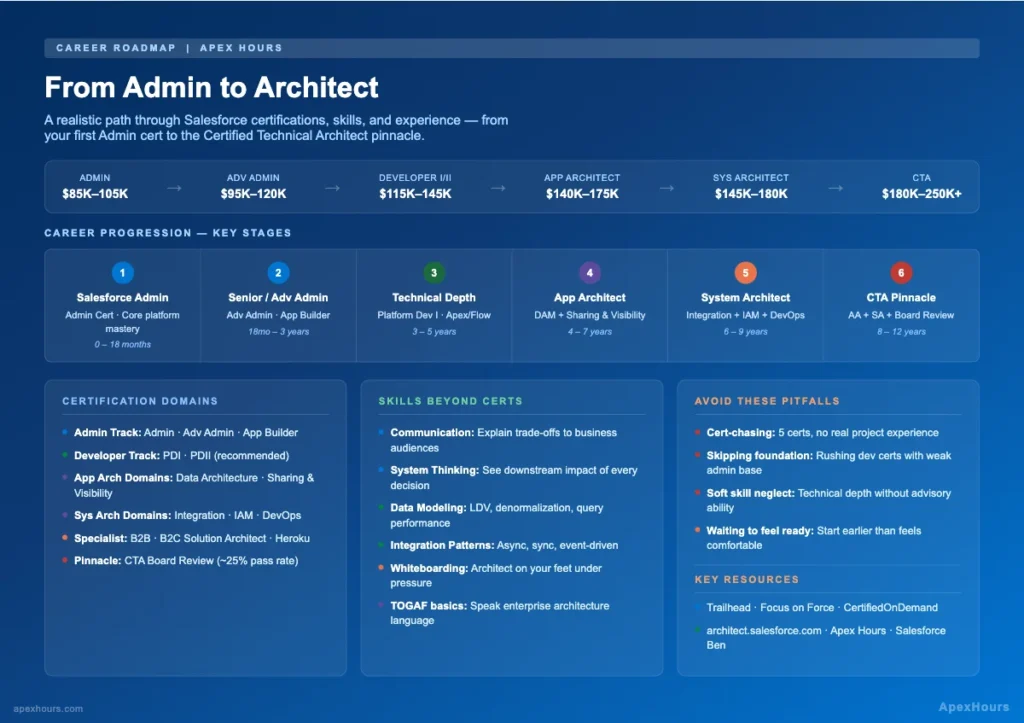
You’ve been managing Salesforce for two, maybe three years. You know your org inside out — validation rules, flows, permission sets, profiles, the works. You’re the go-to person on your team. And somewhere along the way, you sat in a meeting with a Salesforce Architect and thought: what does that person actually do that I can’t?
Here’s the honest answer: probably less technically impressive than you’d expect, but infinitely more strategically important. Architects don’t just configure — they decide why, what, and how entire platforms should be designed. And that shift in thinking is both the challenge and the opportunity on this career path.
This post maps out what it realistically takes to go from Salesforce Admin to Salesforce Architect — the certifications, the skills, the timeline, the traps people fall into, and what hiring managers are actually looking for when they interview architect candidates. No fluff. No “just believe in yourself” platitudes. From Admin to Architect —A Realistic Career Roadmap
Why This Path Matters (and What It Pays)
The demand for senior Salesforce talent — particularly architects — has grown faster than the supply for years running. According to IDC research commissioned by Salesforce, the Salesforce ecosystem is projected to create 9.3 million jobs globally by 2026. Most of those jobs are in implementation and admin, but the architect layer is the one where compensation gets genuinely interesting
Here’s a rough salary landscape (US market, 2025–2026):
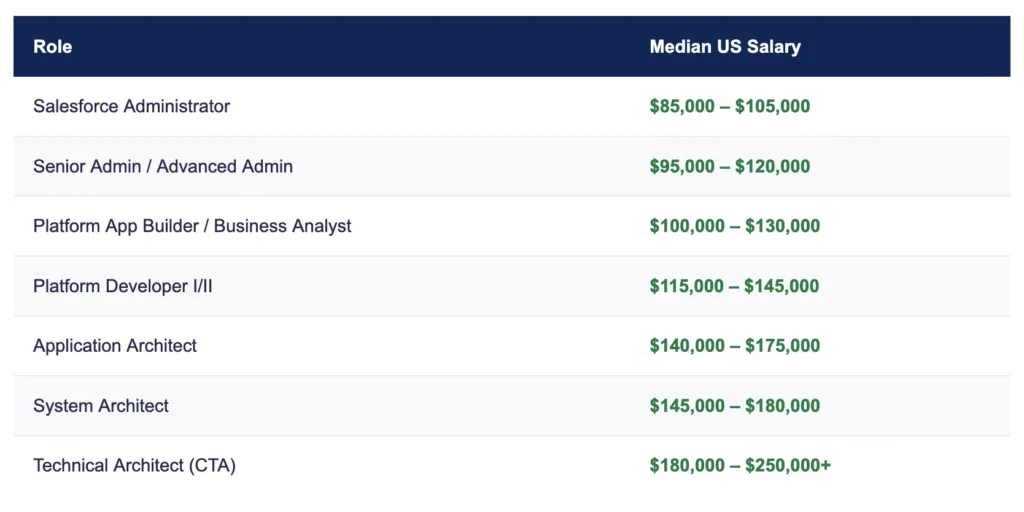
The Technical Architect credential (CTA) is widely considered the most prestigious certification in the Salesforce ecosystem. Fewer than 7,000 people worldwide have ever passed the CTA board review. That scarcity is real, and so is the compensation premium.
But here’s what the salary tables don’t show: the gap between senior admin and application architect isn’t mostly about certifications. It’s about problem-solving depth, communication ability, and credibility earned through hard-won project experience. Certs matter. They’re not the whole story.
What a Salesforce Architect Actually Does
Before you plot a career path, it helps to understand what you’re actually aiming for — because “Salesforce Architect” isn’t one job. There are several distinct roles in the ecosystem, and they emphasize different skills.
Application Architect
Designs solutions within the Salesforce platform. They own decisions about data models, security architecture, automation strategy (when to use Flow vs. Apex vs. the now-retired Process Builder), and overall declarative vs. programmatic trade-offs. Most of the day is spent translating business requirements into scalable Salesforce configurations. This is the natural first destination for admins moving into architecture.
System Architect
Focused on how Salesforce connects to the outside world. Integration patterns, API design, middleware platforms (MuleSoft, Boomi, Informatica), authentication flows, SSO, and data synchronization. If an Application Architect asks “how should we model this inside Salesforce?”, a System Architect asks “how does Salesforce talk to SAP, and what happens when it fails?” Requires a heavier technical background — familiarity with REST/SOAP/GraphQL APIs, event-driven architecture, and Salesforce Connect is essential.
Technical Architect (CTA)
The top of the pyramid. CTAs can design end-to-end enterprise solutions that span platform configuration, custom development, integration architecture, security, data governance, and change management. The CTA board review isn’t a multiple-choice exam — it’s a live scenario presentation in front of a panel of senior Salesforce architects. You’ll be given a complex business scenario and have to architect and defend a complete solution. This is why the CTA carries the weight it does.
Domain Architect Credentials
These are the prerequisite building blocks for Application Architect and System Architect. They validate deep expertise in specific technical domains:
- Data Architecture and Management Designer — data models, large data volumes (LDV), master data management, Salesforce data governance
- Sharing and Visibility Architect — org-wide defaults, role hierarchy, sharing rules, Apex managed sharing, record access patterns
- Integration Architecture Designer — integration patterns, API limits, event bus (Platform Events, Change Data Capture), external connectivity
- Identity and Access Management Architect — OAuth flows, SAML/SSO, Named Credentials, Connected Apps, user provisioning
- Development Lifecycle and Deployment Architect — release management, scratch orgs, unlocked packages, CI/CD pipelines, sandboxes
B2B and B2C Solution Architect
Commerce and experience-focused credentials. The B2B Solution Architect covers Salesforce B2B Commerce, Sales Cloud, Service Cloud, and Experience Cloud working together in account-based selling scenarios. The B2C Solution Architect covers B2C Commerce Cloud, Marketing Cloud, Service Cloud, and the integrations between them. Both require a separate exam and appeal to consultants who specialize in commerce implementations specifically.
Heroku Architect
A specialized credential for architects who design solutions using Heroku for custom app development alongside Salesforce. Less common in the career path conversation but valuable in product companies building on the Salesforce platform.
The Certification Roadmap

The Admin Certifications
Salesforce Administrator — Your foundation. The exam covers standard objects, data management, the security model (profiles, permission sets, roles, OWDs), automation basics (Flow), reports and dashboards. If you’re already working in Salesforce, this should feel achievable within 3–6 months of focused study.
Advanced Administrator — Builds on Admin. Deeper coverage of complex automation scenarios, advanced reporting (cross-filters, joined reports, reporting snapshots), territory management, and change sets for deployment. Many admins delay this longer than they should. Don’t — it forces you to genuinely level up your platform knowledge.
Platform App Builder — Bridges the admin/architect gap. Covers declarative customization in depth: custom objects, formula fields, validation rules, and — critically — when not to build declaratively. The architecture thinking starts here.
The Developer Certifications
Platform Developer I — Covers Apex fundamentals, SOQL, triggers, test classes, and basic LWC concepts. If you’re an admin who’s never written code, give yourself 4–6 months for this one. The investment pays back in spades when you’re later making architectural decisions about where automation should live.
Platform Developer II — Advanced topics: design patterns, REST API callouts, asynchronous Apex (Batch, Queueable, Scheduled, Future), Advanced SOSL/SOQL, and LWC state management. Optional for the Application Architect path but effectively required for strong System Architect or CTA candidacy.
The Domain Architect Certifications
These six credentials are where the real architect training happens. They’re harder than admin certs. Expect 3–6 months of focused prep per exam — and don’t underestimate any of them.
Data Architecture and Management Designer — Large data volumes, skinny tables, external objects, data archiving strategies, master data management, field history tracking implications. If you’ve never had to think about what happens to a Salesforce org with 100 million Account records, this exam will introduce you to that world.
Sharing and Visibility Architect — One of the harder domain exams. OWD settings, role hierarchy, sharing rules, Apex managed sharing, without sharing vs. with sharing vs. inherited sharing, Teams, manual sharing, implicit sharing. The gotchas here are real — and they’re things admins hit every single day without necessarily understanding the architectural reasoning behind them.
Integration Architecture Designer — REST vs. SOAP vs. Bulk API, Platform Events, Change Data Capture, Streaming API, external services, named credentials, OAuth flows, large data sync patterns, error handling in async integrations. This is where admins who’ve only ever worked inside a single Salesforce org realize there’s an entire world of complexity in how Salesforce talks to other systems.
Identity and Access Management Architect — SSO with SAML and OAuth 2.0, Connected Apps, Named Credentials, user provisioning and deprovisioning, delegated authentication, social sign-on, JWT bearer flow. Heavy overlap with security engineering. If your org has never done SSO or has always used Salesforce-managed auth, this cert will expand your perspective significantly.
Development Lifecycle and Deployment Architect — Often underestimated. Scratch orgs, unlocked packages vs. second-generation managed packages vs. change sets, version control with Git, CI/CD pipeline design, sandbox strategy, environment management for large teams. With DevOps Center broadly available in 2026, this cert has become increasingly relevant to architects who need to own release strategy.
Composite and Pinnacle Credentials
Application Architect — Awarded when you’ve passed: Salesforce Administrator + Platform App Builder + Data Architecture and Management Designer + Sharing and Visibility Architect. The credential itself doesn’t require a separate exam — it’s awarded upon completing the constituent certs. Don’t skip the prep thinking it’s just a badge — the domain exams are genuinely rigorous.
System Architect — Awarded upon passing: Platform Developer I + Integration Architecture Designer + Identity and Access Management Architect + Development Lifecycle and Deployment Architect.
Technical Architect (CTA) — Requires Application Architect + System Architect credentials, plus passing the board review. The board review is a 4–5 hour exercise where you present a complete architectural recommendation to a panel of senior Salesforce architects, followed by a Q&A defense. Pass rates hover around 25–30%. Most candidates take it multiple times.
Skills Beyond Certifications
Here’s a truth the certification roadmap can’t show you: the architects who advance fastest are rarely the ones with the most certs. They’re the ones who combined technical depth with skills that get dismissed as “soft.”

Communication Is Architecture
You’ll hear this from every CTA you ever talk to, and it’s true: the biggest lever in your architect career isn’t learning another certification domain. It’s learning to communicate complex technical trade-offs to people who don’t want a technical explanation.
When a VP of Sales asks “can we sync Salesforce with our ERP in real time?”, the answer is almost always “yes, but…” That “but” — and how you explain the trade-offs of synchronous vs. asynchronous integration, what happens to the user experience during latency spikes, what the failure mode looks like — is architectural thinking. Delivering it in a way that lands with a business audience is a skill you have to deliberately build.
System Thinking
Architects live at the intersection of business process and technology. The key habit to develop is asking “what happens downstream?” before committing to any design. A formula field on Account that concatenates Billing City + Country looks innocent. But when it’s used in an integration that exports data to a downstream system expecting a specific format, and someone changes the formula, now you have a broken integration that fails silently. System thinking means seeing the full chain of dependencies before designing the link you’re responsible for.
Data Modeling Depth
Most admins can create objects and relationships. Architects need to understand why certain data model patterns create performance problems at scale — why a deeply hierarchical lookup relationship structure can degrade SOQL performance, why junction objects create query complexity, and when to denormalize vs. normalize data for Salesforce’s specific storage architecture.
Enterprise Architecture Frameworks
TOGAF and Zachman Framework come up in CTA discussions specifically. You don’t need to be a TOGAF practitioner, but understanding how enterprise architects categorize business, application, data, and technology layers helps you communicate with EA teams at large client organizations. Most Fortune 500 companies have EA teams, and if your Salesforce solution needs to fit into their architecture, speaking their language matters.
Common Mistakes and Pitfalls
Cert-Chasing Without Experience
The most common mistake. Someone passes five certifications in 18 months — genuinely impressive — but has never actually built a multi-cloud solution under production constraints, never had to defend an integration design when it failed, never dealt with data migration at scale. Certs open doors. Experience is what gets you through them.
Skipping the Foundation
Some admins try to fast-track to developer certs because “that’s where the money is.” But weak admin fundamentals show up consistently in architect-level design mistakes — over-engineering with Apex what could be done declaratively, not understanding when a validation rule is preferable to a trigger, building flows that don’t account for the sharing model. The admin foundation is not a stepping stone you rush past. It’s a foundation you keep coming back to.
Ignoring Soft Skills
Technical-only practitioners often get capped at Senior Developer or Senior Admin — excellent, valued roles, but not the architect track. The architect track requires you to be a technical authority and a trusted advisor. Those are different muscles. If you’re not deliberately building your communication, facilitation, and stakeholder management skills alongside your technical stack, you’re building yourself into a corner.
Treating Every Problem as a Salesforce Problem
One of the clearest signals of architectural maturity is knowing when Salesforce is not the right tool for a requirement. A CTA who recommends against a Salesforce feature because a different tool serves the need better — and can explain why — is more credible than one who designs everything on-platform by default.
Waiting Until You Feel “Ready”
Most people wait too long to start pursuing the architect path because they don’t feel expert enough. Here’s what’s consistently true: the learning that happens while studying for the certification is what makes you feel expert. Start earlier than feels comfortable. The knowledge compounds.
Practical Resources That Actually Help
For Certifications
- Trailhead (trailhead.salesforce.com) — Free, official, comprehensive. The Architect domain trails are genuinely good for foundational understanding. Don’t skip the hands-on challenges.
For Architect-Specific Knowledge
- Apex Hours — You’re already here. The deep-dive sessions on integration, data architecture, and security are genuinely architect-level content.
- Salesforce Architects YouTube Channel — Official content from Salesforce’s Architect Success team, including the well-architected pattern library.
- Architect Success Hub (architect.salesforce.com) — Salesforce’s official home for architect decision guides and reference architectures. Treat this as required reading.
- Trailblazer Community — Architect Groups — Active, generous, worth finding. People who’ve passed the board review share preparation strategies openly.
For Board Review Prep (CTA)
- Salesforce CTA Prep Program — Official program from Salesforce including practice scenarios and mentoring. Expensive but worth it if you’re serious.
- Peer-led CTA study groups on LinkedIn and Trailblazer Community — practice presenting your scenarios out loud. The board review is a presentation, not a written exam. You need speaking reps.
Realistic Timeline Expectations
Let’s be direct about timelines, because the community is full of outlier success stories that create unrealistic expectations.
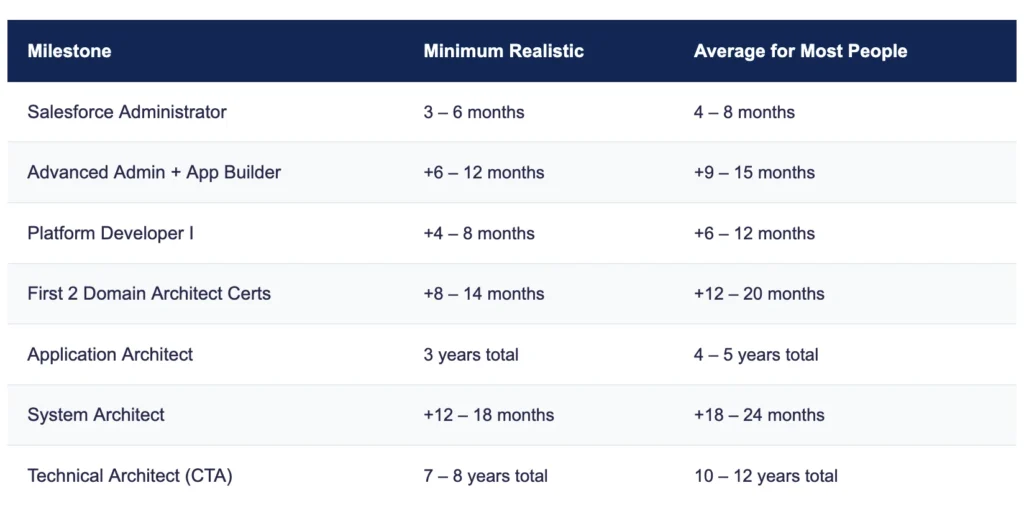
These timelines assume you’re actively working in Salesforce roles — not studying in isolation. The hands-on experience that comes from real implementations accelerates learning in ways no amount of Trailhead can fully replicate.
What Hiring Managers Look for in Architect Candidates
This is where the career path conversation gets real. You can have the right certifications and still not get hired into an architect role. Here’s what consistently separates candidates who get offers from those who don’t.
Architecture stories, not task lists. In interviews, architects need to tell stories about decisions — “we evaluated two integration approaches, and here’s how I analyzed the trade-offs and why we chose the async event-driven model.” Pure execution stories (“I built X flow for Y requirement”) signal implementer, not architect. Prepare four to five decision stories from your experience where you can walk through the problem, the options you considered, the trade-offs you weighed, and the outcome.
Evidence of failure and recovery. Senior architects who interview candidates are experienced enough to know that everyone makes mistakes. Candidates who can describe an architectural decision that didn’t work, explain why it failed, and articulate what they’d do differently are far more credible than candidates who only share success stories. The CTA board review specifically tests your ability to handle challenges to your design — practice this.
Curiosity about the business context. The shift from implementer to architect involves developing genuine curiosity about why the business needs a solution, not just what the solution is. In interviews, architects who ask intelligent questions about the business problem before proposing solutions signal readiness. It sounds simple. Most candidates don’t do it.
Whiteboard credibility. Many architect interviews include a whiteboarding exercise — drawing a solution architecture on the spot for a scenario you’ve never seen. Practice this. Not Lucidchart, not a polished diagram. A whiteboard, on your feet, talking through your reasoning as you draw. This is how architects communicate in the field, and it’s a learnable skill.
References who are architects themselves. When you’re ready to step into your first architect role, having references from people who are themselves respected architects carries significant weight. Build those relationships deliberately — through community involvement, Apex Hours sessions, architect study groups, and peer collaboration.