
Introduction: Your Desktop Just Became a Command Center
You’re on the subway, phone in hand. You type a message: “Research our top three competitors and put a slide deck together before my 3pm.” By the time you surface at your stop, your Mac has already opened a browser, pulled analyst reports, drafted slide content, and dropped a finished deck in your Google Drive.
That’s not science fiction in March 2026. That’s Tuesday.
Two tools are making this happen right now — and they couldn’t be more different from each other. OpenClaw started as a side project by an Austrian developer, went spectacularly viral in China, hit 247,000 GitHub stars in under four months, and triggered government subsidies in Shenzhen. Claude Dispatch launched quietly on March 17, 2026, as Anthropic’s first serious foray into persistent desktop agent infrastructure — no open-source, no viral moment, just a polished product aimed squarely at Claude’s existing subscriber base.
This post breaks down both tools — what they actually do, how their architectures differ, where each one shines, and where each one quietly struggles. If you’re trying to decide which one to run, or just want to understand what this new category of “AI desktop agents” actually looks like under the hood, this is your guide.
What is OpenClaw?
The story starts with Peter Steinberger, an Austrian developer who describes himself as a “vibe coder.” In November 2025, he published a project called Clawdbot — an autonomous AI agent that ran locally on your machine and could be controlled through messaging apps like Signal, Telegram, and WhatsApp. The concept was simple: instead of opening a dedicated app, you just sent a chat message to your bot, and it executed tasks on your desktop.
Simple ideas can explode fast. Clawdbot did exactly that.
Anthropic apparently noticed the Claw- prefix matching their own branding a little too closely. After trademark pressure, Steinberger renamed the project to “Moltbot” on January 27, 2026 — a name that lasted exactly three days before he renamed it again to “OpenClaw” on January 30. The lobster/claw imagery stuck, and ironically gave the project its most memorable identity yet.
By February 14, 2026, Steinberger announced he was joining OpenAI and that the project would transition to an open-source foundation. The GitHub repository crossed 247,000 stars and 47,700 forks by March 2, 2026, making it one of the fastest-growing open-source projects of the year.
How It Works
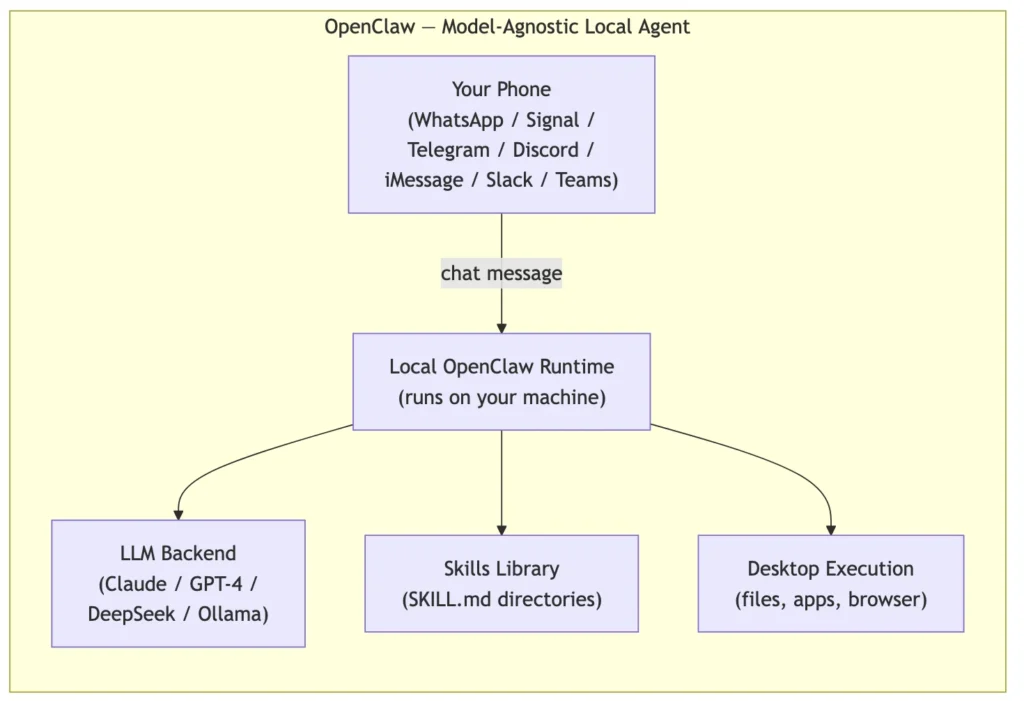
OpenClaw is model-agnostic, fully local, and operates through messaging platforms as its primary UI. You don’t install a new interface. Your existing Telegram, WhatsApp, Signal, Discord, Slack, iMessage, or Microsoft Teams account becomes the control surface.
Under the hood, each OpenClaw instance runs on your machine and calls out to whatever LLM backend you’ve configured — Claude, GPT-4, DeepSeek, or local models via Ollama or LM Studio. Configuration and task history stay on your machine, not in anyone’s cloud. The skills system is where it gets interesting: capabilities are organized as directories, each containing a SKILL.md file that describes what the skill does and how it should be invoked. Want OpenClaw to know how to file Jira tickets? Drop in a Jira skill directory. The modularity is real and the community has been shipping skills at a pace that rivals VS Code extensions at launch.
What is Claude Dispatch?
On March 17, 2026, Anthropic launched Claude Dispatch as a research preview. It rolled out first to Max plan subscribers (the $100–200/month tier), with Pro plan access ($20/month) following shortly after. It’s part of a broader product called Claude Cowork, which frames Claude as a persistent collaborative partner rather than a chat window you open and close.
No viral moment. No GitHub star explosion. Just a quiet product launch that immediately caught the attention of anyone who’d been watching OpenClaw gain momentum.
How to Set Up Claude Code: A Step-by-Step Guide.
How It Works
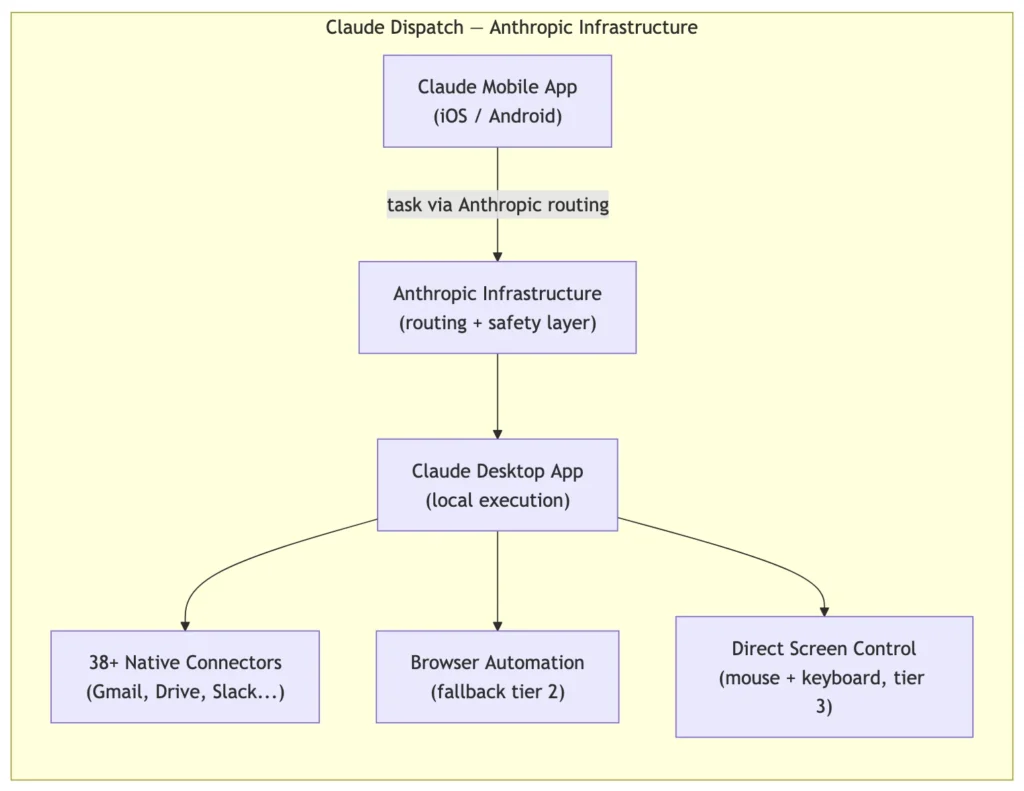
Claude Dispatch solves a specific problem: the gap between your phone and your desktop. The architecture is almost deliberately simple to explain. Your phone becomes a messaging interface. Your Mac does all the actual work. QR code pairing connects the two. Tasks you send from the Claude mobile app get routed through Anthropic’s infrastructure to your desktop, where Claude executes them locally with full access to your files, browser, and applications.
The three-tier tool hierarchy is worth understanding before you start expecting magic:
- Connectors first — 38+ pre-built integrations covering Gmail, Google Drive, Slack, and similar services
- Browser second — automated browser navigation as a fallback
- Direct screen interaction last — mouse and keyboard control, when nothing else works
That fallback ladder exists because each tier carries different reliability and permission trade-offs. Connectors are fastest and safest. Direct screen control works almost anywhere but breaks when UI layouts change.
Memory retention across sessions is a genuine differentiator. Claude Dispatch can remember what it learned in previous task sessions — context about your preferences, project structures, and usual workflows. Scheduled and recurring tasks are supported natively. You can tell it “every Monday morning, pull last week’s analytics report and email me a summary” and it handles that without you having to think about it again.
The Limitations (And There Are Real Ones)
The ~50% success rate on complex multi-app tasks is the number that stops most people mid-conversation when they hear it. That’s not a knock on the product — autonomous desktop agents executing arbitrary cross-application tasks are genuinely hard, and Anthropic is being honest about where the technology is today. But it does set expectations appropriately: this is a research preview, not a finished product.
The desktop must remain awake with the Claude app open for Dispatch to function. For asynchronous delegation — which is the whole point — that’s a meaningful constraint if you travel with your laptop or share a machine. Notifications have been reported as unreliable. And the single conversation thread limitation means you can’t run parallel agent workflows simultaneously.
Architecture: How Each Tool Actually Routes a Task
Before getting into the individual product breakdowns, it helps to see both architectures side by side. The surface-level pitch — “send a message, your desktop does the work” — is identical. The machinery underneath is quite different.
Claude Dispatch — Anthropic Infrastructure
OpenClaw — Model-Agnostic Local Agent
Head-to-Head Comparison
| Category | OpenClaw | Claude Dispatch |
|---|---|---|
| Architecture | Fully local, model-agnostic | Local execution, Anthropic infrastructure routing |
| Platform support | WhatsApp, Signal, Telegram, Discord, Slack, iMessage, Teams | Claude mobile app only |
| Pricing | Free / open-source; ~$5/mo light use, ~$15–20/mo heavy API use | Included with Pro ($20/mo) and Max ($100–200/mo) |
| Security model | User-configured; no default safeguards | Sandboxed, local processing with Anthropic safety layer |
| Model support | Claude, DeepSeek, GPT-4, local models via Ollama / LM Studio | Claude only |
| Complex task success rate | Varies by configuration and skill setup | ~50% on complex multi-app tasks |
| Customization | Skills system (SKILL.md directories), community-built | Connectors + MCP servers |
| Open source | Yes (MIT license) | No (proprietary) |
| Memory | Local config and history files | Cross-session memory retention |
| Scheduled tasks | Via skill configuration | Native support |
How They’re Similar
It’s worth stepping back before diving into the differences, because these two tools share more DNA than their marketing would suggest.
Both tools treat your desktop as an execution environment rather than a display surface. Neither one is a chatbot that tells you what to do — both actually do things. They click, type, open files, browse the web, and navigate applications on your behalf.
Both are asynchronous by design. The whole premise — send a task from your phone, get results back later — is identical across both products. The insight that phones are good interfaces for task assignment but bad execution environments for heavy work is the same insight that drove both projects.
Both use a tiered approach to capability. OpenClaw’s skill system and Claude Dispatch’s connector-then-browser-then-screen-control fallback ladder are solving the same problem: how do you reliably expand what an agent can do without requiring users to rebuild every integration from scratch?
And both face the same fundamental challenge: desktop agents operating autonomously on real systems can cause real damage if they make wrong assumptions. Security isn’t a solved problem for either