Skip to content
No results
Menu
No results
  • Home
  • All Blogs
    • Career
    • Admin
    • Developer
    • DevOps
    • CTA
  • Interview
  • Certifications
  • Free Training
  • About Us
Events
Apex Hours
  • Home
  • All Blogs
    • Career
    • Admin
    • Developer
    • DevOps
    • CTA
  • Interview
  • Certifications
  • Free Training
  • About Us
Courses
Events
Apex Hours
Courses

Audit & Troubleshoot Salesforce Data

  • Amit ChaudharyWritten ByAmit Chaudhary
  • July 29, 2019
  • Apex Hours for Students / Salesforce Admin
  • March 26, 2025
  • 2 mins
Home Salesforce Admin Audit & Troubleshoot Salesforce Data

The ability to troubleshoot and audit your data is imperative to enforce governance across enterprise applications. This episode talks about the tools provided by Salesforce to troubleshoot implementations and audit changes to business data across the Salesforce org.

Table of contents
  1. Audit & Troubleshoot Tool in Salesforce
    1. 1. Debug Logs
    2. 2. Email Logs
    3. 3. Setup Audit Trails
    4. 4. Field History Tracking
    5. 5. Login History & IP White Listing
  2. Audit & Troubleshoot Salesforce Data Demo
    1. Further Learning
  3. Monitoring & Auditing Tools in Salesforce

Audit & Troubleshoot Tool in Salesforce

1. Debug Logs

Debug logs are used to track the events information that occurs in your org.Debugs log will only be generated when you have an active flag turned on for the logged in user. A debug log can record database operations, system processes, and errors that occur when executing a transaction or running unit tests. Debug logs can contain information about:

  • Database changes
  • HTTP callouts
  • Apex errors
  • Resources used by Apex
  • Automated workflow processes, such as:
    • Workflow rules
    • Assignment rules
    • Approval processes
    • Validation rules
Log level

2. Email Logs

  • Email logs describe all emails sent through salesforce.com and can be used to help identify the status of an email delivery.
  • Email logs are CSV files that provide information such as the email address of each email sender and its recipient, the date and time each email was sent, and any error code associated with each email.
  • Logs are only available for the past 30 days.

3. Setup Audit Trails

  • Setup audit trails gives you the picture of all the changes made in your org like Creating a User, Creating Trigger, Page, Component, Modifying any apex class or pages.
  • The last 20 entries for your organization are listed below.
  • You can download your organization’s setup audit trail for the last six months (Excel .csv file).

4. Field History Tracking

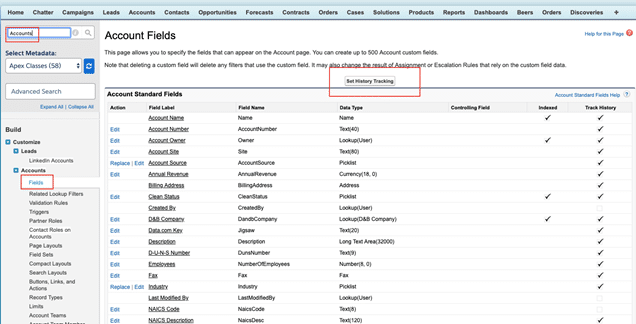
  • Field history tracking is used to track the history of field values from old to new.
  • To turn on the Field history for standard object go to Setup -> Customize -> Object Name -> Fields -> Click on “Set History Tracking”
5. Login History & IP White Listing

  • Login History is used to track the Login information of the users
  • IP Whitelisting is used to exclude the verification code by adding the IP ranges into Network Access

Audit & Troubleshoot Salesforce Data Demo
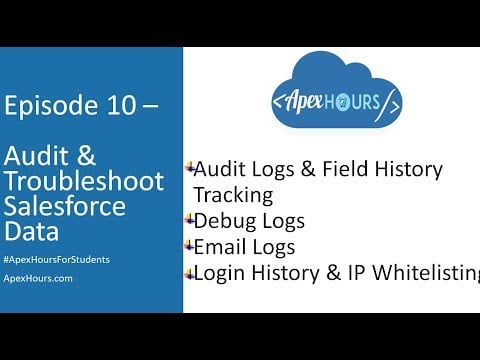
Ep 10 – Audit & Troubleshoot Salesforce Data | Debug Logs | Email Logs | Login History & IP

Further Learning

Here is playlist link for all recording

Monitoring & Auditing Tools in Salesforce

Learn more about Monitoring & Auditing Tools in Salesforce. There are different Monitoring & Auditing Tools are available in Salesforce. Here are some of them

  1. Salesforce Health Checker
  2. Portal Health Check
  3. Salesforce Optimizer
  4. Salesforce Accelerator
  5. Manual Org Assessment
  6. Security Center
  7. Login History
  8. View Setup Audit Trail
  9. System Overview
  10. Field History Tracking
  11. Lightning Usage App
  12. Apex Exception Emails
  13. Debug Logs
  14. Event Monitoring
  15. Transaction Security Policy
  16. API Usage Notification
  17. Force.com Code Scanner
  18. Apex PMD
  19. Custom Error Handling framework
Tags
# Audit Logs# Debug log# login history
Share your love
Share on Facebook Share on X (Twitter) Share on Pinterest Share on LinkedIn
Amit Chaudhary
Amit Chaudhary

Amit Chaudhary is a Salesforce Application & System Architect who has been working on the Salesforce Platform since 2010. He has been Salesforce MVP since 2017 and has 23 Salesforce Certificates.

Articles: 153

Related Posts

How AI Is Changing the Way Salesforce Admins Build Flows

How AI Is Changing the Way Salesforce Admins Build Flows

How Revenue Cloud Helps Subscription

How Revenue Cloud Helps Subscription-Based Businesses

Customizing the Utility Bar for Admins in Salesforce

Customizing the Utility Bar for Admins in Salesforce

Kanban Board in LWC

Developing a Drag and Drop Kanban Board in LWC

Troubleshooting a Broken Flow in Salesforce

Troubleshooting a Broken Flow in Salesforce with Simple Example

Salesforce Installed Packages

Salesforce Installed Packages: A Guide to Implement Salesforce Packages

Leave a ReplyCancel Reply

Your email address will not be published. Required fields are marked *

Accelq

Important Links

Home
About us
Contact us
Privacy Policy

Recent Posts

  • Salesforce Data Breaches- What Really Went Wrong (And How to Protect Your Org)

  • From Admin to Architect —A Realistic Career Roadmap

  • LWC + Apex Best Practices for Large Data Operations

  • getQueryLocator vs. Iterator in Apex

  • Salesforce Revenue Cloud Key Objects We Should Know

Subscribe to the blog via email

Enter your email address to subscribe to this blog and receive notifications of new post by email.

Join 4,531 other subscribers

Copyright 2018-2026. All Rights Reserved By Apex Hours.