We’ll walk through how to design, configure, and deploy a real Agentforce Service Agent using a resort-style customer service use case. The focus is on why each step matters, not just where to click. By the end, you’ll understand how an AI agent is trained, grounded with data, connected to actions, and deployed on a live website using Salesforce.
The Business Scenario
Imagine a customer-facing website where users ask questions like:
- What is your code of conduct?
- Can I view or change my booking?
- I want to cancel my reservation
- I need to talk to a human agent
Instead of sending all of this to support teams, we build an AI service agent that:
- Answers questions from approved content
- Reads policy documents
- Performs booking-related actions
- Escalates to humans only when needed
- Works directly inside an Experience Cloud site
This is a practical, production-ready Agentforce setup.
Step 1: Enable the AI Foundation (Einstein + Agentforce)
Before an agent can understand or respond, the AI layer must be active.
What needs to be enabled
- Einstein
- Agentforce
- The default Agentforce Service Agent
Why this matters
Einstein handles intent detection, retrieval, and reasoning. Agentforce uses that intelligence to drive conversations and actions. Without Einstein, the agent is just a shell.
This step is the foundation. Everything else depends on it.
Step 2: Define the Service Agent Properly
Once Agentforce is enabled, you configure your service agent.
You define:
- Description: What the agent is responsible for
- Role: The type of service it provides
- Company: The business context it represents
Why this matters
These fields shape how the agent responds. They influence tone, scope, and decision-making. A well-defined agent behaves consistently. A poorly defined one feels random.
Think of this as writing a clear job description for your AI.
Step 3: Train the Agent Using Knowledge Data
A real service agent should never guess. You create a Knowledge-based Data Library that includes:
- FAQs
- Event information
- Service details
- Common customer questions and answers
You explicitly map:
- Title
- Summary
- Question
- Answer
What this achieves. When a customer asks a question, the agent searches only this approved content. Answers are grounded in business data, not generated from assumptions.
This is how you avoid hallucinations.
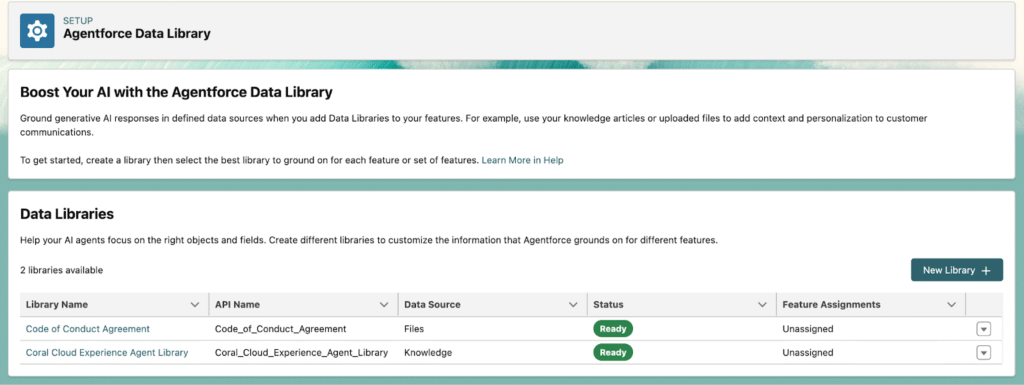
Step 4: Add Policy and Legal Documents as Files
Not all information belongs in Knowledge Articles. Documents like:
- Code of Conduct
- User agreements
- Policy PDFs
are added through a Files-based Data Library.
Why this separation matters
- Knowledge is optimized for Q&A
- Files are optimized for formal reference
Agentforce can retrieve both, but they must be indexed separately to stay accurate and compliant.
Step 5: Grant the Agent Access to Its Data
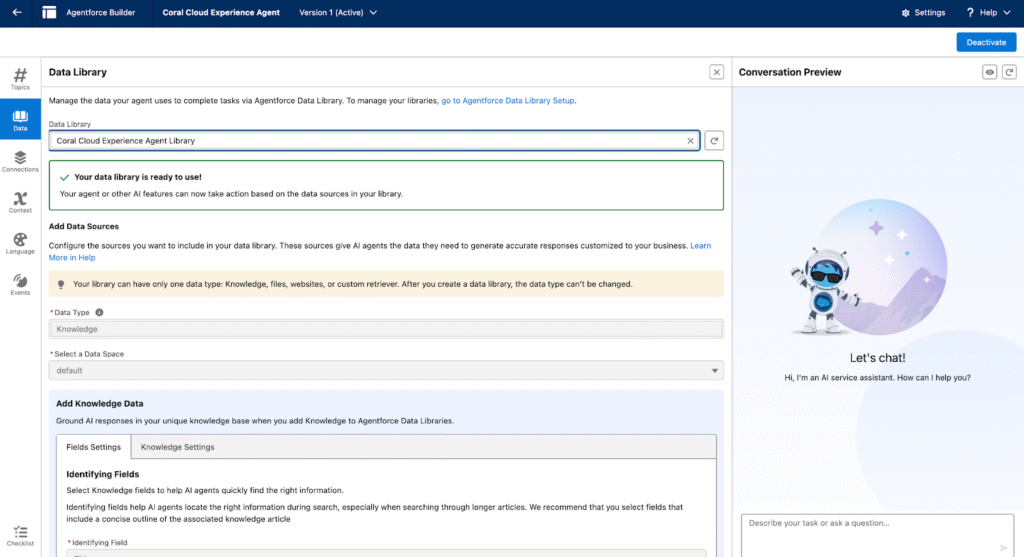
In Agent Builder, you explicitly connect:
- The Knowledge library
- The Files library
This step is critical. If a library isn’t connected, the agent can’t use it, even if the data exists. Once linked, the agent can safely reference both articles and documents during conversations.
Step 6: Teach the Agent How to Handle Bookings
Answering questions is only half the job. Real service agents take action.
You introduce a Booking Management Topic. This tells the agent: “When users talk about reservations, this is your responsibility.”
Topics are how Agentforce understands intent at a higher level.
Step 7: Retrieve Booking Details
You connect a backend Flow that:
- Accepts a booking reference
- Retrieves booking information
The agent now handles conversations like: “Can you check my booking?”
Instead of redirecting users, it asks for the required input and responds with real data.

Step 8: Modify Existing Bookings
Next, you allow booking changes. The agent:
- Requests mandatory inputs
- Passes them to a Flow
- Updates the reservation
Why required inputs matter
They prevent partial or incorrect execution. The agent only acts when it has everything it needs.
This mirrors how a trained human agent works.
Step 9: Cancel Bookings Safely
Cancellations are sensitive.
You configure the agent to:
- Ask for confirmation
- Clearly explain the action
- Proceed only after user approval
This guardrail protects both the business and the customer.
Agentforce supports this kind of responsible action design out of the box.
Step 10: Handle General Questions with Prompts
For broader questions, you configure a Prompt Template that:
- Accepts the user’s question
- Searches Knowledge Articles
- Searches policy documents
- Responds only from retrieved data
This is retrieval-augmented AI in action.
The agent doesn’t invent answers. It assembles responses from trusted sources.
Step 11: Escalate to Human Agents When Needed
No AI should handle everything.
You add an Escalation Topic that allows:
- Smooth handoff to a human agent
- Context preservation
- Better customer experience
Escalation is not a failure.
It’s a sign of a well-designed service model.
Step 12: Deploy the Agent on a Live Website
Finally, you go live.
You:
- Route conversations to the Agentforce Service Agent
- Enable Embedded Messaging on the Experience Cloud site
- Publish
No custom UI. No heavy development.
The agent is now available to real users.

What You’ve Built
At this point, you have a real AI service agent that:
- Answers questions from approved content
- Reads and explains policy documents
- Retrieves, modifies, and cancels bookings
- Escalates to humans when appropriate
- Runs on a production website
This is not a demo or a learning exercise.
This is how Agentforce Service is meant to be used.
Final Thought
Agentforce isn’t about replacing support teams.
It’s about handling routine service reliably so humans can focus on complex, high-value interactions.
If you understand this flow end to end, you’re not just learning features.
You’re learning how to design AI-powered service experiences the right way.