

When an Inspection Does Not Follow the Script
Sometimes an inspection flow looks clear in Salesforce, but the situation on site turns out very different. A technician arrives at a location. The service appointment is clear, the checklist is prepared, and everything looks predictable. Then reality starts to shift. The internet connection drops. The number of items to inspect turns out to be higher than expected. New issues appear that were not part of the original scope.
The technician starts moving between areas, taking photos, making quick notes, and trying to keep track of what has already been checked. Some details are captured in the mobile app. Others are stored locally on the device. A few things are written down with the intention to update Salesforce later.
By the end of the visit, the work is done, but the documentation is scattered.
Back in the office or once connectivity is restored, the technician has to reconstruct the inspection. Photos are uploaded, notes are rewritten, and the final report is assembled from memory. Salesforce receives the result, but not always the full context of what happened during the visit.
This disconnect between planned workflows and real execution is reflected in technician feedback. According to Salesforce research, 55% of technicians say that gathering information for their job is cumbersome, and 37% report that administrative tasks prevent them from doing their actual work.
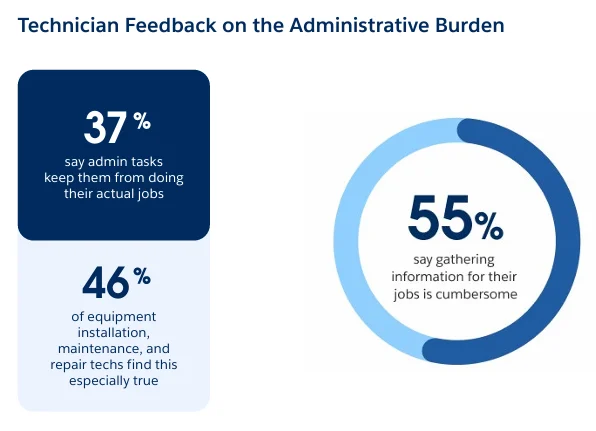
Image source: Salesforce
At this point, a simple question arises. If inspections are rarely conducted according to a fixed procedure, should the data collection process follow such a procedure? To understand this better, let’s look at where standard data capture starts to break down.
Where Standard Data Capture Starts to Break Down
Salesforce Data Capture is built around structure. Questions are predefined, and Flow guides the user step by step. This works well when the process is predictable. In practice, this approach often does not work out. Here are a few points where this becomes noticeable:
1. Configuration complexity and admin dependency:
Data Capture is implemented through Flow and the underlying assessment model, which means setup and changes require configuration in multiple layers. Adjusting forms, logic, or structure typically involves an administrator, which can slow down updates when requirements change.
2. Rigid structure and limited adaptability:
The inspection scope is defined in advance, but on site it can change. New areas, assets, or issues appear, while the form remains fixed. There is also no native way to reuse or prefill values from previous inspections, which means similar work often starts from scratch each time.
3. Offline setup complexity and dependency:
Offline support relies on the Briefcase setup. If the required data is not included, the experience may be limited in low-connectivity environments. In addition, Data Capture is tied to the Field Service mobile app and requires appropriate licensing, which can affect how widely it is used across teams.
4. Media handling limitations:
Photos are central to inspections, but managing large numbers of images within standard flows can require extra steps. Salesforce documentation recommends avoiding uploads of more than 10 files at a time in Data Capture scenarios. At the same time, capabilities such as document scanning, voice-to-text comments, or advanced visual capture, like floor plan-based issue capture or 3D scans, are not part of the standard Data Capture model.
5. Reporting constraints:
Generating customer-ready PDFs is possible, but it is often handled separately from the inspection itself and depends on specific Salesforce editions. As a result, the inspection flow and the final report are not always tightly connected.
None of these points indicate a problem with the platform. This is how Salesforce Field Service operations are designed, with a focus on consistency and control. But when inspections become more flexible and visual, this model does not always match how work is performed on site.
Salesforce Field Service Optimization with Offline Forms in Practice
If we consider the points listed above, a certain pattern begins to emerge. The challenge is capturing that data in a way that matches how the work actually happens.
At this stage, we see that optimization must focus on the field execution phase, where theory meets reality. Instead of starting with a fixed structure, the process should begin with what the technician sees on site. The inspection should become a flexible flow that can grow as new findings appear.
One way to implement this approach in practice is to use dedicated solutions such as offline forms. These are Salesforce-native or integrated applications designed specifically for field data capture in environments where connectivity is limited, and the inspection scope is not fully known in advance.
If you open AppExchange and search for “offline forms,” you will find several solutions addressing this need.

Offline forms solutions on AppExchange
One of the first results in this category is Forms by SharinPix. It provides a useful reference point for understanding how a field-first approach differs in practice. Instead of separating data capture from the inspection itself, offline forms allow technicians to document findings as they move through the site. Here are a few highlights:
- The interaction becomes more visual. Photos, videos, and annotations are captured directly within the form using a Visual Toolkit, so the context is preserved at the moment it is created.
- The structure is also more flexible. Repeated sections allow the form to expand dynamically as new rooms, assets, or issues are discovered, without requiring predefined limits.
- Offline execution is treated as a default condition. Data can be captured without connectivity and synchronized later, which reduces dependency on prior configuration and helps maintain continuity during the visit.
- There is also a shift in how data is entered. With AI features such as Magic Fill, structured information can be extracted from images, which reduces manual input and keeps the process closer to what is actually happening on site.
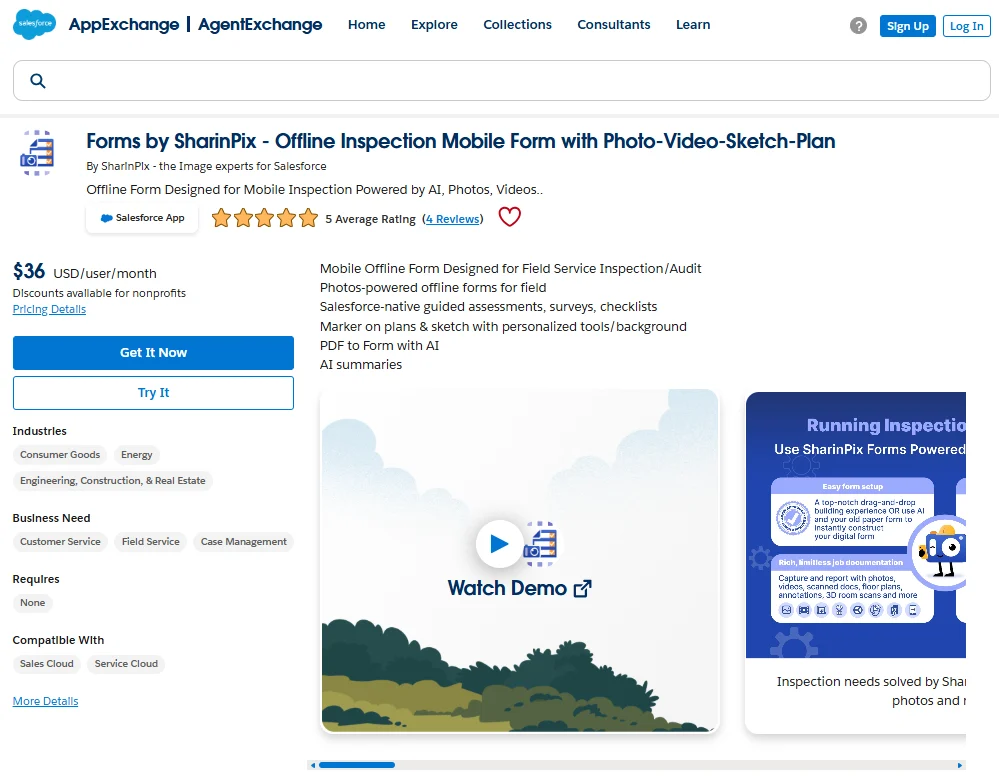
Forms by SharinPix on AppExchange
This approach to more flexible, field-driven workflows reflects a broader trend. According to Salesforce research, 85% of field service leaders expect to increase investment in AI, not as an experiment, but as a response to growing operational pressure.
Field Service Optimization Salesforce: 7 Practical Use Cases
The difference in approach becomes clear: instead of trying to fit inspections into a predefined structure, offline forms allow the structure to follow the inspection itself. But how does this look in real projects? Below are a few practical scenarios where this approach changes how work is executed in the field.
Case #1. Multi-Room or Multi-Asset Inspections
Situation: A technician is inspecting a building, warehouse, or facility where the number of rooms or assets is not fully known in advance.
Challenge with standard approach: Forms are usually designed with a fixed number of sections. If additional areas are discovered during the visit, the technician either improvises or records data outside the system.
How offline forms change this: Repeated sections allow the form to grow during the inspection. Each new room or asset can be added as needed, without redesigning the form beforehand. The structure adapts to the actual scope of the visit.
Case #2. Safety and Compliance Audits with Visual Evidence
Situation: Audits require both structured answers and visual proof, such as photos of equipment, safety signs, or violations.
Challenge with standard approach: Due to Data Capture limitations, photos are often captured separately. This creates a gap between the observation and its documentation.
How offline forms change this: Visual data is captured directly within the form. Photos, annotations, and notes are recorded together, which helps preserve context and makes the audit easier to review later. In practice, this works as a Salesforce checklist app, where each finding is documented together with its supporting evidence. This approach also supports capturing large volumes of visual evidence, with solutions like SharinPix providing unlimited storage for inspection media.
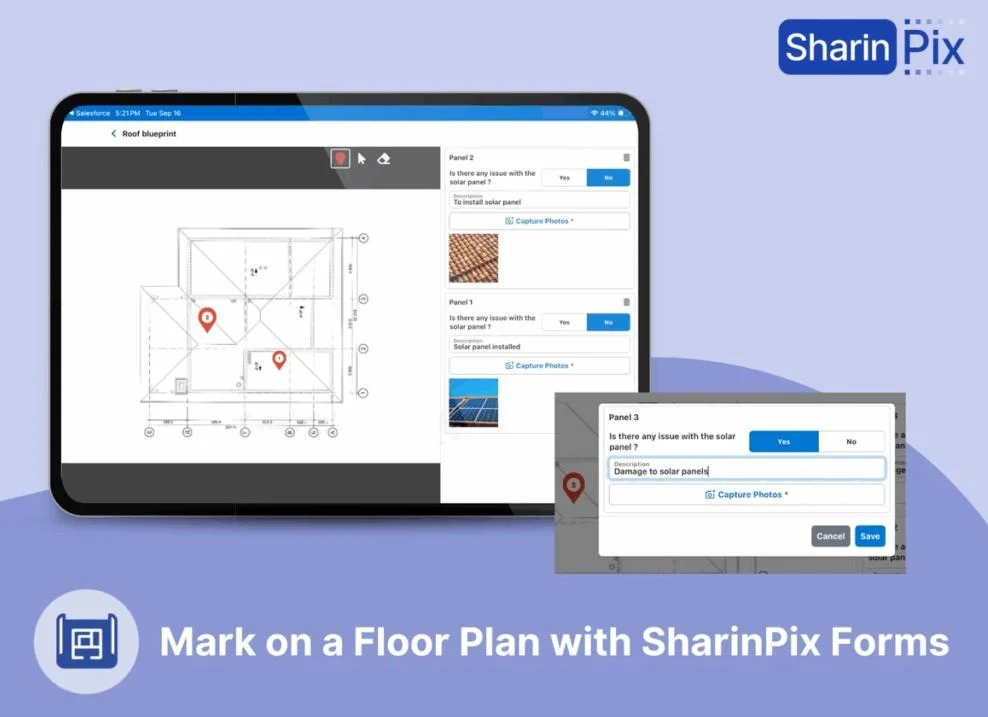
Image source: SharinPix
Case #3. Equipment Maintenance with Before and After Validation
Situation: Maintenance tasks require confirmation of work performed, often with before-and-after comparisons.
Challenge with standard approach: There is no consistent way to document visual changes. Evidence may be incomplete or difficult to match with specific steps.
How offline forms change this: Technicians can capture annotated images before and after the work. This creates a clear visual record linked directly to the task, improving traceability and communication.
Case #4. Remote Locations with Limited Connectivity
Situation: Field work takes place in areas with unstable or no internet connection.
Challenge with standard approach: Offline functionality depends on prior configuration. Missing data or setup issues can interrupt the process.
How offline forms change this: Data capture continues without connectivity by default. Information is stored locally and synchronized later, which allows the inspection to proceed without interruptions.
Case #5. Customer-Ready Service Reports and PDFs
Situation: After the visit, customers expect a clear and complete report with all findings and supporting evidence.
Challenge with standard approach: Reports are often generated separately and may not fully reflect the inspection flow or include all visual context.
How offline forms change this: PDF summaries are generated directly from the captured data, including images and structured inputs. This reduces manual work and produces more consistent documentation.
Case #6. AI-Assisted Data Capture in the Field
Situation: Technicians spend time entering data manually, especially when working with labels, serial numbers, or forms.
Challenge with standard approach: There is no built-in mechanism to extract structured data from images, so all values must be entered manually.
How offline forms change this: AI features such as Magic Fill extract structured information from images. This reduces manual entry and supports Salesforce Field Service automation of the data capture process.
Case #7. Form Management by Business Users
Situation: Inspection requirements change frequently depending on the type of job, customer, or asset.
Challenge with standard approach: Form updates require admin involvement, which creates a bottleneck: delays and dependency on technical resources.
How offline forms change this: Regular users with the appropriate SharinPix permission sets can adjust form templates without deep technical configuration, with additional support from an AI-assisted form template builder. This supports Salesforce Field Service automation solutions by making the system more adaptable to operational changes.
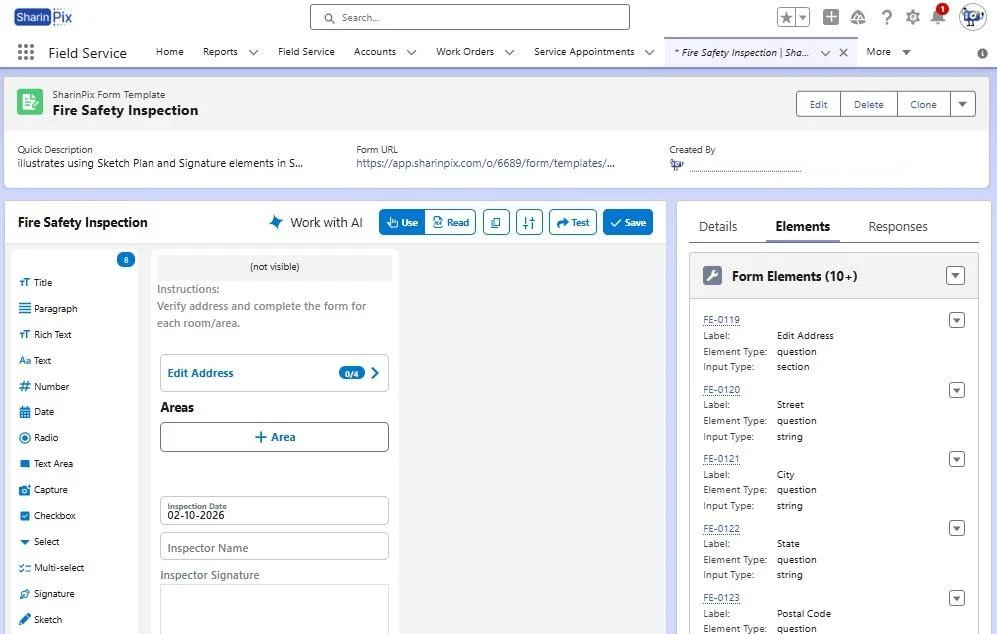
Form template in SharinPix
Practical Considerations for Salesforce Field Service Operations
At this stage, it helps to look at both approaches side by side to understand where the differences become operational:
| Native Data Capture vs Offline Forms in Salesforce Field Service | |||
|---|---|---|---|
| Scenario | Native Data Capture (Salesforce Field Service) | Offline Forms (SharinPix) | Practical Impact |
| Inspection structure | Predefined | Dynamic | Adapts to real scenarios |
| Media handling | Limited workflow integration | Visual-first approach. Unlimited media storage. Integrated Visual Toolkit with AI. | Faster and more accurate documentation |
| Offline support | Configuration required | Built-in | Less setup dependency |
| PDF generation | Requires additional configuration | Integrated | Simpler reporting |
| Form flexibility | Admin-driven | User-adjustable with AI-assistance | Faster adjustments |
From a technical perspective, inspection data is still stored in Salesforce objects and can be linked to Work Orders and Service Appointments, which supports Salesforce Field Service asset management and downstream processes.
In terms of execution, the choice depends on the type of work being performed. For structured processes, native Data Capture fits naturally into scheduling and Salesforce Field Service dispatch automation, where consistency is more important than flexibility.
However, when inspections become variable, involve large amounts of media, or are performed in low-connectivity environments, a more adaptive approach becomes relevant. In these scenarios, reducing manual steps and configuration dependencies can contribute directly to Salesforce Field Service operations improvement.
Final Thoughts: Capturing Work Where It Actually Happens
In this article, we explored how inspection workflows behave in real conditions and where standard data capture approaches start to show limitations.
Offline form solutions like the one from SharinPix show a different way to approach field data capture. Salesforce Field Service is strong in scheduling and coordination, but challenges often arise during on-site work.
Offline forms help in these situations. Instead of reconstructing what happened after the visit, technicians capture details as they go. The result is cleaner data in Salesforce and a record that better reflects the work completed on site.