

Writing reliable Lightning Web Components (LWC) requires solid tests that catch regressions early. Jest provides a fast, developer friendly way to run unit tests for LWCs. This blog walks us through a practical, minimal example and explains the key patterns for mocking Apex calls, timers, events and the NavigationMixin. The goal is to give lightweight, fully actionable steps that can be implemented quickly in any Salesforce DX project.
Why test LWCs actual use case
Unit tests give confidence that UI behavior works as expected without manual clicks. For LWCs, tests should verify render states (loading / empty / list), interactions (clicks, keyboard) and integration points (Apex, navigation). Common things to mock are server calls (Apex), timers (debounce or setTimeout), DOM events and platform services such as the NavigationMixin. Tests that focus on observable behavior rather than internal implementation are the most maintainable.
Example to implement and understand the use
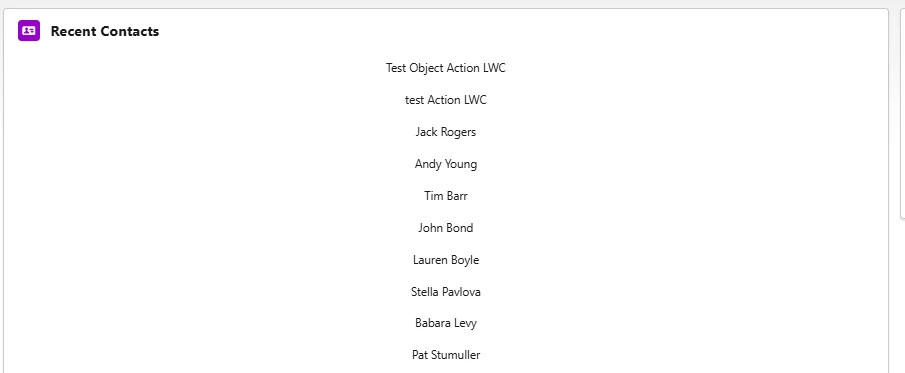
The component c-contact-quick-list shows the most typical patterns: it calls a cacheable Apex method on connectedCallback, shows a spinner while loading, renders a list and navigates to a record on click. Below are the real working files that can be dropped into a Salesforce DX project and tested immediately.
Below is the screen where we can see the implementation of example provided in this blog
JS (contactQuickList.js)
import { LightningElement, track } from 'lwc';
import getRecentContacts from '@salesforce/apex/ContactController.getRecentContacts';
import { NavigationMixin } from 'lightning/navigation';

export default class ContactQuickList extends NavigationMixin(LightningElement) {
  @track contacts = [];
  @track loading = true;

  connectedCallback() {
    getRecentContacts()
      .then(result => {
        // simulate UI debounce
          this.contacts = result;
          this.loading = false;
      })
      .catch(() => {
        this.contacts = [];
        this.loading = false;
      });
  }

  handleClick(event) {
    const id = event.currentTarget.dataset.id;
    this.dispatchEvent(new CustomEvent('contactselect', { detail: id }));
    this[NavigationMixin.Navigate]({
      type: 'standard__recordPage',
      attributes: { recordId: id, objectApiName: 'Contact', actionName: 'view' }
    });
  }
}
HTML (contactQuickList.html)
<template>
  <lightning-card title="Recent Contacts" icon-name="standard:contact">
    <!-- Spinner while loading -->
    <template if:true={loading}>
      <div class="spinner-container slds-p-around_medium">
        <lightning-spinner alternative-text="Loading contacts"
size="small"></lightning-spinner>
      </div>
    </template>

    <!-- Render contact list after loading -->
    <template if:false={loading}>
      <template if:true={contacts.length}>
        <ul class="contact-list slds-list_vertical slds-p-horizontal_small">
          <template for:each={contacts} for:item="contact">
            <li
              key={contact.Id}
              class="contact-item slds-p-vertical_x-small"
              data-id={contact.Id}
              role="button"
              tabindex="0"
              onclick={handleClick}
              onkeydown={handleKeyDown}
            >
              <div class="slds-grid slds-grid_align-spread slds-align_absolute-center">
                <span class="contact-name">{contact.Name}</span>
                <span class="contact-meta">{contact.Title}</span>
              </div>
            </li>
          </template>
        </ul>
      </template>

      <!-- Empty state -->
      <template if:false={contacts.length}>
        <div class="empty-state slds-p-around_medium">
          No recent contacts found.
        </div>
      </template>
    </template>
  </lightning-card>
</template>
Apex (ContactController.cls)
public with sharing class ContactController {
    @AuraEnabled(cacheable=true)
    public static List<Contact> getRecentContacts() {
        return [
            SELECT Id, Name, CreatedDate
            FROM Contact
            ORDER BY CreatedDate DESC
            LIMIT 10
        ];
    }
}
Jest test (contactQuickList.test.js): this demonstrates mocking Apex and navigation, using fake timers for debounce, and cleaning up correctly:
// Mocks before imports
jest.mock(
  '@salesforce/apex/ContactController.getRecentContacts',
  () => ({ default: jest.fn() }),
  { virtual: true }
);

// Minimal mock for lightning/navigation so the component import succeeds.
// Keep it simple: NavigationMixin is a function (mixin) and has a Navigate symbol.
jest.mock(
  'lightning/navigation',
  () => {
    function NavigationMixin(Base) { return Base; }
    NavigationMixin.Navigate = Symbol('Navigate');
    return { NavigationMixin };
  },
  { virtual: true }
);

// Now import component (imports pick up the mocks above)
import { createElement } from 'lwc';
import ContactQuickList from 'c/contactQuickList';

// access mocked apex
const getRecentContacts = require('@salesforce/apex/ContactController.getRecentContacts').default;

// helper to flush microtasks
const flushMicrotasks = async () => {
  await Promise.resolve();
  await Promise.resolve();
};

describe('c-contact-quick-list (simple)', () => {
  const MOCK_CONTACTS = [
    { Id: '0031', Name: 'Alpha', Title: 'Lead' },
    { Id: '0032', Name: 'Beta', Title: 'Manager' }
  ];

  afterEach(() => {
    // cleanup DOM
    while (document.body.firstChild) {
      document.body.removeChild(document.body.firstChild);
    }
    jest.clearAllMocks();
    try { jest.useRealTimers(); } catch (e) {console.log(e);}
  });

  it('loads contacts (mock Apex) and renders after debounce', async () => {
    // Arrange
    getRecentContacts.mockResolvedValue(MOCK_CONTACTS);

    // Use fake timers before mounting (component uses setTimeout in connectedCallback)
    jest.useFakeTimers();

    const element = createElement('c-contact-quick-list', { is: ContactQuickList });
    document.body.appendChild(element);

    // allow promise microtasks to run
    await flushMicrotasks();

    // advance the 300ms debounce
    jest.advanceTimersByTime(300);

    // allow microtasks scheduled by timeout to run
    await flushMicrotasks();

    // Assert: items rendered
    const items = element.shadowRoot.querySelectorAll('.contact-item');
    expect(items.length).toBe(2);
    expect(items[0].dataset.id).toBe('0031');
    // restore real timers
    jest.useRealTimers();
  });
});Steps for Jest setup to move forward with testing
- Make sure that the Node and npm are installed on the development machine.
- From the Salesforce developer experience project root, will need to install the testing package if not already present:
- npm install –save-dev @salesforce/sfdx-lwc-jest
- npm install –save-dev @salesforce/sfdx-lwc-jest
- Run all tests: npx sfdx-lwc-jest or npm run test:unit
- Confirm project structure: LWC components in force-app/main/default/lwc/<component>/__tests__/<component>.test.js
Notes: keep jest.config.js settings that present with sfdx-lwc-jest. When encountering weird platform symbols (like NavigationMixin), prefer lightweight virtual mocks inside the test file (as shown) so the module imports succeed and the platform behavior can be asserted.
Running a single test or a single component
Running a single test file is useful while iterating:
Direct node command (path to test file):
- npx jest force-app/main/default/lwc/contactQuickList/__tests__/contactQuickList.test.js
- Run by test name (pattern):
npx jest -t “loads contacts \(mock Apex\) and renders after debounce” - Use –watch for continuous feedback during development:
npx jest –watch
If sfdx-lwc-jest is available as an npm in our working environment we are using, the same commands we will be able to use with npx sfdx-lwc-jest instead of npx jest.
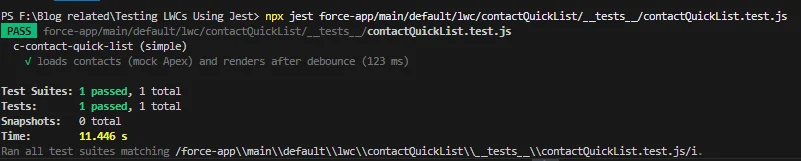
Once we tested implemented of our example the screen looks as below:
Real-time scenarios and testing patterns
- Debounce / Timers: Components often debounce server calls or UI updates. We will be able to use jest.useFakeTimers() and jest.advanceTimersByTime(ms) to simulate timer flow. Always try to restore real timers with jest.useRealTimers() in afterEach.
- Apex success and failure: Test both mockResolvedValue and mockRejectedValue to confirm loading, error and fallback UI states.
- Navigation: Because NavigationMixin.Navigate is a symbol on the mixin, mock lightning / navigation and assert that the symbol was used. If the code directly uses this[NavigationMixin.Navigate], a simple mock mixin with a symbol works well.
- Events and keyboard: Test dispatchEvent behavior by listening for custom events on the component instance or simulate keydown to verify accessibility behavior (e.g., Enter triggers click).
- Network latency and UI states: Simulate long server delays to ensure spinner and disabled states function.
- Selector strategies: Use data-id or CSS classes to select elements. Avoid fragile selectors tied to markup layout.
Best practices to Follow
- Let’s make our tests small and focused; test one observable behavior per test.
- Mock only what is external: Apex, navigation or global services. Avoid mocking internal helper functions and prefer to keep that behavior under test.
- Clean up DOM and mocks in afterEach to prevent cross test leakage.
- Use flushMicrotasks helper when awaiting chained microtasks (promises).
- Prefer assertions on DOM and public events rather than private state.
- Use clear test names and group related tests with describe blocks.
Conclusion
Testing LWCs with Jest becomes routine once a few patterns are applied consistently: mock Apex and platform modules, control timers, flush microtasks and assert DOM and events. The provided c-contact-quick-list example covers the most common needs: loading spinner, debounce, mocked Apex, event dispatch and NavigationMixin handling. Implementing the example in a Salesforce DX project and iterating with single-file Jest runs will speed up development and reduce regressions. With these patterns, teams can build coverage that gives confidence to process the frequent UI changes without breaking behavior.