
Here’s something that keeps Salesforce admins up at night: your platform can be completely up to date, fully patched, and technically secure — and your organization can still get breached. Not because Salesforce failed. Because you misconfigured it. Let learn about Salesforce Data Breaches
That’s the uncomfortable truth at the center of nearly every major Salesforce Data Breaches incident from 2023 through 2026. Government agencies leaked Social Security numbers through publicly accessible Community sites. A supply chain attack through a chatbot integration handed hackers the keys to hundreds of corporate CRM environments. One of the world’s largest tech companies lost 2.55 million customer records after an employee answered a phone call from someone pretending to be IT support.
This post unpacks the real incidents — with verified sources — so you understand exactly what happened, why the shared responsibility model matters more than ever, and what you need to do in your own org before it’s your name on a breach notification.
The Landscape: Why Salesforce Orgs Are Being Targeted
Salesforce runs CRM data for over 150,000 companies. That means it’s holding the contact information, pipeline data, support tickets, and in some cases financial details for billions of people worldwide. For threat actors, that’s not just a target — it’s a gold mine.
What changed between 2022 and 2026 isn’t Salesforce’s core platform security. What changed is the attack surface. More organizations deployed Experience Cloud sites. More sales teams plugged in third-party integrations via OAuth. More pandemic-era portals went live under pressure without proper security review. And the hacking groups got organized, methodical, and frankly quite patient.
Incident 1: The Great Guest User Leak of 2023
Type: Misconfiguration — Guest User Profile Permissions
Date Reported: April 2023
Scale: Hundreds of organizations potentially exposed
In April 2023, security researcher Charan Akiri published findings — amplified by Brian Krebs at KrebsOnSecurity — that a substantial number of public-facing Salesforce Community sites were exposing sensitive, private data to anyone who knew how to look for it. No login required. No exploit needed. Just knowing the right API endpoint.
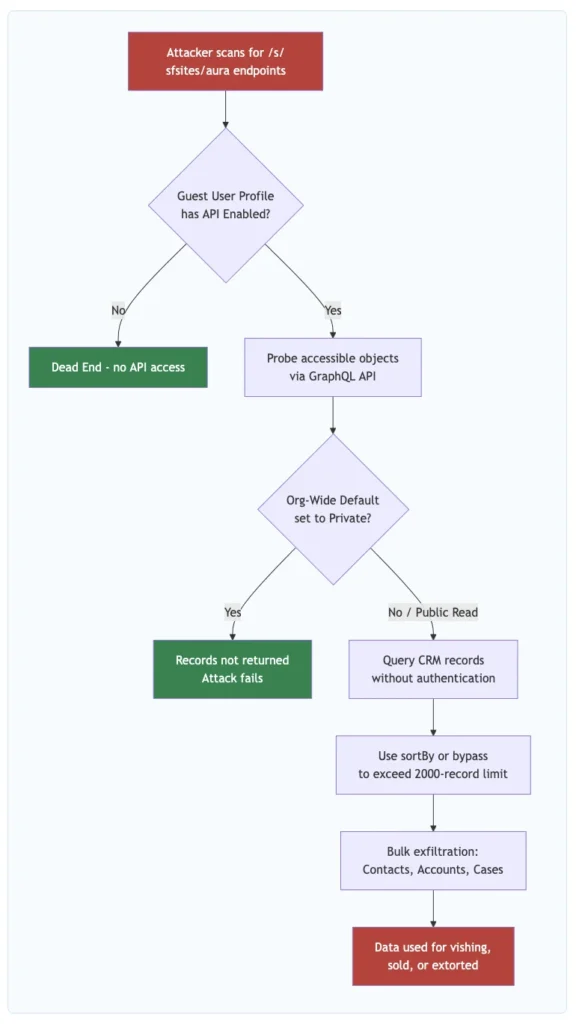
The root cause was straightforward: Salesforce Community sites allow two types of visitors — authenticated users who log in, and guest users who browse without credentials. The guest user profile, when misconfigured, can be granted permissions to read Salesforce objects. If object-level or record-sharing settings aren’t locked down, unauthenticated visitors can query the Aura API and pull back CRM records.
Organizations Confirmed Affected
- State of Vermont: At least five separate Salesforce Community sites were misconfigured, including a Pandemic Unemployment Assistance portal that exposed applicants’ full names, Social Security numbers, addresses, phone numbers, email addresses, and bank account numbers. Vermont’s CISO acknowledged the sites were stood up rapidly during the pandemic.
- Washington D.C. Health: Exposed PII across five websites, including full names, SSNs, dates of birth, license numbers, and expiration dates on a professional licensing portal.
- Huntington Bank (via acquired TCF Bank): A commercial loan application site exposed applicant names, addresses, full SSNs, federal IDs, average monthly payroll figures, and loan amounts.
Why It Happened
Most of these sites were built in a hurry during 2020–2021. The API Enabled checkbox in the Guest User Profile was left checked. Org-wide default sharing wasn’t set to Private for the relevant objects. The result: any anonymous visitor could hit the /s/sfsites/aura endpoint and query whatever objects the guest profile had access to. Salesforce’s position was consistent and technically accurate: this was not a platform vulnerability. The platform behaved exactly as configured. Which is sort of the whole problem.
- KrebsOnSecurity — Many Public Salesforce Sites are Leaking Private Data (April 2023)
- AppOmni — Significant Salesforce Misconfigurations Identified (April 2023)
- Varonis — Salesforce Misconfiguration Causes Sensitive Data Leaks
- CMSWire — The Great Salesforce Data Spill of 2023
Incident 2: The Google Vishing Attack — 2.55 Million Records Stolen (June 2025)
Type: Social Engineering / Vishing + Modified Tool Installation
Date: June 2025 (confirmed August 5, 2025)
Scale: ~2.55 million customer records
In June 2025, the threat group tracked as UNC6040 (part of the ShinyHunters collective) executed a targeted vishing attack against Google employees. The attackers called employees, impersonated IT support, and walked them through installing a maliciously modified version of Salesforce’s Data Loader tool. Once installed, the modified tool exfiltrated data from Google’s Salesforce CRM instance — a system used to manage prospective Google Ads customers.
The stolen dataset contained approximately 2.55 million records including business names, phone numbers, and internal sales agent notes. No payment information or Google Ads account credentials were compromised, but the scale made it significant. Google confirmed the breach on August 5, 2025.
Valence Security — The Google-Salesforce Breach That Started with a Phone CallCX Today — The Google-Salesforce Customer Data Breach: What Really Happened?Fox News — Major companies including Google and Dior hit by Salesforce data breach
Incident 3: The Salesloft Drift OAuth Supply Chain Breach (August 2025)
Type: OAuth Token Compromise / Third-Party Integration / Supply Chain
Date: August 8–20, 2025
Scale: 700+ organizations affected
Salesloft offers Drift — a chatbot platform that many sales teams connect to Salesforce via OAuth. Between August 8 and 18, 2025, a threat actor tracked as GRUB1 (attributed to the “Scattered Lapsus$ Hunters” coalition) obtained Drift OAuth tokens and used them to access connected Salesforce environments. They didn’t break into Salesforce. They walked in with a stolen key.
Confirmed Victims
- Cloudflare: Active compromise August 12–17. Exfiltrated Salesforce Case objects including customer support ticket text, subject lines, and contact information. Cloudflare noted credentials pasted into support tickets should be considered compromised. 104 associated API tokens rotated as precaution.
- Palo Alto Networks: Breach confirmed, limited to Salesforce CRM. Exfiltrated data included business contact information and internal case details.
- Zscaler, Proofpoint, Qualys, Tenable: All confirmed their Salesforce data was impacted.
- Cloudflare Blog — The impact of the Salesloft Drift breach on Cloudflare and our customers
- Palo Alto Networks Unit 42 — Threat Brief: Salesloft Drift Integration
- CyberScoop — Salesloft Drift attacks hit Cloudflare, Palo Alto Networks, Zscaler
- UpGuard — Salesloft Drift Breach: What Happened and How Does It Affect Me?
Incident 4: ShinyHunters Experience Cloud Campaign — 300–400 Organizations (Sept 2025 – Mar 2026)
Type: Automated Reconnaissance + Guest User API Exploitation
Date: September 2025 – ongoing as of March 2026
Scale: 300–400 organizations claimed; 1 billion+ records threatened
Starting in September 2025, ShinyHunters launched a systematic campaign targeting misconfigured Salesforce Experience Cloud sites — essentially automating what security researcher Charan Akiri had documented manually back in 2023. They deployed a modified version of AuraInspector (originally created by Mandiant) that didn’t just identify vulnerable sites but automatically extracted data from them.
The technical centerpiece was a bypass of Salesforce’s GraphQL API query limit. Salesforce caps guest user queries at 2,000 records per request. ShinyHunters discovered that using the sortBy parameter circumvented this restriction. After Salesforce patched that approach, the group claimed to have found a second bypass method and continued operations.
By March 2026, the group claimed 300–400 organizations breached, with approximately 100 being high-profile companies — many of them, ironically, in cybersecurity. The claimed victim list included Chanel, Pandora, Adidas, Cartier, Qantas, Air France–KLM, Cisco, Disney/Hulu, FedEx, IKEA, Marriott, McDonald’s, Toyota, Home Depot, and dozens more.
- BleepingComputer — ShinyHunters claims ongoing Salesforce Aura data theft attacks
- Help Net Security — ShinyHunters claims new campaign (March 2026)
- The Register — ShinyHunters claims more high-profile victims
Incident 5: The Gainsight Supply Chain Breach — 200 Companies (November 2025)
Type: Supply Chain Attack / Chained OAuth Compromise
Date: November 2025
Scale: 200+ companies
Three months after the Salesloft Drift campaign, the same threat actor collective executed a nearly identical playbook through a different third-party vendor: Gainsight, a customer success platform that connects to Salesforce via OAuth.
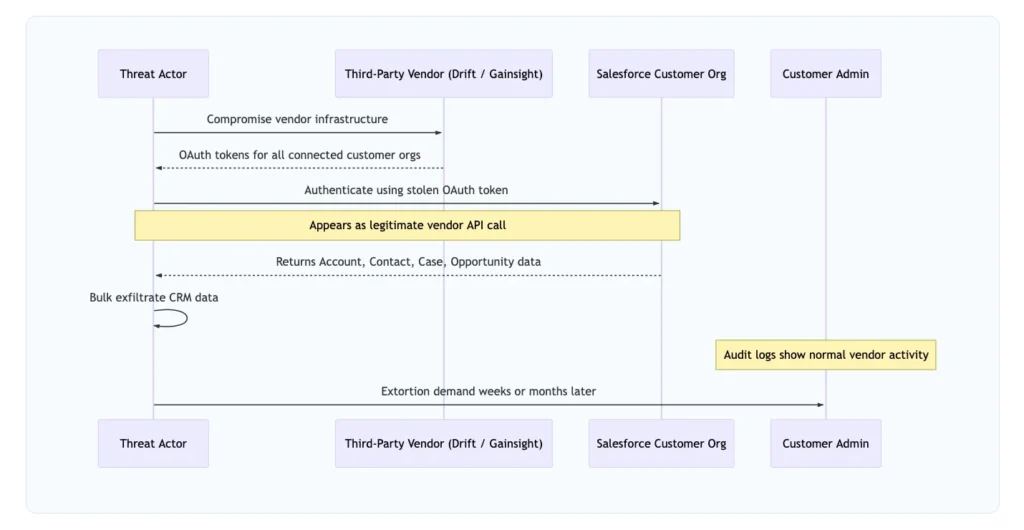
The chilling part: this wasn’t a fresh compromise. The attackers used Drift OAuth tokens stolen during the August 2025 campaign to pivot into Gainsight’s infrastructure, then used their position there to reach into the Salesforce environments of Gainsight’s customers. One breach enabling the next. Google’s Threat Intelligence Group confirmed data from more than 200 companies was stolen. Salesforce responded by revoking all OAuth tokens associated with the affected Gainsight integrations.
- TechCrunch — Google says hackers stole data from 200 companies following Gainsight breach
- CyberScoop — Hundreds of Salesforce customers hit by yet another third-party vendor breach
- Dark Reading — Salesforce Customers Hacked Again Via Gainsight
The Shared Responsibility Model: Where the Line Is Drawn
This is the conversation every Salesforce admin and security team needs to have. Research suggests 73.5% of admins can’t clearly articulate how the shared responsibility model applies to their org — and that gap is exactly what threat actors are exploiting.
Every breach in this post fell on the customer side of that line. Salesforce’s infrastructure wasn’t compromised. The configurations, integrations, and human decisions inside customer orgs were.
Best Practices to Protect Your Salesforce Org
For Experience Cloud / Community Sites
1. Disable “API Enabled” in the Guest User Profile immediately.
Setup > Guest User Profile > System Permissions → uncheck API Enabled. This is the single most impactful configuration change for any org running an Experience Cloud site. It closes the Aura endpoint to unauthenticated API queries — the exact vector used in both the 2023 leaks and the ongoing 2025–2026 ShinyHunters campaign.
2. Set Org-Wide Defaults to Private for sensitive objects.
Contacts, Accounts, Cases, and any custom objects with PII should have their OWD set to Private. Guest users should see only what you explicitly grant through sharing rules or public access configuration.
3. Disable self-registration unless your site genuinely requires it.
When a guest user can enumerate records AND self-register as an authenticated portal user, a guest-tier exposure escalates into a full authenticated session. Don’t give attackers that ladder.
4. Run the Guest User Access Report Package quarterly.
Salesforce provides this package specifically for auditing guest user profile access. Schedule it. Assign an owner. Treat its findings as security tickets — not suggestions.
For Connected Apps and OAuth Integrations
5. Audit every connected OAuth application in your org.
Setup > Connected Apps > OAuth Usage. Look at what permissions each app has been granted and when it last authenticated. Revoke stale connections immediately.
6. Restrict Connected App OAuth scopes to the minimum necessary.
A chatbot integration doesn’t need access to your Opportunity records. Lock scope to only the objects the vendor’s documentation says they need.
7. Enable Event Monitoring and alert on anomalous Connected App activity.
A stolen OAuth token almost always results in access patterns that differ from the legitimate vendor — unusual hours, bulk queries, unfamiliar IP ranges. Event Monitoring (Enterprise/Unlimited) can catch this.
For Human Factor / Social Engineering Defense
8. Train employees specifically on the vishing-plus-Data-Loader attack pattern.
Your team should know: IT support will never ask them to download and run a new version of Data Loader over the phone. Establish a verified channel for software installation requests.
9. Enforce MFA on all users, especially integration users and admins.
Salesforce mandates MFA for direct logins. Make sure it’s actually enforced — check for login flows that might bypass MFA for integration users.
Security Controls Quick Reference
| Control | Where to Configure | Why It Matters |
|---|---|---|
| Disable API Enabled on Guest Profile | Setup > Guest User Profile > System Permissions | Closes Aura API to unauthenticated access |
| OWD Private for sensitive objects | Setup > Sharing Settings | Prevents record exposure through misconfigured sharing |
| Event Monitoring enabled | Setup > Event Monitoring | Detects anomalous API and login patterns |
| Connected App OAuth audit | Setup > Connected Apps > OAuth Usage | Identifies over-permissioned or stale integrations |
| Login IP Ranges on profiles | Setup > Profiles | Restricts which IPs can authenticate |
| MFA enforced org-wide | Setup > Identity Verification | Prevents credential stuffing and phishing login |
| Named Credentials for integrations | Setup > Named Credentials | Centralizes integration auth management |