

Sound dramatic? It shouldn’t. This exact scenario — or something close to it — has played out at real companies over the past three years. Salesforce holds some of the most sensitive data an enterprise generates: customer PII, deal financials, support conversations, health records, and identity data. And yet the security posture of the average Salesforce org lags years behind the sensitivity of what it stores.
This guide is a practitioner’s field manual. You’ll walk away with a clear picture of how attackers actually get into Salesforce orgs, which misconfigurations keep coming up in real incidents, and a 20-point hardening checklist you can start working through this week.
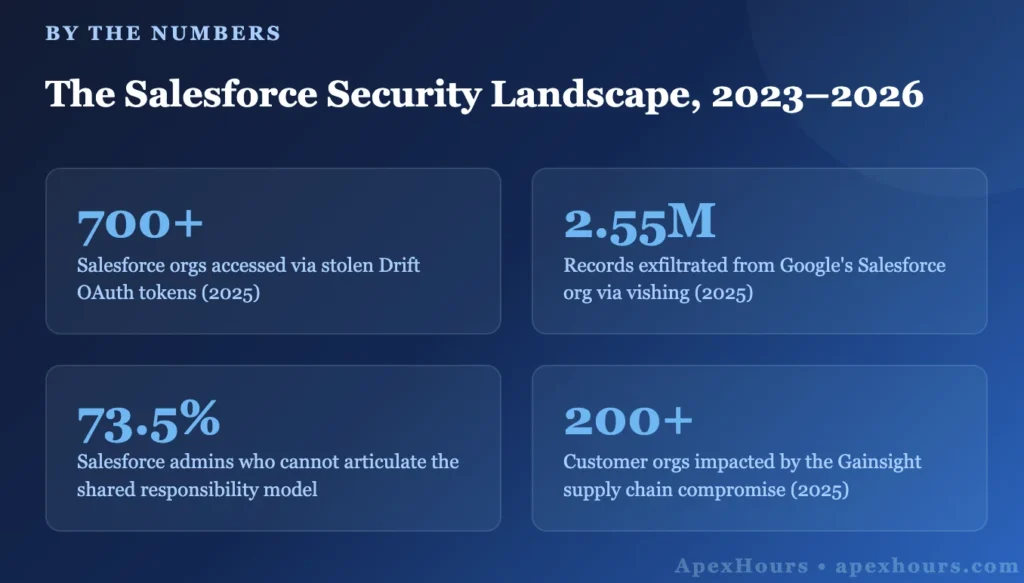
The Breach Landscape: What’s Actually Been Happening
Before jumping to mitigations, let’s spend time on the “why.” Understanding how real breaches unfolded is the fastest way to internalize which controls matter most.
1. The Guest User Epidemic (2023–2024)
The ShinyHunters threat group industrialized this. They modified the open-source AuraInspector browser extension to automate bulk enumeration. The Salesforce GraphQL API has a 2,000-record query limit — they bypassed it using the sortBy parameter to paginate around it. When Salesforce patched that specific bypass, they found another. Salesforce has since hardened the endpoint, but the underlying misconfiguration still exists in a significant number of orgs today.
Incident: Mass Experience Cloud Data Exposure
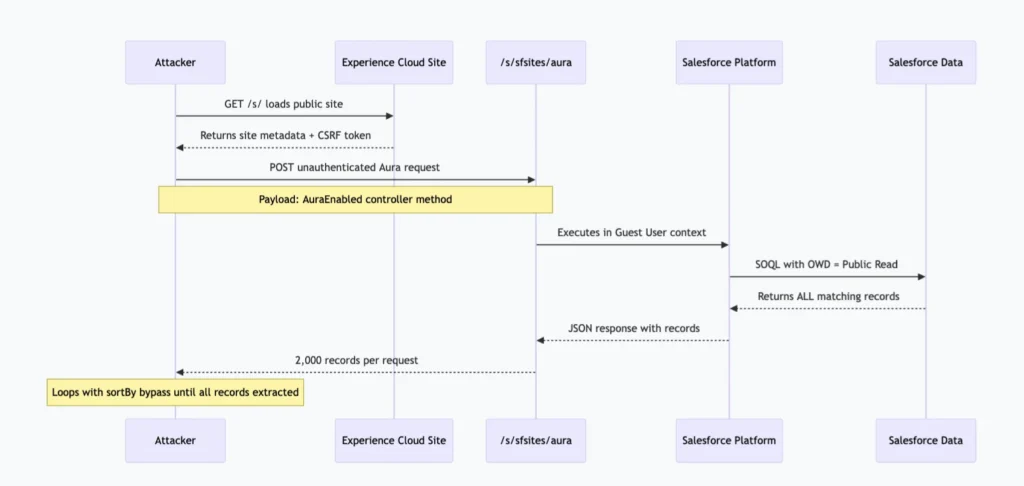
Researchers at AppOmni identified hundreds of public-facing Experience Cloud sites leaking customer records — often millions of them — through the unauthenticated Aura API endpoint at
/s/sfsites/aura. No login. No session token. Just a POST request. The root cause: API Enabled checked on Guest User profiles combined with OWD set to Public Read.
2. The OAuth Supply Chain Attack (August 2025)
The lesson most teams haven’t internalized: your Salesforce org’s attack surface extends to every SaaS tool you’ve connected via OAuth. That includes your marketing automation platform, your customer success software, your revenue intelligence tool, and that demo org you authenticated against production “just once” six months ago.
3. The Vishing + Data Loader Combination (June 2025)
ShinyHunters (UNC6040) used voice phishing against Google employees. The attack vector wasn’t technical — a social engineering call convinced a Google employee with Salesforce access to hand over credentials. The attacker then used a modified version of Salesforce Data Loader to exfiltrate 2.55 million records, bypassing standard audit trail behaviors. The control that would have stopped this: Event Monitoring with a Transaction Security Policy alerting on bulk exports. Google had Shield available. The policy simply wasn’t configured.
The 8 Most Dangerous Salesforce Misconfiguration Vectors
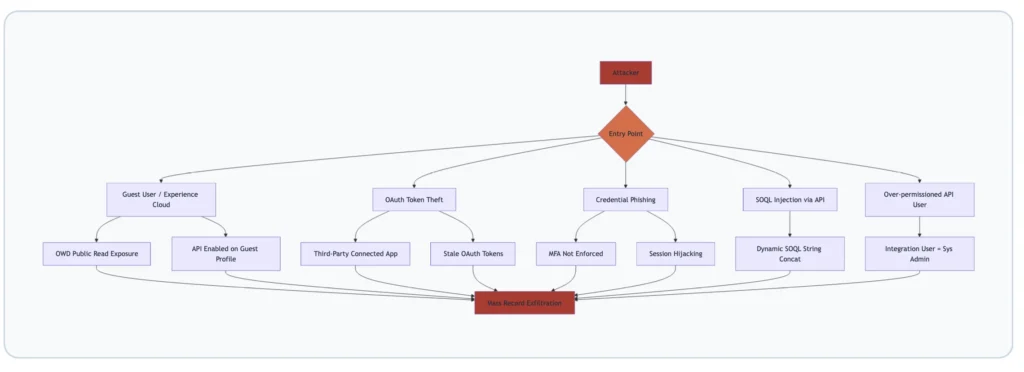
Vector 1: Guest User Profile Misconfiguration
The Guest User profile is a special, persistent profile that controls what unauthenticated users can do on your Experience Cloud site. The safest default: no object permissions, no field permissions, API Enabled unchecked, and all OWD settings for any object storing PII set to Private.
What breaks this safety: enabling API Enabled on the Guest User profile. This opens the Aura API and GraphQL endpoints to unauthenticated requests. Combined with a Public Read OWD on any object, it creates an unauthenticated data access path. Immediate action: Setup > Profiles > Guest User profile > uncheck API Enabled. Do this for every Experience Cloud site — each site has its own Guest User profile.
Vector 2: Organization-Wide Defaults Set Too Permissively
OWDs are your data access floor. Whatever you set here is the minimum access any user — including unauthenticated ones — has to those records. Most security audits find at least one object with PII set to Public Read that should be Private. Common offenders: Contact, Lead, Case, Account, and custom objects created for sensitive workflows.
There’s a persistent myth that “my Experience Cloud site is internal only, so it doesn’t matter.” It matters. A compromised internal account can still hit a permissive OWD and pull records they have no business seeing.
Vector 3: Excessive System Administrator Profile Assignment
This one’s almost universal. Run this SOQL in Developer Console against any mature org:
SELECT COUNT(Id) FROM User
WHERE Profile.Name = 'System Administrator'
AND IsActive = true
If the number you get back is greater than 5 in a 200-person org, or greater than 15 in a 1,000-person org, you have a problem. Every System Administrator user is a high-value target. When one gets phished, the attacker gets everything. The fix: build a least-privilege model using Permission Sets and Permission Set Groups.
Vector 4: Stale and Over-Permissioned Connected Apps
Every OAuth connected app is a potential breach vector. For each one, ask: Is it still in use? What scopes does it request (full access is almost never justified)? Is the refresh token policy set to expire after inactivity? Who authorized it? If a System Administrator authorized it, the app has System Administrator-level access.
Vector 5: Unencrypted Sensitive Data Without Shield
Salesforce stores data encrypted at rest by default — but that’s platform-level encryption, transparent to Salesforce itself. Salesforce Shield Platform Encryption provides an additional layer where data is encrypted with keys you control. For orgs handling HIPAA data, financial records, or PII under GDPR/CCPA, Shield encryption on sensitive fields is table stakes. Most commonly left unencrypted: SSN__c, DOB__c, BillingStreet, MobilePhone.
Vector 6: SOQL Injection in Apex Code
SOQL injection happens when user-supplied input is concatenated directly into a SOQL string. It’s shockingly common in codebases that predate modern Apex security controls
// VULNERABLE — never do this
String searchTerm = ApexPages.currentPage().getParameters().get('search');
String q = 'SELECT Id, Name FROM Account WHERE Name LIKE \'%' + searchTerm + '%\'';
List<Account> results = Database.query(q);

// SAFE — bind variable approach (always preferred)
String searchTerm = '%' + ApexPages.currentPage().getParameters().get('search') + '%';
List<Account> results = [SELECT Id, Name FROM Account WHERE Name LIKE :searchTerm];
Vector 7: Missing CRUD and FLS Enforcement in Apex
Apex runs in system context by default — it bypasses object-level security (CRUD) and field-level security (FLS) unless you explicitly enforce them. The modern approach is WITH USER_MODE in SOQL (available from API v49.0+), which enforces OLS, FLS, and sharing rules automatically:
// Modern: WITH USER_MODE enforces OLS, FLS, and sharing
List<Contact> contacts = [SELECT Id, Name, Email FROM Contact WITH USER_MODE];

// For DML: USER_MODE on Database methods (Spring '23+)
Database.insert(records, AccessLevel.USER_MODE);

// Legacy pattern: stripInaccessible for older codebases
SObjectAccessDecision decision = Security.stripInaccessible(
    AccessType.READABLE, contacts
);
List<Contact> safeContacts = decision.getRecords();
Vector 8: Event Monitoring Not Configured
Without Event Monitoring and Transaction Security Policies configured, you can have an active exfiltration running for weeks before anyone notices. The minimum viable configuration: alert on logins from new geographies, alert on any report returning >2,000 records, alert on any user making >1,000 API calls per hour, and alert immediately on Data Export initiation.
Experience Cloud Security: The Highest-Risk Surface
If you have an Experience Cloud site, you have the most complex part of your security posture to manage. Every Experience Cloud site extends your Salesforce data model to an external-facing URL. The Guest User profile, site-specific sharing rules, and public component configurations all interact in ways that are easy to misconfigure and hard to audit.
The Anatomy of a Guest User Breach
Experience Cloud Hardening — Profile Controls
- Uncheck API Enabled on every Guest User profile (one per site)
- Remove all object-level CRUD permissions from Guest User profiles for objects containing PII
- Disable View All Data and Modify All Data — they should be absent, but verify
Experience Cloud Hardening — OWD Controls
- Set OWD to Private for
Contact,Lead,Case,Account, and any custom object referenced in Experience Cloud components - Use Sharing Sets to grant guest users access to only specific records they need
- Avoid broad Sharing Rules on Experience Cloud objects — they over-share by design
Experience Cloud Hardening — Component Controls
- Audit every Apex controller and
AuraEnabledmethod exposed to your Experience Cloud site - Use
WITH USER_MODEin SOQL inside all guest-accessible controllers - Never annotate guest-accessible Apex with
without sharingunless explicitly required and documented
API Security: Protecting Your Integration Layer
The Salesforce API surface is large: REST API, SOAP API, Bulk API 2.0, Streaming/Platform Events, Metadata API, Tooling API, GraphQL API, and Composite API. Each is a potential ingress point for an attacker with a valid authentication token.
Connected App Hardening Settings
| Setting | Recommended Value | Why |
|---|---|---|
| OAuth Scopes | Minimum required (e.g., api, refresh_token) | full scope = System Admin-level access |
| IP Relaxation | Enforce IP restrictions | Blocks token reuse from attacker IPs |
| Refresh Token Policy | Expire after 7 days of inactivity | Limits blast radius of stolen tokens |
| Permitted Users | Admin approved users only | Prevents self-authorization by non-admins |
| Session Policies | High Assurance session required | Forces MFA for connected app authorization |
Named Credentials over stored credentials: Any Apex code calling an external service should use Named Credentials instead of storing usernames, passwords, or tokens in Custom Settings or Custom Metadata. Named Credentials encrypt the credentials and store them outside the data model — a SOQL query or Data Export cannot retrieve them.
The 20-Point Salesforce Security Hardening Checklist
Work through this systematically. Every item is actionable in your org today.
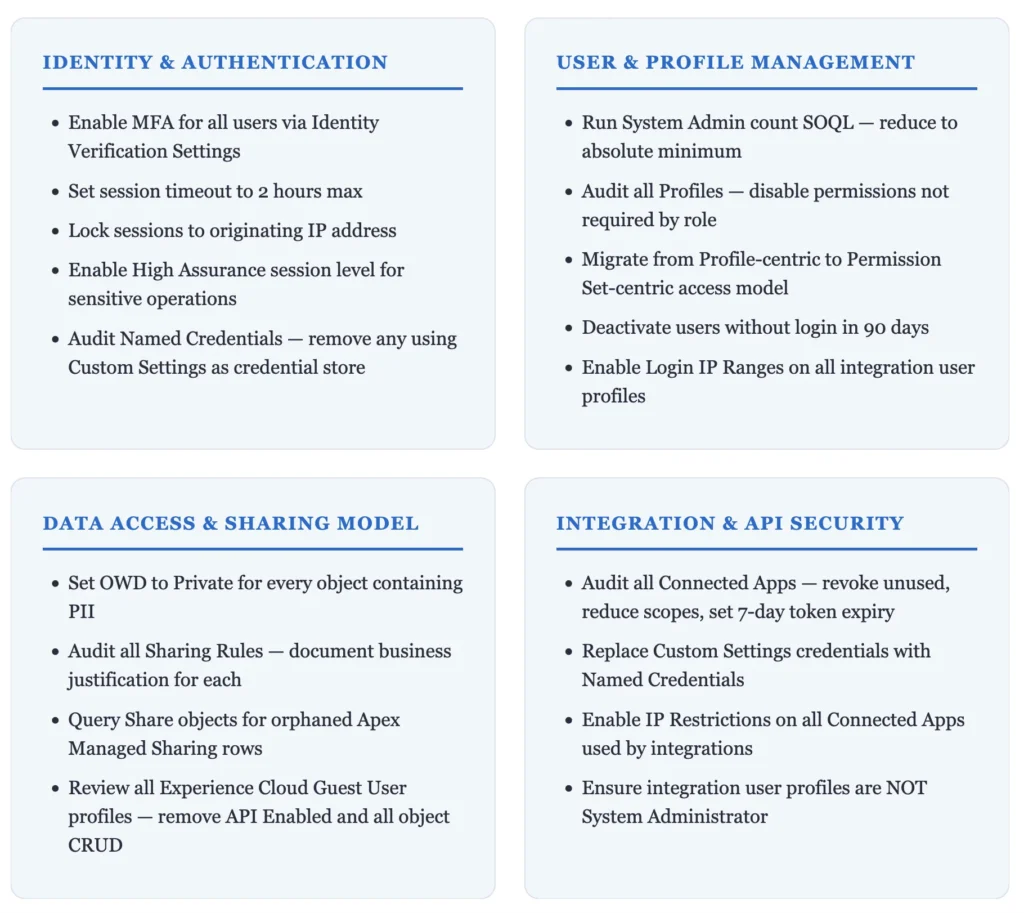
Beyond the 20 items: enable Event Monitoring with Transaction Security Policies for bulk exports, impossible-travel logins, and excessive API calls. Enable Salesforce Shield Field Audit Trail for all PII fields (10-year retention). Configure Shield Platform Encryption on SSN, DOB, financial, and health fields.
Salesforce Security Monitoring Tools Reference
| Tool | What It Covers | License Required |
|---|---|---|
| Event Monitoring | Login events, API calls, report runs, data exports | Event Monitoring add-on (included in Unlimited) |
| Shield Platform Encryption | Field-level encryption with customer-managed keys | Salesforce Shield |
| Field Audit Trail | 10-year history of field changes on any object | Salesforce Shield |
| Transaction Security Policies | Real-time event-driven blocking and alerting | Included with Event Monitoring |
| Health Check | Scores your org against Salesforce Baseline Standard | Free — Setup > Security > Health Check |
| AppOmni / Varonis / Obsidian | Third-party CSPM for continuous misconfiguration scanning | Vendor pricing |
The Health Check score (Setup > Security > Health Check) is the fastest starting point. It compares your org configuration against Salesforce’s Baseline Security Standard and shows exactly which settings are non-compliant. If your Health Check score is below 80, you have immediate work to do.




Generally this is an excellent resource. There are a few points I’d make though:
AFAIK, Sharing Sets are not available for Guest Users, even in Digital Experiences rather than force.com sites; instead Guest User Sharing Rules must be used to create criteria-based sharing (a “Guest user access, based on criteria” type sharing rule associated with the correct site’s Guest User).
I personally disagree with the use of USER_MODE in all automation for Guest User access. If you take this approach then you require explicit exposure of the objects and fields through any avenue open to the Guest User (e.g. across all pages and all automations associated with that site). Yes, sure, ensure that inputs from and outputs to the Guest User are covered by permissions, but where the automation needs to interact with other data just to do its job, don’t force the need to expose those objects and fields out through other mechanisms.
By way of an example, your site is designed to expose work placements the Guest User could apply for. They enter their list of skills, their location and the radius of travel for such work placements and run the search. This search will return specific details for jobs, so the guest user is appropriately granted read access to these job records and the select fields to be presented. However, to run the search, the system needs to access “match rule” records and their fields that configure how the search operates.
If we grant read access to the “match rule” object and its fields, and there’s a generic list page in your site, a bad actor could gather the details of all these “match rules” for whatever purpose they have.
Instead, IMO, the “match rule” object and its fields should be used in the automation without requiring USER_MODE access since we only want to use them internally and never allow them to be viewed outside.
Basically a blanket “USER_MODE” approach can actually mean you are making the site less secure. Thought is required.
Several of the hardening checklist points have scenarios where they don’t work (e.g. if integrations are with mobile apps, you cannot restrict IP access or lock IP addresses for the session). I’d also say that OWDs for sharing, and CRUD/FLS permissions, are not just for PII data, but any data that might give a bad actor insight into your business.
Thanks for adding great points Phil