
Security should not be an optional for anyone or anywhere in the system. It is the foundation of any Lightning Web Components (LWC) project. Modern threat vectors such as cross-site scripting (XSS) and supply-chain risks make it essential to understand how the platform defends the browser surface: Content Security Policy (CSP), the client-side sandboxes (Locker and Lightning Web Security- LWS), secure wrappers around global objects, and safe DOM patterns that prevent accidental exposure. This blog will walk us through those protections, explains practical coding patterns, shows a very small, safe example to drop into an org and capture screenshots and describes real-time scenarios that commonly require special care.
Threats and why they matter in Salesforce
The most prevalent client-side vector threat input is still cross site scripting (XSS), which contains script or event handlers that, if rendered without in a proper way, can execute in the browser of another user. The best or safe course of action is to never trust input and to favor framework rendered UI over the manual DOM insertion. Salesforce and modern browsers both help limit what injected content can do. By limiting the locations from which scripts, styles, and images may load and prohibiting the execution of inline scripts in strict configurations, Content Security Policy (CSP) lowers risk and lessens the impact of injected markup. When combined, CSP and component sandboxing significantly lessen the risks that could arise after production goes live, but secure development practices are still necessary.
Locker, Lightning Web Security (LWS) and secure wrappers
Historically, Locker (LockerService) provided a JavaScript sandbox that isolated components and exposed “secure wrappers” for globals (for example, SecureWindow, SecureDocument, SecureElement). These wrappers intercept access to browser APIs and only allow safe operations, preventing components from reaching into other component contexts or executing dangerous operations. Salesforce has been evolving the model toward Lightning Web Security (LWS), which aims to be less restrictive while still enforcing isolation and sanitization. LWS performs content sanitization and is the recommended model for new development. Whether Locker or LWS is active, any developer should code to the platform’s security model rather than bypassing it for any developments.
Safe DOM patterns and secure wrappers in practice
A few practical rules reduce most client-side risk:
- Let LWC render markup. Avoid manual DOM manipulation (no lwc:dom=”manual”) unless absolutely required. The framework is built to manage safe rendering.
- Use framework-provided display components for rich content. For example, lightning-formatted-rich-text is designed to render sanitized HTML safely.
- When receiving free-form HTML (from a rich text field, CMS, or external service), sanitize it before injecting. Prefer platform sanitization (LWS) or vetted libraries but be mindful that third-party libraries may need special handling in the sandbox. DOMPurify is industry-standard, but integrating it into a sandboxed LWC can require extra steps and testing.
- Avoid eval, inline on* attributes and building script tags from data. CSP can block inline scripts, but code should never rely on CSP as the only protection.
- Validate and get away server side as well. Client side sanitization complements server side checks, not replaces them.
Real-time scenarios and recommended approaches
Scenario A => A community site accepts HTML from business users and displays it to customers: store only a strict subset of allowed HTML and render with lightning-formatted-rich-text. Validate and sanitize before saving; also audit image and link targets to avoid mixed content and open-redirect issues.
Scenario B => Embedding third-party widgets: add trusted origins to CSP Trusted Sites and host static assets from trusted CDNs only after security review; sandbox the widget in an iframe where possible to limit capabilities.
Scenario C => Lightning Out or embedding LWC in external pages: confirm CSP requirements for the external page and test under both Locker and LWS because host pages change the allowed script or style sources.
Safe example to implement (ready to drop into a sandbox)
Goal: Show the proper without any threats rich text stored on a custom object and render it safely in LWC. This will avoid the manual DOM injection and use a platform provided proper sanitization or display.
Steps to set up
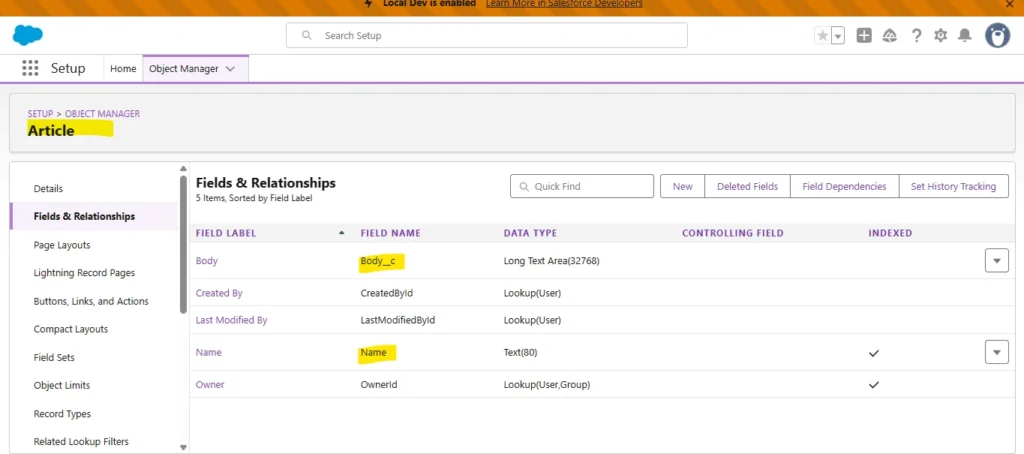
- Create a custom object Article__c with fields:
- Name (Text)
- Body__c (Long Text Area (Rich) or Long Text Area) this stores user entered HTML or rich text.
- Name (Text)
- Apex controller (read-only):
public with sharing class ArticleController {
    @AuraEnabled(cacheable=true)
    public static List<Article__c> getArticles() {
        return [SELECT Id, Name, Body__c FROM Article__c LIMIT 10];
    }
}
LWC components:
articleList.html
<template>
  <lightning-card title="Articles">
    <template if:true={articles}>
      <template for:each={articles} for:item="a">
        <div key={a.Id} class="slds-p-around_small">
          <h3>{a.Name}</h3>
          <lightning-formatted-rich-text value={a.Body__c}></lightning-formatted-rich-text>
        </div>
      </template>
    </template>
   <template if:true={error}>
      <div class="slds-text-color_error">Error loading articles</div>
    </template>
  </lightning-card>
</template>
articleList.js
import { LightningElement, wire } from 'lwc';
import getArticles from '@salesforce/apex/ArticleController.getArticles';

export default class ArticleList extends LightningElement {
  articles;
  error;

  @wire(getArticles)
  wiredArticles({ error, data }) {
    if (data) {
      this.articles = data;
      this.error = undefined;
    } else if (error) {
      this.error = error;
      this.articles = undefined;
    }
  }
}
Why this is safe:
lightning-formatted-rich-text uses platform sanitization to strip unsafe markup before rendering, reducing XSS risk. It avoids manual inner HTML insertion and does not rely on lwc:dom=”manual”. This is the recommended approach when showing admin-entered or third-party HTML.
Where to capture screenshots (for the blog)
- Below screenshot shows our Object manager with Article__c fields.
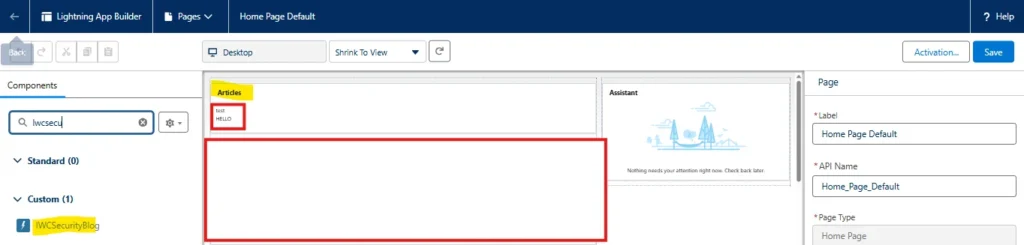
- LWC component in App Builder with the component added.
- Below screenshot shows result in the UI showing rendered rich text.

Practical checklist for secure LWC delivery
- Prefer LWS (enable and test in sandbox) but keep regression tests for Locker compatibility if the app uses legacy flows.
- Avoid manual DOM insertion; when needed, sanitize with a vetted library and test inside the Salesforce sandbox.
- Use lightning-formatted-rich-text, lightning-input, and other base components rather than building custom renderers for common patterns.
- Add CSP Trusted Sites only after security review; test pages under the stricter CSP profiles.
- Log and monitor: instrument unexpected client-side errors and review component behavior after platform upgrades (Locker => LWS changes can affect edge cases).
Conclusion
Security in LWC is a team sport: platform features such as CSP, secure wrappers, Locker, and LWS provide a strong baseline, but secure code patterns are the daily defense. Prefer framework rendering, sanitize external content before it reaches the DOM, and choose lightning-formatted-rich-text or other platform components when rendering rich content. Small, repeatable habits avoid lwc:dom = “manual”, never build script tags from data, and validate on the server will prevent most common vulnerabilities. Following these patterns enables fast, modern user experiences without trading off safety.