

Handling large volumes of data is a common requirement in real-world Salesforce implementations. As our orgs or business grow, so does the number of records, users and integrations interacting with the system. Lightning Web Components (LWC) with Apex provides us a powerful way to grow fast, scalable user experiences, but only when we follow or designed with performance and limits in mind.
Many performance issues in Salesforce applications may not get from complex business logic but from inefficient data access patterns. Fetching not required or unnecessary fields, querying inside loops or triggering multiple server calls from the UI can easily lead to governor limit errors and slow page loads. This is especially noticeable when LWCs deal with large datasets such as Accounts, Contacts, Cases or custom objects used in reporting and operational dashboards.
This blog focuses on practical and modern best practices for using LWC and Apex together when working with large data volumes. It explains how the connection between LWC and Apex should be designed, how bulk queries and caching improve performance, how platform limits influence architecture decisions and how to choose between wire and imperative calls. Real-time scenarios and a simple implementation example are also included so the concepts can be applied directly in an org.
Understanding the LWC and Apex Connection
LWC and Apex communicate through annotated Apex methods that expose server-side logic to the UI layer. The connection between apex and LWC is lightweight, secure and highly optimized when we will be using it correctly. Apex acts as the data and logic layer. On the other hand LWC handles presentation and client-side interactions.
There are two primary ways LWCs interact with Apex:
- Wire service
- Imperative Apex calls
The wire service is reactive by nature. When parameters change, Salesforce automatically gets the Apex method and that will refresh the data. This will be ideal for read-only data and scenarios where automatic refresh is required.
Imperative calls, on the other hand, provide more control. They are invoked manually and are best suited for actions like button clicks, conditional data loading or updates where timing matters.
For large data operations, the key principle is to push as much work as possible to Apex, while ensuring Apex itself follows bulk-safe and limit-aware practices. LWCs should never request more data than needed and should always display data incrementally when possible.
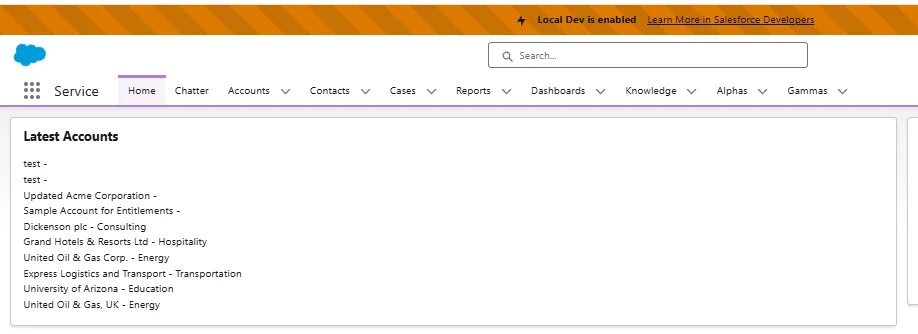
Once we implemented easy example to understand the concept salesforce page will look like as below, implementation steps you may find below in this blog:
Bulk Queries, Caching and Limit-Aware Design
Bulk Queries in Apex
When working with large data volumes, Apex must always be written with bulk processing in mind, even if the LWC currently handles a single record.
Queries should be:
- Avoid querying inside loops
- Select only required fields
- Use indexed fields in WHERE clauses when possible
- Respect row limits by using LIMIT appropriately
Instead of fetching thousands of records blindly, Apex methods should support pagination or controlled limits. This ensures consistent performance across environments with varying data sizes.
Caching with the annotation @AuraEnabled(cacheable=true)
Caching is the impactful optimizations for read-heavy operations. Apex methods that will be marked with @AuraEnabled(cacheable=true) allow Salesforce to cache the responses on the client side. This reduces server calls and improves page load time significantly.
Cacheable methods must:
- Be read-only
- Avoid DML operations
- Return consistent results for the same parameters
When used correctly, caching allows LWCs to scale smoothly even as data volume grows.
Respecting Platform Limits
Salesforce enforces strict limits such as:
- SOQL query limits
- Heap size limits
- CPU time limits
- Concurrent Apex execution limits
Design decisions should always assume data growth. Even a simple list view today may need to handle thousands of records in the future. Efficient queries, minimal payload sizes and controlled UI rendering help avoid hitting limits unexpectedly.
Wire or Imperative Calls: Choosing the Right Approach
Selecting between wire and imperative calls is a critical design decision.
When to Use Wire Service
- Data needs to load automatically on component render
- Data should refresh when parameters change
- Read-only operations
- Cached responses are acceptable
Wire service works best for dashboards, summary views and list components where data consistency matters more than timing control.
When to Use Imperative Calls
- Data should load only after a user action
- Conditional logic determines whether data is fetched
- Error handling needs more control
- Large data loads triggered by buttons or filters
For large data operations, imperative calls often provide better control. They prevent unnecessary server calls and allow developers to show loaders, handle errors properly and fetch data only when required.
A balanced architecture often uses both approaches within the same component.
Real-Time Scenarios from Salesforce Implementations
Scenario 1: Account List with Thousands of Records
In enterprise orgs, Account objects can easily cross tens of thousands of records. Loading all Accounts at once leads to slow UI performance and limits issues.The best approach is to load a limited set of records in the start and fetch more data only that will be needed.
Scenario 2: Case Management Console
Service teams often work with high Case volumes. LWCs displaying Case lists should avoid frequent refreshes and instead rely on cached data where possible. Imperative calls are useful when applying filters or refreshing data manually.
Scenario 3: Custom Reporting Components
LWCs built for operational reporting should summarize data in Apex rather than returning raw records. Aggregated SOQL queries will reduce the payload size and improve performance very easily.
Above examples will highlight the importance of intentional data design rather than relying on default patterns.
Simple Real Example: Displaying Latest 10 Accounts
With this example we will get a better idea to handle large data sets or volumes.
Apex Class
The Apex method fetches only the required fields and limits the result set. It is cacheable and read-only.
public with sharing class AccountDataController {

    @AuraEnabled(cacheable=true)
    public static List<Account> getLatestAccounts() {
        return [
            SELECT Id, Name, Industry, CreatedDate
            FROM Account
            ORDER BY CreatedDate DESC
            LIMIT 10
        ];
    }
}
LWC JavaScript
Wire service is used because the data may load automatically in most of the cases and does not change again and again.
import { LightningElement, wire } from 'lwc';
import getLatestAccounts from '@salesforce/apex/AccountDataController.getLatestAccounts';

export default class LatestAccounts extends LightningElement {
    accounts;
    error;

    @wire(getLatestAccounts)
    wiredAccounts({ error, data }) {
        if (data) {
            this.accounts = data;
            this.error = undefined;
        } else if (error) {
            this.error = error;
            this.accounts = undefined;
        }
    }
}
LWC HTML
<template>
    <lightning-card title="Latest Accounts">
        <template if:true={accounts}>
            <ul class="slds-m-around_medium">
                <template for:each={accounts} for:item="acc">
                    <li key={acc.Id}>
                        {acc.Name} - {acc.Industry}
                    </li>
                </template>
            </ul>
        </template>

        <template if:true={error}>
            <p class="slds-text-color_error">
                Error loading data
            </p>
        </template>
    </lightning-card>
</template>
This example demonstrates:
- Limited data retrieval
- Cacheable Apex method
- Clean separation of concerns
- Easy extension for pagination or filtering
Conclusion
Building scalable Salesforce applications requires more than our functional code. That will require an understanding of how LWC and Apex interact, how data flows through the system and how platform limits influence design decisions. Large data operations might show us inefficiencies, making best practices mandatory rather than not following them.
By using bulk-safe Apex queries, following caching, respecting governor limits and choosing the right communication pattern between LWC and Apex, applications remain fast and reliable even as data grows. Simple techniques such as limiting record counts, avoiding unnecessary fields and controlling server calls can drastically improve user experience.
Real time Salesforce development is about building for today while preparing for tomorrow’s data. When these best practices become part of everyday development, LWCs scale naturally, Apex will stay efficient and the overall system will remain stable and maintainable.






But How to tun that code
But to run that code please explain me