
Understanding the First Challenge in Campaign Preparation
Have you ever opened Salesforce Marketing Cloud to prepare a multi-region campaign and noticed that every team relies on a different storage source? One group works from Box, another uses SharePoint, and an agency partner sends updated visuals by email. When you start building the email in Content Builder, the images do not match, and it is unclear which version should be used.
This problem is more common than many teams realize. Gartner reports that 47% of digital workers struggle to find the information they need to perform their jobs effectively, which reflects what often happens when assets are scattered across several unconnected tools. The lack of a central source makes it easy to lose track of versions and difficult to confirm which file is approved for the current campaign.
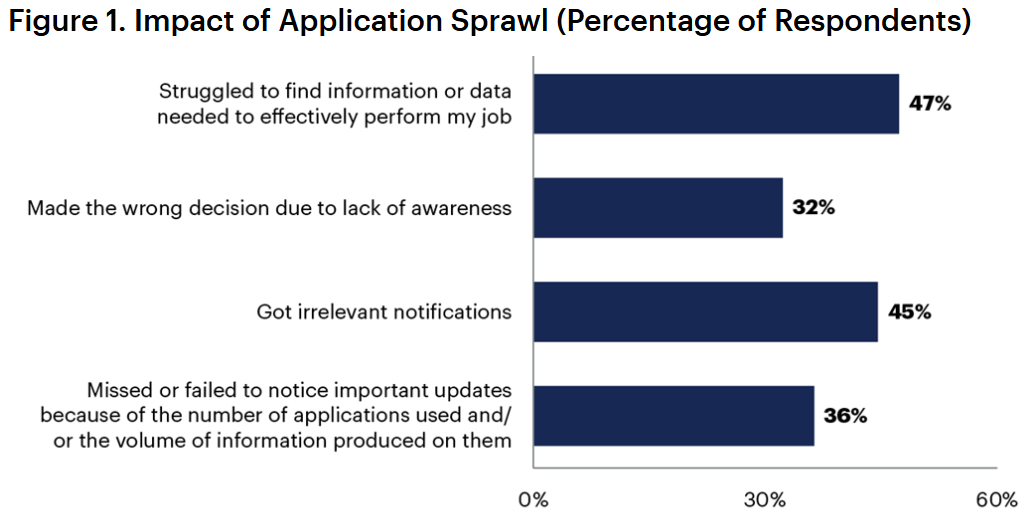
Image source: Gartner
As a result, many teams notice that even routine work begins to take longer than expected. This is often the moment marketers begin to look for ways to improve content management Salesforce workflows so assets are accessible in a predictable, organized way.
In the next sections, we will look at why these gaps appear and how connecting a DAM to the Salesforce Marketing Cloud helps teams work with accurate, approved assets without extra steps.
Where Problems in Campaign Assets Usually Come From
Teams often notice asset issues only when they begin preparing time-sensitive campaigns. These gaps usually come from a few predictable problems:
- Files Stored Across Too Many Systems: Assets often sit in Box, SharePoint, local desktop folders, or older server locations. When several storage sources are in use, content quickly becomes inconsistent.
- Unclear Version Control: Designers may upload a revised banner while another team continues using last month’s file. Without a single place to store approved assets, Content Builder ends up with duplicates, outdated images, and cropped variations that no one remembers creating.
- Missing or Incomplete Metadata: Many files lack clear titles, dates, region indicators, or usage context. This makes it hard to decide which asset fits a campaign.
- Manual Transfer Processes That Break Under Pressure: Teams often share assets through email or chat. When deadlines are tight, these informal steps lead to missed updates and delays.
These patterns show why improving content management in Salesforce usually starts with fixing how and where teams store their assets.
How a DAM Connection Helps Fix Everyday Asset Issues
Once teams connect a dedicated Digital Asset Management (DAM) solution to Salesforce Marketing Cloud, many of the issues described earlier start to disappear. The most visible change is that everyone works from the same approved source. Instead of checking several folders or old shared links, the correct asset is selected directly from the DAM panel while building emails or landing pages. This reduces the risk of outdated files entering live campaigns.
Recent findings from the MediaValet 2025 DAM Trends Report highlight how widespread these inefficiencies are. The report shows that 79% of organizations using a Digital Asset Management (DAM) solution improve efficiencies and achieve measurable time savings.
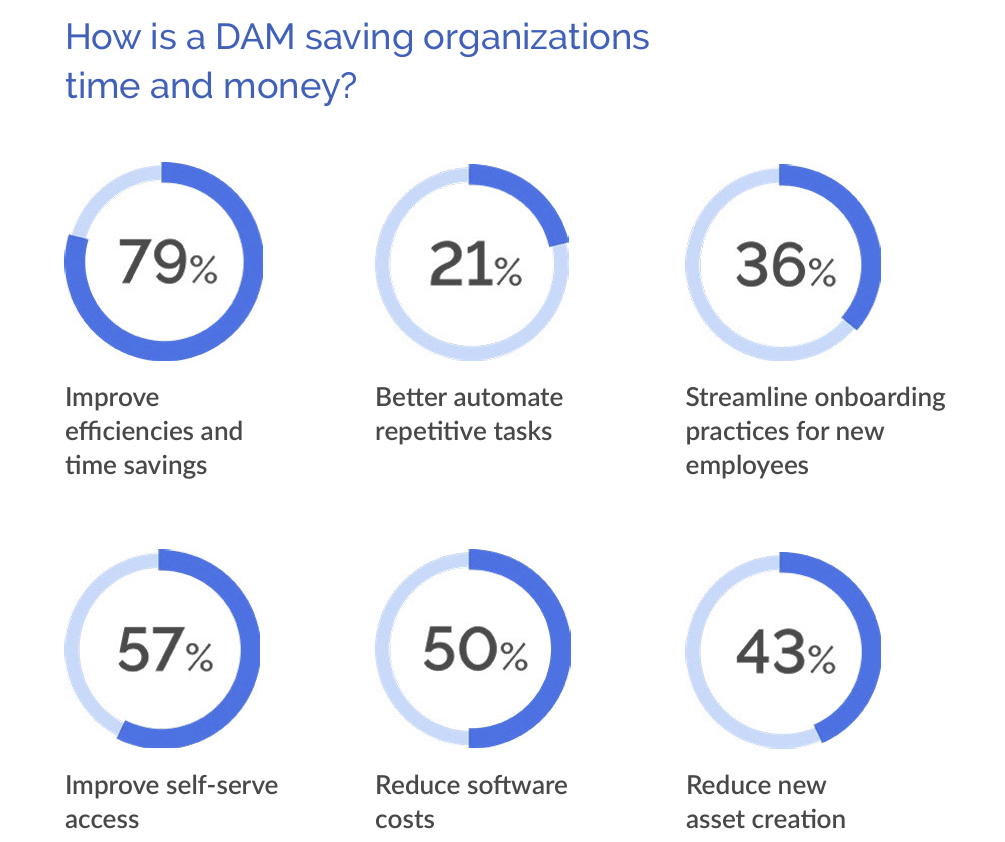
Image source: MediaValet
A connected DAM keeps every asset current, simplifies approvals, and helps teams reuse existing materials more easily, and we will look at these benefits in detail later in the article.
These improvements also support teams who prepare dynamic content in Salesforce Marketing Cloud, since approved variations become easier to locate and use during campaign preparation. Salesforce Marketing Cloud content management becomes more predictable and easier to maintain.
How to Connect Salesforce Marketing Cloud with a DAM
When teams start looking for a way to link the Salesforce Marketing Cloud with their existing asset libraries, the AppExchange is often the first place they check. It helps them quickly find and install an out-of-the-box solution that is native to Salesforce, instead of using third-party integrations built through APIs with external platforms or fully custom setups.
A search for tools to connect DAM on AppExchange shows several options, including solutions from specific DAM providers and universal tools designed to integrate many different DAMs and cloud services with Salesforce Marketing Cloud.
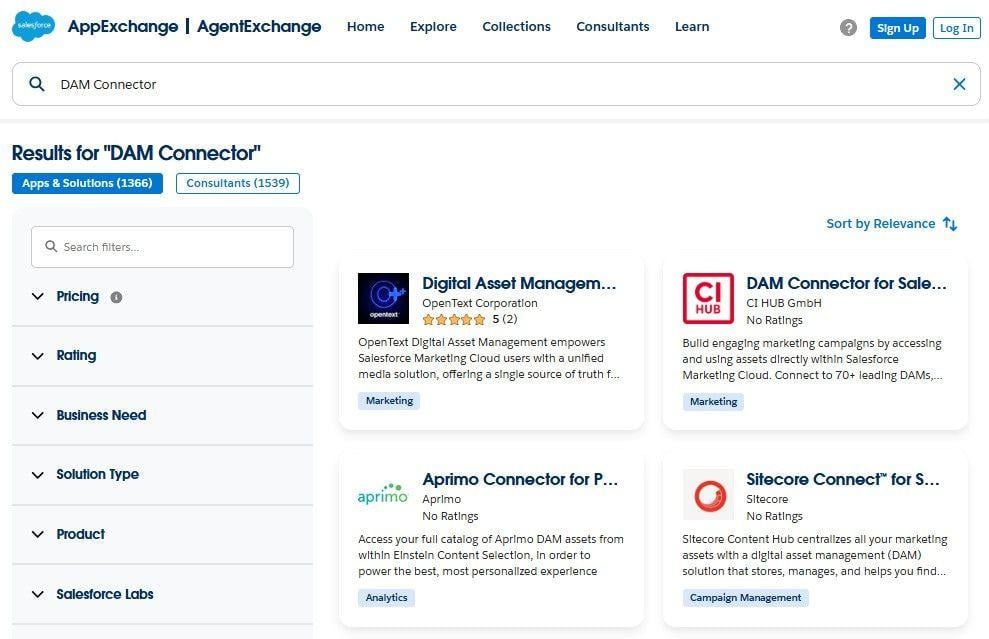
DAM connection solutions on AppExchange
For many teams, it is important to continue using their current tools and not be tied to one specific DAM or cloud solution. That is why, in this article, we will use CI HUB’s DAM Connector for Salesforce as an example since it connects with many commonly used DAM and cloud storage systems that teams already rely on.
How to Set Up the Connector in Salesforce Marketing Cloud
Step #1. Install the connector from AppExchange: Open the AppExchange listing, click “Get It Now”, and follow the installation steps. Select the Salesforce Org where you want to install the connector. After installation, a CI HUB block becomes available inside Content Builder.
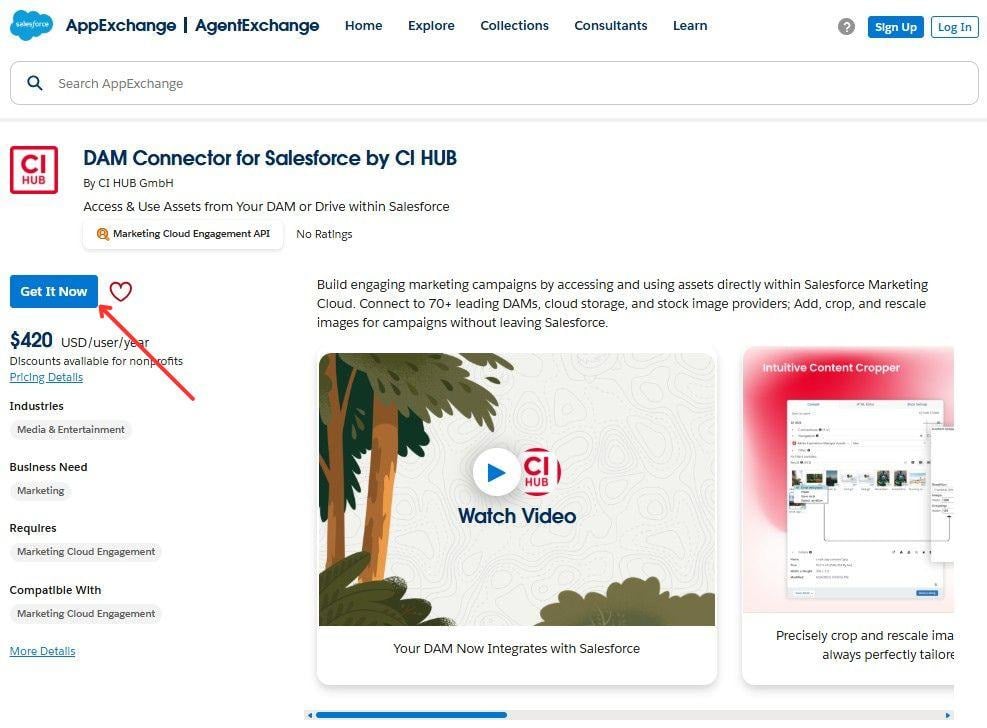
DAM Connector for Salesforce by CI HUB on AppExchange
Step #2. Connect your storage systems: Place the CI HUB block on the canvas, and the CI HUB panel will appear. Inside the panel, choose the service you want to link and sign in. Each connected system becomes available for browsing directly in Content Builder.
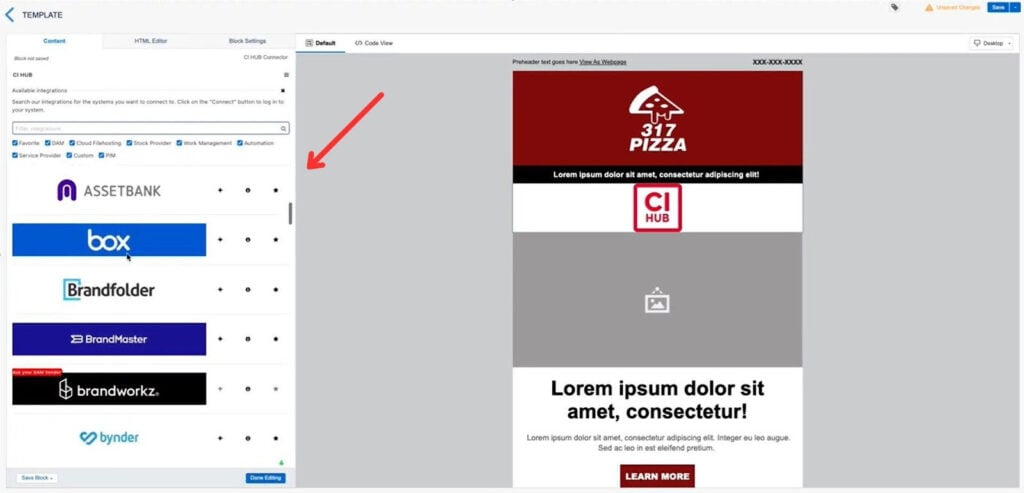
Selection of the needed integration in CI Hub for Salesforce
Step #3. Test the integration in Content Builder: Open an email and check whether your folders, previews, and approved assets are visible.
Seeing everything in one place often becomes one of the practical Salesforce content management tips because it removes the need to switch between multiple tabs or confirm versions manually.
Practical Ways to Work with DAM Assets in Marketing Cloud
When teams connect a DAM to Content Builder in Salesforce Marketing Cloud, asset work becomes clearer and more predictable. Let’s look at how, instead of switching between folders, local tools, and shared drives, users can search, select, and prepare visuals directly in one place.
Practical Step #1. Choose Approved Assets Directly from the DAM Panel
Teams can browse their connected DAM folders inside Content Builder and select assets from the same approved source. This keeps the selection process structured and avoids guessing between similar versions stored in different locations.
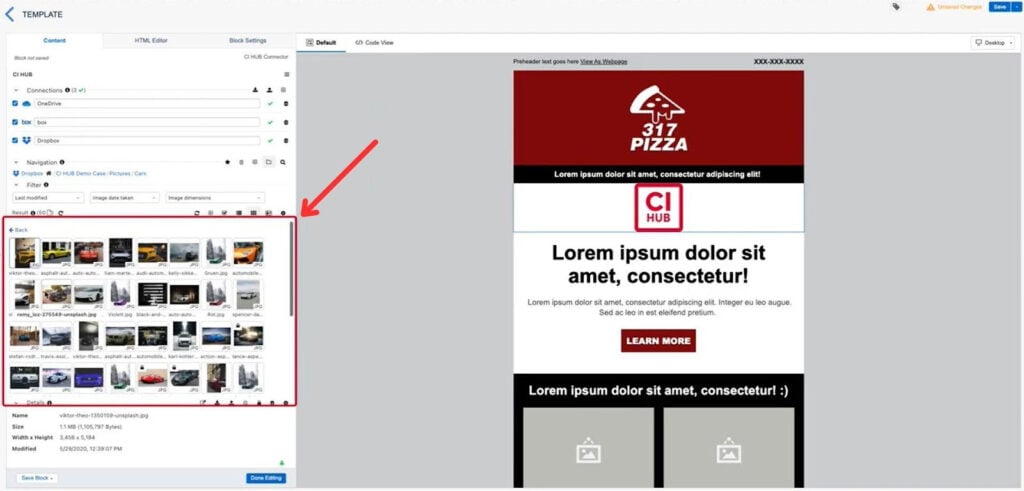
Asset library in the CI HUB panel within Content Builder
Practical Step #2. Use Metadata to Pick the Right Visual for Each Audience
Teams can find and use assets intended for a specific country or product line, and use the metadata shown in the DAM panel to identify the needed asset. This helps them choose visuals that match each audience segment without uploading several versions manually.
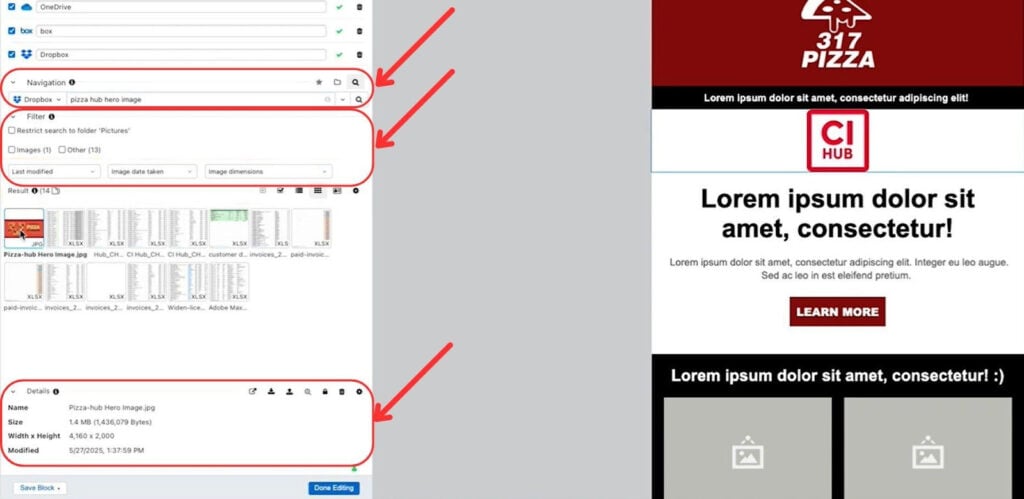
Search, Filter Results, and View Metadata sections on the CI HUB panel
This approach also supports dynamic content Salesforce Marketing Cloud setups, since teams can quickly locate the correct variation for each audience without preparing additional uploads.
Practical Step #3. Adjust Images Inside the Panel Before Placement
When using a DAM connector like CI HUB, the panel includes a built-in image editor that allows basic adjustments, such as cropping or resizing, before placing the file into the email. This helps avoid creating multiple versions of the same asset and keeps the focus on selecting the right file instead of preparing new copies.
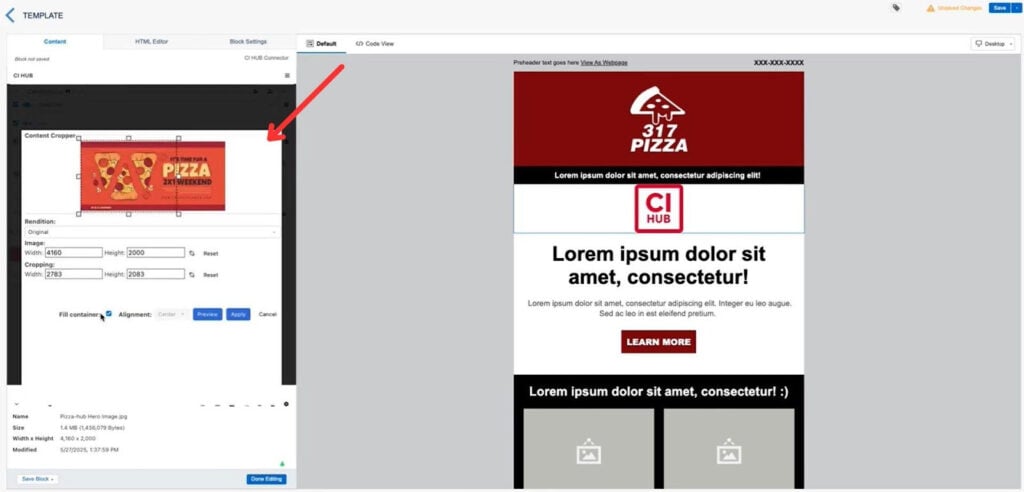
Editing assets with the CI HUB DAM Connector inside Content Builder
Practical Step #4. Use Linked Assets to Keep Versions Consistent Across Campaigns
Because assets stay linked to their source system, updates made in the DAM appear automatically in Content Builder. This helps prevent outdated images from appearing in new messages and supports consistent branding, helping users avoid outdated materials.
Practical Step #5. Use Shared DAM Folders for Distributed Teams
Distributed teams open the same connected folders inside the DAM panel and select assets from a shared, approved structure. This makes collaboration smoother, especially when several regions, time zones, or contributors prepare related messages.
Benefits of DAM Integration for Marketing Cloud Workflows
Once a DAM is connected to Salesforce Marketing Cloud, teams often notice that the overall production process becomes easier to plan and maintain. Instead of reacting to missing files or unexpected rework, the entire workflow becomes more structured.
1. Less repeated production work.
Teams usually prepare multiple versions of the same asset when working across several markets. With a connected DAM, this preparation is no longer repeated for every project. Teams use a single asset record, and Content Builder displays every available version based on metadata. This reduces the amount of manual file preparation and keeps production time under control.
2. Predictable workload for larger campaigns.
When several segments or languages are involved, planning becomes easier because all assets follow the same structure. This helps teams estimate how long it will take to organize visuals for seasonal launches or product announcements. It also supports Salesforce Marketing Cloud dynamic content setups that depend on consistent file organization.
3. Clear asset governance across departments.
Connected assets follow the rules defined in the DAM, which helps maintain clarity during campaign preparation. Teams know which visuals are valid, which ones are restricted, and which ones require updates before publishing. This removes uncertainty and helps reduce last-minute corrections.
4. Better scalability for future campaigns.
As new products or regions are added, existing asset structures can be reused. Teams do not need to redesign their storage approach each time. This makes future campaigns easier to build and helps maintain stable production standards over longer periods.
If a team wants to understand how a connected DAM workflow performs inside Marketing Cloud, they can test it in their own setup. For example, CI HUB offers a 30-day trial that allows users to review the process without committing to a paid plan.
To Sum Up: Why Connected Assets Lead to Better Campaign Preparation
Throughout the article, we looked at the practical steps that help teams avoid common content issues in Salesforce Marketing Cloud. When a DAM is connected, the preparation process becomes more predictable. Assets no longer need to be downloaded, renamed, or reuploaded. Instead, teams work from a shared structure, check metadata, edit visuals, and place them directly into Content Builder.
This setup reduces repeated work, helps maintain consistent branding, and supports more advanced cases such as preparing content for several audiences or organizing variations for different regions.
Teams that use a connected DAM workflow often notice that their content preparation becomes easier to manage. Every file is stored, updated, and linked in one place, which makes campaigns easier to plan, review, and deliver on schedule.